Webinar multistreaming can put one live programme in front of people on LinkedIn, YouTube, a partner channel, and your own watch page at the same time. That sounds like a simple reach decision. In practice, it is also a decision about where registration happens, who can be identified, who moderates each conversation, where calls to action appear, and which numbers can be trusted after the event.
The strongest B2B setup is rarely "stream everywhere." It is one home base for the conversion and measurement journey, supported by a small number of external destinations with a clear job. Each destination needs an audience, an owner, a next step, a metric, and a fallback.
This guide gives you that operating model, including a destination matrix, data-boundary check, conversion bridge, pre-live checklist, and response plan for an unhealthy output.
What webinar multistreaming means
Webinar multistreaming means producing one live webinar and sending the same programme feed to more than one viewing destination at the same time. It is also called simulcasting.
That is different from:
- Simulive: playing a prerecorded session as if it were live.
- Replay syndication: publishing a recording to other channels after the live event.
- Separate live productions: running different sessions or feeds for different audiences.
One feed can reach several destinations, but the audience systems around those destinations remain separate. Registration, viewer identity, chat, Q&A, polls, calls to action, analytics, replay, and follow-up do not automatically merge into one record.
That distinction matters more than the destination count. Distribution tells you where the programme can appear. It does not tell you whether an external viewer is a known lead, whether a moderator saw their question, or whether their next action can be measured.
Decide what the webinar home base owns
For most B2B webinars, the owned watch experience should be the home base for registration, known audience data, calls to action, replay, and follow-up. External channels then act as discovery or partner-distribution surfaces.
A home base gives the team one place to manage:
- Registration details and consent.
- Known audience records.
- The primary live watch experience.
- Live and replay calls to action.
- Replay access.
- Follow-up eligibility.
- The most complete measurement path.
HeyStream's webinar registration pages give that journey an owned starting point. The broader B2B webinar platform connects registration, the live session, audience context, next actions, and replay.
This is a default, not a universal rule. A pure awareness broadcast may intentionally make LinkedIn or YouTube the primary destination. A partner may own the audience and insist that viewers stay on its channel. In those cases, accept the data and conversion tradeoff deliberately rather than pretending the external experience behaves like an owned room.
A useful decision is: Which destination owns the next important audience action? If nobody can answer that, the distribution plan is not finished.
Choose destinations by job, not logo count
Start with the audience and the job. Add a destination only when the team can explain why it belongs in the plan and support it during the live session.
| Destination | Audience and job | Identity available to your team | Interaction owner | CTA bridge | Primary metric | Fallback |
|---|---|---|---|---|---|---|
| Owned watch page | Registered prospects, customers, or partners who need the full webinar journey | Known when the registration and viewing flow identifies them | Main webinar moderator | Native live or replay CTA | Registrations, attendance, known CTA actions | Keep the watch page as the published recovery link |
| LinkedIn Live | Professional audience discovery, company followers, partner amplification | Usually platform-level or aggregate unless the viewer takes an identifiable owned action | LinkedIn moderator | Event description, comment, spoken URL, or permitted on-screen prompt | Concurrent viewers, views, engagement, tracked visits | Direct people to the owned registration or watch page where LinkedIn rules allow |
| YouTube Live | Search, subscriber reach, public education, and durable replay discovery | Usually platform-level or aggregate unless the viewer follows an owned path | YouTube moderator | Description link, pinned message, spoken URL, or QR code | Concurrent viewers, views, watch time, tracked visits | Keep the owned watch link in the description and incident plan |
| Facebook Live | Community or customer groups already active on Facebook | Usually platform-level or aggregate unless the viewer completes an owned action | Facebook moderator | Description, comment, spoken URL, or QR code | Live viewers, views, engagement, tracked visits | Redirect to the owned watch page when appropriate |
| Partner channel | Access to a relevant partner audience | Depends on the partner platform and data agreement | Named partner moderator plus internal owner | Partner-approved link or offer | Partner reach, tracked visits, registrations, or agreed next action | Give the partner a tested owned link and escalation contact |
| Custom RTMP endpoint | Niche community, event portal, media property, or internal distribution surface | Depends entirely on the destination | Named destination owner | Destination-specific | Destination health plus agreed audience metric | Use the owned watch page or another approved endpoint |
Do not add Twitch because it is technically available if the audience is not there. Do not add a partner channel without a named moderator. Do not add another social destination merely because the plan allows it.
Platform rules also shape the choice. Twitch's simulcasting guidance permits simultaneous streaming subject to its current experience rules and any account-specific exclusivity agreement. Its current rules also restrict using Twitch to push viewers toward a concurrent stream elsewhere, so a conversion bridge that works on YouTube may not be acceptable on Twitch. Recheck each destination's terms before the event.
Map the data and interaction boundaries
Before creating stream keys, decide what the team can actually know and control on each surface.
| Capability | Owned watch experience | External social destination | Partner or custom destination |
|---|---|---|---|
| Registration | Controlled by your registration flow | Often optional or outside your system | Depends on the partner |
| Viewer identity | Known when the audience journey identifies the person | Usually aggregate or platform-specific | Depends on access and data-sharing terms |
| Chat and Q&A | Managed in the owned experience | Separate platform conversation | Separate unless the destination proves otherwise |
| Polls and reactions | Available according to the owned platform workflow | Platform-specific | Destination-specific |
| CTA control | Native live and replay actions | Links, comments, descriptions, spoken prompts, or on-screen creative, subject to rules | Depends on the destination |
| Analytics | Owned registration, attendance, and action data | Platform definitions and time windows | Data supplied by the partner or endpoint |
| Replay | Controlled in the owned journey | Platform recording or archive rules | Destination-specific |
| Follow-up | Possible for known people with an appropriate basis | Not automatic | Depends on identifiable data and permission |
External viewers do not automatically become known CRM contacts. A public view, comment, or concurrent-viewer count is not the same as a registration record. HeyStream's audience intelligence is useful for known viewer context inside the owned journey, but it should not be presented as a record of third-party behavior that the product never received.
The same boundary applies to interaction. Unless a verified integration says otherwise, plan for separate chat, Q&A, reactions, and platform controls. One producer cannot reliably watch every destination and run the broadcast at the same time. Assign channel moderators according to the number and importance of the conversations.
Build the external-to-owned conversion bridge
External reach becomes commercially useful only when there is an appropriate next step. The bridge should feel useful to the viewer, not like an attempt to pull everyone away from the platform.
Possible bridges include:
- An owned registration link shared before the event.
- A resource link in the event description.
- A permitted pinned comment or message.
- A short lower-third URL.
- An on-screen QR code.
- A spoken invitation at a planned moment.
- Registration for the next session.
- An owned replay, template, demo, or resource offer.
Give every bridge four things:
- One owner: the person who checks the link, placement, and timing.
- One destination: the exact owned page people should reach.
- One moment: where the invitation appears in the run of show.
- One measurement method: a trackable link where appropriate, with a clear definition of what the click means.
HeyStream's webinar conversion tools support live and replay next actions on the owned experience. External channels need their own permitted bridge. A link creates an opportunity for action; it does not guarantee conversion or identify everyone who saw it.
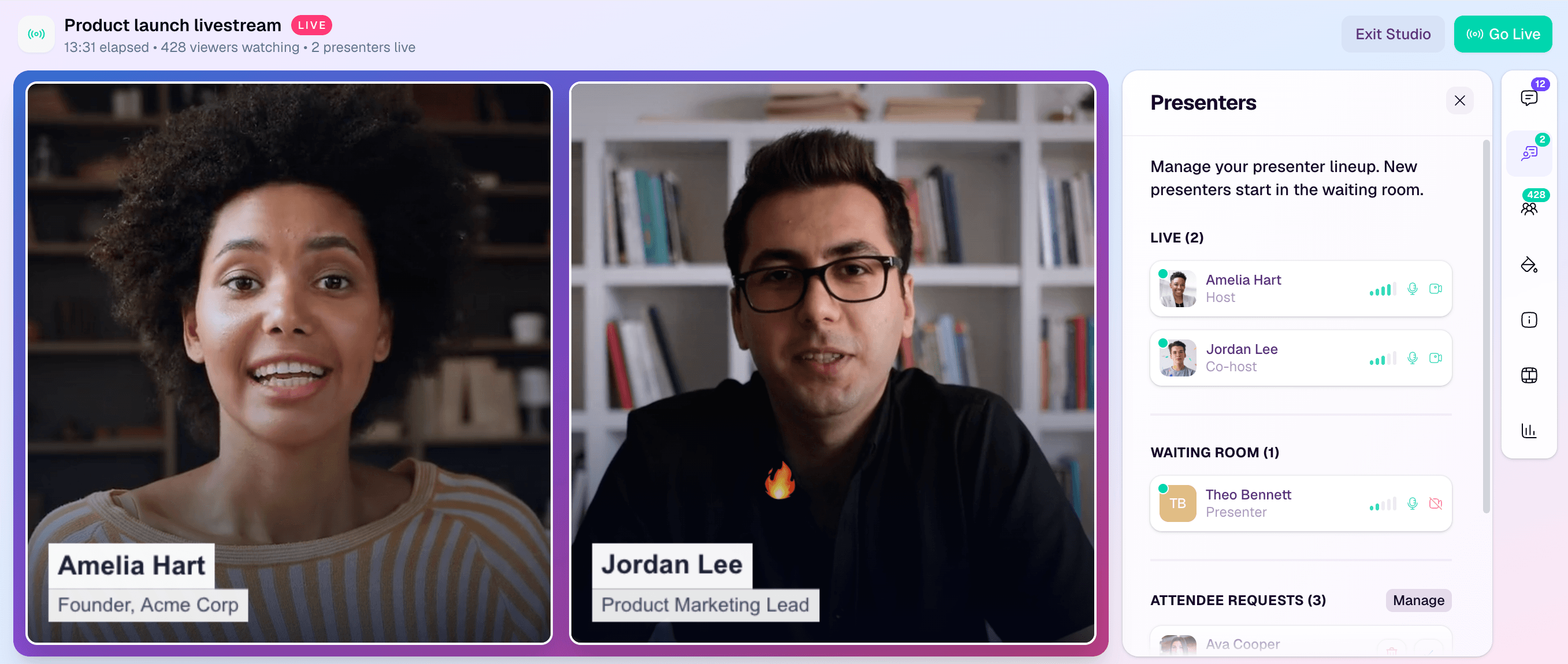
Set up multistreaming in HeyStream
Keep the setup simple and finish it before the rehearsal.
- Check your plan's additional-destination limit.
- Collect the correct RTMP URL and stream key from each destination.
- Add or verify the destination in HeyStream.
- Activate the intended destinations for the specific broadcast.
- Keep the built-in HeyStream destination active when the hosted watch page is the home base.
- Check account eligibility, scheduled-event state, privacy, preview, and any separate platform go-live step.
- Test every active output and confirm who will monitor it.
At publication, HeyStream's current plan limits list no additional destinations on Launch, three on Growth, and eight on Scale. Treat the live limits page and your account billing area as the source of truth before planning an event.
HeyStream's destination setup guide recommends configuring and activating each external destination before the broadcast starts. It also explains the role boundary: organizers and staff can manage workspace destinations, while hosts and co-hosts can select existing destinations for a broadcast.
Use the platform-specific guides for the details:
- LinkedIn Live RTMP setup
- YouTube Live RTMP setup
- Custom RTMP streaming setup
- Facebook Live RTMP setup
- Twitch stream key and RTMP setup
Do not assume stream keys behave the same way everywhere. LinkedIn's current persistent-key guidance limits persistent keys to scheduled Page events, excludes personal profiles, and allows only one concurrent event on a persistent key. YouTube's encoder guide warns that first-time live-stream activation can take up to 24 hours. Those checks belong in the rehearsal plan, not the final minutes before the webinar.
Put multistreaming roles in the run of show
Multistreaming adds operational work even when the video feed is shared. Put the work into the run of show so it has an owner and a handoff.
| Role | Input | Output | Failure to watch for | Handoff |
|---|---|---|---|---|
| Producer | Approved destinations, current keys, broadcast plan | Healthy programme feed and destination states | Missing feed, wrong event, unhealthy output | Incident lead |
| Channel moderator | Platform access and moderation plan | Questions, issues, and useful audience signals surfaced | Unanswered questions or unsafe content | Host or producer |
| Host | Run of show and approved CTA language | Clear home-base and next-step cues | Conflicting destinations or vague CTA | Marketing owner |
| Marketing owner | Descriptions, UTMs, links, QR creative, replay routes | Working conversion bridges | Broken, untracked, or misleading links | Analytics owner |
| Incident lead | Failure thresholds and fallback links | Continue, redirect, disable, or stop decision | Restarting healthy outputs unnecessarily | Producer and moderators |
| Analytics owner | Metric definitions and reporting window | Separated, labelled performance review | Double counting and false identity matching | Programme owner |
A small team can combine roles, but it should not erase them. If the producer is also moderating LinkedIn and YouTube, presenting slides, and deciding incident response, the destination plan is too ambitious for the available team.
Run a pre-live destination test
Use a real rehearsal, not a settings-page review.
- Confirm account eligibility and permissions.
- Confirm the scheduled event and privacy state.
- Confirm the current stream URL and key without pasting either into shared notes.
- Check the title, thumbnail, description, and conversion links.
- Verify audio, video, slides, lower thirds, CTAs, and QR-code legibility.
- Inspect health indicators and platform previews.
- Confirm moderator access on every destination.
- Confirm the owned watch-page fallback.
- Check whether the platform requires a separate go-live action.
- Avoid accidentally publishing a private rehearsal as a public stream.
- Record who has authority to regenerate a key or disable an output.
Testing should include the audience side. Open each destination as a viewer, check the experience, click the approved next step, and confirm that the result matches the measurement plan.
Respond when one destination fails
A failed external output should not automatically end a healthy webinar.
Use this sequence:
- Keep the primary home-base broadcast running when it is healthy.
- Check the affected platform's dashboard and preview.
- Confirm the event state, stream URL, stream key, account permission, and plan capacity.
- Decide whether the output can recover without disrupting healthy destinations.
- Share the owned watch link with affected viewers when the platform permits it.
- Record the failure, decision, recovery time, and audience communication.
- Review the incident after the event before reusing the destination.
HeyStream's multistream troubleshooting guide advises keeping the main broadcast running while the producer investigates one unhealthy external destination. It also recommends checking the affected platform, exact event, stream key, account permission, and any separate go-live requirement.
Do not restart every output because one destination fails unless the producer confirms the main broadcast is affected. The home base is useful here as both the conversion anchor and the recovery path.
Measure reach without inventing a unified audience
Report each surface honestly.
A practical review separates:
- Owned registrations.
- Owned live attendance.
- External concurrent viewers or views by platform.
- Tracked visits from each external destination to the owned path.
- Known live and replay CTA actions.
- Replay activity by surface.
- Follow-up actions for identified people.
- Destination incidents and moderator workload.
Label platform definitions and time windows. A view on one channel may not mean the same thing as a viewer on another. Do not add every platform number together and call it unique reach. Deduplicate only where identity or analytics genuinely support it.
Use webinar analytics to review the owned programme and CTA performance. Keep external platform figures beside it, not silently inside it. The useful question is not only which destination showed the largest view count. It is which destination reached the intended audience and created an observable next action without excessive operational cost.
When multistreaming is the wrong choice
More distribution is not always better. Keep the webinar on one destination when:
- The team cannot moderate or support the extra channels.
- The intended audience is not active on those channels.
- The session needs controlled access or confidentiality.
- One interaction room is central to the session design.
- Platform rules, rights, or licensing restrict distribution.
- The conversion path would become confusing.
- The additional test creates more live risk than credible distribution value.
- The team cannot measure the destination well enough to learn from it.
A focused owned event can be more useful than a fragmented multi-platform broadcast. Multistreaming should solve a distribution problem, not create a production one.
Build a one-page multistreaming plan
Use this worksheet before adding any destination.
| Field | Decision |
|---|---|
| Webinar home base | Where registration, the primary watch experience, replay, and known next actions live |
| Destination | The exact external platform, event, Page, channel, partner, or endpoint |
| Audience | The people already present there |
| Job | Discovery, partner reach, public education, community access, or another defined purpose |
| Owner | Person responsible for platform readiness and live monitoring |
| CTA bridge | The permitted next step and exact destination URL |
| Metric | Platform metric, tracked visit, registration, or other observable signal |
| Readiness | Account access, event state, key, privacy, preview, moderator, and creative |
| Fallback | What viewers and the team should do if the output fails |
| Post-event review | Result, incident, qualified next action, and whether to reuse the destination |
The worksheet turns "Can we stream there?" into the more useful question: "Should this destination be part of this webinar?"
Webinar multistreaming is most effective when distribution stays connected to an audience journey. Choose one home base, give each external channel a clear job, build a permitted path to the next action, and measure every surface within its real data boundary.
If you want to run that model with branded registration and watch pages, a live studio, audience records, conversion tools, analytics, and follow-up in one owned workflow, explore HeyStream's B2B webinar platform.


