Running one good webinar is mostly a campaign problem. Running a webinar every month is an operating problem.
That difference matters. A one-off session can survive on momentum, urgency, and a few people doing a lot of manual work. A recurring program cannot. If every broadcast needs a new topic scramble, registration page, follow-up plan, and reminder sequence built from scratch, the program will eventually slow down or quietly stop.
The better approach is to design the program before you design the next session.
A sustainable webinar program gives your team a repeatable way to choose topics, promote each broadcast, capture audience signals, reuse what works, and follow up based on what people actually did. The goal is not simply to show up live every month. Each session should become easier to run and more useful than the last.
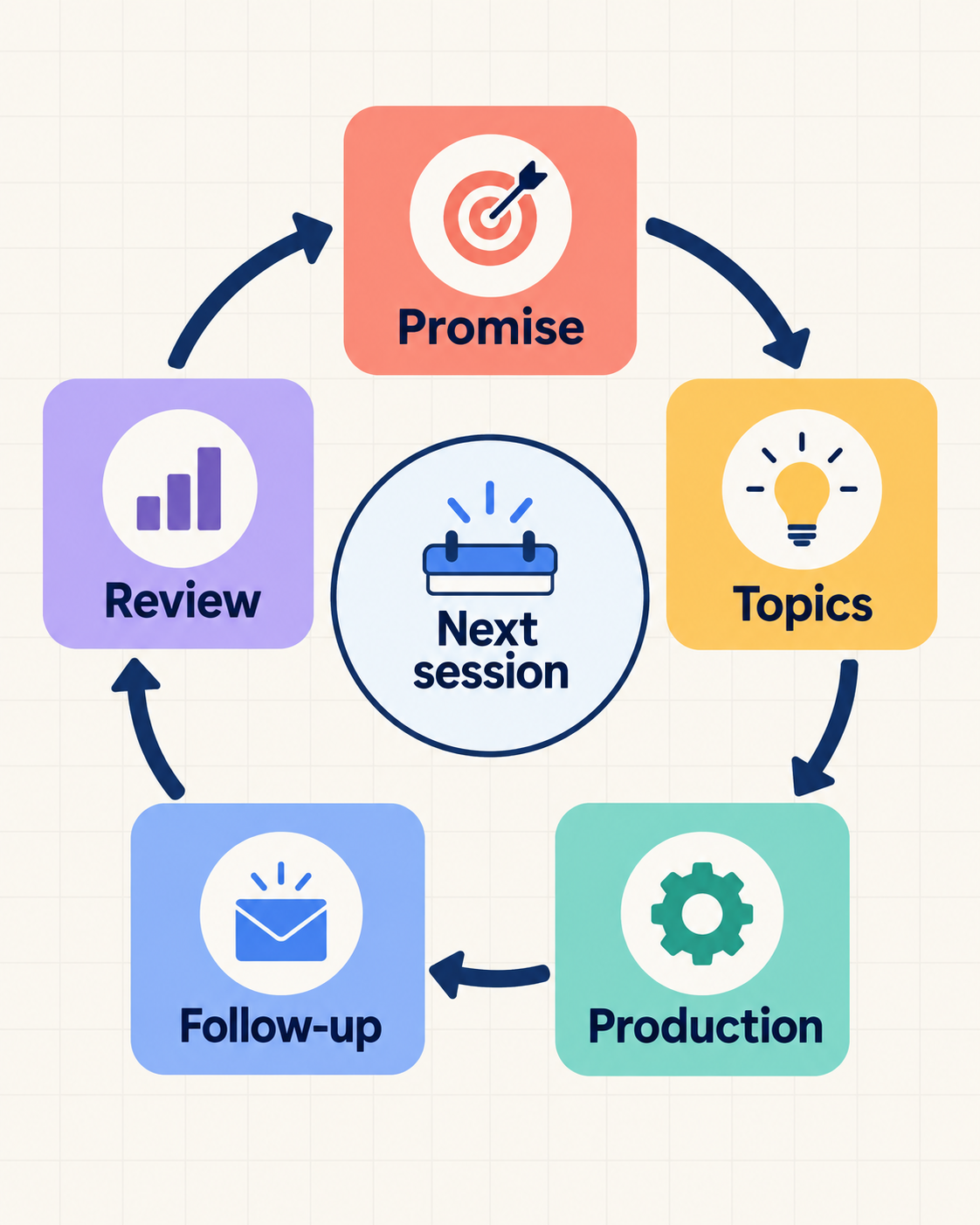
A recurring webinar program is a connected series built around one audience promise, with a repeatable operating model for topics, promotion, production, follow-up, and learning.
| Format | What repeats | What the attendee registers for | Main operating job |
|---|---|---|---|
| Recurring webinar program | The audience promise, format, workflow, and learning cycle | One session or an ongoing series, depending on the registration model | Plan and improve the whole program |
| Recurring scheduling | Dates or occurrences configured in a webinar platform | One occurrence, several selected occurrences, or the series, depending on the platform | Configure cadence and registration mechanics |
| Evergreen automated webinar | A prerecorded or automated presentation and its delivery path | An on-demand or scheduled automated viewing | Maintain the automated experience and follow-up |
A program is the strategy and workflow. Recurring scheduling is one platform mechanism inside it. Zoom's recurring webinar scheduling guide is one concrete example: it asks the organiser to choose the recurrence, occurrences, and registration model. Those options are specific to Zoom. If your immediate question is software selection rather than program design, use the recurring webinar platform checklist.
Start With the Program Promise
Before choosing topics, formats, or speakers, define what the program is meant to become.
Most webinar plans start with a title. A better recurring program starts with a promise: who the program is for, what they will learn by showing up repeatedly, and what the business should get from running it.
That promise does not need to be complicated. A useful program brief can be as short as:
We run monthly live sessions for demand generation and product marketing teams who want to turn webinars into a repeatable growth channel. Each session teaches one practical way to improve registration, engagement, conversion, replay, or follow-up.
That kind of brief gives the program boundaries. It helps you say no to topics that are interesting but off-track. It also helps your audience understand why they should come back.
When the program promise is clear, every session has a job. One broadcast might educate early-stage buyers. Another might help solution-aware prospects compare workflows. Another might support product adoption. The series stays coherent because each episode serves the same larger point of view.
Pick a Format Your Team Can Repeat
The best recurring format is not always the most ambitious one. It is the one your team can run consistently without turning every month into a production sprint.
A few formats tend to work well for B2B teams:
- Solo teaching session. One presenter, one clear idea, and a focused Q&A. This is usually the lightest format to run.
- Interview or guest session. A host brings in one practitioner or customer. This adds perspective, but also adds scheduling work.
- Live demo or walkthrough. A repeatable format for solution-aware audiences who want to see how a problem is solved in practice.
- Workshop. An interactive session built around a framework, template, or exercise. It can be valuable, but it needs tighter facilitation.
Choose one primary format first. The temptation is to make every session feel new. The stronger move is to make the production shape familiar so the content can carry the value.
Cadence follows the same rule. Monthly is often the most realistic starting point for a small team because it leaves time to promote, run, follow up, and learn before the next session. A faster cadence can work, but only when the topic engine and production workflow are already stable.
Build Topics From a Framework, Not a Backlog
A list of webinar ideas feels useful until it starts shrinking.
A topic framework is more durable because it gives you a repeatable way to create ideas. Use a webinar topic strategy that connects audience problems to the live format, CTA, replay, and follow-up plan. For HeyStream's audience, that framework should usually connect to the live growth loop:
- Registration: how the right people find and commit to the session
- Attendance: how the live experience earns attention
- Engagement: how the audience interacts, asks questions, and responds
- Conversion: how CTAs and offers move viewers to a next step
- Replay: how the session keeps working after the live moment
- Follow-up: how audience behaviour shapes what happens next
- Learning: how each session improves the next one
That loop can generate a full content calendar without forcing your team to chase random topics.
For example, one month could focus on registration page quality. The next could focus on live CTAs. The next could focus on replay follow-up. The next could focus on how sales should prioritise attendees using audience signals. Each session stands alone, but together they teach a bigger system.
This also makes internal planning easier. Instead of asking, "What should we talk about next month?", the team can ask, "Which part of the live growth loop do we need to teach next?"
Turn Production Into a Reusable Workflow
Recurring webinars become tiring when the team has to remember everything from scratch.
The fix is a simple production workflow with clear phases. It does not need to be elaborate. It just needs to remove guesswork.
Four weeks before the session, the team should know the topic, format, speaker, audience, and registration-page angle. Two weeks before, the promotional plan and session outline should be in place. The week of the event should be about reminders, speaker prep, CTA setup, and the final run-through. After the event, the team should move quickly into replay, follow-up, and review.
A webinar series planner can keep episode owners, deadlines, audience handoffs, and review checkpoints in one reusable calendar. The repeatable assets matter as much as the checklist:
- registration page structure
- speaker briefing template
- email promotion sequence
- reminder emails
- slide or demo outline
- live CTA plan
- replay page structure
- follow-up segments
- post-session review notes
Templates do not make the program generic. They protect the team from spending energy on the same setup decisions every month.
The goal is to reuse the frame and improve the substance.
Plan the Next Step Before You Go Live
The biggest waste in many webinar programs happens after the session ends.
The audience showed up. Some people stayed until the end. Some clicked a CTA. Some asked specific questions. Some missed the live session but came back for the replay. Those behaviours can guide follow-up, but none of them proves buying intent on its own.
Follow-up should be designed before the broadcast, not assembled afterwards. A recurring webinar workflow helps the team reuse series-level context while preserving the session-level behaviour that made each response relevant.
At minimum, plan for four groups:
- Registered but did not attend. Send the replay and restate the specific value they missed.
- Attended but did not engage. Send a useful recap with one clear next step.
- Engaged during the session. Send a relevant resource, invitation, or offer based on what they clicked or asked, without treating that action as proof of sales readiness.
- Watched the replay. Treat replay behaviour as its own signal, not as a weaker version of live attendance.
This is where a recurring program starts to compound. The team learns who responds to which topics, which CTAs create action, which replays continue to attract attention, and which follow-up paths move people forward.
Use that evidence to shape the next session and decide where a human should review the context before sales outreach.
Review the Program, Not Just the Event
A recurring webinar program needs a review rhythm.
Looking at each broadcast in isolation can be misleading. One session might have a smaller audience but stronger engagement. Another might drive more replay views than live attendance. Another might produce better questions, more CTA clicks, or more useful sales conversations. These are patterns to investigate, not proof of revenue.
The useful question is not simply, "How many people attended?"
Better questions include:
- Which topic attracted the right audience?
- Which promotion channels drove the most engaged registrants?
- Which CTA created the clearest next step?
- Which part of the session held attention?
- Who came back for the replay?
- What should we repeat, change, or stop next month?
This review does not need to become a heavy reporting exercise. A short monthly retro is enough if it captures the decisions that will change the next session. A webinar performance report template gives those decisions an owner and carries them into the next plan.
The review can also connect the program to webinar ROI: which sessions influenced pipeline or signup movement, which follow-up paths created action, and which topics deserve another slot. Influence still needs careful attribution. A repeat visit or CTA click is useful context, not a closed-loop revenue claim.
The best programs get easier because the team carries learning forward. The registration page gets sharper. The CTA timing improves. The replay follow-up becomes more relevant. The topic calendar becomes less speculative.
Each broadcast becomes part of the system.
Where HeyStream Fits In
You can run a recurring webinar program with a stitched-together stack. Many teams do. The challenge is that the work becomes harder to sustain when registration, streaming, CTAs, replay data, contact records, and follow-up all live in different places.
HeyStream is built around the idea that a live session should connect to what happens next. Teams can run branded broadcasts in a browser-based studio, host registration and watch pages, add live and replay CTAs, track audience behaviour, and follow up based on engagement signals in one workflow.
For an ongoing program, HeyStream's broadcast series lets a team create one connected series, use one signup flow, add linked broadcasts, and review subscriber participation across sessions. The current feature page also explains how teams can use series activity in follow-up workflows.
That matters most when you are building a recurring webinar program. The less time your team spends rebuilding the broadcast mechanics, the more time it can spend improving the topic, the offer, the audience experience, and the follow-up.
The Takeaway
A recurring webinar program is not a bigger version of a one-off webinar. It is a different kind of system.
The durable version starts with a clear program promise, a repeatable format, a topic framework, reusable production assets, and a follow-up plan that acts on audience behaviour. Once those pieces are in place, each session can do more than create a temporary spike in attendance.
It can make the next broadcast sharper.