LinkedIn webinar ads can take two different routes. Send people to an external registration page when the webinar platform needs to create the registrant and control confirmation and access. Use LinkedIn-native lead capture when LinkedIn should own the first lead record, but build and test a separate handoff before you count that person as registered.
That distinction matters. A click is not a lead. A lead is not a webinar registrant. A registrant has not necessarily received access, attended, reached the CRM, or received the right follow-up. The campaign only works as an operating system when every state has an owner and evidence.
This guide shows how to choose the path, test the handoff, and reconcile the records without turning ad-platform activity into unsupported pipeline claims. If you need the wider channel plan first, start with a webinar promotion plan.
Choose the system of record first
Start with a blunt question: where should the canonical webinar registrant live?
If the answer is your webinar platform, send the ad to its hosted page or to an owned page with an embedded registration form. If the answer is LinkedIn, use native lead capture and define how that lead becomes a registrant in the external webinar system.
| Decision | External registration page | LinkedIn-native lead capture |
|---|---|---|
| First complete record | Webinar platform registrant | LinkedIn lead |
| Best fit | You need immediate access, confirmation, source capture, or custom registration fields | You want a low-friction lead form and have a tested downstream process |
| Confirmation owner | Webinar platform | Your integration or operations workflow after the LinkedIn form |
| Proof required | Registration record, confirmation, access, and source values | LinkedIn lead record plus a separate external registrant, confirmation, and access record |
| Common failure | Ad clicks look healthy, but the registration form or attribution path breaks | Leads are reported as registrations even though no external registrant exists |
LinkedIn's April 2026 Event Ads announcement describes off-platform Event Ads that send members to an external event destination without requiring a duplicate LinkedIn Event page. It also describes a lead-generation objective that uses LinkedIn Lead Gen Forms. Those are two different ownership models, even when both begin with a LinkedIn ad.
The current off-platform Event Ads setup guide lists the live setup inputs and permissions. The ad-account Page needs an eligible Page role, the ad account needs Creative Manager access or higher, and the campaign needs a supported objective, destination URL, event details, image, and call to action. Check that page on launch day because provider labels and options change.
A lead is not a registrant
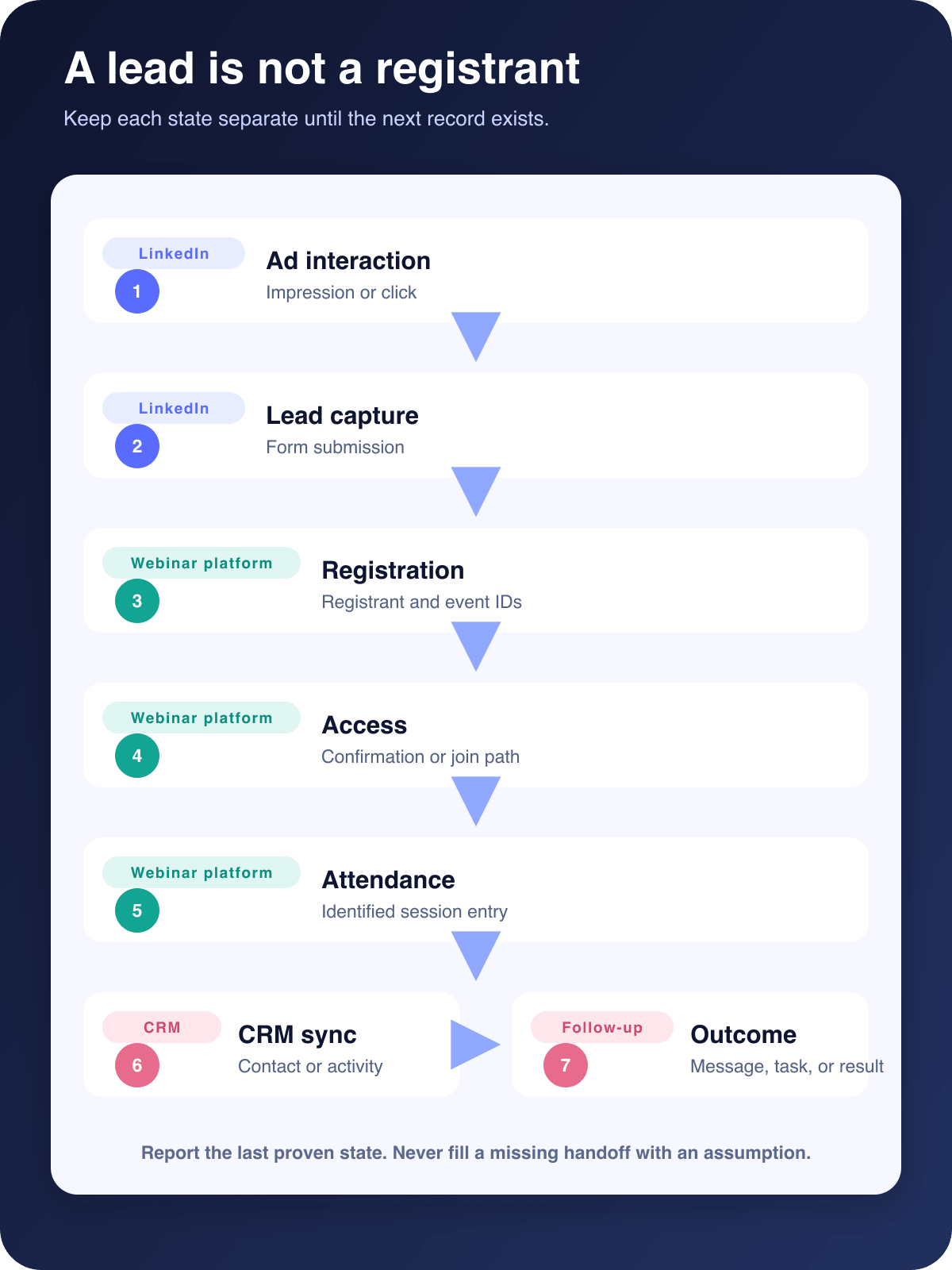
Treat the campaign as a sequence of records, not one conversion event.
- An impression proves that LinkedIn delivered the ad.
- A click proves that someone selected the ad destination.
- A form submission proves that one system captured a lead or registration request.
- A webinar registration proves that the webinar platform created a registrant.
- A confirmation or access record proves that the person received a usable next step.
- An attendance record proves that the identified registrant entered the live session.
- A CRM sync proves that the intended contact or activity reached the CRM.
- A follow-up outcome records what happened after the webinar.
Each state answers a different question. Keep them separate even if your dashboard puts them in one funnel.
Path A: send the ad to an external registration page
This is usually the cleaner path when registration, access, attendance, replay, and follow-up should share one identity from the start.
Use the exact external registration URL as the ad destination. Add a controlled source convention, then test the entire route from a real campaign link. A webinar registration page checklist can help with the page itself. The ad-specific test should also cover the handoff.
Check these points before launch:
- The ad opens the intended registration page without dropping campaign parameters.
- The form creates a registrant in the correct webinar.
- The confirmation screen or email gives the expected access instructions.
- The saved registrant record contains the source values you need.
- The CRM receives the correct contact or activity without creating an avoidable duplicate.
- Consent and follow-up rules match the promise on the form.
A click is only the start of this path. If the landing page returns an error, strips parameters, rejects the form, or sends the visitor to the wrong event, the click metric can rise while registrations stay flat.
Use separate tagged links for placements you genuinely plan to compare. The webinar UTM tracking guide covers naming, registration-source capture, first-touch and last-touch context, and the limits of source-linked reporting.
Path B: capture the lead inside LinkedIn
LinkedIn-native lead capture can reduce the steps before a form submission. It also creates a new handoff problem: the LinkedIn lead still needs to become an external webinar registrant if the session runs outside LinkedIn.
Define that process before the campaign goes live. It may use an API, an integration platform, a scheduled export, or a tightly controlled manual process. Whatever you choose, test it with a real lead and retain evidence for each step.
The minimum test is simple:
- Submit the LinkedIn form with a test identity.
- Confirm the lead appears in LinkedIn with the expected fields and consent context.
- Run the approved handoff.
- Confirm the external webinar platform creates one registrant with the right event, email, and source.
- Confirm the person receives access or confirmation.
- Confirm the CRM record is created or updated as intended.
- Repeat with an existing contact to expose duplicate and field-overwrite behavior.
Do not report the LinkedIn form submission as a webinar registration until step four passes. Do not report the registrant as attendance until the attendance record exists.
LinkedIn's Event Ads overview focuses on the native LinkedIn Event lifecycle. That setup is useful when LinkedIn owns the Event page and reporting. It is not evidence that a LinkedIn form automatically registered someone in an external webinar platform.
Keep delivery separate from registration
LinkedIn Live can be the broadcast destination while registration remains external. These are separate decisions.
An RTMP destination controls where the live video is sent. It does not decide where a registrant is created, which form fields are collected, or how a contact reaches the CRM. If you plan to send the session to LinkedIn Live, follow the LinkedIn Live RTMP setup guide and test the destination separately from the registration path.
This separation also keeps troubleshooting sane. A healthy test stream does not prove the registration form works. A valid registration does not prove the RTMP destination is ready.
Build a handoff QA ledger
Write the expected record before you run the test. A compact ledger makes ownership visible and gives the team something more useful than screenshots scattered across chat.
| State | Owner | Expected evidence | Failure owner |
|---|---|---|---|
| Ad interaction | Paid media | Campaign, ad, timestamp, destination or form | Paid media |
| Lead capture | LinkedIn or webinar platform | Lead ID or registration request with required fields | Paid media or web operations |
| Webinar registration | Webinar platform | Registrant ID, event ID, email, source | Webinar operations |
| Confirmation and access | Webinar platform or handoff workflow | Confirmation status, join or watch path | Webinar operations |
| Attendance | Webinar platform | Identified attendee, session, join time | Webinar operations |
| CRM sync | CRM or integration layer | Contact or activity ID, mapping result | Revenue operations |
| Follow-up | Marketing or sales | Segment, message, task, or reviewed outcome | Named follow-up owner |
For a hypothetical test, imagine Priya submits a LinkedIn Lead Gen Form at 10:02. The export runs at 10:05, the webinar platform creates registrant R-184 at 10:06, and the confirmation email is accepted at 10:07. The CRM updates the existing contact rather than creating a duplicate. That chain proves the handoff reached confirmation. It does not prove Priya attended or entered pipeline.
The ledger should record failures too. If LinkedIn has a lead but the webinar platform has no registrant, stop at the lead state. Name the broken step and its owner instead of filling the gap with an assumption.
Reconcile reporting without inventing attribution
Campaign Manager, the webinar platform, and the CRM will often disagree. Some differences are expected because the systems measure different events and use different timing, identity, and deduplication rules.
Reconcile by state and time window:
- Compare LinkedIn clicks with visits to the intended registration destination.
- Compare LinkedIn lead submissions with successful handoff attempts.
- Compare webinar registrants with confirmation and access records.
- Compare registrants with identified live attendance and replay activity.
- Compare CRM contacts or activities with the webinar registrant set.
- Review follow-up outcomes only after the agreed window closes.
Do not force every row into one number. Keep ad delivery, lead capture, registration, attendance, CRM sync, and business outcome visible. The webinar CRM integration guide explains how to map platform-neutral contact fields and activities without pretending every provider uses the same model.
UTM values can show that a tracked LinkedIn link was present in a captured visit or registration. They do not prove that LinkedIn caused a later sale. Multi-touch attribution needs preserved touch history, identity resolution, cost data, outcome data, an attribution window, and an agreed credit model.
Troubleshoot the gaps by state
If a lead exists but the registrant is missing, inspect the handoff trigger, required fields, email normalization, event mapping, rate limits, and error queue. Do not resend the entire list until you understand duplicate behavior.
If a registrant exists but confirmation is missing, check the event's confirmation rules, email status, suppression state, access-link generation, and any custom redirect. Confirm access with the same identity used for registration.
If access works but the source is blank, repeat the test from the real tagged ad URL. Check redirects, embedded forms, consent state, cross-domain behavior, and the mapping that writes source data into the registration or CRM record.
If duplicate contacts appear, decide which system owns identity matching. Normalize email consistently and test whether the integration updates an existing contact, creates a new one, or records a separate activity.
If attendance does not reconcile, compare the same event, identity, and time window. A LinkedIn viewer, an external webinar attendee, and a CRM contact may be different records until your process connects them.
Run one controlled launch test
Do not discover the handoff during the live event. Run a controlled test while there is still time to fix it.
- Verify Page and ad-account permissions.
- Confirm the objective and Event Ad variant.
- Check the destination URL, event details, time zone, call to action, and image.
- Review registration or lead-form fields and consent wording.
- Submit a new test identity and an existing-contact identity.
- Verify the registrant, confirmation, access, source values, CRM mapping, and duplicate behavior.
- Check the owner and response path for a failed handoff.
- Record the rollback or manual recovery process.
One complete test is worth more than a dashboard full of disconnected green checks.
Where HeyStream fits
HeyStream can provide hosted webinar registration pages, embedded signup widgets, registration and audience records, marketing-attribution context, and viewer-level audience intelligence. It can also send a broadcast to LinkedIn Live through an RTMP destination when you supply the endpoint and stream key.
HeyStream does not currently provide a native LinkedIn Ads manager or LinkedIn Lead Gen Form import. If LinkedIn owns the first lead, you still need an explicit, tested process that creates the HeyStream registrant and delivers access.
That boundary is useful. It keeps the article honest and helps you choose the path based on record ownership rather than convenience alone.
Report only what the evidence proves
The registration path is an operating decision, not a cosmetic form choice. Pick the system that should own the registrant, then test every handoff through access and CRM delivery.
When you report results, keep the states separate. Say how many people clicked, submitted, registered, received access, attended, reached the CRM, and produced a reviewed follow-up outcome. That is less dramatic than calling every lead a registration, but it gives the team a campaign it can diagnose and improve.


