A webinar can create useful audience signals before someone fills out a sales form. A person registers for a specific topic, attends live, asks a question, clicks a CTA or returns for the replay. Those actions can help a marketing or sales team choose a relevant next step.
The problem is that webinar data often stays inside the webinar platform, a CSV export or a dashboard nobody checks after the event. CRM and email tools are where follow-up happens, but they do not always get the context that would make that follow-up timely.
A good webinar integration closes that gap carefully. It sends the right signals into the systems where teams already work without turning the CRM into a noisy event-data dump.
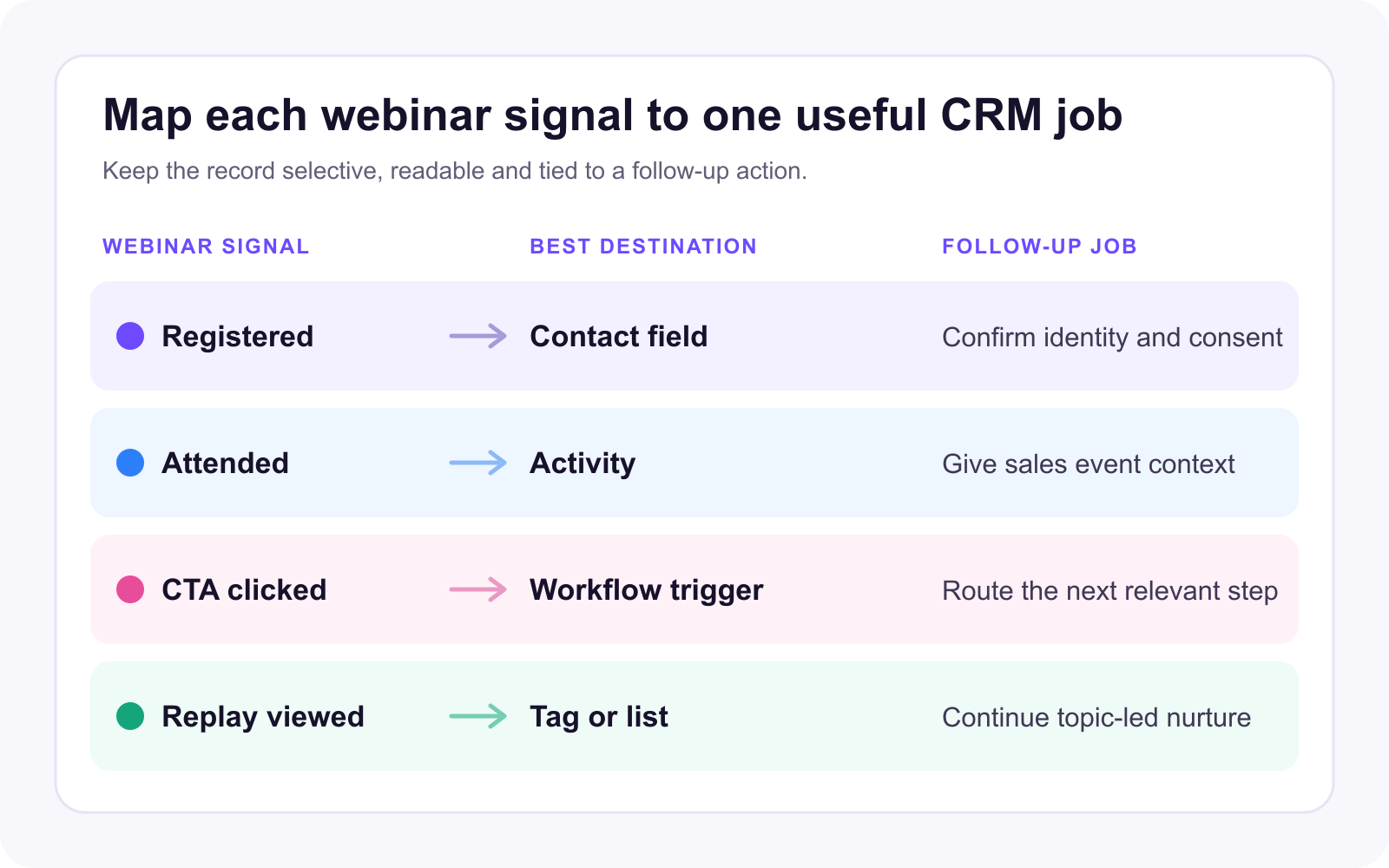
What webinar CRM integration actually means
Webinar CRM integration is the process of moving useful webinar data into a CRM, email platform or marketing automation system. That can include registration data, attendance status, selected registration fields, CTA clicks, replay views, questions, tags, list membership, activity notes or workflow triggers.
The important word is useful. Not every webinar event belongs in CRM. The goal is to give sales and marketing enough context to identify the person, understand the session they engaged with and choose the right next step.
Official integration examples show both the value and the limits. HubSpot's guide to Zoom webinar sync explains how registration and attendance data can support segmentation, while documenting limits around required fields, email matching and contact activity. HubSpot's Microsoft Teams webinar documentation shows a similar pattern: registration and attendance can flow into marketing events, but admin setup, permissions and sync rules still matter.
That is the right mindset for any webinar integration. Treat it as an operating workflow, not just a connector.
Decide what the CRM needs to know
Start with the follow-up job, then choose the data. For most B2B webinar programs, the CRM needs a small core record of what happened:
- Who registered
- Which webinar or broadcast they registered for
- Whether they attended live or missed the session
- Whether they watched the replay
- Whether they clicked a CTA
- Whether they asked a useful question or submitted relevant registration details
- Which topic, offer or segment should shape follow-up
That is enough to make follow-up more specific without creating clutter.
Some data is better left outside CRM or summarized into a cleaner activity. Full chat logs, every timestamp, raw poll exports, long watch-session histories and unsupported lead scores can make the contact record harder to use. Sales teams need context they can act on, not a wall of event telemetry.
A useful rule is to sync the signal when it changes the next action. If it does not change the email, task, route, segment or conversation, it may belong in webinar analytics rather than CRM.
Map webinar signals to follow-up segments
The strongest webinar integrations are built around segments, not static attendance lists.
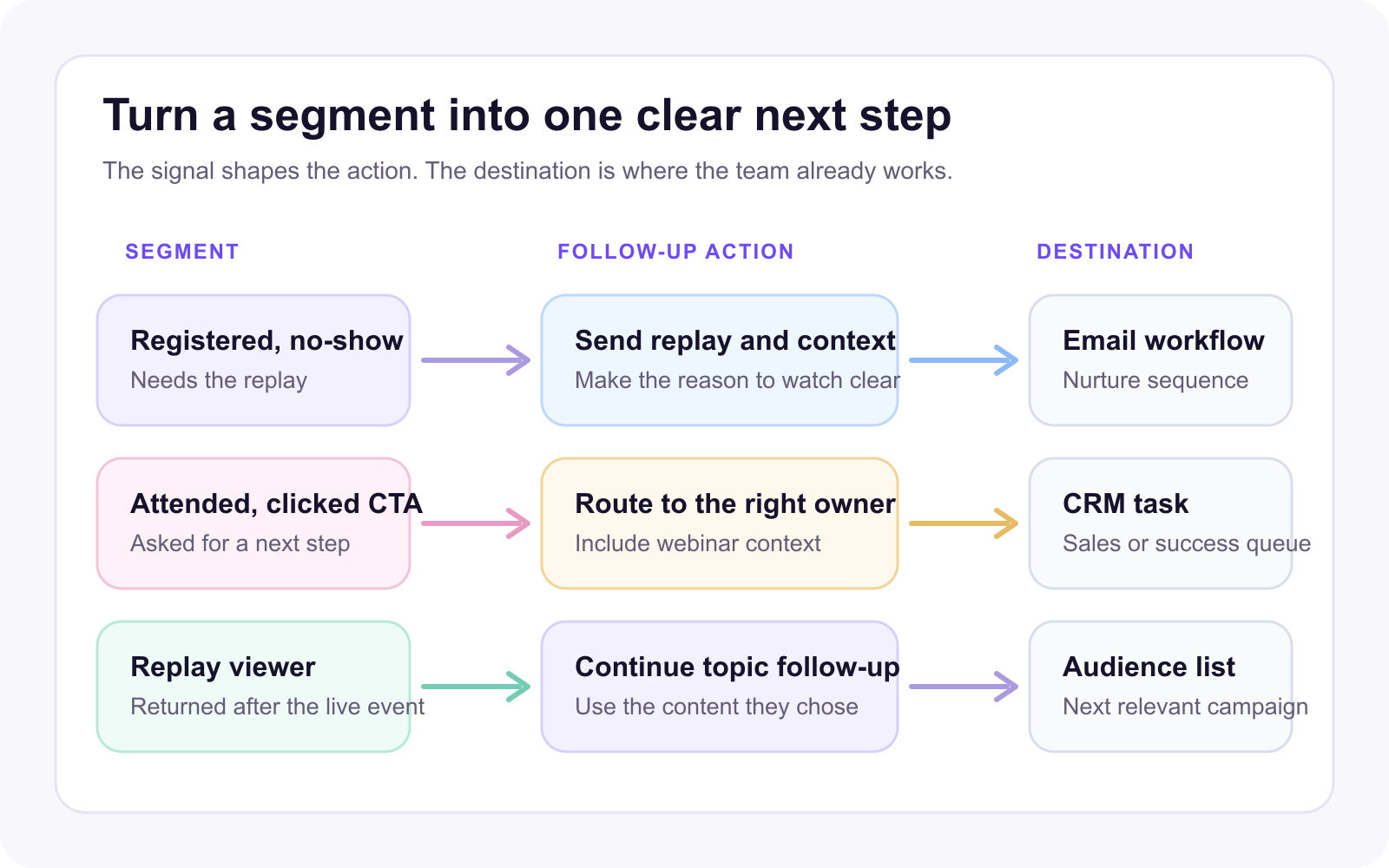
A registrant who attended live and clicked a pricing CTA should not receive the same message as a no-show. A replay viewer who returned three days later may need a different path from someone who attended live but left early. Someone who asked a detailed product question may be ready for a sales or customer-success handoff, while a low-fit registrant may belong in a slower nurture path.
| Webinar signal | Useful CRM or marketing action |
|---|---|
| Registered but did not attend | Send the replay and a short reason to watch |
| Attended live | Send the recap, resources and the next relevant offer |
| Clicked a CTA | Trigger faster follow-up or a specific nurture path |
| Asked a product question | Create a task or route the contact to the right owner |
| Viewed the replay | Follow up using the topic and viewing context |
| Attended multiple sessions | Add the contact to a relevant audience or education path |
This is where audience intelligence matters. The more clearly you can see who engaged and how, the easier it is to build behavior-based follow-up around the person's actual interest.
Choose the right integration model
There is no single best integration model for every team. The right setup depends on how quickly follow-up needs to happen, how much control the team needs over fields and workflows, and where sales and marketing already work.
| Integration model | Best fit | Useful data | Main limitation | What to verify |
|---|---|---|---|---|
| Native CRM | Teams that follow up in one CRM | Contacts, selected fields and supported events | Scope varies by provider | Creation, updates, duplicates and field mapping |
| Email or marketing automation | Replay, nurture and lifecycle messaging | Contacts, tags, lists and supported events | Less sales context | Consent, list rules and event triggers |
| Webhook or connector | Custom workflows without a native route | Registration, attendance or summary payloads | Your team owns mapping and monitoring | Authentication, retries and error visibility |
| CSV | Small, occasional programs | A reviewed contact export | Manual and slow | Deduplication, consent and import ownership |
| Custom API | Mature operations with a defined data model | Selected records and events | Engineering and maintenance cost | Permissions, observability and failure recovery |
Native integrations are usually the cleanest option when the webinar platform supports the CRM your team uses. Browse HeyStream integrations to confirm the current destinations and the scope shown for each provider.
Email and marketing automation integrations suit replay distribution, list membership and lifecycle messaging. Mailchimp's Marketing API fundamentals explains how marketing systems separate contacts, audiences, tags, activity and events instead of treating everything as one generic contact field.
Webinar webhooks help when a native CRM is not the right route. HeyStream can send registration, attendance and post-broadcast summary events to an HTTPS endpoint, but the receiving team still owns the destination mapping, monitoring and follow-up logic.
CSV exports can work for small, occasional programs. Custom APIs suit teams with a defined data model, strict governance needs and clear engineering ownership. Both need explicit handling for duplicates, permissions and failed transfers.
Keep the CRM clean
More webinar data does not automatically mean better follow-up.
CRM records should stay readable. Use consistent field names, clear event naming, predictable list or tag conventions and deduplication rules based on a reliable identifier such as an email address. Be selective about what becomes a contact field versus an activity, note, tag, list membership or automation event.
For example, "last webinar attended" may be useful as a summary field. A specific attendance event may fit better as an activity. A tag or list can support replay follow-up, while a workflow event can trigger a timed sequence.
For a series, keep reusable automation separate from session-specific data. The recurring webinar CRM workflow shows how to preserve consistent routing while keeping each broadcast's registration and attendance context distinct.
Good CRM hygiene also protects trust. If the CRM fills with inconsistent fields, old event names, duplicate contacts or unexplained tags, teams stop relying on the data. The integration should make follow-up easier, not create another cleanup project.
Use webinar data after the event
The value of webinar integration shows up after the live session.
At a minimum, teams should be able to send different follow-up to registrants, attendees, no-shows, replay viewers and CTA clickers. More mature teams can route relevant activity to sales, add suitable contacts to nurture programs, invite people to the next session or compare which topics created useful next-step behavior.
The same data can improve planning. Review which topics, formats, sources and CTAs created useful engagement. Over time, the CRM connection helps the team fit each session into the broader B2B webinar growth engine: registration, attendance, engagement, conversion, replay, follow-up and learning.
The point is not to prove that every webinar creates pipeline. It is to make sure the team can see what happened, take the next relevant action and improve the next session with better evidence.
Evaluate a webinar platform's CRM integration
When choosing a B2B webinar platform, do not stop at "does it integrate with our CRM?" Ask what the integration actually does.
- Which CRM, email and marketing automation tools are supported?
- Does it create new contacts, update existing contacts or both?
- What happens when a contact already exists?
- Can selected registration fields sync into the destination?
- Does attendance arrive as a field, activity, tag, list membership or event?
- Can CTA clicks or replay views trigger follow-up for this provider?
- Are sync errors visible to the team?
- Can the team choose which fields or events are enabled?
- What permissions, API scopes or admin setup are required?
- Can you audit what synced after the webinar?
These questions matter because integration quality is partly about capability and partly about operational reliability. A connector that exists but cannot send the events your team needs may still leave you exporting CSVs after every session.
This article gives you the platform-neutral data model. If your team uses Salesforce, the Salesforce webinar integration guide covers HeyStream's current Contact sync boundary for registrants and attendees.
Where HeyStream fits
HeyStream is built around the idea that live broadcasts should create useful next steps, not just attendance reports.
Teams can capture registration and viewing behavior, review audience activity, use live and replay CTAs, and connect supported follow-up workflows to the signals a broadcast creates. Current native providers include CRM and marketing tools such as HubSpot, Salesforce, Pipedrive, Zoho CRM, Attio, GoHighLevel, Mailchimp, ActiveCampaign and Loops.
Capabilities vary by provider. For example, HeyStream's GoHighLevel integration can create or update contacts, apply configured tags and send selected registration fields when people register or attend. Salesforce currently creates or updates Contact records for registrations and attendance. HeyStream webhooks can send registration, attendance and post-broadcast summary events to an endpoint your team controls. Those examples do not imply that every provider receives the same fields, activities, tags, lists or two-way sync.
The best webinar integration is not the one that syncs the most data. It is the one that helps the team act on the right signals while keeping the CRM clean enough to trust.


