Webinar UTM tracking should give you a trustworthy path from promotion to follow-up. The practical model is simple: tag each distribution link consistently, save the source when someone registers, record live and replay activity as separate events, and review the evidence before choosing a CRM action.
That last step matters. A registration source tells you where one observed journey began. It does not prove that one channel caused a sale, that an attendee is ready to buy, or that your webinar platform has solved multi-touch attribution.
Treat the data as an event ledger inside your wider B2B webinar growth engine. You will get cleaner reporting, more relevant follow-up, and fewer confident conclusions built on incomplete evidence.
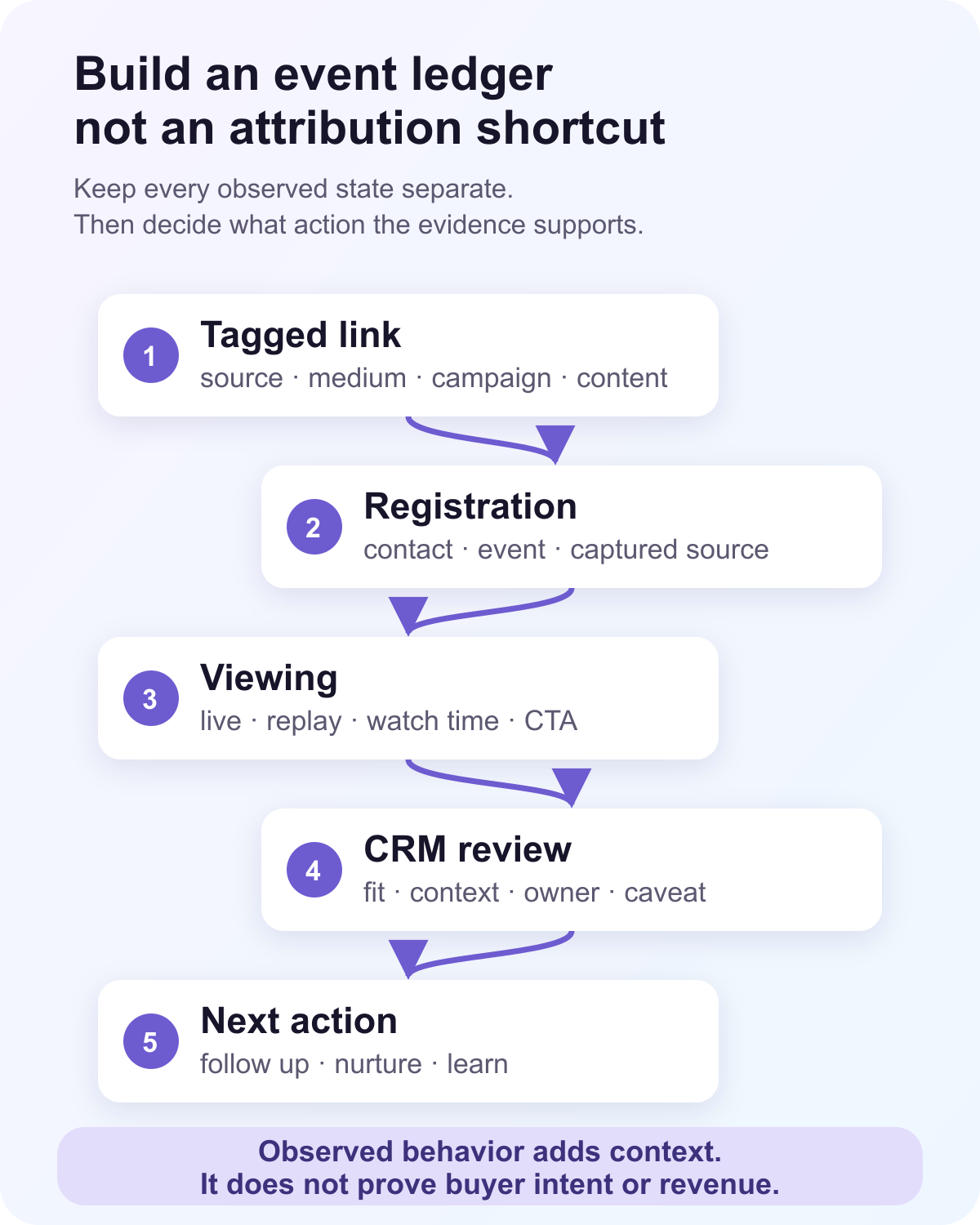
The seven-step webinar UTM tracking workflow
Use this sequence for each webinar campaign:
- Define one campaign name for the webinar.
- Assign a stable source and medium to every promotion channel.
- Create a distinct tagged link for each channel, partner, or important creative.
- Test the full route from click to the final webinar registration page.
- Save the captured source against the registration record.
- Record registration, live attendance, replay viewing, and CTA activity as separate states.
- Reconcile the records before reporting results or sending them to a CRM.
The workflow is deliberately modest. It tells you which tracked link a person used and what happened next in systems you control. It does not recover missing tags, identify every earlier touch, or assign revenue credit by itself.
Start with a naming convention your team can keep
Google Analytics' campaign URL guidance defines the core parameters and recommends consistent, case-sensitive values so one campaign does not split into several reporting rows. Pick the convention before anyone creates links.
| Field | Job | Example | Rule |
|---|---|---|---|
utm_source |
Names the platform, publisher, or partner that sent the visit | linkedin, partner-acme |
Use one stable lowercase value per source |
utm_medium |
Groups the type of distribution | paid-social, email, partner |
Use a short approved list |
utm_campaign |
Connects every link to the same webinar campaign | q4-pipeline-clinic |
Keep one value across channels |
utm_content |
Distinguishes an important creative or placement | speaker-post, email-footer |
Add it only when the distinction will change a decision |
utm_term |
Identifies a paid search term when needed | webinar-attribution |
Reserve it for keyword-level tracking |
A workable URL might look like this:
https://example.com/webinar?utm_source=linkedin&utm_medium=organic-social&utm_campaign=q4-pipeline-clinic&utm_content=speaker-post
Keep a shared source dictionary. If one marketer uses linkedin, another uses LinkedIn, and a third uses li, your report will treat them as separate values. The same problem appears when campaign names drift between a launch plan, ad platform, registration system, and CRM.
Do not pack every detail into the URL. The webinar ID, session ID, contact ID, registration timestamp, and later audience behavior belong in your event records. UTMs should describe acquisition context, not become an encoded database.
Give each important source its own link
Create one link for each channel or partner you want to compare. Split links further only when the result could change what you do next.
Useful distinctions often include:
- Company email versus a partner email
- Organic LinkedIn versus paid LinkedIn
- The company account versus a speaker's post
- A homepage banner versus an article CTA
- Partner A versus Partner B
Avoid creating dozens of links that nobody will maintain. A separate value for every social post, employee, button color, and send time can make a small webinar campaign impossible to read.
Vendor source-tracking features show the same basic pattern. Zoom's registration tracking workflow creates distinct registration URLs and reports visits and completed registrations for each link. Zoho Webinar's source-tracking guidance uses separate links for email, social, websites, and partners, then compares visitors with registrations and attendees. These are useful examples, but each describes that vendor's implementation. Check what your own registration system stores and exports.
Preserve the source through the registration journey
A tagged link is useful only if its values reach the registration record. Follow the exact path a visitor will take:
- Click the promotion link.
- Load the campaign or registration page.
- Follow any redirect.
- Open an embedded or hosted registration form.
- Submit the form.
- Confirm the saved registration record and export.
Test custom domains, cross-domain routes, embedded forms, cookie-consent choices, link shorteners, and redirects separately. Each can change what reaches the final form. Do not claim universal UTM persistence because one direct hosted-page test worked.
Decide what should happen when a person returns through another source. One sensible first-touch rule keeps the first useful UTM values on the registration record while saving later visits as separate touches. Another team may need a last-touch field as well. Either choice can work if the rule is explicit and the original values are not silently overwritten.
Also record missing data honestly. "Unknown", "direct", and "not captured" are different states. A blank field should never be quietly relabelled as organic traffic.
Build a lifecycle event ledger
Registration source is the beginning of the record, not the final result. ON24's definition of registration source describes the promotional path identified through parameters on an audience URL. To use that context after registration, keep each later state separate.
| State | Minimum evidence | What it can support | What it cannot prove |
|---|---|---|---|
| Link visit | Tagged URL or source-link visit | The link received a visit | A real person registered |
| Registration | Contact, webinar, time, captured source | The person completed registration | They attended or watched |
| Live attendance | Registration joined to a live viewing record | The person entered the live session | They stayed, understood, or intend to buy |
| Replay view | Contact joined to a replay session | The person returned to the recording | The replay caused a later outcome |
| CTA interaction | CTA, contact or session, time, action type | The viewer saw or selected a next step | The person is qualified or became pipeline |
| CRM handoff | Contact, source event, destination, delivery result | A record or event reached the chosen system | A rep reviewed or acted on it |
| Reviewed outcome | Owner, decision, time, reason | The team accepted, nurtured, suppressed, or rejected the handoff | Revenue credit without a separate attribution model |
This structure prevents a common reporting mistake: treating one row as if it represents the whole journey. Registration, attendance, replay, CTA, CRM delivery, and a reviewed business outcome happen at different times and can fail independently.
Use webinar analytics to compare campaign-driven registrations with live and replay behavior. Then keep the interpretation narrow. A source with many registrations may be good at reach. A source with fewer registrations and stronger attendance may be better for the topic. Neither result proves channel-level ROI until costs and downstream outcomes are joined under an agreed model.
Reconcile registration, attendance, replay, and CTA data
Start with counts that can be reproduced from the ledger:
- Visits by tracked link
- Completed registrations by captured source
- Live attendees by registration source
- Replay viewers by registration source
- CTA impressions and clicks by source when the identity join is valid
- Records delivered to the CRM by source
- Handoffs accepted, nurtured, suppressed, or rejected by source
Use stable identifiers for joins. A contact ID is usually safer inside one platform, while a normalized email address may be the practical key across an export and CRM. Document the rule and decide how you will handle duplicates, changed addresses, anonymous viewers, shared addresses, test registrations, and deleted records.
Keep live and replay viewing separate. A replay view may happen days after the registration source was captured. It adds useful context, but it does not create a new acquisition source unless the person arrived through a new tracked journey that your model records separately.
The same caution applies to webinar engagement metrics. Watch time, questions, reactions, and clicks can explain what someone did. They should not be promoted into lead quality, pipeline, or revenue without fit, destination data, and human review.
Send a compact record to your CRM
Your webinar CRM integration should carry enough context to change the next action without turning the contact record into an event dump.
For a practical handoff, include:
- Contact and webinar identifiers
- Registration time and captured source, medium, campaign, and content
- Live attendance and replay status as separate values
- The relevant CTA action or question when one exists
- The event time and source session
- The intended destination, owner, and next action
- A caveat when the evidence is incomplete
Provider scope varies. Some integrations create or update contacts. Others send selected registration fields, tags, list membership, activities, or supported events. Registration and attendance support does not imply replay, CTA, source fields, two-way sync, opportunity creation, or automatic lead scoring.
Use webinar follow-up automation for the obvious, agreed paths. A no-show can receive a replay. A live attendee can receive resources from the session. A CTA click can route to a more specific next step. Keep human judgment for sales priority, account ownership, consent, duplicate outreach, and claims about active buying intent.
If the team needs a sales handoff, the guide to using webinar engagement data to prioritize outreach shows how to combine the observed signal with fit, recency, context, an owner, and a clear caveat.
Separate observation from attribution
Webinar source tracking can answer useful operational questions:
- Which tracked links generated visits and registrations?
- Which captured sources were associated with live attendance?
- Which registered contacts returned for the replay?
- Which sources were associated with CTA interactions?
- Which records reached the CRM, and which handoffs were accepted?
It cannot answer these questions on its own:
- Which touch caused the person to register?
- How much credit should email, paid media, a partner, and an earlier brand visit each receive?
- Did the webinar create the opportunity or influence an existing one?
- Did a CTA click show genuine buying intent?
- How much revenue should the webinar receive credit for?
Those are attribution-model questions. They need defined touch rules, identity resolution, cost data, CRM stages, outcome data, and an agreed credit method. If your team has not made those choices, report observed source-linked behavior instead of calling the result multi-touch attribution.
To compare tools for connecting webinar registrations with ad spend, CRM stages and revenue, see LeadJourney's roundup of the best webinar tracking software.
Run pre-launch and post-event QA
Use one test contact per planned route. Record the expected values before the test, then compare the saved record with the result.
| Check | Before launch | After the event |
|---|---|---|
| Naming | Source, medium, campaign, and content match the dictionary | No unexpected case or spelling variants appeared |
| Route | Tags survive the final page, redirect, embed, and consent path | Saved registration source matches the test link |
| Registration | Contact and webinar identifiers are present | Duplicate and repeat-registration rules behaved as expected |
| Viewing | Live and replay states use separate events | Attendance and replay totals reconcile with session records |
| CTA | Impression and click events include session context | Clicks join only where identity is valid |
| CRM | Field mapping, destination, and owner are known | Delivery result and failure state are visible |
| Reporting | Unknown and direct states are defined | Totals and denominators can be reproduced |
Test one failure on purpose. Remove a required UTM, use an unexpected capital letter, or break a field mapping in a safe test environment. You need to know whether the system records an unknown state, rejects the input, or silently loses the value.
Troubleshoot the breaks that distort reporting
The UTM values disappear before registration. Inspect every redirect and embedded-form handoff. Confirm whether the final form reads the original landing URL, current URL, referrer, or a stored browser value. Test each consent state.
One campaign appears in several rows. Look for case differences, spaces, punctuation, and alternate abbreviations. Fix the source dictionary, then decide whether historical reporting needs a controlled normalization rule.
Registrations reconcile, but attendance does not. Confirm the join key, event time zone, attendee role, waiting-room behavior, and whether the live attendance event is emitted only after the viewer reaches live content.
Replay viewing is counted as live attendance. Check that viewing records carry an explicit live or replay type and that reports do not merge them before the team needs a combined reach figure.
CTA clicks cannot be tied to a contact. Confirm that the interaction record has a valid viewing-session identity. Keep anonymous or unmatched clicks in aggregate reporting instead of assigning them to a person.
The CRM shows a contact but no usable context. Review the provider's supported fields and events. A successful contact upsert does not prove the source, attendance, replay, or CTA data arrived.
Where HeyStream fits
HeyStream captures the registration landing URL and referrer context, normalizes UTM values, and stores the attribution snapshot with the broadcast registration. When a known contact returns, first-touch UTM values can be preserved while recent attribution touches remain available in the audience record.
Live and replay viewing are recorded separately. CTA impressions and clicks belong to viewing sessions, and contact-level summaries can include first touch, last touch, recent touches, and source, medium, campaign, and referrer counts. Teams can use webinar conversion tools and supported integrations to act on that context.
The boundary is important. HeyStream records first-party registration and audience signals. It does not turn one observed source into automatic multi-touch attribution, prove sales readiness, replace a CRM, or assign closed revenue without the destination data and model your team chooses.
Start with one controlled webinar
Do not roll a new naming and attribution model across your entire webinar program at once. Choose one webinar with a manageable promotion plan. Use three to five source links, test every route, compare the source-linked lifecycle states, and document where data goes missing.
The useful outcome is not a perfect dashboard. It is a ledger your team can reproduce: where the observed journey started, what the person did next, what reached the CRM, what action the evidence supported, and where the attribution claim must stop.


