Webinar analytics are easy to collect and hard to use well.
A standard webinar report can show how many people registered, how many attended, and maybe how long the session ran. Those numbers are useful, but they do not answer the question that matters after a B2B webinar: what should we do next?
The best webinar engagement metrics help you understand intent. They show who paid attention, what they cared about, where interest dropped, which offers earned action, and how follow-up should change after the broadcast.
That is the difference between reporting webinar performance and using webinar analytics to improve the whole growth loop.
What webinar analytics should help you decide
Webinar analytics should not be a long dashboard of numbers the team glances at once.
They should help you decide:
- which registrants deserve immediate follow-up
- which attendees should receive a softer nurture path
- which parts of the session held attention
- which CTAs matched the audience's intent
- which replay viewers showed renewed interest
- which topic, offer, or format should shape the next session
That decision lens matters because not every metric deserves the same weight. Registration volume can tell you whether the topic attracted interest. Attendance can show whether the audience made time for it. Questions, watch time, CTA clicks, replay behavior, and follow-up actions show what people did with that interest.
For B2B teams, the goal is not to crown one perfect webinar KPI. The goal is to build a practical view of audience intent.
The engagement metrics worth tracking
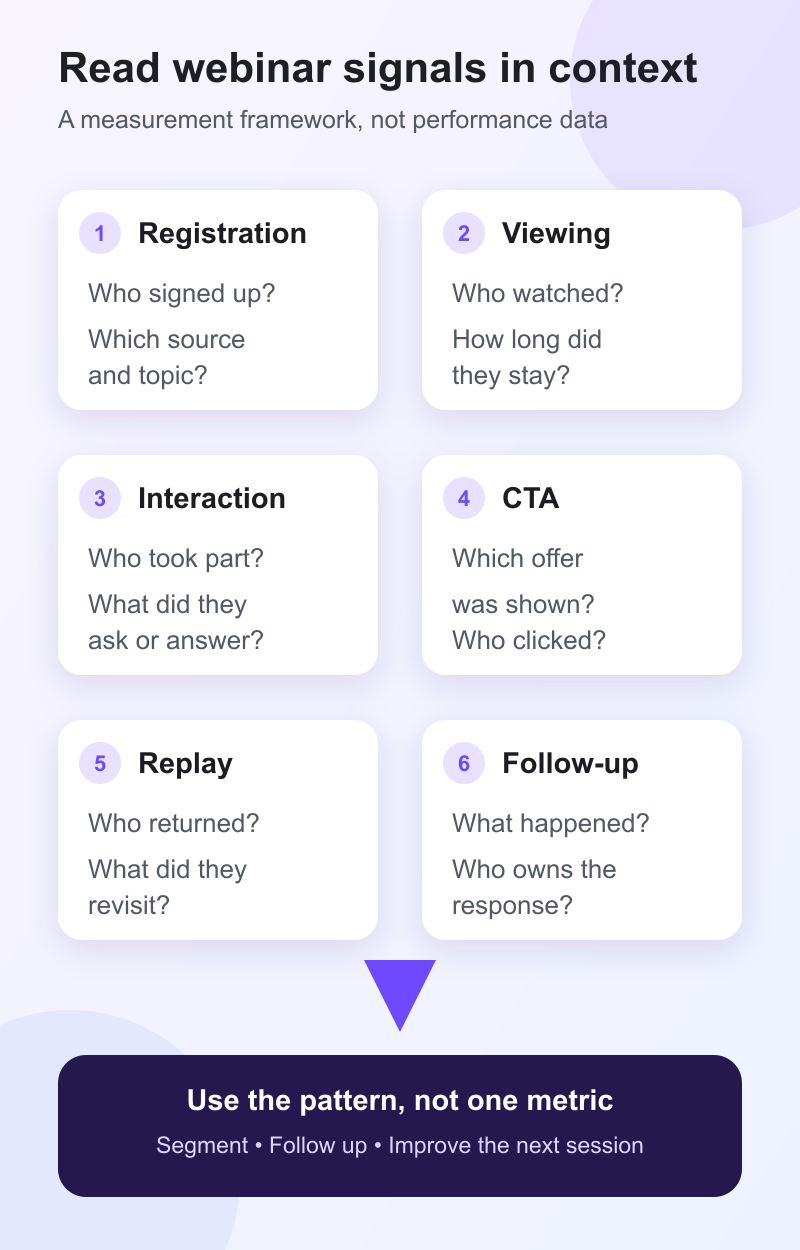
The right webinar metrics should cover the journey from registration through post-event action. Define the reporting window and denominator before comparing sessions. A live attendance rate, a replay-view count, and a CTA click-through rate answer different questions and may cover different periods.
| Metric | How to calculate or define it | Decision it supports | Main caveat |
|---|---|---|---|
| Registration-to-attendance rate | Unique live attendees divided by valid registrants | Whether to adjust the topic promise, reminder flow, or live value | A benchmark describes attendance behavior, not lead quality or buyer intent |
| Unique live and replay viewers | Deduplicated people who watched live, replay, or both within a stated window | How to split live follow-up from replay nurture | Do not add live and replay totals unless the platform deduplicates returning viewers |
| Average watch time | Total watch time divided by the viewers included in the report | Whether the session held attention and which contacts need a shorter recap | Platforms may treat joins, reconnects, and repeat visits differently |
| Drop-off or retention | Viewers remaining at each point, or the share who reached a chosen section | Where to tighten the format, introduction, or content sequence | A drop can mean lost interest, a technical issue, or that viewers got what they needed |
| Interaction participation | Unique attendees who used chat, Q&A, polls, or reactions divided by eligible attendees | Which topics created active participation and what follow-up context to use | Total messages, answers, or reactions are actions, not unique people |
| CTA click-through rate | Unique CTA clickers divided by unique viewers who saw that CTA | Whether the offer and its timing matched the audience's next step | A click shows action, but its meaning depends on the offer and what happened after it |
| Replay return behavior | Unique people who returned after the live session, plus repeat visits and watch depth | Which no-shows or attendees deserve replay-specific follow-up | Define the replay window and separate first-time viewers from returning live attendees |
| Downstream follow-up actions | Replies, resource visits, bookings, signups, or CRM activity tied to the audience record | Whether engagement became a useful next step and who owns the response | Attribution is rarely proof that the webinar caused the outcome |
Zoom's engagement analytics documentation gives a useful platform-specific example of why definitions matter: participation rates count people who acted at least once, while resource-click totals can include repeat clicks by the same attendee. Your platform may calculate these fields differently, so document the definition before comparing reports.
Engagement signals are evidence for segmentation and follow-up. They are not proof of purchase intent. A useful interpretation combines the action, its context, and what happened next instead of assigning a universal lead score to one behavior.
Registration and attendance show topic pull
Registration volume is the earliest signal that a topic has market pull.
It tells you whether the webinar promise was interesting enough for someone to exchange their details and reserve time. Registration by itself is still a light signal. People register for sessions they never attend, forward invites to teammates, or sign up because the topic is relevant but not urgent. A B2B webinar platform should help the team connect that signup to later viewing and follow-up behavior.
That is why attendance matters as the second layer. If many people register but few attend, the topic may be too broad, the reminder flow may be weak, or the audience may not feel the live session is worth prioritizing.
The useful question is not simply "was attendance good?" A webinar attendance rate benchmark can provide diagnostic context, but it cannot prove lead quality or buyer intent. Ask what the gap between registration and attendance says about the audience's urgency and the live promise.
If the gap is large, the next move may be better reminder messaging, a sharper title, a shorter format, or stronger reasons to attend live rather than wait for the replay.
Watch time and drop-off show depth of interest
Attendance tells you who entered the room. Watch time tells you who stayed.
That distinction is important. A viewer who joins for five minutes and leaves should not receive the same follow-up as someone who watches most of the session, returns for the replay, or stays through the final CTA.
Watch time helps you understand depth of interest at the contact level. Drop-off points help you understand where the session lost attention at the content level.
At the audience level, drop-off can show where the format dragged, where the introduction ran long, or where a section failed to match the webinar promise. At the contact level, watch time can shape follow-up. Someone who watched deeply may be ready for a practical next step. Someone who left early may need a short recap, a timestamped section, or a different resource.
This is where analytics and insights become more useful than a simple attendee count. The team needs behavior in context instead of a bare list of names.
Questions, chat, and polls show what people care about
Interactive moments reveal what the audience is thinking while the topic is still fresh.
Questions often show where people need detail. Chat can reveal objections, use cases, or internal language. Polls can show where the audience is in the buying or implementation journey.
These signals need careful interpretation. A high volume of chat messages does not automatically mean buying intent. A poll response does not mean someone is ready for sales. A question can come from curiosity, confusion, evaluation, or urgency.
Treat interaction data as qualitative context for follow-up and future content. For example:
- repeated questions about setup may suggest a need for implementation content
- questions about integrations may suggest a CRM or workflow concern
- questions about measurement may suggest the audience needs help proving value internally
- poll responses showing early-stage maturity may suggest a softer educational follow-up
This is why audience intelligence matters. The value is not simply knowing that someone interacted. It is understanding that interaction alongside their registration, attendance, CTA, replay, and follow-up history.
CTA clicks show a next step
CTA clicks are useful webinar engagement metrics because they show that someone moved from watching to acting.
That action might be booking a demo, downloading a guide, registering for the next session, joining a waitlist, starting a trial, or visiting a product page. The meaning depends on the CTA.
A demo CTA usually signals different intent from a checklist CTA. A replay CTA may mean something different from a live CTA. A click near the beginning of the webinar may mean the offer was obvious. A click after a specific section may mean that section created the moment of interest.
That is why CTA analytics should not stop at total clicks. Ask:
- which CTA did the viewer see?
- when did it appear?
- what topic or section came before it?
- did the viewer click during the live session or replay?
- did the click lead to a useful next step?
For practical examples of matching CTAs to the viewer's moment, see the guide to webinar CTA examples. The strongest webinar CTAs fit the audience's context. They do not need to be more aggressive.
With conversion tools, the point is to connect the offer to the moment when intent appears. That makes CTA clicks more useful as an engagement signal.
Replay behavior shows continued interest
Replay analytics deserve more attention than they usually get.
A replay viewer may have missed the session but still care about the topic. They may be revisiting a section before sharing it internally. They may have attended live and returned because one point mattered.
That makes replay behavior a useful second intent moment.
Track who watched the replay, how much they watched, whether they attended live first, whether they returned more than once, and whether they clicked a replay CTA. Those signals help you avoid treating every no-show or replay viewer the same way.
A registrant who never watches may need a short reason to revisit the topic. A replay viewer who watches deeply may need a more specific next step. A viewer who clicks a replay CTA should receive follow-up tied to that action, not a generic "thanks for watching" message.
Replay analytics work best when connected to a broader webinar follow-up system. The replay should not sit outside the rest of the engagement record.
Follow-up actions show whether the data became useful
The final layer of webinar analytics is what happens after the event.
This does not mean every webinar needs to be judged by one revenue number. That creates messy attribution and overclaiming, especially when the sales cycle is long or the webinar is educational.
Teams should still track whether webinar engagement led to useful next steps and contributed to webinar ROI in a way the team can explain:
- replies to follow-up
- visits to the recommended resource
- demo or sales conversations
- trial or signup actions
- registrations for the next related event
- meaningful CRM activity tied to the audience record
These signals close the loop. They show whether the webinar created useful movement after the live moment ended.
Use a webinar performance report template to keep the metric definitions, interpretation, follow-up owner, and next-session decision in one repeatable handoff.
If one topic creates strong watch time but weak CTA action, the offer may need work. If one CTA earns clicks but little follow-up movement, the landing page or next step may be mismatched. If replay viewers engage more deeply than live attendees, the team may have a packaging or timing opportunity.
Good webinar analytics do not end with the report. They feed the next decision.
How to interpret webinar engagement signals
Once the signals are collected, the useful work is interpretation.
| Pattern | What it may suggest | Useful next step |
|---|---|---|
| High watch time and CTA click | Strong topic fit and clear next-step interest | Follow up around the clicked offer |
| High watch time, no CTA click | Interest without obvious action | Send a relevant resource or softer next step |
| Low watch time, later replay view | Topic interest, poor timing | Highlight the most useful replay section |
| Poll or question activity | Specific pain point or evaluation context | Follow up with content tied to the question |
| Registration only | Light interest or low urgency | Send a concise reason to watch or join the next session |
This model is intentionally simple. It stops the team treating every registrant, attendee, and replay viewer as if they behaved the same way without turning webinar analytics into a complicated scoring system.
That is where the buyer-intent value appears: in the pattern, not one isolated metric.
Turn analytics into better follow-up
The most practical use of webinar analytics is follow-up.
A single generic post-webinar email is easy to send, but it wastes the signals the audience just gave you. A viewer who asked a detailed question, watched the full session, and clicked a CTA deserves a different message from someone who registered and never attended.
Follow-up can stay simple:
- send high-engagement viewers a specific next step
- send CTA clickers a message tied to the clicked offer
- send replay viewers a follow-up based on what they watched
- send low-engagement contacts a recap or softer educational resource
- use repeated questions to guide future content or sales enablement
This is the practical reason to connect webinar analytics with audience records and follow-up workflows. The data should help the team respond faster and with more context.
The takeaway
Webinar analytics should do more than summarize what happened.
They should help your team understand who engaged, what they cared about, what action they took, and what should happen next.
Attendance, watch time, questions, polls, CTA clicks, replay behavior, and follow-up actions are useful signals. They become more useful when you read them together.
The best webinar engagement metrics create a feedback loop: run the session, capture the signals, act on them, and make the next broadcast sharper.
That is how a webinar becomes more than a one-off event. It becomes part of a repeatable live growth engine.


