The best webinar follow-up does not start after the webinar.
It starts before the session goes live, when your team decides which audience signals matter, what each signal should trigger, and what next step will feel relevant for each viewer. Without that plan, follow-up usually becomes a rushed replay email, a generic demo prompt, or a manual sales handoff built from incomplete data.
The live session creates attention. The follow-up decides whether that attention turns into a useful next step.
This article covers what to track, how to segment your audience, what to send each group, and how to connect the workflow back to future broadcasts. It also includes a simple sequence you can adapt for no-shows, engaged attendees, CTA clickers, and replay viewers.
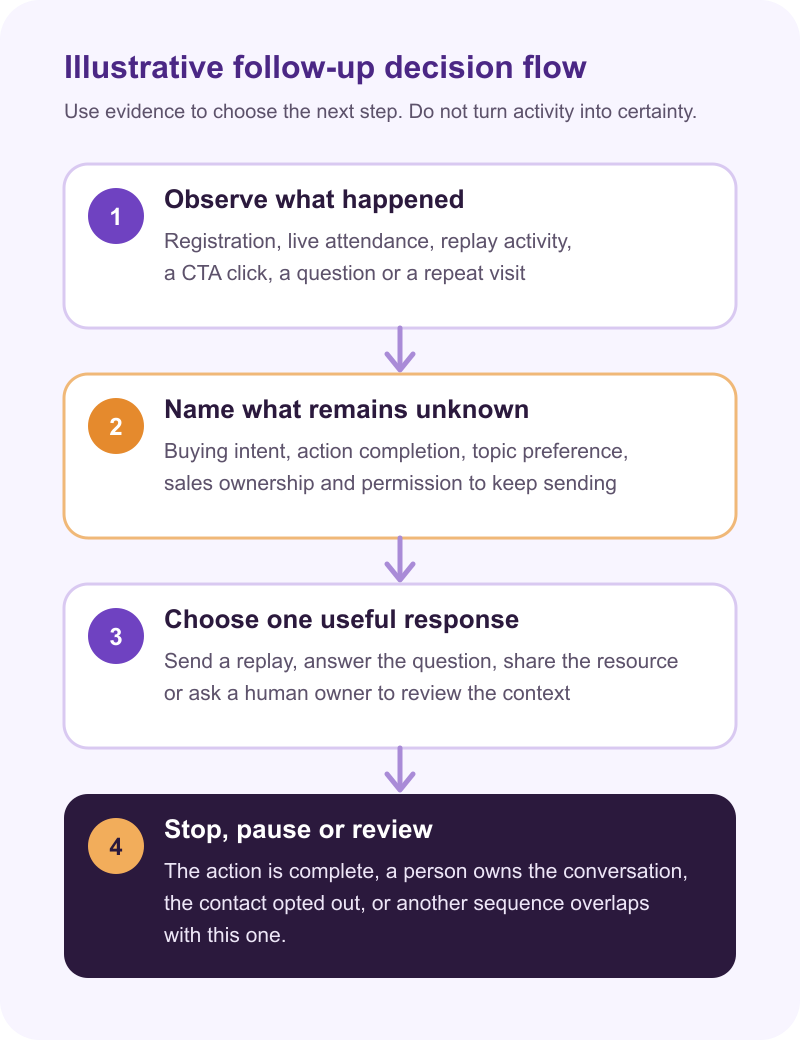
Start with the follow-up decision tree
Many teams plan the webinar first and the follow-up later.
That order creates avoidable friction. Once the session is over, the team has to interpret attendance data, find CTA clicks, write emails, update the CRM, and decide who should hear from sales. By then, useful context may be sitting in a spreadsheet or scattered across several tools.
A stronger approach is to define the follow-up decision tree before the broadcast.
At minimum, decide what happens when someone:
- registers but does not attend
- attends briefly and leaves early
- stays for most of the live session
- clicks a CTA during the broadcast
- asks a question or engages in chat
- watches the replay
- returns to the replay after attending live
These behaviors give you context, not certainty. The goal is to avoid treating every registrant as if they had the same experience while keeping each response proportionate to the evidence.
Use behavior, not attendance alone
Attendance is useful, but it is too blunt to carry the whole follow-up strategy.
Someone who registered and missed the session may still be interested. A person who attended for five minutes may need a lighter re-engagement path. Someone who stayed longer and clicked a booking CTA has given you more context, but neither action proves sales readiness or confirms that they completed the booking.
For most B2B webinars, the most useful follow-up signals are:
- Registration context: role, company type, signup answers, source, and the problem they said they cared about.
- Live attendance: whether they attended, when they joined, and how long they stayed.
- Engagement: questions, chat activity, poll responses, and other participation signals.
- CTA activity: which offer they clicked and when they clicked it.
- Replay activity: whether the replay page was visited, whether playback was measured, how long the person watched, and whether they returned.
- Previous history: whether this is their first broadcast or part of a longer engagement pattern.
Those observations still leave gaps. A long visit does not reveal buying intent. A CTA click does not confirm the action was completed. Aggregate watch duration does not tell you which exact section someone saw unless your measurement system records content position separately. Use these boundaries when you interpret webinar engagement metrics.
For recurring programs, review the pattern across sessions without treating a higher activity count as an automatic qualification score. Audience intelligence is more useful than a basic attendee list when it helps the team see that context and make a human judgment.
Match each segment to one clear next step
The most common follow-up mistake is sending everyone the same replay link and the same CTA.
The second is giving people too many options. A follow-up email with a replay, a blog post, a demo button, a pricing link, a resource download, and a newsletter invite asks the viewer to sort out what matters. Each segment should get one primary next step.
| Segment | Observed activity | What remains unknown | Useful response and stop rule |
|---|---|---|---|
| Registered but did not attend | Registration without live attendance | Whether the timing failed or interest changed | Send the replay with one reason to watch. Stop if they opt out or no longer fit the topic. |
| Attended briefly | A short live visit | Why they left or how much context they gained | Send a short recap or one useful replay section. Do not treat the visit as rejection or intent. |
| Stayed for most of the session | Longer live attendance | Attention quality, topic preference and buying intent | Share the relevant resource or next-session invite. Ask a human to review before sales outreach. |
| Clicked a CTA | A click on a specific offer | Whether the person completed the requested action | Follow up around that offer. Stop the reminder if the action is already complete. |
| Asked a question | A specific question or objection | Whether they want education, support or a sales conversation | Answer the question or assign an owner. Pause automated sales messages while a person owns the conversation. |
| Watched the replay | A replay visit or measured playback | The exact content seen unless position tracking exists | Use the measured replay evidence you have. Stop or change the path when live and replay sequences overlap. |
For example, a no-show might receive:
The replay is ready. If you only have ten minutes, start with the section on mapping your webinar CTAs before the session goes live.
A CTA clicker might receive:
You clicked the planning template during the session. Here is the template again. If you have already used it, you can ignore this reminder.
The copy stays short because the context does the work. For a fuller library, use these webinar follow-up email templates.
Plan the CTA and the follow-up together
A webinar CTA is an offer and an observable action. Your follow-up system needs to know what happened after the click before it sends a reminder.
Someone who clicks a checklist may want to implement the idea themselves. A booking click may justify a faster review, but it does not prove that a meeting was booked. A next-session click points to the broader program rather than an immediate sales action.
Before the broadcast, define:
- what each CTA offers
- who should receive the follow-up
- what the first message should say
- whether the next step belongs to marketing, sales, or the product team
- how the team will check whether the requested action was completed
- when a human owner should take over
Use the full context before you prioritize sales outreach. If you are still shaping the live offer, the guide to webinar CTA examples covers how to match CTAs to different moments in the session.
Send follow-up while the context is still fresh
Speed matters, but speed without relevance is faster noise.
Prepare the first follow-up before the session ends, then send it at a pace that fits the action and your sales cycle. A CTA click may deserve a faster review than a no-show. That does not mean every clicker needs an immediate sales email.
For a practical B2B workflow:
- CTA clickers receive a message about the exact offer, after checking whether they completed it
- engaged attendees receive the most relevant resource or recap
- no-shows receive the replay with a clear reason to watch
- replay viewers enter a path based on the replay evidence you actually collect
- sales receives an alert only after a human-reviewed handoff rule is met
Templates help when they are connected to behavior. A polished email sent to the wrong segment still feels generic.
Turn the decision tree into a follow-up sequence
Once the segments are clear, turn the decision tree into a short sequence instead of a one-off replay blast. One reasonable starting point is an initial segmented message, a later message that responds to new behavior, then a relevant resource, next-session invite, or sales handoff when the context supports it.
Treat the timing as a choice, not a universal formula. A CTA click may need a faster response than a no-show. A replay viewer may become active several days after the live session.
No-show: The replay is ready. If you only have ten minutes, start with the section on choosing the right CTA before the session goes live.
Engaged attendee: Thanks for joining us. Here is the checklist for mapping your next broadcast's segments and messages.
CTA clicker: You clicked the planning template during the session. Here it is again, plus the next step for using it before your next broadcast.
These messages refer to observed activity without pretending to know why it happened.
Check whether follow-up is still appropriate
A delayed message can become wrong even when its original trigger was correct. Check the current state in your sending platform or CRM before each scheduled step.
Stop, pause, or reroute the message when:
- the person already completed the requested action
- a sales, support, or customer-success owner has taken over the conversation
- the contact opted out or is covered by another suppression rule
- the same person appears in overlapping live and replay audiences
- a repeat attendee is already active in a newer session or series workflow
These are workflow design checks, not claims about native HeyStream triggers. Your exact options depend on the system doing the sending. For example, HubSpot's workflow documentation explains that unenrollment prevents future actions but does not undo actions that already ran, and that a record may re-enroll when it meets the relevant triggers. The cited controls also depend on HubSpot permissions and plan availability.
Treat replay as another source of evidence
A replay is more than an archive, but replay activity needs the same care as live attendance.
Separate three different observations:
- a replay-page visit shows that the page loaded, not that the person watched
- measured playback or watch duration shows some consumption, but not necessarily the exact content seen
- content-position data can support section-level follow-up only when your measurement system records it directly
Someone who returns after the live session may be revisiting the topic, sharing it internally, or continuing where they left off. The data alone does not tell you which explanation is true.
That is why a webinar replay strategy and replay CTAs matter. Keep the replay CTA relevant to the content, but route follow-up from the evidence you actually have.
For a recurring webinar program, aggregate patterns can help shape future sessions. Repeated questions or verified content-position data may justify a deeper workshop. Total watch duration by itself does not reveal which topic held attention.
Connect follow-up back to the next broadcast
Follow-up should help one person take a useful next step. It should also teach your team what to improve.
After each session, review:
- which segments replied or completed the requested action
- which CTAs received clicks and which downstream actions were completed
- which questions came up repeatedly
- which replay signals your system actually captured
- which messages produced useful replies, bookings, signups, or sales conversations
- which audience groups should be invited to the next related session
This turns follow-up into part of the live growth loop. The broadcast creates signals. Follow-up acts on them. Verified outcomes shape the next session.
How HeyStream supports this workflow
You can build webinar follow-up across separate tools, but the workflow becomes harder when registration, live attendance, CTA clicks, replay viewing, CRM records, and outbound messages live in different places.
HeyStream helps teams run branded live broadcasts, use live and replay CTAs, review audience behavior, and build follow-up automation around viewer activity.
The data should support a decision, not make the decision for you. Check completion, suppression, ownership, and the limits of each signal before the next message goes out.
The takeaway
Webinar follow-up is the system that connects observed audience activity to the next useful action.
Start with a decision tree. Track more than attendance. Give each segment one next step. Check whether the situation has changed before a delayed message goes out. Treat replay activity as evidence with clear limits.
That approach keeps follow-up relevant without pretending that a click, a long visit, or a replay view can tell you what someone intends to buy.


