A webinar registration page is the signup page for a live or on-demand webinar. Unlike a broader promotional landing page, it has to complete the registration itself. Its three jobs are to explain the promise, collect only information the team will use, and set up attendance and follow-up.
That makes the page more than a form. It is the handoff between promotion and the webinar experience: the place where a visitor decides whether the session is worth their time, learns what happens next, and becomes a registrant your team can support before and after the event.
Copy This Webinar Registration Page Blueprint
Build the page in the same order a visitor makes the decision. This nine-part blueprint works for a one-off B2B webinar, product demo, customer session, or recurring series.
- Lead with an outcome, not an event label. Name the problem the session will help solve or the result the audience will work towards. “Join our May webinar” describes the format. “How product marketers can turn live demos into useful follow-up signals” gives the reader something to evaluate.
- Say who the session is for. Name the role, situation, or level of experience. A clear fit statement helps the right people continue and lets everyone else opt out without wasting time.
- Show the date, time, timezone, and expected duration together. Do not make visitors hunt across the page. If the session will be available as a replay, say whether registration is still required to receive it.
- Establish speaker relevance. Use a short bio that explains why each speaker can help with this topic. A job title alone is weaker than a specific sentence about their experience or point of view.
- List three to five concrete takeaways. Describe what attendees will understand, decide, or be able to do. Keep the list aligned with the webinar agenda template so the live session can keep the page's promise.
- Give people a reason to attend live. That might be a Q&A, teardown, product walkthrough, working session, or time-sensitive discussion. If the replay offers the same value, be honest about that too.
- Explain the form and privacy context. Ask only for information you can justify and use. Separate the details needed to deliver the webinar from any optional marketing choice.
- Use one clear call to action. “Register for the webinar” or “Save my place” is usually clearer than a vague button such as “Submit.” Repeat the action only when a longer page genuinely needs it.
- Set the confirmation path before launch. Decide what appears immediately after signup, what arrives by email, which timezone the calendar invite preserves, when reminders are sent, and how replay or follow-up access will work.
The registration form is only one part of this sequence. If the promise, logistics, speakers, and next step are unclear, shortening the form will not repair the page.
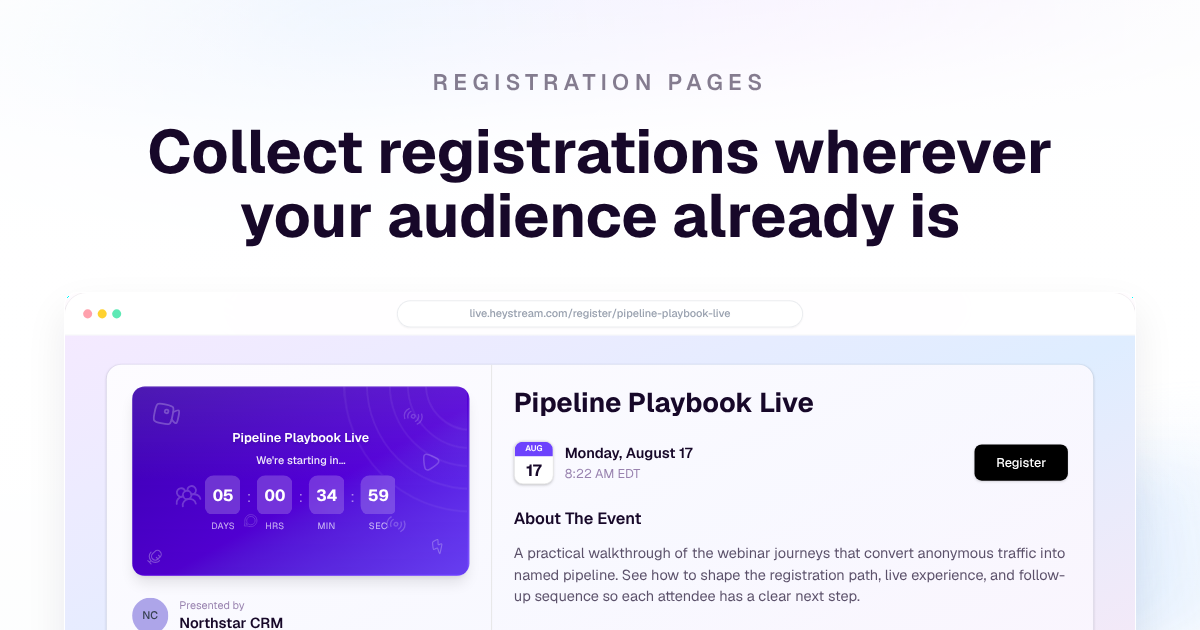
Current HeyStream hosted registration-page example. The form and confirmation choices should follow the same promise and logistics shown here.
Make the Promise Specific Enough to Earn Registration
The strongest webinar registration-page headline names a useful outcome and gives it enough context to feel credible. It does not need to include every keyword or explain the whole agenda.
Before writing the headline, complete this sentence:
This session is for [audience] who need to [do a practical job], and it will help them [make or understand a useful decision].
Then turn that answer into a short headline and supporting sentence. For example:
- Weak: “A webinar about product demos”
- Better: “How to Plan a Product Demo Webinar That Creates Useful Follow-Up”
- Supporting copy: “A practical session for product marketers who want the live demo, audience questions, CTA, and post-event workflow to work as one campaign.”
The takeaways should make the promise testable. If the page says attendees will leave with a framework, template, or plan, the live agenda should show when they will receive and use it. That consistency matters more than adding inflated claims about guaranteed pipeline, attendance, or conversion.
Two Webinar Registration Page Examples
These examples are intentionally narrow. They show how the blueprint changes with the event model without pretending there is one universal layout.
Example 1: a one-off B2B product demo
Page promise: “See how to turn webinar registration, live engagement, and replay activity into a cleaner follow-up workflow.”
What the page includes:
- a headline that names the workflow rather than simply saying “product demo”
- a fit statement for demand generation and product marketing teams
- date, time, timezone, and a 30-minute duration
- one presenter bio focused on practical product experience
- three takeaways: setting up registration, reading engagement signals, and routing follow-up
- a live reason: audience Q&A and a short workflow teardown
- name, email, company, and one optional workflow question
- an immediate confirmation, calendar link, reminder promise, and replay expectation
What it deliberately omits: a long company history, a feature-by-feature product tour, a phone-number field without a stated use, and claims that registering demonstrates buying intent.
How the promise carries through: the live session follows the three takeaways in order. Follow-up can then differ based on later behaviour such as attendance, replay viewing, a CTA click, or a question—not on the signup alone.
Example 2: a recurring webinar series
Page promise: “Join a monthly live clinic for B2B marketers building a repeatable webinar programme.”
What the page includes:
- a clear series name and the outcome shared across episodes
- the next session's date, time, timezone, and topic
- a short explanation of the recurring format and who it suits
- the hosts plus any episode-specific guest
- what changes each month and what stays consistent
- a single registration path for the series when that is how the programme operates
- a confirmation that explains future session notifications and how to opt out
What it deliberately omits: an overloaded archive of every previous session above the form, an assumption that one registration permits unrelated marketing, and a promise that every episode will fit every registrant.
How the promise carries through: each episode repeats the series format while delivering a specific topic. Registration and later engagement can be reviewed by session, so the team can learn which topics attract attendance, replay viewing, questions, and useful next steps. For the wider operating model, use the recurring webinar programme guide.
Choose Form Fields by the Decision They Support
Name and email are a sensible starting point for many webinar forms, but they are not a universal rule. Every field should change delivery, segmentation, the live experience, or follow-up. If the answer will sit unused, do not collect it.
| Field | Ask when | How the answer changes the workflow | Skip when |
|---|---|---|---|
| Name | You need to address the registrant, personalise confirmation, or support the live experience. | Personalises operational messages and the attendee experience. | A deliberately anonymous or low-friction access model makes identity unnecessary. |
| You need to confirm registration, send joining details, reminders, or replay access. | Delivers the webinar journey and links later activity to the registrant. | The experience has another reliable access and notification method. | |
| Company | Account context changes routing, customer communication, or analysis. | Helps compare attendance and engagement across relevant account segments. | The event is consumer-facing, community-led, or company data will not be used. |
| Role | The session or follow-up genuinely differs by role. | Supports role-aware examples, reporting, resources, or handoff. | A broad role label would not change anything after signup. |
| One qualifying question | The answer will shape the agenda, live Q&A, segmentation, or a useful next step. | Surfaces the registrant's current problem, priority, or workflow. | The question is really a sales discovery form or no owner will review the answers. |
| Optional marketing consent | You want permission for marketing beyond event delivery and the applicable rules require or support that choice. | Records a distinct communication preference for later marketing. | It is bundled into registration, preselected, unclear, or not supported by the team's consent process. |
Avoid using form answers as a shortcut to lead qualification. A company name, job title, or single response can add context, but it does not prove high intent. More reliable follow-up decisions combine registration context with later behaviour such as attendance, watch time, questions, CTA clicks, replay viewing, and account history.
Make the Form Accessible and Forgiving
A short form can still be difficult to use if its controls are unclear or errors are hard to recover from. The W3C Web Accessibility Initiative's guidance on labelling controls recommends labels that describe each control and are associated with the correct input in code. Visible labels are usually clearer than placeholder-only fields, and the association gives assistive technology the right name for each control.
Use this practical accessibility pass before publishing:
- give every field a visible, descriptive label and associate it programmatically with the input
- use the appropriate input purpose and autocomplete value for familiar details such as name and email
- make every field, checkbox, and button usable with a keyboard
- identify required fields in text as well as visually
- keep instructions close to the field they describe
- preserve entered values when validation fails
- put the error beside the affected field where possible and explain how to fix it
- move focus or announce a submission error so a screen-reader user knows what happened
The W3C's input-validation tutorial also stresses clear feedback and accessible error identification. Validation should help someone complete the form, not punish a different spacing style or erase everything after one mistake.
Separate Registration from Optional Marketing Consent
Registration and marketing are related, but they are not the same instruction from the user.
Operational event messages can include the confirmation, calendar details, joining instructions, necessary reminders, and the replay or access information promised on the page. Ongoing newsletters, sales campaigns, or unrelated promotions are a separate use that needs its own lawful and clearly explained basis.
Collect only data you can justify for a stated purpose. The UK Information Commissioner's Office explains the data minimisation principle as keeping personal data adequate, relevant, and limited to what is necessary. Its UK PECR guidance for electronic mail marketing explains that marketing rules depend on factors including the recipient, the channel, consent, and the soft opt-in.
In practice:
- explain why each non-obvious field is being requested
- keep event-delivery language separate from optional direct-marketing language
- do not preselect an optional marketing choice
- record the choice and the wording shown at the time
- provide an appropriate way to withdraw or opt out
- confirm the requirements that apply to your audience, organisation, and jurisdictions
This is practical page guidance, not legal advice. One consent pattern will not be correct for every country, audience, or campaign.
Hosted Registration Page or Embedded Widget?
The right path depends on who owns the campaign page and how quickly the team needs to launch.
| Option | Choose it when | Main advantage | Check before launch |
|---|---|---|---|
| Hosted registration page | You want one complete signup destination for a broadcast or series without building and maintaining a separate campaign page. | Fastest route from event setup to a shareable page with event context and registration together. | Brand, copy, presenters, timezone, form questions, privacy context, confirmation, and reminders. |
| Embedded registration widget | You already have an owned campaign, product, partner, or content page and want visitors to register without leaving it. | Keeps the surrounding campaign story and registration action in the same journey. | Responsive layout, loading and error states, consent wording, source attribution, confirmation behaviour, and a fallback route. |
HeyStream supports both hosted webinar registration pages for broadcasts and series and embedded signup widgets for owned sites. Choose one primary registration path for each campaign so reporting, copy, and QA do not fragment across accidental variants.
Treat Registration as the First Audience Signal
Add source context before promotion begins. Use a consistent campaign taxonomy and retain the source, medium, campaign, partner, or placement values that matter to the team. Your webinar promotion plan should define those channels and links before invitations go out.
Then compare the journey by source:
- page visits and registrations show which channels created signup activity
- attendance shows which sources brought people who joined live
- watch time, questions, polls, and CTA clicks add engagement context
- replay viewing shows which campaigns kept working after the live session
- later product, CRM, or revenue outcomes show whether any apparent pattern lasted
Do not call a registrant qualified or high intent because they submitted a form. Registration says the page and topic earned a commitment at that moment. It becomes more useful when connected with the person's later actions and existing account context.
This is where audience intelligence can connect the signup with live and replay behaviour. Look for patterns at a useful cohort level—such as source, audience segment, or topic—before turning one person's activity into a conclusion.
Connect Confirmation, Reminders, and Follow-Up
The page is not finished when the form submits. The immediate handoff should make the next step unambiguous.
Immediately after registration
Show a clear success state and send the promised confirmation. Repeat the webinar title, date, time, timezone, and expected duration. Offer a calendar action that preserves the correct time and joining details. Tell the registrant when reminders will arrive and whether a replay is planned.
If the form collected a qualifying answer, do not echo sensitive or unnecessary detail into an email that could be forwarded. Keep the confirmation focused on access and expectations.
Before the webinar
Use reminders to repeat the page's live-attendance reason, not merely the start time. A teardown, Q&A, working exercise, or live product walkthrough is more useful than artificial urgency. If the schedule or speaker changes, update the page and messages together so they do not contradict each other.
After the webinar
Follow-up should reflect what happened after registration. Someone who attended, asked a question, watched the replay, or clicked a relevant CTA may need a different resource or next step from someone who never watched. Use conversion tools, follow-up automation, and webinar engagement metrics as parts of the same workflow, without treating any one action as automatic proof of intent.
Webinar Registration Page Checklist
Before publishing, confirm that the page has:
- an outcome-led headline and a clear audience fit statement
- date, time, timezone, and duration in one scannable area
- speaker proof tied to the topic
- three to five takeaways that match the live agenda
- an honest reason to attend live
- a form whose fields each have a defined use
- visible labels, keyboard access, clear required states, and helpful errors
- separate, accurate privacy and optional marketing language
- one clear registration action
- source tracking that matches the campaign plan
- an immediate confirmation and accurate calendar path
- a documented reminder, replay, and follow-up handoff
- a mobile check at 320px as well as a standard desktop review
The final test is simple: can the intended attendee understand the promise, logistics, form, and next step without guessing? If so, the page is ready to do its real job—earn a useful signup and carry that person cleanly into the webinar experience.


