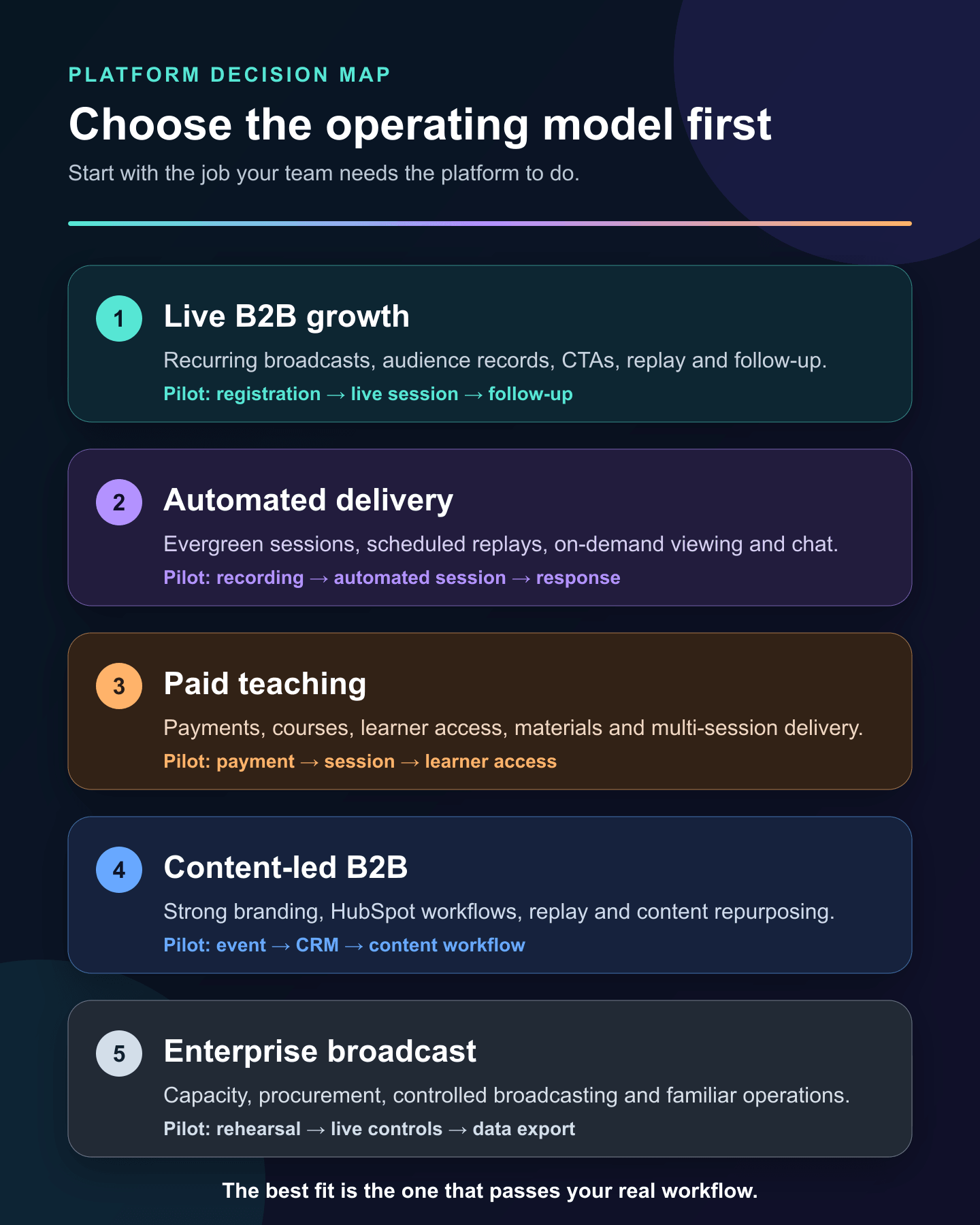
The best WebinarNinja alternative depends on the work you need it to do. HeyStream is the strongest fit for live-first B2B programs; EasyWebinar and Demio cover live plus automated delivery; eWebinar specializes in recorded sessions; Contrast suits content-led teams; WebinarJam fits live selling; Livestorm covers broader browser-based events; and Zoom's webinar product offers familiar enterprise broadcasting.
HeyStream publishes this comparison and includes itself. We have used the same criteria for every option, called out where each one does not fit, and linked to current official sources so you can verify the details.
When WebinarNinja is still the right choice
Switching platforms only makes sense when the replacement improves the workflow that matters most. WebinarNinja's current product and pricing page combines live, automated, hybrid, series, replay, paid-webinar and course workflows. It also includes registration pages, emails, handouts, offers, analytics, Stripe, Zapier and API access.
That breadth is valuable. A team running paid teaching alongside evergreen and live sessions may create more work by moving to a narrower product. WebinarNinja also supports recurring live events with either one-time or session-by-session registration, as its live webinar setup guide explains.
Stay with WebinarNinja if those workflows already work well together, especially when you rely on its course portal, payments, recurring registration or automated delivery. Its billing language and September promotion are time-sensitive, so check the live page rather than treating a price in a comparison article as permanent.
Choose the operating model before the vendor
Webinar products use overlapping labels for different experiences. Separate the delivery model before you compare feature lists:
- Live: presenters and attendees join at the same time.
- Automated or evergreen: a recorded session runs without a live presenter, often on a schedule or on demand.
- Simulated live: recorded content follows a live-style schedule while the team may still respond in chat or Q&A.
- Hybrid: live presentation and prerecorded segments appear in the same session.
- Series or recurring: multiple live sessions share a cadence, registration relationship or program identity.
- On demand: the viewer starts recorded content when convenient; it may or may not include automated interactions.
If you are still weighing the broader category, our guide to the best webinar platform for B2B lead generation explains the selection criteria in more depth. The distinction between automated webinars and live webinars is also worth settling before you shortlist products.
How we selected these WebinarNinja alternatives
This is not a universal ranking. We assessed each platform against the jobs a WebinarNinja buyer is likely to care about:
- Live, automated, replay and recurring delivery.
- Registration pages, reminders and follow-up ownership.
- Audience data, CRM handoff and downstream automation.
- CTAs, offers, payments and course requirements.
- Billing unit, attendee capacity, hosts and duration.
- A clear fit and non-fit for B2B teams.
- A practical pilot that can expose workflow gaps before migration.
Current official product and pricing pages were checked on 7 September 2026. Product limits and promotions can change, so use this article to make a shortlist and the vendor pages to confirm the final plan. You can also compare webinar platforms directly once you have narrowed the operating model.
WebinarNinja alternatives at a glance
| Platform | Best fit | Delivery model | Registration and email owner | Billing unit | Main tradeoff | First pilot check |
|---|---|---|---|---|---|---|
| HeyStream | Live-first B2B growth programs | Live, series and replay | HeyStream or connected tools | Plan and live attendees per broadcast | Not an evergreen automation or course platform | Registration through replay and follow-up |
| EasyWebinar | Live selling plus automated funnels | Live, automated, simulive and evergreen | Built-in pages, email and CRM options | Plan and viewer capacity | Sales-led scope may be broader than a simple live program needs | Live event converted into an automated path |
| eWebinar | Recorded demos, onboarding and evergreen sessions | Automated, scheduled and on demand | eWebinar with integrations | Active webinars and monthly registrants | Not designed for a presenter-led live program | Recorded session, chat and lead routing |
| Contrast | Branded, content-led B2B webinars | Live, prerecorded and replay | Contrast or HubSpot | Monthly registrants | Less suitable for paid teaching or evergreen-first programs | HubSpot registration and engagement sync |
| Demio | Marketing teams needing live and automated formats | Live, series, on demand and automated | Demio with integrations | Hosts and attendee-room size | Room and host planning can shape cost | One live and one automated event |
| Livestorm | Broad browser-based event operations | Live, replay and on demand | Livestorm with integrations | Attendee credits | Credit usage needs forecasting across formats | Credit use across live and replay attendance |
| WebinarJam | Live selling and offer-led webinars | Live and hybrid; evergreen via EverWebinar | Built-in pages, email and SMS | Hosts, duration and attendee capacity | Automated delivery spans a companion product | Offer, email and EverWebinar handoff |
| Zoom Webinars | Familiar enterprise broadcasting | Live and simulive, with broader event tiers | Zoom or connected marketing tools | Licensed capacity and plan tier | Marketing lifecycle work may need other systems | Rehearsal, roles, controls and data export |
1. HeyStream: best for live-first B2B growth programs
Why consider it: HeyStream brings the live program around the broadcast: branded registration and watch pages, persistent audience records, live and replay CTAs, integrations, reusable CTA collections, broadcast series and follow-up automation. HeyStream's current plans are organized around workspaces, live-attendee capacity and operating features rather than automated-viewer quotas.
Where it differs from WebinarNinja: HeyStream is intentionally live-first. Its audience intelligence keeps registration, viewing and interaction context close to the audience record. Teams can reuse live and replay CTAs and route signals into webinar follow-up automation.
Who should not choose it: Do not choose HeyStream when automated evergreen webinars, a paid course portal or a teaching-first product is the core requirement.
Billing unit and tradeoff: Plans set live-attendee capacity per broadcast alongside workspace and feature boundaries. That is easy to reason about for a recurring live program, but it is not equivalent to a monthly registrant or automated-viewer model.
First pilot check: Run one representative webinar from registration through live attendance, CTA activity, replay and follow-up. Confirm that the audience record and connected systems contain the fields your team actually uses.
2. EasyWebinar: best for live selling plus automated funnels
Why consider it: EasyWebinar's current plans cover live webinars, automated sessions, simulive or evergreen delivery, paid webinars, registration pages, email follow-up, CRM features and multistreaming on the relevant tiers.
Where it differs from WebinarNinja: EasyWebinar leans strongly into sales and funnel workflows. It can be a close functional replacement when the team wants live sessions and automated follow-up in one product, without making course delivery the center of the decision.
Who should not choose it: A team that only needs a polished live B2B program may not need the broader funnel and automation surface. Validate the interface and operating burden with the people who will run events each week.
Billing unit and tradeoff: Plans combine live-attendee capacity with larger automated-viewer limits. Compare both numbers against your real program rather than treating the headline plan price as a like-for-like match.
First pilot check: Build a live event, convert or reuse it as an automated session, and trace one registrant through reminders, attendance, replay and CRM follow-up.
3. eWebinar: best for recorded demos and evergreen delivery
Why consider it: eWebinar's pricing model is designed around active automated webinars and monthly registrants. Its plans include recurring sessions and multiple team members, with higher tiers expanding the active-webinar library and registrant allowance.
Where it differs from WebinarNinja: eWebinar is a specialist. It turns recorded video into scheduled or on-demand experiences with interaction and chat paths, rather than trying to replace every live-event and teaching workflow in WebinarNinja.
Who should not choose it: It is not the right primary platform when presenter-led live webinars, live production or paid courses are the main job.
Billing unit and tradeoff: Active webinars and monthly registrants are different constraints from per-session live capacity. A small library with many viewers and a large library with fewer viewers can land on different tiers.
First pilot check: Publish one real recorded session, test scheduled and on-demand entry, and confirm how questions, chat, notifications and lead data reach the right owner.
4. Contrast: best for content-led B2B webinar teams
Why consider it: Contrast focuses on branded live and prerecorded webinars, replay, engagement data, content repurposing and marketing workflows. Its current pricing page also details a deep HubSpot integration, including registrant and engagement data, watch time, workflow registration and activity-timeline events.
Where it differs from WebinarNinja: Contrast is a stronger fit when webinars sit inside a B2B content and HubSpot program. It is less centered on courses, paid teaching and a broad evergreen teaching bundle.
Who should not choose it: Teams that need a course portal, payment-led teaching flow or an automation-first evergreen library should assess more specialized options.
Billing unit and tradeoff: Contrast counts unique registrants within a monthly quota. That can fit predictable campaign volume, but it should not be compared directly with live-attendee capacity or attendee-credit pricing.
First pilot check: Register a contact through the intended page or HubSpot path, attend and watch the replay, then verify the engagement fields and follow-up workflow in HubSpot.
5. Demio: best for marketing teams needing live and automated formats
Why consider it: Demio's current plans support live events and series, with prerecorded on-demand and automated webinars on the relevant tiers. The product combines browser-based delivery, branded experiences, engagement features, analytics and integrations.
Where it differs from WebinarNinja: Demio provides a marketing-webinar operating model across live and automated formats without WebinarNinja's course-portal emphasis.
Who should not choose it: If paid learning, student access or a wider enterprise event environment is central, Demio may not cover the whole job. Check integration and domain requirements against the exact tier.
Billing unit and tradeoff: Paid plans are shaped by host count and attendee-room size. Concurrency matters because a host is the person who can start and stop an event.
First pilot check: Run one live session and one prerecorded event. Test host roles, room capacity, registration, reminders, replay, integrations and exports with real operational owners.
6. Livestorm: best for broad browser-based event operations
Why consider it: Livestorm supports browser-based live sessions, replays and on-demand experiences alongside integrations and team workflows. Livestorm explains its billing model as yearly attendee-credit packs rather than a fixed number of registrants or one room-capacity ceiling.
Where it differs from WebinarNinja: Livestorm is suited to teams running a wider mix of webinars, demos, training and online events. It is less centered on paid teaching and the all-in-one live-plus-course combination.
Who should not choose it: Teams that want a simple fixed-capacity plan or a dedicated evergreen automation product may find the credit model or broader event scope unnecessary.
Billing unit and tradeoff: A credit is used when an external attendee joins live, watches a replay or watches on demand. Registrants who never attend do not consume credits. Forecast repeated attendance across sessions, not registrations alone.
First pilot check: Model a month that includes live attendance and replay viewing, then confirm credit use, registration data, team access and downstream integrations.
7. WebinarJam: best for live selling and offer-led webinars
Why consider it: WebinarJam's plans combine live webinars with customizable pages, email and SMS, live offers, polls, multiple hosts and capacity-based tiers. Hybrid delivery can include prerecorded video during a live session.
Where it differs from WebinarNinja: WebinarJam is especially relevant to live selling. Its evergreen path uses the companion EverWebinar product, so the team should examine the handoff between live creation and automated delivery rather than assuming one product owns both modes.
Who should not choose it: It is a weaker fit when the core job is a content-led B2B program, a learner portal or a simple live webinar operation without offer and funnel tooling.
Billing unit and tradeoff: Plans vary by attendee capacity, host count and maximum duration. Confirm which tier supports the full team and session length, then include EverWebinar in the operating and cost comparison when automation matters.
First pilot check: Test registration, reminder messages, a live offer, recording and the EverWebinar conversion path with one real campaign.
8. Zoom Webinars: best for familiar enterprise broadcasting
Why consider it: Zoom Webinars supports controlled broadcasts with chat, reactions, polls, Q&A, recordings and performance reporting. Zoom also documents simulive delivery for prerecorded content with live interaction, while broader event tiers add production and multi-session capabilities.
Where it differs from WebinarNinja: Zoom fits organizations that already use Zoom for procurement, identity and meeting operations. It is primarily a broadcast and event environment, so registration lifecycle, audience intelligence and marketing follow-up may span other tools.
Who should not choose it: Teams looking for an integrated course portal, evergreen teaching funnel or opinionated B2B audience workflow may need more specialized software.
Billing unit and tradeoff: Webinar licenses are capacity- and tier-based. Compare the licensed audience size and event features with the marketing systems required around it.
First pilot check: Rehearse host and panelist roles, live controls, simulive behavior if needed, recording, reporting and the export or integration path into your system of record.
Compare the billing unit, not the headline price
The platforms above meter different things: live attendees per broadcast, automated viewers, active webinar programs, monthly registrants, host seats, attendee credits or licensed capacity. Those units answer different questions.
Start with a dated planning scenario. For example: four live sessions a month, 300 registrants per session, 150 live attendees, 100 replay viewers, two hosts and one evergreen recording. Then ask each vendor:
- Which people or sessions consume the allowance?
- Does replay or on-demand viewing count again?
- Are hosts, workspaces or concurrent sessions separate limits?
- Are automated webinars included or handled by another product?
- Which integrations, domains and API features require a higher tier?
This method will not identify a universal cheapest platform. It will show which billing model matches your operating pattern with the fewest surprises.
What data and workflow must survive a switch
A platform migration is more than moving a recording. Inventory the whole path before you cancel anything:
- Registration pages, embeds, consent language, branded URLs and custom fields.
- Confirmations, reminders, follow-up sequences and replay emails.
- Existing registrants, attendees, students and historical engagement.
- Recordings, replays, handouts, offers, payments and course materials.
- CRM fields, tags, integrations, API jobs, webhooks and automation triggers.
- Recurring registrations, subscriptions and future-session logic.
- Owners, permissions, speaker roles and reporting routines.
Decide which system will own each item after the move. Export does not prove that the replacement can import, preserve or use the same data. Our webinar platform migration checklist provides a more detailed inventory, mapping, cutover and rollback process.
Run a real-event pilot before cancelling WebinarNinja
An empty-room feature tour will not expose the handoff failures that matter. Choose one representative event and run the complete workflow:
- Build the registration page and test consent, fields and embeds.
- Register internal testers through the same paths your audience uses.
- Send the real confirmation and reminder sequence.
- Rehearse host, speaker and attendee roles, then run the session.
- Test the recording, replay, CTA, CRM and follow-up paths.
- Reconcile registrants, attendees and downstream records before declaring success.
For a recurring live program, also test one-time versus per-session registration and future-session behavior. Our recurring webinar platform guide explains the requirements that often get missed.
Keep WebinarNinja active until the replacement passes your acceptance criteria and you understand what happens to historical access. Define rollback triggers before the pilot, not after a failed live event.
Which WebinarNinja alternative should you choose?
Choose HeyStream for a live-first B2B program built around audience records, reusable actions, replay and follow-up. Choose EasyWebinar or Demio when live and automated delivery must sit together. Choose eWebinar for an automation-first recorded experience, Contrast for branded HubSpot-led content programs, Livestorm for broad browser-based event operations, WebinarJam for live selling and Zoom's webinar product for familiar enterprise broadcasting.
Keep WebinarNinja when its combined live, automated, course and payment workflows already match the job. The right decision is the one that survives a real pilot with your data, people and follow-up systems—not the product with the longest feature list.


