The best webinar platform for B2B lead generation depends on your webinar motion. Compare registration, branded viewing, engagement, live and replay CTAs, contact-level audience records, analytics, CRM handoff and follow-up. Shortlist familiar tools for straightforward sessions, event suites for complex programs, automation-first tools for recorded funnels, and HeyStream for branded live B2B workflows.
A busy session does not tell you whether the right people attended or what to do next. Start with the audience, the offer and the follow-up owner, then test whether the platform preserves the context they need. For careful benchmark interpretation, use our guide to webinar lead generation statistics.
This guide combines a use-case shortlist with an evaluation exercise you can run in a vendor demo. HeyStream publishes it and is included as one option. The recommendations reflect workflow fit, not a paid ranking or a claim that one tool wins for every team.
What "best webinar platform" means for B2B lead generation
A B2B lead-generation webinar platform should help you do five jobs well:
- Attract and register the right audience.
- Deliver a polished session that makes your company feel credible.
- Capture meaningful engagement during the live session and replay.
- Give viewers clear moments to take the next step.
- Preserve enough audience context for relevant follow-up.
That is a different buying question from "Can this tool host a webinar?" Most credible webinar products can handle video, registration, reminders, Q&A, and basic reporting. The harder question is whether the workflow helps your team turn attention into qualified next steps.
Build your shortlist around the job your team needs to do. A recurring product demo, an enterprise conference and a self-serve replay program require different operating models.
Quick answer: choose by webinar motion
Choose the session format and operating model before comparing feature lists. Use this matrix to decide which options belong in your demo shortlist.
| Webinar motion | Named options to evaluate | What to test |
|---|---|---|
| Straightforward webinars in an existing stack | Zoom Webinars, Microsoft Teams webinars | Registration, audience permissions and the handoff to your campaign tools |
| Corporate webinars or high-capacity programs | GoTo Webinar, Zoom Events for multi-session needs | Licensed capacity, rehearsal, reporting and event administration |
| Recorded demos and evergreen education | eWebinar | Scheduling, recording disclosure, chat ownership and follow-up |
| Recurring live B2B demos and demand programs | HeyStream | Branded viewing, live/replay CTAs, audience records and supported integration events |
These are options to investigate, not interchangeable products. Check the exact plan and event format in the demo. If you need a conference with several tracks, networking or sponsor areas, test those requirements separately from a single webinar.
Webinar platform shortlist by use case
The shortlist below uses current official product information checked on 16 September 2026. It avoids exact prices and review scores because those do little to explain operational fit and can change quickly. The evaluation questions are our recommendations, not claims that a vendor lacks a feature.
Zoom Webinars for teams already using Zoom
Zoom's webinar product page lists chat, reactions, polls, Q&A and downloadable reports for its standard webinar offering. It distinguishes that product from Webinars Plus, which adds capabilities such as pre-recorded sessions, backstage coordination, production layouts and richer analytics, and Zoom Events for multi-session programs.
Put Zoom on the shortlist when presenter familiarity and existing organizational adoption matter. Do not assume every capability described on the broader page is included in the plan you are buying. Ask the vendor to demonstrate registration, your branded attendee journey, the recording experience and the exact data your campaign team will receive. An existing Zoom subscription may simplify adoption, but it does not prove that your full marketing workflow is covered.
Microsoft Teams webinars for a Microsoft-centered organization
Microsoft's Teams webinar guide distinguishes structured webinars with registration from collaborative meetings. It documents custom registration questions, branded event themes and reports covering registration and attendance. Public and private event choices affect who can register, and advanced registration availability depends on event size and licensing.
Evaluate Teams when your presenters and administrators already work in Microsoft 365. Include your IT owner in the demo so registration permissions and licensing are confirmed rather than inferred. Trace an external registrant through joining, participation and reporting. Then check how that person's answers and attendance reach the sales or marketing system. Familiar software is useful only if the external audience and follow-up owner can use the resulting workflow.
If a specific gap remains in your Microsoft setup, compare Microsoft Teams webinar alternatives against that requirement before buying another platform.
GoTo Webinar for established corporate webinar programs
GoTo Webinar describes custom registration, rehearsal through Practice Mode, reminders, CRM and marketing integrations, and pre-recorded Simulive events. Its official feature guide also covers polls and surveys, attendee reports, source tracking, event templates and browser-based webcast attendance.
Shortlist it for a program that values repeatable webinar administration and reporting. For a larger audience, confirm the contracted capacity and attendance mode rather than treating a headline maximum as a promise for every plan. Ask to see both the live event and the post-event export. Test whether the reports carry the identifiers, answers and engagement fields your team actually uses. Our guide to GoToWebinar alternatives adds context for comparing an established webinar workflow with other operating models.
eWebinar for recorded, repeatable sessions
eWebinar's official product page describes turning a pre-recorded video into an interactive session with chat, available on demand, on a recurring schedule, or both. That makes it a relevant candidate when the core job is delivering the same demo or educational session repeatedly without presenting it live each time.
Test the recording disclosure, scheduling experience and chat response process. Who answers when a viewer asks a specific implementation question? What happens outside staffed hours? A recorded session can still support a conversation, but the team must own the response. If live presentation and fresh group Q&A are central to your program, evaluate that requirement explicitly. Our automated versus live webinar guide helps separate the format decision from the software decision.
HeyStream for branded live B2B programs
HeyStream's B2B webinar platform connects branded registration and viewing with audience records, reusable CTAs, analytics and follow-up workflows. Evaluate it when a lean marketing team wants to run live sessions and keep the audience context useful after the broadcast.
Check your required integration events and fields before choosing. Built-in audience records do not replace every function of a sales CRM. HeyStream is also not a full enterprise conference suite or an automation-first product for delivering recorded presentations on a schedule. If either is your central requirement, include a product built for that job in the shortlist.
Use the HeyStream comparison hub to compare these operating models, then ask each vendor to demonstrate the same registrant journey.
Evaluation criteria for B2B lead-generation webinars
Use the same criteria for every shortlisted option. Mark a requirement as demonstrated, manual, unavailable or unverified. A feature name on a website is not enough evidence that your team can operate it.
| Criterion | Evidence to request | Decision it supports |
|---|---|---|
| Registration and identity | One signup with custom answers and source context | Whether the team can recognize and segment the audience |
| Live and replay action | A working CTA plus its resulting record | Whether the offer remains useful across formats |
| Audience context | Attendance, activity and answers attached to a person | Whether follow-up can be relevant |
| CRM handoff | Actual mapped fields and supported event types | Whether the receiving team can act without rebuilding the data |
| Operating effort | Rehearsal, reporting, permissions and repeat setup | Whether the workflow is sustainable |
Registration experience and audience fit
Registration is the first audience signal. A strong platform should make it easy to create a registration page that feels credible, captures the right fields, works well on mobile, and gives your team useful context about who is interested.
Do not over-collect. If your form asks for too much, conversion may suffer. If it asks for too little, follow-up may be generic. The right balance depends on your audience, offer, and sales process.
Branded viewing experience
For B2B lead generation, the webinar room is part of your brand. Buyers should not feel like they have been dropped into a generic meeting link if the session is meant to build trust, teach a framework, or introduce a product.
Look for control over the registration page, watch page, presenter experience, session layout, assets, replay, and post-event destination. A polished experience will not create demand by itself, but a weak one can make a good topic feel less credible.
Engagement that creates useful context
Chat, Q&A, polls, reactions, resource clicks, and watch behavior are not proof that someone is ready to buy. They are context.
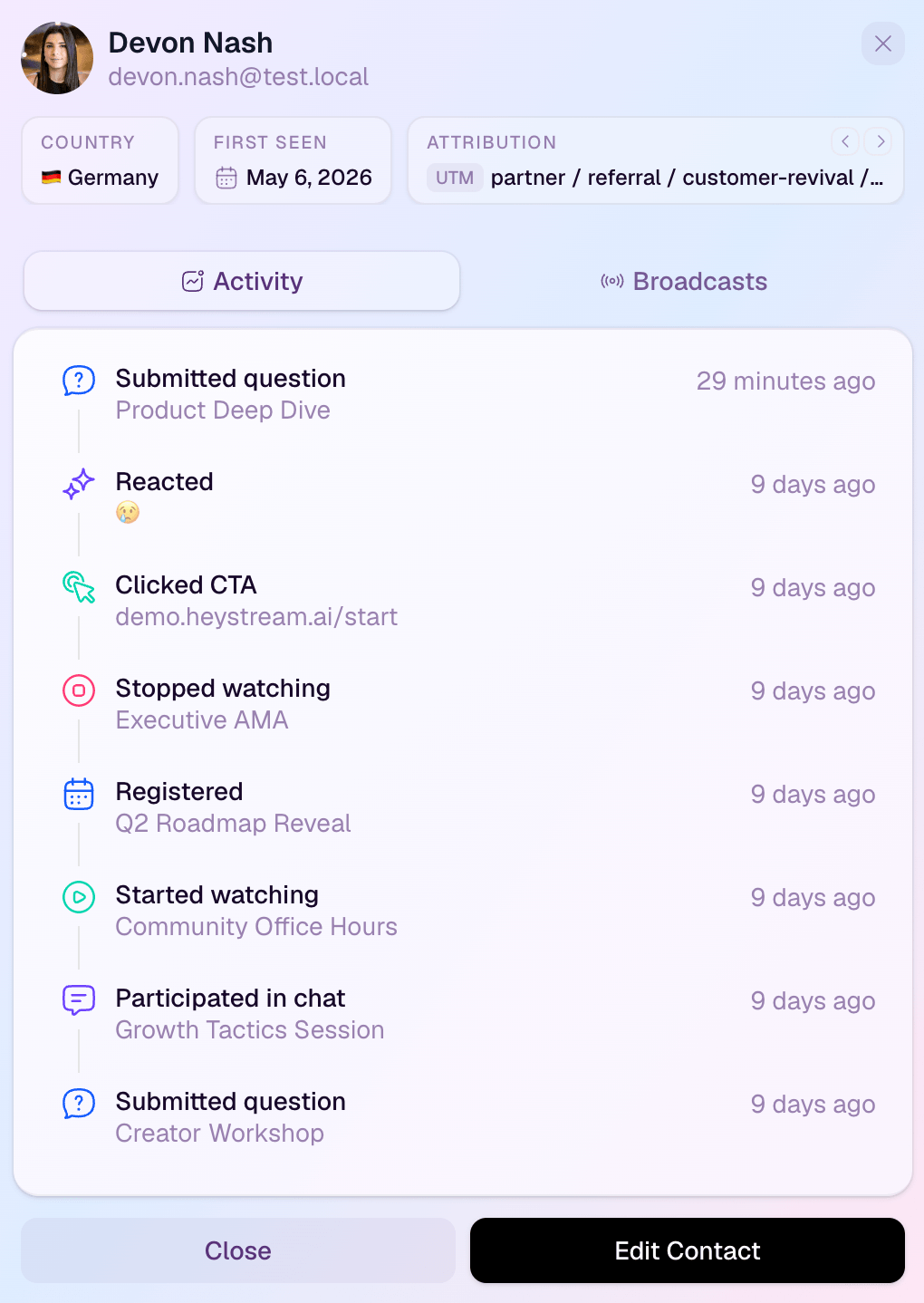
The platform should help you see what people did, not just whether they attended. A viewer who asked a buying-stage question, clicked a pricing-related CTA, or watched the replay section about implementation deserves a different follow-up path from someone who registered and never attended.
CTAs and conversion moments
Lead generation depends on clear next steps. That could be booking a demo, starting a trial, downloading a checklist, joining the next webinar, asking a question, or visiting a pricing page.
The best platforms make those moments easy to place during the live session and replay. HeyStream's webinar conversion tools, for example, are built around reusable CTAs that can turn viewer attention into action while the topic is still fresh.
Audience records and viewer-level signals
Aggregate attendance is useful, but it is not enough. B2B teams need to understand contact-level behavior: who registered, who attended, who watched later, what they clicked, what they asked, and what they might need next.
That is where audience intelligence becomes important. The goal is not to turn every engagement event into a lead score. The goal is to give marketing and sales a clearer picture of the audience so follow-up is more relevant.
CRM, marketing automation, and follow-up handoff
The platform should fit your existing handoff. Some teams need deep CRM and marketing automation integrations. Others need a simple export, webhook, or a clear internal workflow that tells the right person what happened.
Use our webinar CRM integration guide to define the fields, identifiers and event types before the demo. Ask which signals are supported, how duplicates are handled, and who can spot a failed sync. A CRM logo in an integration directory does not answer those questions.
If your follow-up depends on replay viewers, CTA clickers, or people who asked specific questions, make sure those signals can reach the team or tool that owns the next step. A platform that supports webinar follow-up automation can reduce the manual gap between attention and outreach.
Replay and on-demand behavior
Replay viewers may watch after a meeting, share the session with a colleague or return to a specific section. Compare their actual behavior without assuming they are active prospects or ready for sales contact.
If replay matters to your lead-generation motion, compare how platforms handle on-demand viewing, replay CTAs, viewer-level replay data, and follow-up triggers. Check which replay signals are recorded and available for follow-up, rather than assuming a recording link includes them.
Reliability and total operating effort
Ask who prepares the session, rehearses presenters, moderates, checks the recording and produces the report. Test joining from an external network and a mobile device. Confirm your expected audience size, support arrangements, permissions and recording retention with the vendor.
Compare the subscription alongside the work around it. An export that takes ten minutes can be acceptable for a monthly session and burdensome across a large program. A sophisticated integration can be valuable, but someone still has to configure and maintain it. Choose the amount of platform your team can operate consistently.
Analytics and learning
A lead-generation webinar program should improve over time. You need to understand what topics brought the right audience, where viewers engaged, which CTAs attracted action, and which follow-up paths created real conversations.
Look for webinar analytics that support decisions. The goal is not to drown the team in charts. It is to answer practical questions: which topics should we repeat, which segments need better follow-up, where did the audience drop off, and what should change before the next session?
A 30-minute webinar platform evaluation exercise
Use this exercise in a vendor demo or trial. It is a walkthrough of a prepared sample session, not a demand to produce a full event in half an hour. Ask the vendor to have a recording, a CTA and a sample integration destination ready. Use demo data and a destination that will not contact real prospects.
Choose one test identity and one next step, such as requesting a product demo. Have the follow-up owner join the walkthrough. If a capability cannot be demonstrated, mark it unverified and arrange a specific follow-up. Do not silently count it as a pass.
Minutes 0-5: register and check identity
Register as an external attendee on mobile. Answer one custom question that would change follow-up, such as the problem you want to solve. Open the organizer view and find the same person. Can the team see the answer, session and source context it needs? Confirm what happens if that identity already exists in the CRM.
Minutes 5-10: join and engage
Join the prepared session as an attendee. Ask a sample question or use an available interaction. Switch to the organizer view and locate that activity. Check the difference between an aggregate report and a person's record. Also inspect presenter permissions so the team knows who can moderate without accidentally changing the broadcast.
Minutes 10-15: view the replay and use the CTA
Open the recording as the same test viewer. Check whether the viewing experience explains that it is a replay, whether the CTA is available and where it sends you. Open the resulting activity record. Can the team distinguish live attendance, replay viewing and the action taken? Record any plan or configuration needed for that distinction.
Minutes 15-22: trace the handoff
Inspect an actual export or integration result. Follow the person's identifier, registration answer, session identifier and supported attendance or activity events into the destination. Do not assume every signal visible inside the webinar platform is available through its integration. Ask to see the supported-field list and a failed-sync example or documented recovery process.
For example, if a connector sends registration and attendance but not CTA clicks, write that down. The team may still choose it, but a CTA-based sales handoff would require a different supported path or a manual step. Treat that step as operating work in the comparison.
Minutes 22-30: decide what happens next
Ask the follow-up owner to choose a next step using only the demonstrated data. Could they distinguish a relevant attendee who asked an implementation question from a no-show? Could they send a useful replay follow-up without guessing? Is the message appropriate to the person's permissions and relationship with your company?
Finish with a short decision note for each platform. Record the demonstrated capabilities, manual steps, unavailable requirements, unresolved questions and owner of each next action. Reject an option when it misses a genuine requirement. Otherwise, compare the time and complexity of the full workflow rather than counting feature checkmarks.
Where HeyStream fits for B2B lead generation
HeyStream is designed for teams that want webinars to become part of a repeatable growth motion.
That usually means:
- Branded registration and watch experiences that feel like your company.
- Live broadcasts that support a polished presenter workflow.
- Reusable CTAs that can appear during live sessions and replays.
- Audience records that preserve what each viewer did.
- Analytics that help the team learn what worked.
- Follow-up context that makes post-webinar outreach more relevant.
For a team running recurring webinars, that context can support decisions about topics, offers and follow-up. A product marketer can inspect available attendance, replay and CTA activity alongside registration answers. Avoid assuming that watch history identifies the exact topic a person cared about, or that every activity type is exported to an external CRM. Check the supported scope for the connector you will use.
That does not mean every viewer is a sales-ready lead. It means the team has better context for deciding what happens next.
Buyer checklist before you choose a webinar platform
Before you commit to a platform, answer these questions with your team:
- What next step should the webinar drive?
- Who owns follow-up after the session?
- What audience signals would change the follow-up message?
- Do replay viewers matter to the campaign?
- Which integrations are required on day one?
- How much production complexity can the team sustain?
- Does the platform help us learn from one webinar to the next?
- Do we need an event suite, a webinar tool, or a webinar growth workflow?
- How will we compare cost against the work the team no longer has to do manually?
- Is the buying path clear enough for the team to move quickly?
If you are still comparing categories, use the HeyStream comparison hub to compare webinar platforms by workflow rather than by a generic feature checklist. If budget is the immediate question, check HeyStream pricing and compare the total operating fit, not just the subscription line item.
Common mistakes when choosing webinar software for lead generation
Choosing by attendee capacity alone
Capacity matters, especially for larger events. A platform with enough seats can still be a poor fit when the topic is too broad, the audience is poorly matched, the CTA is unclear or follow-up lacks useful context. Capacity is a requirement, not a complete selection method.
Treating registrations as leads
A registration is interest, not qualification. It may become a useful lead signal when combined with company fit, role, attendance, replay behavior, CTA clicks, questions, and follow-up response.
Use a webinar lead scoring model to separate audience fit from behavior and define what deserves a response. Keep scores open to review; engagement does not establish buying intent.
That is why focused topics often matter. A narrower session can create clearer signals than a broad, high-registration webinar. Our guide to focused webinars and B2B lead signals goes deeper on that point.
Ignoring replay behavior
Replay can extend the life of the webinar, but only if your platform and process treat it as active audience behavior. If replay viewers cannot see relevant CTAs, and your team cannot tell who watched, the replay becomes a content archive rather than a growth asset.
Buying too much platform
An enterprise event suite can be the right answer for a large event portfolio. It can also slow down a lean team that needs a repeatable monthly or weekly webinar workflow.
Choose the platform your team can run consistently. The best lead-generation system is usually the one your team can actually operate, measure, and improve.
Using meeting software for a demand-generation job
Meeting tools are excellent for many things. But if your webinar is meant to build demand, capture audience signals, drive CTAs, and support segmented follow-up, you may need more than a meeting room with registration.
Final recommendation
Start with the workflow, then choose the platform.
If your webinars are mostly trainings or internal sessions, a familiar webinar tool may be enough. If you run large event programs, an event suite may be worth the operational weight. If your motion is automated replay funnels, an evergreen-first tool may be a better fit.
If you are a B2B team trying to turn live and replay attention into clearer audience signals and qualified next steps, compare platforms by the whole growth workflow: registration, branded viewing, engagement, CTAs, audience records, replay, analytics, and follow-up.
That is the lens HeyStream is built around. As Content Marketing Institute's 2026 B2B research shows, many B2B marketers are still wrestling with fundamentals such as creating content that prompts action, measuring effectiveness, and using first-party data well. The right webinar platform should help with those fundamentals instead of adding another disconnected tool to the stack.
See how HeyStream handles registration, live and replay CTAs, audience records and follow-up, then start a free trial if that workflow fits your team.


