A recurring webinar program sounds simple until the operating model gets real. You are not just repeating a date on a calendar. You are asking a team to promote a series, register the right audience, run live sessions, make replays useful, capture intent, and follow up without losing the thread between sessions.
That is why the best recurring webinar platform is rarely the tool with the longest feature list. For B2B teams, the stronger choice is the platform that keeps the whole series connected: registration, live delivery, replay, audience history, CTAs, analytics, and follow-up.
This guide explains what to look for when choosing recurring webinar software, how to separate live recurring programs from evergreen automation, and where a product like HeyStream fits when your webinar series is meant to create real conversations and useful buyer signals.
What a recurring webinar platform actually needs to do
A recurring webinar platform should help you run a connected series of webinars, not just clone the same event every week.
At a minimum, it should support the work before, during, and after each session:
- Registration that makes the series easy to understand.
- Live production that presenters can repeat without rebuilding the room every time.
- Replay access that supports people who miss the live session.
- Audience records that show how someone engaged across the program.
- CTAs and follow-up paths that can change by session, topic, or audience behavior.
- Reporting that helps the team improve the next session.
Scheduling still matters, but it is only one layer. Zoom's recurring webinar documentation shows how quickly the operational choices multiply once a webinar repeats: cadence, end date, registration rules, and session-level attendee reports all affect how the program runs. Livestorm's multiple-session event guidance is another useful example: recurring or multi-session events often need each session to have its own timing, settings, room access, and management workflow.
That is the buying question. You are not only asking, "Can this tool repeat a webinar?" You are asking, "Can this platform preserve context across the whole series?"
Recurring webinar platform vs webinar series software vs evergreen webinar platform
The search results for recurring webinars often mix three different jobs. Separating them early makes the platform decision clearer.
| Platform type | Best fit | Watch out for |
|---|---|---|
| Live recurring webinar platform | A hosted series where Q&A, expertise, audience learning, and timely follow-up matter | A schedule-only workflow that loses replay, CTA, and audience context between sessions |
| Evergreen webinar platform | A pre-recorded session that can run repeatedly without a host | Treating a relationship-led live series like passive automation |
| General webinar software | Occasional webinars, broad event needs, or teams that mainly need live meeting infrastructure | Needing extra tools for registration, audience history, conversion paths, and program-level reporting |
A live recurring webinar can still have replay. It can still use automation. The difference is that the live session remains a core part of the value. The team learns from attendees, answers real questions, adapts future sessions, and gives people a reason to return.
If your plan is entirely pre-recorded and self-running, evergreen webinar software may be the better category. If your plan is a live educational series for prospects, customers, or a product community, you need a recurring webinar platform that treats the series as one connected growth workflow.
When a live-first recurring webinar platform is the right fit
A live-first platform is usually the stronger fit when the series depends on presence, trust, or progressive learning.
That includes programs like:
- Monthly demand generation webinars for a defined buyer segment.
- Customer education sessions where the curriculum builds over time.
- Product marketing deep dives tied to launches, releases, or use cases.
- Partner or community sessions where audience questions shape future topics.
- Thought leadership series where the guest, host, or live discussion is part of the value.
In those cases, a recurring webinar is not only a broadcast format. It is an audience learning loop. Each session should teach you something about what people care about, what they ask, which CTAs they click, who returns, who watches replays, and who is ready for a next step.
That is why automated webinars vs live webinars is not a cosmetic choice. Automated playback can be efficient, but a live recurring series is better when the team needs interaction, timely expertise, and audience context that compounds over multiple sessions.
The recurring webinar platform checklist
Use this checklist before you compare tools or sit through demos.
| Capability | Why it matters |
|---|---|
| Series registration | People should understand whether they are joining one session, several sessions, or the full program. |
| Repeatable live production | Hosts should not need to rebuild scenes, presenters, branding, and settings from scratch every time. |
| Replay workflow | Replays should support the live program instead of becoming a disconnected video library. |
| Audience history | The team should see how someone registered, attended, watched, clicked, and returned across the series. |
| CTAs and offers | Each session should be able to point viewers toward the next useful action. |
| Follow-up automation | Post-session messages should reflect behavior, not just a generic attendee list. |
| Program-level reporting | The team should be able to learn which topics, sessions, and CTAs are working over time. |
The strongest recurring webinar software makes these jobs feel connected. If a platform handles live delivery but forces registration, replay, CTAs, audience data, and follow-up into separate systems with no shared context, the recurring program will be harder to improve.
Registration and series enrollment
Registration is where the recurring webinar promise becomes clear or confusing.
For some series, one registration should give someone access to every session. For others, each session should have its own registration path because topics, audiences, or availability differ. Many teams need something in between: a clear series page, session-level choices, and enough flexibility to promote individual topics.
The platform should help you answer practical questions:
- Can one landing page explain the whole series?
- Can people register for one session without misunderstanding the rest of the program?
- Can the team promote individual sessions while still building the series brand?
- Can the registration experience connect to reminders, replays, and follow-up?
HeyStream's webinar registration pages are useful here because recurring programs need more than a signup form. They need a clear promise, a reliable registration path, and a way to connect that signup to the rest of the audience journey.
Live delivery should be repeatable without becoming generic
A good webinar series has rhythm. It may use the same host, format, intro, Q&A structure, and CTA pattern, but each session still needs to feel specific to the topic and audience.
That means your platform should make the repeatable parts easy while leaving room for session-level customization.
Look for:
- Branded live room or studio controls.
- Reusable layouts and production settings.
- Simple presenter handoff.
- Clear destination and replay settings.
- Session-level title, description, and CTA control.
- A workflow the team can run without engineering help.
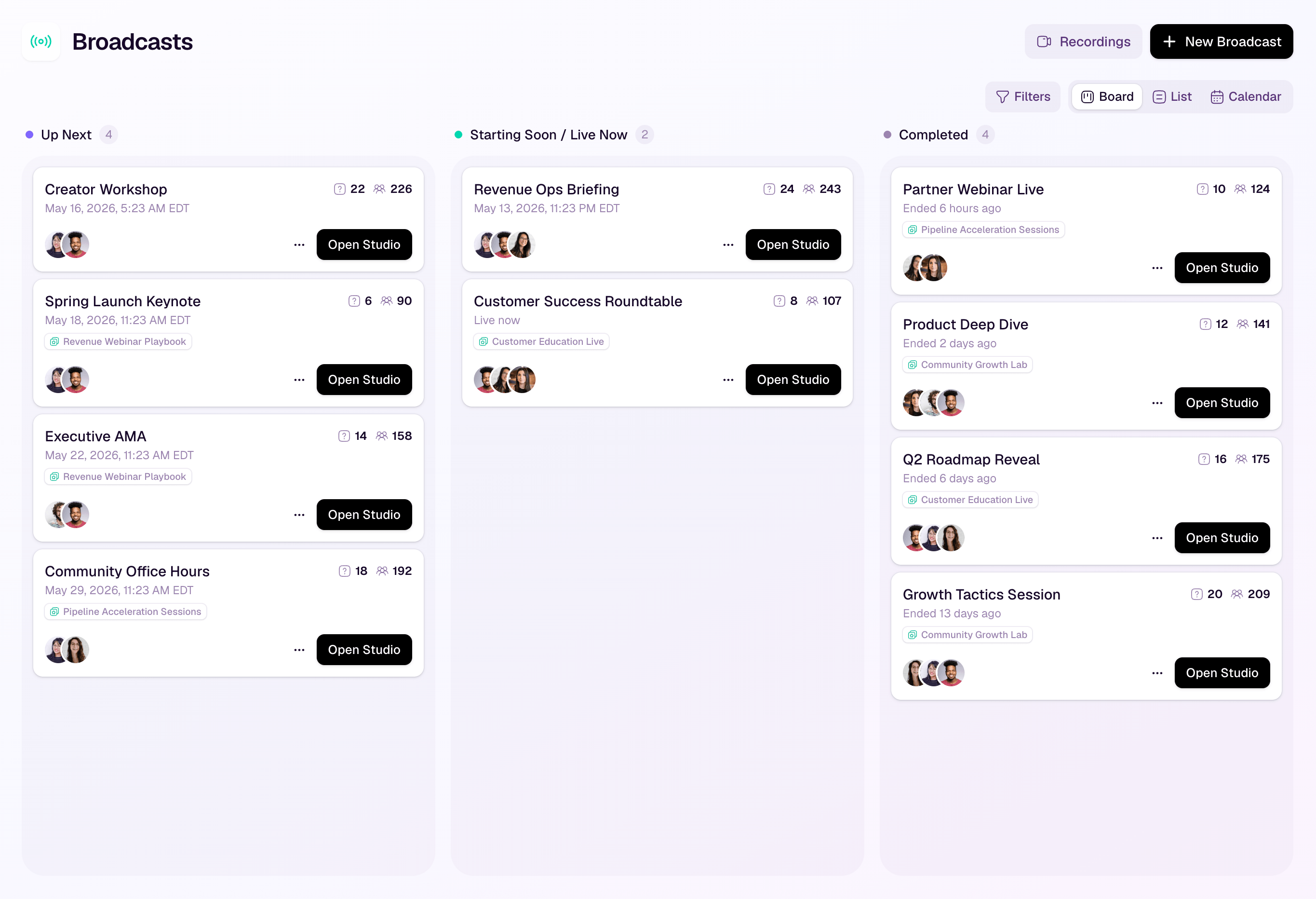
HeyStream's broadcast series feature is designed around that connected-series model: the program can feel repeatable operationally without flattening every session into the same generic event.
Replay and on-demand access
Replay is not the same as evergreen automation.
For a live recurring webinar program, replay should extend the value of the session. It gives registered no-shows a second chance, lets attendees revisit important sections, and gives the team another signal about interest. It should not erase the reason to attend live.
When evaluating platforms, ask:
- Can the replay sit near the original registration or watch experience?
- Can replay viewers still see relevant CTAs?
- Can the team distinguish live attendance from replay engagement?
- Can follow-up reflect whether someone watched live, watched later, or skipped entirely?
If replay behavior disappears into a generic video host, the team loses one of the best reasons to run a recurring program: learning from how the audience engages over time.
Audience intelligence across the whole series
Single-session attendance reports are useful, but recurring webinar programs need a longer view.
For B2B teams, the important question is not just "How many people attended this session?" It is also:
- Who came back?
- Who watched the replay after missing live?
- Which topic moved someone from passive viewer to active prospect?
- Which accounts are engaging with the whole series?
- Which questions, CTA clicks, or viewing behavior should shape follow-up?
That is where audience intelligence becomes part of platform selection. A recurring series creates a pattern of intent. The platform should help you see that pattern instead of forcing the team to reconcile disconnected exports after every webinar.
CTAs and follow-up
Recurring webinars work best when each session has a clear next step.
That next step might be:
- Register for the next session.
- Book a product walkthrough.
- Download a related template.
- Watch a deeper replay.
- Join a customer education track.
- Talk to sales about a specific problem raised in the session.
The platform should make those actions easy to place, track, and follow up on. HeyStream's webinar CTAs and webinar follow-up automation are relevant because a recurring program should not end with a static attendee list. It should give the team a practical way to act on what people did.
Integrations and CRM workflow
No webinar platform needs to replace your CRM. For many B2B teams, that would be the wrong goal.
The better question is what context should live inside the webinar platform and what should sync to the systems your team already uses.
Keep the webinar platform responsible for the context it sees best:
- Registration source and session choices.
- Live attendance and replay behavior.
- Questions, polls, CTA clicks, and engagement.
- Session-by-session audience history.
- Follow-up triggers tied to webinar behavior.
Then decide what should move into your CRM or marketing automation system:
- New or updated contacts.
- Attendance and replay milestones.
- CTA clicks or qualified hand-raisers.
- Segments for nurture, sales follow-up, or customer education.
If a platform only exports spreadsheets, the recurring program will depend on manual cleanup. If it syncs every small interaction without useful structure, the CRM can become noisy. The right balance is clean webinar context in the webinar platform and meaningful next-step signals in the system of record.
How to choose between HeyStream, automated webinar tools, and general webinar platforms
Choose a live-first recurring webinar platform when the program depends on timely expertise, interaction, buyer education, and audience learning. That is where HeyStream is the strongest fit: live recurring programs where registration, branded delivery, replay, CTAs, audience signals, and follow-up need to stay connected.
Choose an evergreen webinar platform when the same recorded session can run repeatedly without meaningful live involvement. That can be useful for low-touch education, product onboarding, or always-on demos, but it is a different operating model from a live series.
Choose general webinar software when your main need is basic live hosting and you already have strong systems for registration, conversion, replay, and follow-up elsewhere.
For teams still defining their category, it can help to compare the recurring use case with the broader B2B webinar platform decision. A one-off webinar, a recurring webinar program, and an evergreen content engine may all use similar words, but they create different platform requirements.
Final buying checklist
Before you choose recurring webinar software, answer these questions:
- Is the program live-first, evergreen, or hybrid?
- Will people register once for the series, separately for each session, or both?
- Can the platform preserve audience context across sessions?
- Can presenters repeat the production workflow without rebuilding everything?
- Do replays support follow-up and conversion, or do they sit apart from the program?
- Can CTAs change by session, topic, or audience need?
- Can follow-up reflect behavior instead of treating every attendee the same?
- Can reporting show what is improving across the series?
- Does the platform fit the team's CRM and marketing automation workflow?
- Does the product help you run a better recurring webinar program, not just another isolated webinar?
The right recurring webinar platform should make the series easier to operate and easier to learn from. If it only repeats the event date, the team still has to stitch the real program together by hand. If it connects registration, live delivery, replay, audience intelligence, CTAs, and follow-up, every session can make the next one sharper.


