Automation makes webinars easier to repeat. That does not mean every webinar should run on autopilot.
For B2B teams, the useful question is which format matches the job. You may need to teach a stable lesson, answer current buyer questions, support a launch, keep a proven session available, or build a program that improves with every episode.
The short answer is straightforward. An automated webinar runs pre-recorded content on a schedule. An on-demand webinar is available whenever the viewer chooses, while evergreen describes content designed to stay useful over time. A one-off live webinar happens in real time for a specific occasion. A recurring live webinar repeats on a planned cadence so the team can keep learning from questions and audience behavior.
This guide compares those four delivery motions and gives you a practical way to choose between them.
What is an automated webinar?
An automated webinar is a scheduled webinar experience that can run without the host presenting live. The content is usually pre-recorded, and the platform may trigger slides, surveys, chat settings, or calls to action during the session. ClickMeeting's automated webinar documentation describes its provider-specific format as a scheduled event that can run automatically with pre-recorded video, presentations, a prepared CTA, or a survey.
That makes automation useful when the content is stable and the audience does not need a real-time conversation. Product onboarding, partner training, and repeatable introductory education can all fit.
The risk is expectation mismatch. If the registration page or reminder emails imply a live conversation but the audience gets only a recording, the experience can feel misleading. Be clear about the format and give viewers a real way to ask questions afterward.
What is a live webinar?
A live webinar is a real-time event where presenters or moderators are present as the session happens. ON24's live webinar glossary defines the provider's live format around real-time presentation and interaction through tools such as Q&A, chat, and polls.
Live webinars can be one-off events, including a product launch, guest session, quarterly briefing, or topical panel. They can also become a recurring program with a repeated cadence, theme, and audience expectation.
Zoom's recurring webinar guide documents daily, weekly, and monthly schedules, with provider-specific registration choices for repeated sessions. ON24's webinar series glossary describes a series as connected webinars built around a consistent theme or cadence. These product definitions are useful for format clarity, not proof that a recurring program will perform better.
That recurring layer matters for B2B teams. A one-off event creates one moment. A recurring webinar program adds cadence, clear ownership, and an operating rhythm for choosing topics, producing sessions, following up, and reviewing what to change next.
Automated, on-demand, one-off live, and recurring live compared
These terms overlap in everyday marketing language, but they are not interchangeable.
| Format | Presenter presence | Audience interaction | Freshness | Best fit | Main risk |
|---|---|---|---|---|---|
| Automated webinar | Usually pre-recorded and scheduled | Timed CTAs, surveys, chat options, or later questions | Depends on regular review | Stable education, onboarding, partner training, repeatable demos | The content or implied live experience can drift |
| On-demand replay | No live presenter; watched whenever the viewer chooses | Replay CTAs, forms, or follow-up prompts | Depends on the original recording | Extending the life of a useful live session | Viewers may lack context or a clear next step |
| One-off live webinar | Presenters are live for a specific event | Real-time Q&A, chat, polls, and audience response | High for that moment | Launches, guest sessions, timely topics, customer panels | The value fades if replay and follow-up are not planned |
| Recurring live webinar | Presenters are live on a repeated cadence | Real-time interaction across sessions | High because each session can address new questions | Category education, product demos, audience building, market learning | The team needs a repeatable operating rhythm |
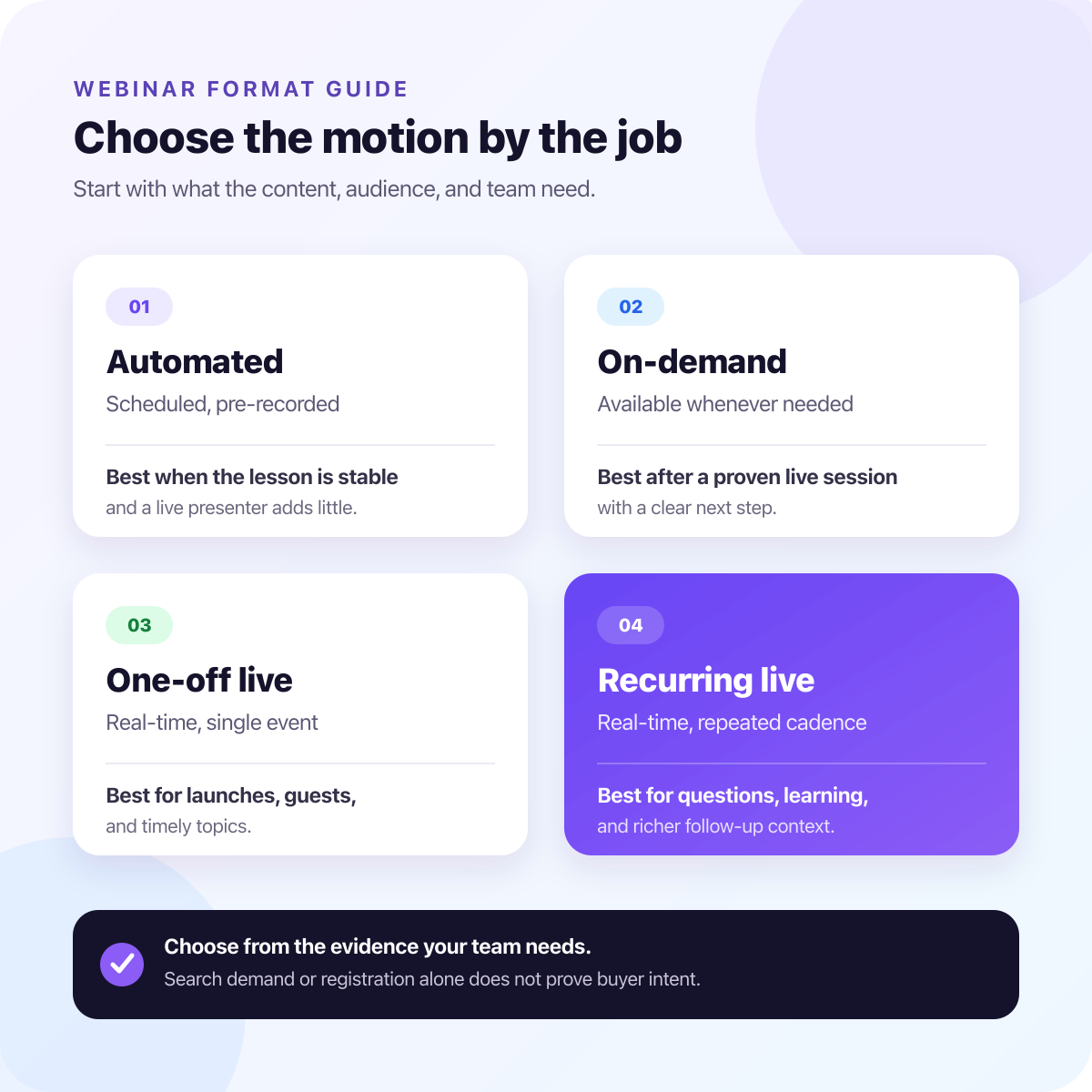
The decision is less about whether the video is recorded and more about what the team needs from the audience. Automation distributes a stable lesson. Live formats add current questions and context. Neither format proves that a viewer is ready to buy.
When automated webinars work well
Automated webinars are strongest when the lesson is durable, the promise is clear, and viewers can succeed without a live presenter.
They can work well for:
- Product education that changes rarely
- Customer onboarding
- Partner enablement
- Internal training
- Repeatable introductory demos
- Evergreen topic explainers
- Audiences in time zones where live coverage is difficult
An automated webinar still needs an owner. Review the recording, CTAs, product screens, examples, and follow-up path on a schedule. A session that was accurate six months ago can become misleading when the product, pricing, market language, or recommended workflow changes.
Automation also works better when the next step is simple. A checklist, related guide, replay link, or booking option can give viewers a clear path. If they are likely to have account-specific objections or complex questions, a live or hybrid motion may fit better.
When recurring live webinars work better
Recurring live webinars are stronger when the webinar is part of an ongoing learning loop, not just a content asset.
They are especially useful for:
- Category education where buyers are still forming a point of view
- Product demos where questions reveal objections
- Fast-changing topics where examples must stay current
- Launches and feature education that benefit from live feedback
- Customer education programs
- Expert-led sessions where the audience expects interaction
- Teams that want to test which topics, CTAs, and follow-up paths deserve another session
The advantage is not guaranteed conversion lift. It is closer contact with what the audience asks and does.
Live questions show what people did not understand. Polls and chat reveal recurring concerns. CTA clicks and replay views show actions the team can investigate. These are useful clues, but they need human interpretation alongside account fit, topic, timing, and prior context.
HeyStream's recurring webinars workflow connects registration, branded live delivery, audience signals, CTAs, replay, and follow-up across a repeated program. Teams that have already chosen this motion should evaluate series registration, presenter workflow, replay handling, audience records, and integrations.
The B2B tradeoff: scale versus signal quality
Automated and on-demand webinars can scale access. Viewers can register, watch, and move to the next step without waiting for the team to present the same lesson again.
Live webinars create fresher context. A question during Q&A, a poll answer, a replay visit after the session, or a CTA click during a demo does not prove buyer intent. It tells the team what happened and gives a human reviewer more to work with than registration alone.
For B2B teams, that distinction matters. Many webinar programs struggle because the follow-up treats every registrant the same, not because the content was recorded instead of live.
A recurring live program can create a better learning loop:
- Run a focused live session.
- Capture questions, objections, attendance, CTA interest, and replay behavior.
- Use webinar audience signals to assemble context, then have a person interpret what those signals mean.
- Review webinar analytics to find where attention held and where viewers acted.
- Improve the next session, replay, nurture path, or sales handoff.
- Turn proven material into on-demand or automated content later.
Automated webinars are useful for distribution. Recurring live webinars add an ongoing source of questions and feedback.
Which webinar format should I choose?
Use this checklist before choosing a delivery motion:
- Is the content stable enough to play without a presenter checking every example or product detail?
- Do viewers need answers to current objections while the topic is still fresh?
- Will audience questions change the next session, offer, or follow-up?
- Does real-time interaction matter to the promise made on the registration page?
- Can the team use follow-up context, or will every registrant receive the same message anyway?
- Is the team ready to own a repeated cadence, or is this a single campaign moment?
Choose an automated webinar when the lesson is stable and the viewer can succeed without a live conversation.
Choose an on-demand replay when a live session has already proved useful and deserves a longer life.
Choose a one-off live webinar when timing, a guest, a launch, or a specific campaign moment matters.
Choose recurring live webinars when the team needs repeated market contact, current questions, and useful follow-up context. Once the format decision is clear, use a recurring webinar platform guide to compare the software and operating features that support it.
Search demand can tell you how people describe a problem. Registration can tell you that someone accepted the invitation. Neither proves buyer intent on its own.
How to combine automated and live webinar motions
Strong B2B webinar programs do not have to choose one format forever.
A practical path is:
- Run the session live first.
- Use questions, comments, CTA clicks, and replay behavior to see what needs clarification.
- Improve the talk track, examples, and next-step offer.
- Publish the replay with clear context and CTAs.
- Turn stable sections into evergreen or automated content.
- Keep the recurring live series for new topics, sharper questions, product updates, and high-context education.
This keeps automation grounded in actual audience behavior. Instead of guessing what should become evergreen, the live program gives the team evidence to review.
A defined recurring webinar workflow connects each session to audience records, CRM handoff, and follow-up without flattening every signal into the same lead label. Someone who clicked a pricing CTA during a live demo may need a different next step from someone who watched a replay two weeks later or asked a broad strategy question during Q&A.
Where HeyStream fits
HeyStream is built for B2B teams that want webinars to become a repeatable growth workflow rather than isolated events.
The live product pages describe branded registration and watch pages, browser-based live sessions, audience records, live and replay CTAs, replay engagement, and follow-up context in one workflow. That makes HeyStream a fit for teams building recurring live programs and keeping the best sessions useful afterward.
HeyStream is not a pure automated-webinar or evergreen-scheduling platform. The fit here is a live and replay-led motion: run useful sessions, learn from audience behavior, keep the best content working after the live moment, and make follow-up less generic.
If your team is comparing tools broadly, start with the job. A B2B webinar platform should support how your team plans to teach the market, run live sessions, interpret viewer behavior, and move people to a suitable next step.
The practical takeaway
Use automated webinars when the content is stable and viewers need convenient access to a repeatable lesson. Use on-demand replays to keep a proven live session available. Use one-off live webinars for timely moments. Use recurring live webinars when current questions and a repeated learning loop matter.
The best B2B webinar motion often starts live, learns from real audience behavior, and automates only the parts that can stand on their own.


