A webinar platform migration is a controlled change to the system that runs your event workflow. It is not a file transfer. You are moving registrations, communications, calendar events, integrations, live delivery, recordings, replay, reporting, and team responsibilities from one operating setup to another.
The safest rule is simple: do not cancel the old platform until the new one has passed registration, communications, live delivery, data sync, replay, and follow-up checks. If one of those checks fails, you still need a usable fallback.
In this checklist, "without losing data" means controlling and documenting loss risk. It does not promise that every source-platform object or historical relationship can be recreated.
HeyStream publishes this guide and makes webinar software. Use the process as a platform-neutral operating framework, then verify each vendor's current export, import, retention, and cancellation rules before you act.
The seven-step migration plan
If you need the short version, use this sequence:
- Inventory the current workflow and preserve the evidence you may need later.
- Decide which upcoming events should move, stay, or wait.
- Classify every asset as transfer, rebuild, archive, or leave behind.
- Map fields, system owners, integrations, emails, and calendar side effects.
- Rebuild the destination and run a named pilot from registration through replay.
- Cut over in a controlled order, then reconcile every expected result.
- Retire the old platform only after acceptance and rollback sign-off.
This order matters. Starting with an import file can make the project feel productive while the harder dependencies remain hidden. A neat CSV does not tell you which system should send reminders, whether an existing calendar invite will update, or how historical attendance should appear in the new platform.
Decide whether each event should move
Do not give every event the same migration plan. Start with event state and risk.
| Event state | Default decision | What to preserve | Main risk |
|---|---|---|---|
| Completed event | Archive evidence and media; rebuild only if there is a clear replay need | Registrants, attendance, interactions, recording, replay URL, reports, consent and suppression evidence | Losing history that teams still need for reporting, follow-up, or retention duties |
| Upcoming but not promoted | Best pilot candidate | Draft configuration, presenters, planned integrations, email copy, registration fields | Missing a dependency that would have been discovered after promotion |
| Open for registration | Move only with an explicit communications and calendar plan | Existing registrants, signup answers, original confirmation state, invite identity, source attribution | Duplicate emails, broken links, a second calendar event, or split registration totals |
| Recurring series | Migrate one future occurrence or a small test series first | Series membership, occurrence rules, registrants, templates, replay conventions | Rebuilding the series but losing the relationship between people and occurrences |
An event that is already accepting registrations is not automatically a bad migration candidate, but it is a high-risk one. If you cannot explain what happens to the existing registration page, confirmation email, reminder schedule, calendar event, and registrant record, defer that event. Move the next one instead.
Teams still choosing a destination should first review the criteria for a B2B webinar platform or compare webinar platforms. Selection and migration are different jobs. Finish the choice before you build the cutover plan.
Build a migration asset register
Create one inventory before you export anything. The register should name the current owner, destination, verification method, fallback, and retention decision for each asset.
| Asset | Current owner | Destination decision | Verification evidence | Fallback or archive |
|---|---|---|---|---|
| Registration pages and embeds | Webinar platform or website | Rebuild and replace at an agreed time | Test signup, page screenshot, embed check, analytics event | Original page and link list |
| Contacts and signup answers | Webinar platform or CRM | Transfer mapped fields that still have a defined purpose | Row counts, sampled records, rejected-row report | Encrypted source export |
| Consent and suppression context | CRM, email tool, or webinar platform | Preserve evidence and assign a destination owner | Sampled opt-in, unsubscribe, complaint, and bounce states | Restricted compliance archive |
| Confirmation and reminders | Webinar platform, CRM, or email tool | Rebuild once with one sender of record | Test inbox, send log, suppression result | Old schedule disabled only after sign-off |
| Calendar events | Webinar platform or calendar service | Update, replace, or leave unchanged by design | Test invitation behavior in major calendar clients | Original event details and cancellation plan |
| Integrations and webhooks | Webinar platform, CRM, automation tool | Reconfigure and test with scoped identities | Delivery log, destination record, idempotency result | Old integration paused and reversible |
| Recordings and replay | Webinar platform or video host | Transfer media or preserve the current host | File checksum, playback, captions, access check | Original media and metadata export |
| Analytics and reports | Webinar platform, CRM, BI tool | Archive historical evidence; define a new baseline | Report exports, metric definitions, reconciliation note | Read-only source archive |
Add configuration that is easy to forget: presenters, roles, scene layouts, branding, domains, privacy copy, custom registration questions, CTAs, email templates, replay settings, tracking tags, API credentials, and support instructions.
The ICO's data-minimisation guidance says personal data should be adequate, relevant, and limited to what is necessary. That makes the inventory a retention decision as well as a transfer task. Do not move every available field merely because the export includes it.
Classify assets by what can really move
Use four buckets. This prevents "we exported the data" from being mistaken for "the destination can recreate the same history."
| Classification | Meaning | Typical examples |
|---|---|---|
| Transfer | The destination can accept the source value with a defined field mapping | Contact name, email, selected registration answers |
| Rebuild | The destination needs a new configuration or object | Registration page, reminder schedule, embed, webhook, branded scene |
| Archive | The evidence should remain accessible but does not need to become live destination state | Historical attendance report, chat transcript, legacy campaign report |
| Leave behind | The item is obsolete, duplicated, unsupported, or no longer needed | Old test events, expired templates, redundant tags, stale automation branches |
Export format and semantic fit are separate. A CSV may be structured and machine-readable while still losing relationships, calculated values, source identifiers, or platform-specific history. The ICO's data-portability guidance also explains that the right applies only in defined circumstances and does not require two organisations to maintain technically compatible systems. Treat legal portability and product migration as separate questions, and get qualified advice for your own obligations.
For each transferred object, write down:
- the source field and its exact meaning
- the destination field and its exact meaning
- any transformation or default
- how blank, invalid, duplicate, unsubscribed, and deleted records are handled
- the source identifier retained for reconciliation
- who approves the mapping
This is the same discipline used in a good webinar CRM integration. The field name is only the label. The contract is the meaning, owner, and side effect attached to it.
Assign one owner to every side effect
Migration failures often come from two systems doing the same job. Running platforms in parallel is safe only when each side effect has one owner.
| Side effect | Owner during pilot | Owner after cutover | Proof required |
|---|---|---|---|
| New registration | Named source form or destination page | Destination registration path | One contact and one registration created |
| Confirmation email | One named sender | Destination or connected email system | One delivered message with correct links |
| Reminder email | One named schedule | Destination or connected email system | No duplicate queued send |
| Calendar invitation | One named event owner | Agreed destination owner | Expected update, cancellation, or new invite behavior |
| CRM update | One integration path | Destination integration | Correct object, fields, timestamp, and source |
| Replay publication | One replay host | Destination or retained host | Public or gated playback works as designed |
| Follow-up campaign | One automation owner | Agreed lifecycle system | Correct segment, suppression result, and message |
| Reporting | Named reconciliation owner | Destination plus retained historical archive | Counts explained, not merely copied |
Calendar events deserve their own test. The iCalendar specification defines UID as the persistent, globally unique identifier for an event component. Test whether your cutover updates the existing event, cancels it, or creates a second event. Vendor and calendar-client behavior can differ, so the standard does not guarantee a particular outcome.
Do the same for webhooks and CRM actions. Use a scoped test identity. Record the expected destination state and every expected external side effect before you press the button. Never test a migration by sending real lifecycle messages to the full audience.
Rebuild the destination before importing the audience
Build the smallest complete destination workflow first:
- Create the event or series.
- Configure roles, presenters, branding, privacy text, and access rules.
- Build the registration path and custom questions.
- Configure the confirmation, reminders, and calendar behavior.
- Connect the CRM, email, analytics, and webhook paths.
- Configure the live experience, recording, replay, CTAs, and follow-up.
- Test the empty workflow before adding migrated contacts.
This order gives you a known destination for each record. It also exposes missing capabilities before customer data enters the system.
When registration is part of the move, test both hosted pages and embeds. HeyStream's current webinar registration pages support broadcasts and series, embedded signup widgets, and custom registration questions. Whatever destination you use, test the exact public path, required fields, mobile layout, error states, analytics, and post-submit behavior.
Run one end-to-end pilot
Name the pilot. Give it a real owner and an acceptance sheet. An unpublished future webinar is usually safer than an event already promoted to hundreds of registrants.
Use several controlled identities, not one. Include a new contact, an existing contact, a suppressed contact, a malformed row, and any role or segment your workflow treats differently.
| Test | Action | Expected destination state | Expected external side effect | Evidence |
|---|---|---|---|---|
| Registration | Submit the real public form | Contact and registration created once | One confirmation and intended calendar action | Record IDs, inbox copy, calendar screenshot |
| Import | Upload a small mapped file | Valid rows created or matched; rejected rows explained | No unexpected sends | Preview and completion report |
| CRM sync | Register the test contact | Correct CRM object and fields updated once | One integration delivery | CRM record and delivery log |
| Live attendance | Join and leave the pilot | Attendance and watch time recorded | No unrelated campaign | Audience profile and analytics view |
| Engagement | Ask a question and click a CTA | Interaction attached to the right contact | Intended webhook or CRM update only | Contact timeline and event log |
| Replay | Open the replay as the test contact | Replay view connected to the contact | Intended follow-up eligibility | Replay page, audience activity, campaign preview |
| Follow-up | Run the approved test path | Correct segment and message | One delivery to the scoped inbox | Recipient, content, send log |
Prepare the pilot with a broader B2B webinar checklist. The migration sheet proves the handoff between systems. The event checklist proves that the webinar itself is ready.
Do not accept "looks right" as evidence. Record identifiers, counts, screenshots, message copies, delivery logs, and an explanation for expected exclusions. A difference between source and destination counts is not automatically a failure, but it must be understood.
Define rollback before cutover
Rollback is a decision with a deadline, not a vague promise that the old tool is still available.
| Trigger | Detection evidence | Stop action | Fallback |
|---|---|---|---|
| Registration failure | Real-path test cannot create the expected record | Restore the old registration link or embed | Old page remains available |
| Duplicate emails or invites | Two sends, two calendar events, or conflicting schedules | Pause the new sender and schedule | Old sender remains authoritative |
| Wrong CRM mapping | Required fields missing or attached to the wrong object | Disable the new sync | Preserve source export and old integration |
| Presenter or live access failure | Presenter cannot join or required controls are absent | Do not open the new live room | Run the event on the old platform |
| Missing recording or replay path | Pilot cannot produce and publish the required media | Keep replay on the old host | Preserve original media and URL |
| Unexplained count variance | Reconciliation cannot account for missing or extra records | Freeze further imports and sends | Reconcile from immutable exports |
Assign the owner who can call rollback and the latest safe decision time. If the cutover cannot be reversed after a public email, embed change, or calendar update, move that action to the end and require explicit sign-off.
Cut over in a controlled order
Freeze changes in the source before the final export. Otherwise your inventory starts drifting while you migrate it.
A practical cutover order is:
- Confirm the fallback and decision owners.
- Freeze source configuration and take final exports.
- Import the approved records and review rejected rows.
- Run the final scoped registration, CRM, calendar, live, replay, and follow-up checks.
- Replace public links and embeds.
- Enable the destination integrations and communications in the approved order.
- Disable the equivalent source side effects.
- Reconcile counts, messages, event records, media, and reports.
- Record known exclusions and archive locations.
Keep the public-change window small. Avoid changing registration URLs, email senders, calendar events, CRM mappings, and replay hosts at unrelated times. A compact window makes failures easier to attribute and reverse.
Reconcile after cutover
Compare source and destination using a shared definition, not only headline totals. Reconcile at least:
- contacts considered, created, matched, rejected, suppressed, and skipped
- event or series registrations
- custom registration answers
- confirmation and reminder sends
- CRM updates and webhook deliveries
- attendance and watch activity from the pilot
- recording and replay availability
- follow-up eligibility and delivery
- analytics collection and source attribution
For each variance, record whether it is expected, accepted, or unresolved. Examples of expected exclusions include duplicates, invalid emails, unsubscribed contacts, closed events, unsupported fields, and data deliberately left behind under the retention decision.
A bounded HeyStream migration preflight
HeyStream can be a destination for B2B teams that want registration, live delivery, audience records, replay, analytics, and follow-up in one workflow. It does not mean every object or historical record from another product can be recreated.
Current HeyStream contact imports are available on paid plans. Each CSV import can contain up to 1,000 rows and must include mapped Name and Email columns. Eligible contacts can be linked to an active broadcast or to a series with registration open. The importer previews new, matched, and rejected rows before processing.
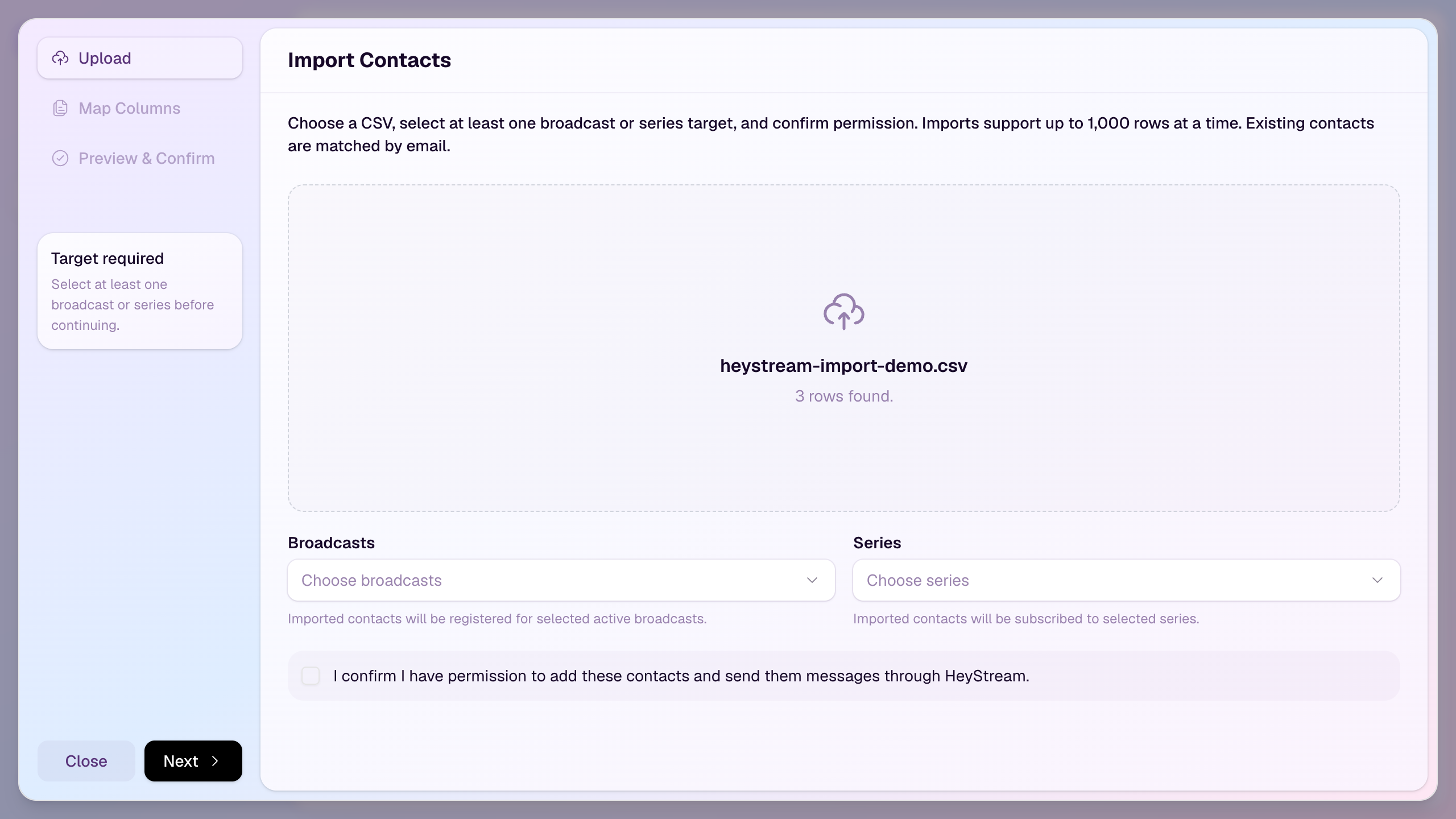
That is a bounded contact import, not a promise to reproduce arbitrary historical webinar activity. HeyStream's audience records connect registration, attendance, clicks, and replay activity created inside the HeyStream workflow. Preserve source-platform history separately when the destination cannot recreate it.
Before choosing HeyStream as the destination, verify:
- your plan and expected import volume
- registration pages, embeds, custom questions, and series behavior
- the fields and consent evidence you need to retain
- CRM, email, webhook, and analytics integrations
- confirmation, reminder, and calendar ownership
- presenter, studio, recording, replay, and capacity needs
- the audience signals and webinar analytics required for acceptance
- the segments and webinar follow-up automation you plan to use
HeyStream may not be the right destination if a must-have integration is unavailable, you need unsupported historical activity to become live destination state, or you cannot test the complete workflow before a high-risk event. Verify those boundaries before importing the audience.
Copyable webinar platform migration checklist
Decide
- Name the migration owner, event owners, system owners, and rollback approver.
- List completed, upcoming, open-registration, and recurring events.
- Choose which events move, stay, or wait.
- Set the final cutover window and rollback deadline.
Inventory and preserve
- Record registration pages, embeds, fields, roles, templates, emails, invites, integrations, media, replay, analytics, and support dependencies.
- Take immutable exports and record when they were created.
- Document consent, suppression, retention, deletion, and access decisions.
- Preserve required recordings, captions, transcripts, reports, and campaign evidence.
Map and rebuild
- Classify each asset as transfer, rebuild, archive, or leave behind.
- Approve field meanings, transformations, defaults, and rejected-row rules.
- Assign one owner to registration, email, calendar, CRM, replay, and reporting side effects.
- Build the destination workflow before the main import.
Pilot and accept
- Run scoped registration, import, CRM, calendar, live, engagement, replay, and follow-up tests.
- Capture expected destination state and external side effects for each test.
- Explain count differences and rejected records.
- Confirm every rollback trigger and fallback still works.
Cut over and retire
- Freeze source changes and take final exports.
- Apply public links, embeds, integrations, and sender changes in the approved order.
- Reconcile contacts, registrations, messages, invites, CRM activity, media, replay, and reporting.
- Disable old side effects only after the replacement has passed.
- Cancel the old platform only after archive, acceptance, billing, retention, and rollback sign-off.
When the old platform is safe to cancel
The old platform is safe to cancel when the destination has passed the agreed acceptance tests, every upcoming event and registrant has an explicit home, required media and historical evidence are preserved, source integrations and senders have been disabled in a controlled order, and the rollback window has closed through named approval.
Elapsed time is not proof. Evidence is.
The goal is not to make the move look effortless. It is to keep the registration-to-replay workflow understandable, testable, and reversible until the new platform earns trust. That complete loop is the same operating idea behind a B2B webinar growth engine: every registration, live signal, replay visit, and follow-up should have a clear owner and a verifiable next step.


