A webinar series is a connected sequence of sessions built around one audience promise. Unlike a loose calendar of one-off events, each episode should move the same audience through a deliberate topic arc, registration experience, live session, follow-up, and learning loop.
This planner gives B2B teams one place to map that system. You can copy the fields into a spreadsheet, project board, or campaign workspace, then adapt the cadence and ownership model to your team. If you are building a broader recurring webinar program, use the planner as the operating layer that connects the strategy to each episode.
Copy the webinar series planner
Start with the series-level decisions. These should stay stable enough to guide every episode, even when individual topics, speakers, and offers change.
| Series field | What to decide | Example |
|---|---|---|
| Goal | The business or audience outcome the series is designed to support | Help product marketers run stronger customer-education webinars |
| Audience | The specific group and problem the series serves | B2B product marketers building repeatable education programs |
| Series promise | Why the same audience should return | One practical operating framework in every session |
| Series model | Finite season, ongoing editorial series, repeatable demo, or progressive learning program | Six-episode customer-education season |
| Cadence | A rhythm the audience and production team can sustain | One session every three weeks |
| Review point | When the team will decide whether to continue, change, or stop | After episode three and at the end of the season |
| Registration model | Register once for all, choose episodes, or register per episode | Register once and receive every session invite |
| Primary CTA | The main next step the series should create | Book a planning call |
| Reporting owner | The person responsible for the series-level readout | Demand generation manager |
| Continue rule | The evidence that justifies another season or cycle | Qualified attendance plus useful follow-up conversations |
Then use one row per episode. Keep the cells short enough that the planner stays useful during weekly production meetings.
| Episode | Live date | Audience problem | Topic and promise | Speaker | Owner | Promotion start | Registration model | Rehearsal and production deadline | Live CTA | Replay and follow-up owner/date | Success signal and next change |
|---|---|---|---|---|---|---|---|---|---|---|---|
| 1 | 10 Sep, 15:00 BST | Teams struggle to choose a focused topic | Pick a topic that earns the right audience's attention | Product marketing lead | Webinar producer | 20 Aug | Series-wide | Rehearsal 8 Sep; assets 5 Sep | Download topic worksheet | Lifecycle lead, 11 Sep | Qualified questions; narrow the next episode if intent is too broad |
| 2 | 1 Oct, 15:00 BST | Registration is disconnected from follow-up | Design the registration-to-replay journey | Demand generation lead | Campaign manager | 11 Sep | Series-wide | Rehearsal 29 Sep; assets 26 Sep | Book a workflow review | Lifecycle lead, 2 Oct | CTA clicks and replay actions; change the offer if the next step is unclear |
| 3 | 22 Oct, 15:00 BST | Teams collect engagement without acting on it | Turn audience signals into a practical follow-up plan | Revenue operations lead | Webinar producer | 2 Oct | Series-wide | Rehearsal 20 Oct; assets 17 Oct | Request a follow-up template | Sales enablement lead, 23 Oct | Repeat attendance and follow-up replies; keep, change, or stop the format |
The example is intentionally incomplete. Your team should add real dates, URLs, owners, and results rather than treating the sample cadence as a recommendation.
Define the job of the series before choosing dates
A useful series starts with a repeatable audience problem, not a calendar slot. Write the goal, audience, promise, and next step before filling the episode rows.
The series promise should be narrow enough that the same person can see why each session belongs. “Monthly marketing webinar” describes a schedule. “A monthly operating clinic for B2B product marketers turning live sessions into qualified follow-up” describes a reason to return.
Choose the series model that matches that promise:
- A finite season works well when the audience is moving through a defined subject in stages.
- An ongoing editorial series suits a market or problem that produces a steady supply of useful questions.
- A repeatable demo series is helpful when buyers need regular access to the same decision-stage experience.
- A progressive learning program works when each episode builds on skills or context from the previous one.
Do not force every topic into the series. Use the webinar topic selection framework to check that each episode solves a real audience problem while supporting the overall promise.
Choose a cadence your team can sustain
There is no universal best webinar cadence. Weekly may suit a focused product-demo program with a stable format. Monthly may fit a thought-leadership series that needs guest speakers and original research. A short season may be better when the topic has a clear beginning and end.
Plan cadence around five constraints:
- How quickly the audience needs the next session.
- How many strong topics the team can support without repetition.
- How much promotion runway each episode needs.
- Whether speakers and production owners can meet the same quality bar repeatedly.
- How much time the team needs to review one episode before committing to the next.
In its 2026 B2B Webinar Benchmark Report, Goldcast reports that 31.2% of webinars in its 2025 platform dataset belonged to a series and that the median series ran for four episodes. Those figures describe Goldcast customer activity, not a rule for every B2B program. Use them as context, then choose a cadence and review point that fit your audience and capacity.
A review point is more useful than an indefinite commitment. After two or three episodes, inspect topic fit, registration quality, live participation, replay behavior, CTA response, and production effort. Keep the cadence only if it still serves the audience and the team.
Build a topic arc, not a list of unrelated sessions
The episode calendar should feel like a progression. A simple B2B topic arc can move through four jobs:
- Foundational: define the problem and give the audience a shared language.
- Problem-aware: help people diagnose what is going wrong in their current process.
- Practical proof: show a framework, example, template, or workflow they can use.
- Decision-stage: help qualified viewers compare approaches or choose a next step.
Not every series needs that exact order. The important part is that each episode earns its place. If the only connection is that the sessions are all “about marketing,” you have a content calendar, not a coherent series.
Add the audience problem and live promise to every row. Those two fields make it easier to judge whether the episode belongs and give the promotion owner a clear starting point. The webinar promotion plan can then turn that promise into a campaign timeline without making the planner carry every channel-level task.
Pick the registration model deliberately
Registration affects commitment, reminders, reporting, and what the audience believes they have joined. Common models include:
- Register once for the full series. This reduces repeat signup work and suits a connected program with a consistent promise.
- Register once and choose sessions. This gives attendees control while keeping one series-level relationship.
- Register separately for every episode. This makes session intent explicit but adds friction and repeated administration.
Zoom's recurring-webinar documentation documents all three patterns and shows why the decision belongs in the planner: each model changes how registrants select occurrences and how session reports are organized.
HeyStream's Broadcast Series supports a connected model where people can subscribe through one series registration flow, see upcoming linked broadcasts, and retain series context as the program grows. That is useful when the audience is joining an ongoing promise rather than buying a ticket to one isolated date.
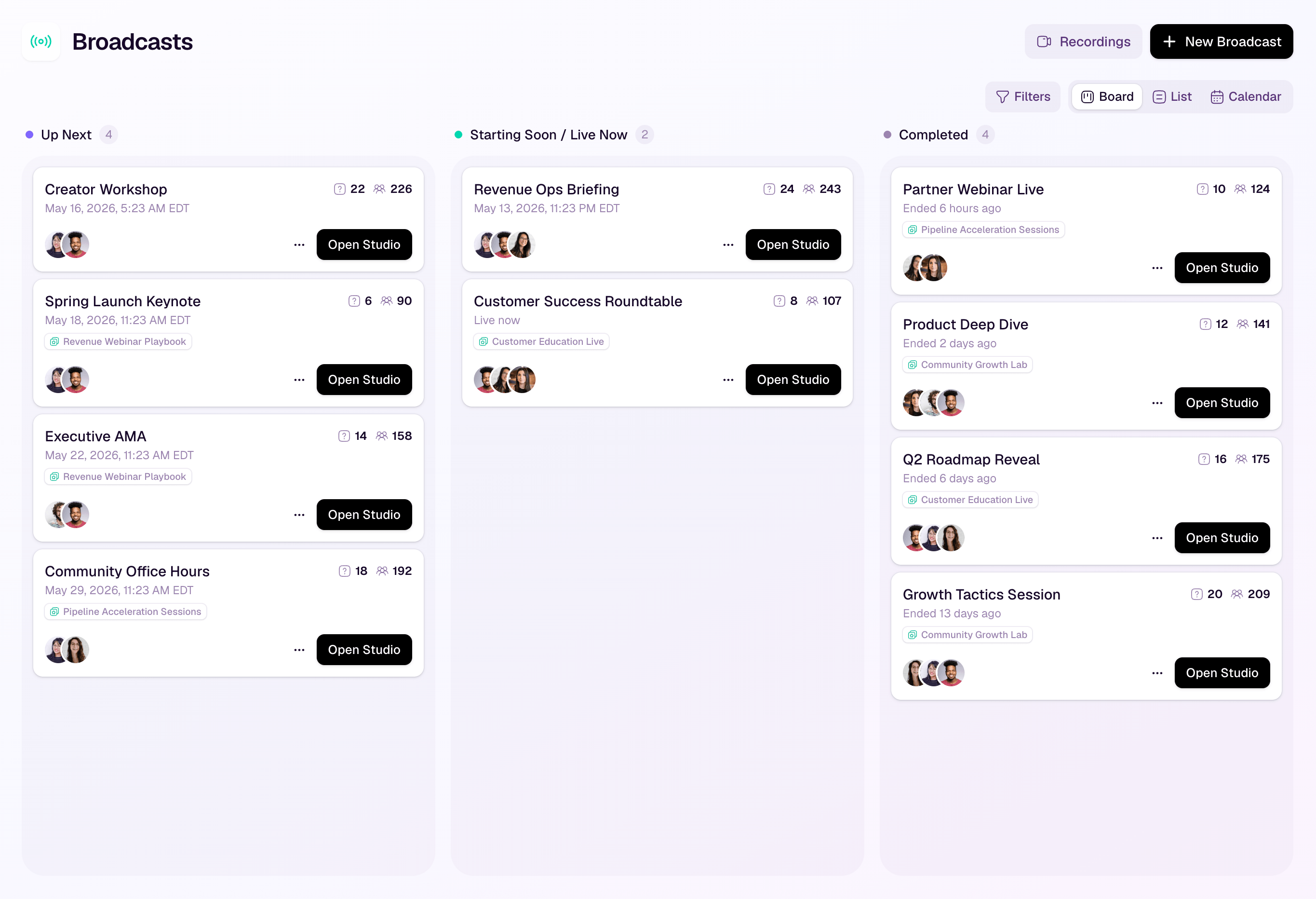
Whichever model you choose, write it at both the series and episode level. If an episode needs a different registration path, that exception should be visible before promotion begins.
Add promotion, production, replay, and follow-up checkpoints
A webinar calendar is not operational until it includes the handoffs around the live date. Work backwards from each session and add the checkpoints that could block delivery or weaken the audience journey.
At minimum, plan for:
- Topic and speaker confirmation
- Registration page and tracking readiness
- Promotion start and reminder schedule
- Slides, demo, offer, and production assets
- Technical rehearsal
- Live CTA and destination
- Replay publication
- Attendee, no-show, and replay follow-up
- Reporting and the decision for the next episode
Use relative timing rather than copying someone else's fixed schedule. A customer panel with three external speakers may need a longer asset and rehearsal runway than a repeatable product clinic. The planner should expose the dependency, not pretend every webinar takes the same number of days.
Assign one accountable owner to each handoff. Shared responsibility often means no responsibility when the replay, follow-up, or reporting deadline arrives.
If the series connects to a CRM or lifecycle program, pair the planner with a recurring webinar workflow. The calendar should show when a handoff happens; the workflow should define what data, audience state, and automation move through it.
Measure each episode and the whole program
Choose success signals before the first invitation goes out. Otherwise the team will default to whichever number looks most flattering after the event.
Review each episode across a small set of decision-oriented categories:
- Acquisition: registrations, source, and fit with the intended audience.
- Attendance: live attendance with no-show and timing context.
- Engagement: questions, polls, watch behavior, and content signals without treating them as proof of purchase intent.
- Action: CTA clicks or completion of the chosen next step.
- Replay: replay starts, meaningful viewing, and post-live actions.
- Return: attendance or participation in a later episode.
- Operations: whether assets, rehearsal, live delivery, replay, and follow-up happened on time.
- Learning: one thing to keep, change, or stop before the next episode.
The episode row needs only the headline signal and next change. Keep the full readout in a separate webinar performance report so the calendar remains usable.
At the series level, look for patterns across episodes. A single low-attendance session may reflect timing or topic fit. Repeated high registrations followed by weak attendance may point to a promise or reminder problem. Strong replay action may mean the audience values the content but cannot reliably attend live. The planner should help you see those differences without turning every interaction into a claim about revenue or intent.
Use HeyStream to keep the series connected
HeyStream can give the public and operational sides of a series one connected structure. Teams can create a series, add linked broadcasts, offer one registration flow, show upcoming sessions, and review how subscribers participate across the program.
That does not replace editorial planning or project management. Your team still owns the topic arc, speakers, deadlines, offers, and learning decisions. HeyStream's role is to keep the registration, broadcast, audience, replay, and follow-up context connected once the plan moves into production.
Check the plan before the first episode
Before promotion starts, confirm that the planner answers these questions:
- Is the audience and series promise specific enough to guide every episode?
- Does each topic solve a distinct problem without drifting from that promise?
- Can the team sustain the cadence and production workload?
- Is the registration model clear to both the audience and the reporting owner?
- Does every handoff have one accountable owner and a real deadline?
- Is the live CTA relevant to the topic and buyer stage?
- Are replay and follow-up planned before the session goes live?
- Does the team know which signals will trigger a keep, change, or stop decision?
If those answers are visible, the series is more than a row of dates. It is a repeatable program your team can run, review, and improve one episode at a time.


