Recurring webinars should get easier as the series matures. The topic rhythm improves, the audience starts to recognize the format, and the team has fewer decisions to remake from scratch.
But the CRM workflow often moves in the opposite direction. Every new session can create another landing page, another list, another reminder path, another follow-up branch, another set of attendance fields, and another reporting question nobody wants to untangle later.
A recurring webinar workflow is the operating model that keeps the reusable parts of a series reusable while preserving the session-level details that sales, marketing, and customer teams still need. Done well, it lets a team repeat the program without flattening every registrant, attendee, no-show, replay viewer, and CTA click into the same generic campaign.
Why recurring webinars break one-off webinar workflows
One-off webinar workflows are built around a single date. Someone registers, receives reminders, attends or misses the session, gets a replay, and moves into follow-up.
That structure works until the webinar becomes a series. The moment you repeat the same program weekly, monthly, or quarterly, a few awkward questions appear:
- Should one registrant record cover the whole series, or just one session?
- Which date did a person register for?
- Did they attend live, watch the replay, click the CTA, or return for a later session?
- Should a no-show get the same follow-up if they watched the replay the next morning?
- Should sales see program-level engagement or only the latest event?
Official platform docs show why this distinction matters. Zoom's recurring webinar documentation describes registration choices where attendees may register once for all occurrences, register separately for each occurrence, or choose selected occurrences. Those choices affect how registration and attendee reports are organized. Zoom's guidance for recurring sessions events also makes the session-level point explicit: recurring programs can span multiple instances, and attendance is counted at the individual session level.
That is the core workflow problem. A recurring webinar is one program, but it creates many session-specific signals. If your CRM workflow treats it only as one campaign, you lose useful detail. If it treats every session as a totally separate event, the operations work keeps multiplying.
Define the reusable webinar workflow layer first
Start by deciding what should stay the same every time the series runs. This is the reusable layer.
For most B2B teams, that layer includes the core webinar series promise, the audience segment, the registration experience, the reminder structure, the baseline CRM fields, the replay policy, the post-webinar handoff, and the reporting model.
In HeyStream, this is where recurring webinars and Broadcast Series become useful: the series gives the program a durable home instead of forcing the team to rebuild the same signup and broadcast structure each time.
Think of the reusable layer as the part of the workflow you should be able to trust before you even know the next session topic.
| Workflow layer | Reuse across the series | Keep session-specific |
|---|---|---|
| Registration | Core series page, required fields, consent language, source tracking | Session date, session topic, speaker, campaign source |
| Reminders | Reminder timing, audience rules, brand voice | Topic-specific hooks, speaker details, live-only value |
| CRM sync | Contact identity, source fields, program membership, baseline status | Session date, occurrence ID, attendance status, replay action |
| Audience signals | Signal categories such as registered, attended, no-show, replay viewer, CTA click | The exact session and offer that created the signal |
| Follow-up | Segment logic, handoff rules, fallback replay path | Message angle, offer, sales note, next recommended action |
| Reporting | Series-level dashboard and review rhythm | Session-level performance, topic learnings, drop-off causes |
This table is the simplest way to avoid CRM sprawl. If a field or workflow rule will apply to every session, make it part of the series layer. If it changes the meaning of a person's engagement, keep it attached to the specific session.
Keep session-specific details separate
The recurring part of the webinar should not erase the session context. A person who attends a product launch session, asks a pricing question, and clicks a demo CTA should not look the same as a person who registers for a thought-leadership session and watches the replay later.
At minimum, keep these details session-specific:
- Session date and time
- Topic or episode title
- Speaker or host
- Registration source or campaign
- Live attendance status
- Replay viewing status
- CTA or offer shown during that session
- Question, poll, or chat signal when relevant
- Follow-up path triggered by that session
This is especially important when the series uses the same registration path for multiple sessions. The registration record can be reusable, but the engagement record still needs context.
The practical test is simple: if a salesperson, customer marketer, or RevOps teammate would ask "which session did this come from?", do not store the signal only at the program level.
Decide which audience events actually matter
A recurring webinar workflow does not need to sync everything. It needs to preserve the events that change what should happen next.
For most B2B programs, the useful events are:
- Registered for the series
- Registered for a specific session
- Attended live
- Missed live
- Watched the replay
- Clicked a CTA
- Asked a question
- Returned for another session
- Dropped off early, when watch time is available and meaningful
That is enough to make follow-up smarter without pretending attendance alone proves intent.
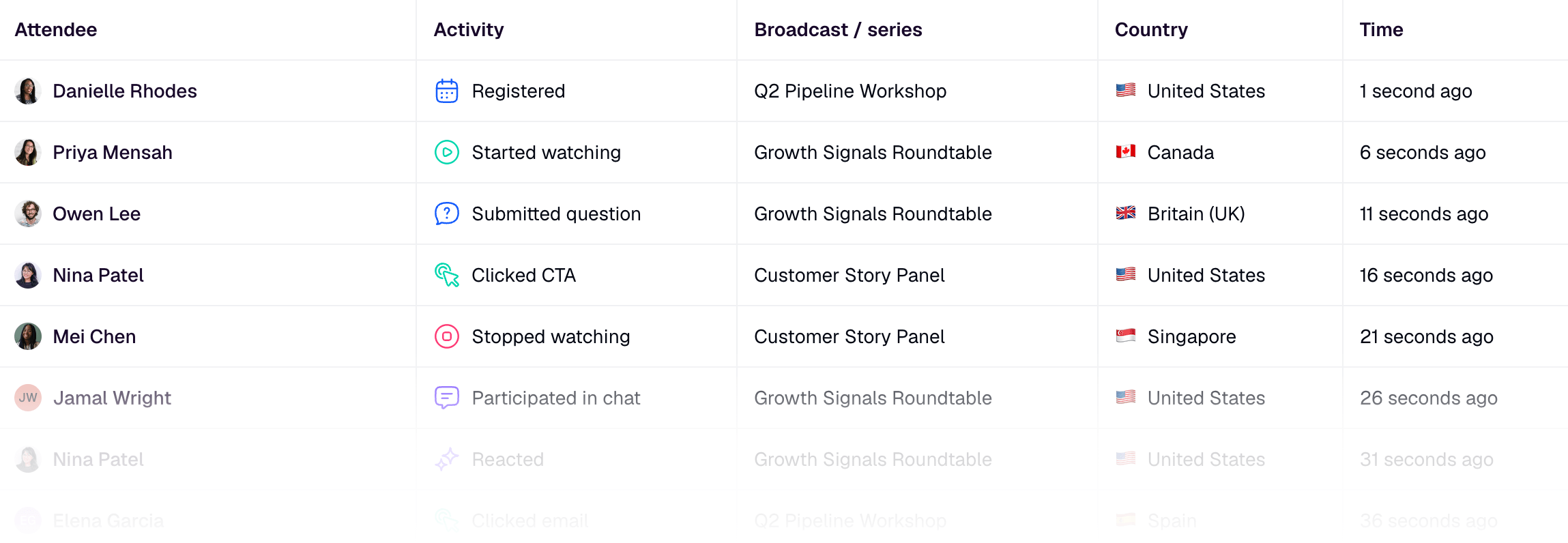
HeyStream's audience intelligence is designed around this kind of audience context. The goal is not to turn every webinar interaction into a sales alarm. It is to keep enough signal in the audience record that your next step matches what the person actually did.
Map the CRM layer without over-syncing
The CRM should receive useful context, not a messy copy of the whole webinar platform.
Before you wire up native sync, webhooks, or automation tools, choose the minimum set of fields and events your downstream teams need. A clean recurring webinar CRM model usually includes:
- Contact identity: email, name, company, and any approved registration fields
- Program context: recurring webinar series name, source, and topic cluster
- Session context: date, topic, speaker, and occurrence identifier when available
- Engagement state: registered, attended, no-show, replay viewer, CTA click
- Follow-up state: replay sent, sales-ready handoff, nurture path, or no action
This is where it helps to be precise about platform boundaries. For example, HubSpot's Zoom webinar documentation describes syncing Zoom webinar registration and attendance data into HubSpot, then using registration, attendance, and engagement information for segmentation, follow-up campaigns, and reporting. It also documents limits around required registration fields and some recurring-webinar contact properties, which is a useful reminder to design the workflow around the data your integration can actually carry.
For HeyStream, keep the CRM claim just as specific. HeyStream can support webinar workflows through audience records, selected registration-field context, HubSpot contact sync where configured, and webinar webhooks for structured events such as registrations, attendance, and post-broadcast summaries. It is not a replacement for the CRM, and the article should not treat it like one.
Build follow-up segments for the series, not just one event
Recurring webinar follow-up works best when the segments are stable and the messages adapt.
Instead of creating a brand-new follow-up workflow for every session, define the repeatable audience states once:
- Registered but did not attend live
- Attended live but did not click the CTA
- Attended live and clicked the CTA
- Watched the replay
- Returned for multiple sessions
- Asked a question or showed specific topic interest
- Registered for one session but not the next relevant session
Then let the session details change the message. The segment logic stays consistent, while the email, sales note, or next offer reflects the topic and behavior.
That is the difference between a reusable workflow and a generic one. A reusable workflow keeps the same rules. A generic workflow ignores the session context.
For example, the no-show path should not be "send replay to everyone and call it done." A better path is:
- Send the replay with the session-specific promise.
- Watch for replay views or CTA clicks.
- Route replay viewers into a lighter follow-up path.
- Route CTA clickers into a clearer sales or product next step.
- Leave inactive registrants in a broader nurture path.
HeyStream's webinar follow-up automation can help here because the follow-up is based on behavior, not just registration status.
Use webhooks when the workflow needs structured events
Native CRM integrations are useful when the destination is obvious. Webhooks are useful when the team has a more specific routing model.
Use a webhook or automation layer when you need to:
- Send webinar events into a data warehouse or internal system
- Trigger different paths in a marketing automation platform
- Preserve custom session identifiers
- Notify sales or customer teams based on a CTA or attendance event
- Combine webinar activity with other product or campaign signals
If you prefer an automation layer instead of connecting each destination directly, viaSocket’s HeyStream integration provides triggers for new registrations, attendees joining and recordings becoming ready, plus actions including creating broadcasts and registering contacts.
The important part is not "webhooks are more advanced." The important part is that structured events let you keep the recurring webinar model clean. A registration event, attendance event, CTA event, and post-broadcast summary should mean different things downstream.
If those events all become one generic "webinar activity" note, the CRM may look updated while the workflow remains hard to use.
Recurring webinar workflow checklist
Use this checklist before launching the next session in a recurring series.
| Question | Why it matters |
|---|---|
| What is the reusable series layer? | Prevents the team from rebuilding registration, reminders, and follow-up logic every time. |
| What is unique about this session? | Preserves the date, topic, speaker, CTA, and source context that make the engagement meaningful. |
| Which events change follow-up? | Keeps the CRM focused on signals that affect routing, not every possible interaction. |
| Which fields must sync to the CRM? | Reduces noisy data while preserving contact, session, status, and follow-up context. |
| How will replay viewers be handled? | Stops no-shows from being treated as lost when they engage after the live session. |
| Which internal links or CTAs should this session use? | Keeps every episode tied to the right next step instead of a generic sales ask. |
| What will be reviewed after the session? | Creates a learning loop so the next session gets easier to run and easier to measure. |
If you cannot answer one of those questions, do not add more automation yet. Clarify the workflow first.
Review each session so the next one gets easier
Recurring webinars compound only when each session teaches the next one something useful.
After each broadcast, review the series-level pattern and the session-level pattern separately. At the series level, look for registration quality, repeat attendance, common audience questions, CTA performance, replay behavior, and whether follow-up paths are still useful. At the session level, look for topic fit, speaker draw, reminder performance, live engagement, and any CRM cleanup the team had to do manually.
The best sign that the workflow is working is not that every metric goes up. It is that the team spends less time rebuilding the same operations and more time acting on clearer audience context.
That is the job of a recurring webinar workflow: make the program repeatable without making the audience data vague.


