A webinar performance report should do more than collect numbers after the live session ends. For a B2B team, the useful version explains what happened, what the data can reasonably tell you, who should follow up, and what the next webinar should change.
That matters because webinar data is easy to overread. A registration shows interest in a topic. A CTA click shows action on a specific offer. A question may signal buying interest, curiosity, confusion, or a useful content gap. A good report keeps those differences visible so the team can make better decisions without pretending every signal proves revenue impact.
Use the template below as a working report structure after each webinar. Copy it into your team doc, fill in the fields that matter, and keep the interpretation plain enough that marketing, sales, and leadership can all act on it.
Copyable webinar performance report template
Start with the report itself before you build a longer analysis. The goal is not to create a perfect dashboard. The goal is to give stakeholders a clean readout they can understand and use.
| Section | What to capture | Why it matters |
|---|---|---|
| Webinar summary | Title, date, format, audience, owner, speaker, goal, primary CTA, and follow-up owner | Sets context before anyone judges the numbers |
| Goal and audience fit | Original goal, target segment, core promise, and whether the audience matched that promise | Separates a weak result from a mismatched topic or audience |
| Registration and attendance | Registration source, registered count, live attendance, no-shows, and replay access sent | Shows whether the topic attracted attention and whether reminders worked |
| Engagement and content signals | Watch time, drop-off points, chat, questions, poll responses, CTA views, and CTA clicks | Shows which parts of the session earned real attention |
| Replay behavior | Replay views, replay watch time, late CTA clicks, and common replay segments watched | Keeps post-event engagement from disappearing after the live session |
| Audience feedback | Survey themes, open questions, objections, satisfaction, and requests for future topics | Adds qualitative context to the behavior data |
| Follow-up actions | Segments, next-step offers, sales handoffs, nurture paths, owners, and due dates | Turns the report into movement instead of documentation |
| Lessons for next time | What worked, what confused people, what to cut, what to repeat, and what to test next | Makes the next webinar sharper |
Here is the short version you can paste into a document:
| Field | Notes |
|---|---|
| Webinar title | |
| Date and format | |
| Primary audience | |
| Webinar goal | |
| Primary CTA | |
| Registration summary | |
| Attendance and replay summary | |
| Strongest engagement signals | |
| Weakest engagement signals | |
| Audience questions and feedback | |
| Follow-up segments | |
| Sales or success handoff | |
| Content or replay actions | |
| Next webinar improvements | |
| Owners and deadlines |
This structure is deliberately simple. A report that people actually use beats a polished spreadsheet that nobody reads twice.
What to include in a webinar performance report
A useful webinar report starts with the goal, then explains the metrics in relation to that goal. Before interpreting registration, attendance, replay, or follow-up results, document the source context with a webinar UTM tracking plan; attribution is useful context, not proof of causality.
If the report is part of a recurring campaign, use the B2B webinar promotion plan as the upstream channel and handoff reference, then compare the planned sources with what actually happened.
If the webinar was meant to generate demo interest, CTA clicks and sales handoff quality matter more than raw attendance. If it was meant to educate existing customers, attendance from target accounts, replay usage, questions, and support follow-up may matter more.
The important move is to separate three layers:
| Layer | Example | How to handle it |
|---|---|---|
| Observed behavior | 42 people attended live, 19 watched the replay, 11 clicked the checklist CTA | Report it plainly |
| Reasonable interpretation | The checklist CTA matched the audience's need for implementation detail | Label it as interpretation |
| Follow-up decision | Send checklist clickers a practical next-step email and invite high-fit accounts to a workshop | Assign an owner and due date |
That distinction keeps the report honest. It also makes the document more useful for AI search and internal reuse because each answer block can stand alone: what happened, what it may mean, and what to do next.
Demand Metric's webinar evaluation template is a useful reference point here because it frames a completed webinar around project assessment, deliverables, accomplishments, improvements, future considerations, and best practices. The lesson is not that every report needs the same sections. It is that a webinar report should capture learning and repeatable improvement, not just attendance.
Webinar metrics that belong in the report
The best metrics are the ones that change a decision. If a number will not affect follow-up, targeting, content planning, sales context, or the next session, it probably belongs in the raw dashboard rather than the stakeholder report.
| Metric | What it helps decide | What it does not prove |
|---|---|---|
| Registration source | Which channels attracted the right audience | Whether those contacts were sales-ready |
| Registration-to-attendance rate | Whether the topic and reminder flow created live interest | Whether the session itself was valuable |
| Live attendance | Who made time for the session | Whether every attendee has buying intent |
| Watch time and drop-off | Which parts held attention or lost people | Why someone left |
| Questions and chat | What the audience wanted clarified | Whether a question is an active buying signal |
| Poll responses | Segment needs, challenges, or preferences | A complete view of the account |
| CTA views and clicks | Which offer moved attention into action | Revenue, urgency, or sales qualification by itself |
| Replay views | Who engaged after the live window | Whether the person preferred replay or was merely catching up |
| Survey responses | What attendees said they valued or still need | The full truth of buyer intent |
| Follow-up status | Whether the team acted on the webinar | Whether the webinar created pipeline by itself |
For a deeper companion framework, HeyStream's guide to webinar engagement metrics explains how registration, watch time, questions, CTA clicks, replay behavior, and follow-up actions work together. In this report, use those signals to decide what happens next, not to crown one magic KPI.
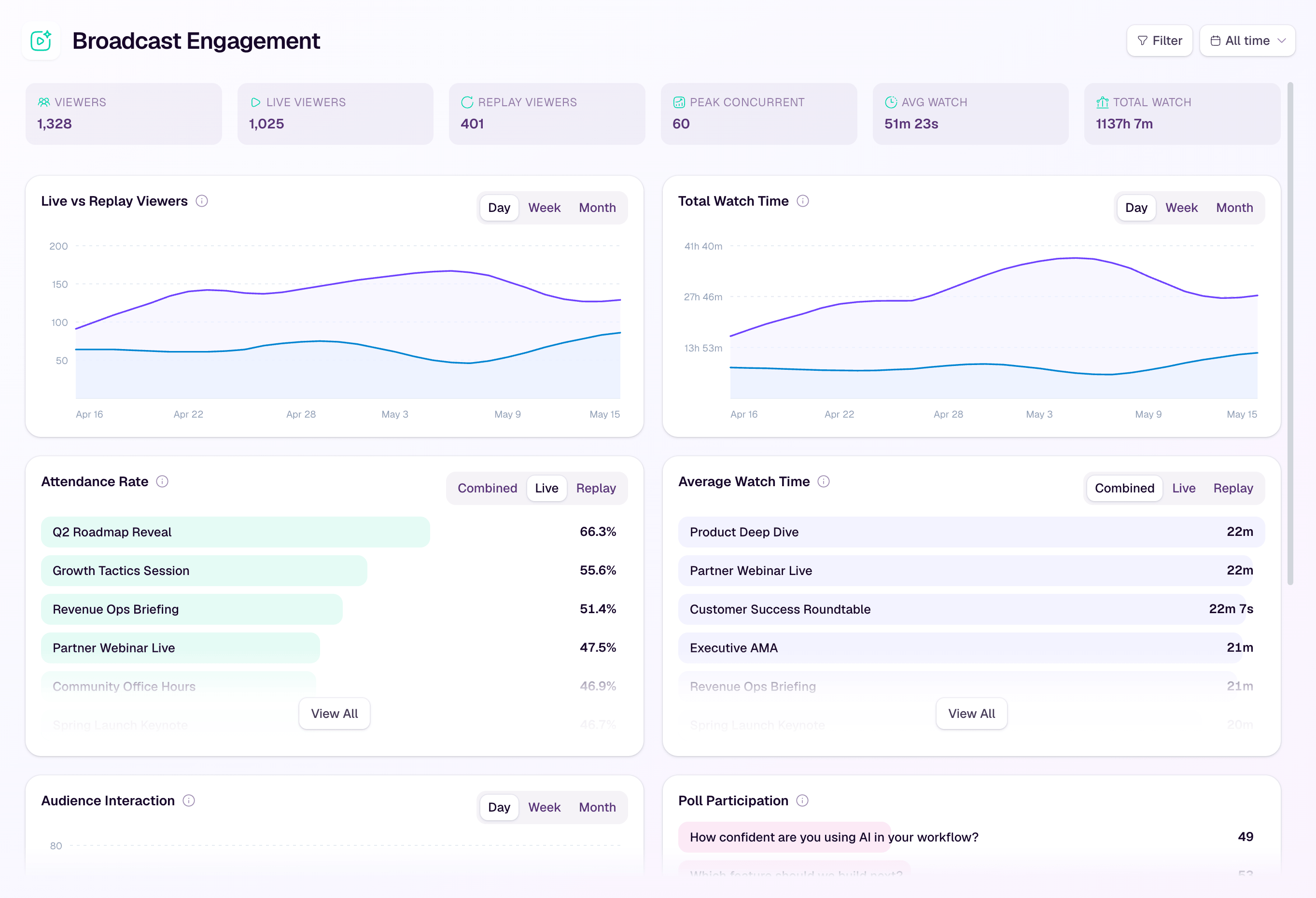
HeyStream's webinar performance insights are designed for this kind of readout: seeing how people registered, watched, engaged, and acted so the team can turn the webinar into a clearer next step. Use the product data as evidence of behavior, then add human judgment before you route follow-up.
How to turn webinar data into follow-up actions
The fastest way to make a report useful is to add a follow-up table. The upstream webinar promotion plan gives the report a channel and audience context to carry forward; it is a planning reference, not a performance benchmark.
Do not stop at "send follow-up email." Decide which people should receive which message, who owns it, and when it should happen.
| Segment | Signal | Follow-up action | Owner |
|---|---|---|---|
| High-engagement attendees | Watched deeply, asked a relevant question, or clicked the main CTA | Send a specific next step tied to the question or CTA | Sales or demand gen |
| CTA clickers | Clicked demo, checklist, pricing, trial, or resource offer | Follow up with the promised resource and one contextual next step | Marketing or sales |
| Replay viewers | Watched after the live session or returned to a key section | Send replay-specific follow-up based on the topic watched | Marketing |
| Survey responders | Shared feedback, objections, future topics, or next-step interest | Route answers by owner and add common themes to the report | Webinar owner |
| Low-engagement contacts | Registered but did not attend, or watched briefly | Send a lighter recap, future invite, or educational resource | Marketing |
| Product-specific question askers | Asked about workflow, integration, pricing, or implementation | Reply with the exact answer and account context | Sales or product marketing |
This is where audience intelligence becomes more useful than a static attendee list. The report should help your team understand what each person did before, during, and after the session so follow-up can match the behavior.
If email is the main next step, pair the report with practical webinar follow-up email templates. The copy should reflect the segment. A person who watched the full replay and clicked a demo CTA should not receive the same generic recap as someone who registered and missed everything.
Use survey feedback without overreading it
Post-webinar survey answers belong in the report, but they should sit beside behavior data instead of replacing it. A positive rating does not prove buying intent. A negative comment may reveal a fixable targeting issue. A future-topic request can be more useful for content planning than for sales qualification.
HeyStream's post-webinar survey questions give teams a compact question set for usefulness, relevance, unanswered questions, missing information, future topics, and preferred next steps. Add the themes to the report in plain language:
| Survey theme | Example report note | Action |
|---|---|---|
| Topic was useful but too advanced | Several attendees wanted more implementation detail | Create a beginner resource or practical checklist |
| Strong interest in a specific workflow | Multiple questions mentioned CRM handoff | Add a follow-up resource or product demo angle |
| Missing context | Attendees expected examples by company size | Add segment-specific examples next time |
| Clear next-step request | Several people asked for the template or replay | Send the promised asset and track follow-up |
| Future topic demand | Repeated requests for reporting, ROI, or integrations | Add to the webinar calendar backlog |
For CRM handoff examples, only link to a specific integration when the article actually discusses that workflow. If your team routes webinar signals into HubSpot, the HubSpot webinar integration article is the better next step than a broad analytics link.
Webinar report vs webinar debrief
A webinar report and a webinar debrief are related, but they are not the same job.
| Document | Primary audience | Main job | Best timing |
|---|---|---|---|
| Webinar performance report | Stakeholders, marketing, sales, leadership | Summarize outcomes, interpretation, and follow-up actions | Within a few business days |
| Webinar debrief | Webinar team and collaborators | Learn what worked, what did not, and what to improve | Within 24 to 48 hours |
| Meeting notes | People in the debrief discussion | Capture decisions and action items from the conversation | During or immediately after the meeting |
Guidebook describes an event debrief template as a structured way to capture feedback, lessons learned, and actionable improvements after an event. Goldcast's event debrief template also shows how a post-event review can cover goals, business impact, content, technology, audience feedback, and action items.
For B2B webinars, use the report to package the outcome and the debrief to improve the operating system. The report might say that replay viewers engaged heavily with the product workflow section. The debrief should ask why that section worked, whether the next webinar should lead with it earlier, and what assets the team should prepare before the next session.
Common reporting mistakes to avoid
The most common webinar reporting mistakes come from trying to make the numbers sound more certain than they are.
Avoid these traps:
Treating attendance as the main success story when the goal was qualified follow-up.
Reporting CTA clicks without explaining what the CTA offered.
Using benchmark numbers without a credible primary source.
Presenting replay views as an afterthought.
Combining every registrant into one follow-up segment.
Calling a question, poll response, or CTA click "buyer intent" without context.
Leaving owners and deadlines out of the report.
Reporting ROI or pipeline influence without matching CRM evidence and attribution caveats.
If you need to talk about ROI, keep it precise. A webinar can contribute to pipeline, educate active opportunities, create useful sales context, and reveal demand for future content. But the report should not imply that attendance, engagement, or one CTA click proves revenue on its own.
Example B2B webinar report structure
Here is a lightweight example for the tone and level of detail to aim for. The numbers are placeholders; replace them with your own data and avoid inventing benchmark comparisons.
| Report item | Example wording |
|---|---|
| Goal | Help demand gen teams understand how to turn webinar engagement into follow-up segments. |
| Audience fit | Registrants mostly matched the intended audience: demand gen, marketing ops, and product marketing. |
| Strongest signal | The highest-quality engagement came from questions about CRM routing and replay follow-up. |
| Weakest signal | Several viewers dropped before the CTA, so the CTA may have appeared too late. |
| Follow-up plan | Send CTA clickers the checklist, send question askers a specific answer, and send no-shows a replay with a shorter summary. |
| Sales handoff | Route accounts with product-specific questions and CTA clicks to sales with the question, CTA, and watch context. |
| Next webinar change | Move the CRM handoff example earlier and add a short walkthrough of replay follow-up. |
This is the shape of a useful webinar performance report: short enough to read, specific enough to act on, and careful enough not to turn every metric into a claim it cannot support.
Final takeaway
A webinar performance report is a decision document. It should show what happened, explain what the data can and cannot tell you, and make the next action obvious.
Start with the template. Add the metrics that change follow-up. Keep survey answers and behavior data together. Use the debrief to improve the next session. And when the data is ambiguous, say so. That honesty makes the report more credible and more useful.


