A HubSpot webinar integration should do more than copy names and email addresses into a CRM.
For B2B teams, the useful question is what sales and marketing should know after someone registers or attends. If that context is missing, HubSpot may show that a contact exists, but the follow-up still feels generic.
The strongest setup starts with the follow-up decision you want to make, then maps only the webinar signals HubSpot needs for that decision. Some data belongs in HubSpot. More detailed viewer context may belong in the webinar platform. Broader event handling may need a webhook or custom workflow. The goal is to help your team act with better context, not to sync everything.
What a HubSpot webinar integration should actually do
A HubSpot webinar integration connects webinar activity to the CRM records and marketing workflows your team already uses. At a basic level, that usually means creating or updating contacts, syncing selected registration fields, and recording whether someone registered or attended.
That basic sync matters. HubSpot's current Zoom integration guide documents registration and attendance sync, contact matching, lists, and follow-up workflows for that specific app. HubSpot also has a dedicated Webinars Apps marketplace, which reflects how often buyers compare webinar tools by their HubSpot compatibility.
But contact sync is not the same as useful follow-up intelligence. A broader webinar CRM integration plan helps teams decide which data belongs in the CRM, which fields will drive action, and which provider-specific details need separate testing.
If all HubSpot receives is that someone registered, your team still has to answer practical questions:
- Did they attend live?
- Which broadcast or topic did they register for?
- Did they share a role, company, use case, or priority during registration?
- Is this person a good-fit account, an early researcher, a current customer, or a low-priority contact?
- Does the follow-up belong with sales, marketing, customer success, or a nurture path?
The integration is useful when it helps answer those questions without turning HubSpot into a noisy archive of every possible event.
The webinar signals worth sending to HubSpot
Start with the signals that change what someone should receive next. For most B2B webinar teams, that means a small set of contact, registration, attendance, and context fields.
| Webinar signal | Where it may belong | How it helps follow-up | Watch-out |
|---|---|---|---|
| Email, name, and company | HubSpot contact properties | Creates or updates the contact record | Confirm how the chosen integration matches contacts |
| Broadcast or webinar topic | Contact property, list, campaign context, or note | Shows which problem or use case created the interaction | Do not overwrite useful history without a deliberate rule |
| Registration status | Contact property, list, or workflow trigger | Separates registrants from people who never opted in | Registration alone is a weak intent signal |
| Attendance status | Contact property, list, or workflow trigger | Helps distinguish attendees and no-shows | Attendance does not prove sales readiness |
| Selected registration fields | Custom contact properties | Adds role, company size, use case, challenge, or requested next step | Sync only fields your team will use |
| Follow-up request or CTA intent | Property, workflow trigger, or webhook path where supported | Routes people who asked for a next step | Verify that the integration actually writes the signal |
| Replay or deeper engagement data | Webinar platform, webhook path, or selected CRM field where supported | Adds richer context for marketing and sales | Keep detail out of HubSpot unless it changes action |
This is where many teams overbuild. They sync every field because it feels safer, then nobody trusts the record because it is noisy. A better first version is small. Send enough data to identify registrants and attendees, preserve the topic context, and route clear next steps.
Native sync vs webhook automation
Native CRM sync and webhook automation solve different problems.
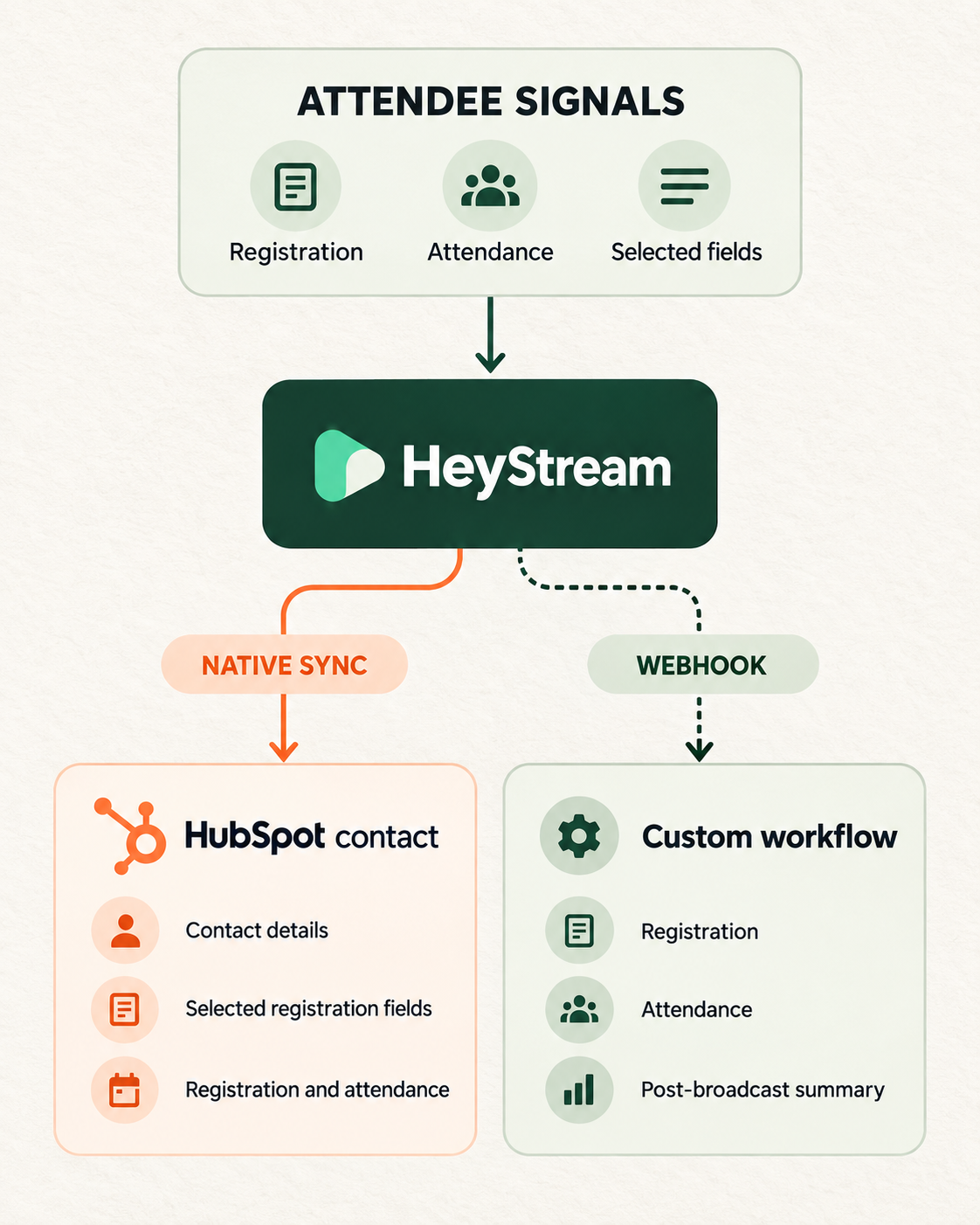
Native HubSpot sync is best for the supported CRM layer, such as contacts, selected registration fields, and registered or attended events. It keeps the people and fields your team needs in HubSpot without requiring a custom integration.
Webhook automation is the better path when you need a broader event payload or a custom workflow. A webhook can send registration, attendance, or post-broadcast summary events to an endpoint your team controls. Another system can then route, transform, enrich, or combine the data.
| Need | Best path |
|---|---|
| Create or update HubSpot contacts | Native HubSpot sync |
| Send selected registration answers to contact properties | Native HubSpot sync |
| Use supported registration and attendance events | Native HubSpot sync |
| Send registration or attendance events to another system | Webhook |
| Send post-broadcast summary data to a custom workflow | Webhook |
| Keep detailed viewer-level context available for review | Webinar platform or audience intelligence layer |
| Build custom routing across multiple tools | Webhook or integration middleware |
HeyStream follows that boundary. The HeyStream HubSpot integration syncs contacts and selected registration fields and supports registered and attended contact events. For broader outbound event delivery, HeyStream webhooks can send registration, attendance, and post-broadcast summary events to an HTTPS endpoint.
HubSpot's own app behavior also varies by provider. Its Zoom guide covers Zoom-specific contact matching, registration, attendance, recordings, permissions, and marketing-event settings. Its current Microsoft Teams webinar guide documents Teams-specific registration, attendance, marketing-event, history, and workflow behavior. Neither guide describes a universal capability shared by every HubSpot webinar integration.
What to check before choosing a HubSpot webinar integration
Use a short evaluation checklist before you connect a webinar tool to a live HubSpot account:
- Authentication: Does the integration use OAuth or another method, and which permissions will it request?
- Destination and fields: Does it write to contacts, marketing events, custom objects, or another record type? Which standard and custom fields can it update?
- Event coverage: Does it handle registration and attendance, and are those events written in a form your lists or workflows can use?
- Timing and history: Is sync immediate or delayed? Can it backfill past events? What happens when a contact already exists?
- Failure visibility: Can an operator see failed syncs, missing permissions, or rejected fields and test the connection before a live webinar?
- Direction: Is the integration one-way or two-way? Do not assume registration can flow back into the webinar tool.
- Webhook boundary: Which events need a webhook, connector, or custom service because the native integration does not support them?
Write the expected answer for each item before implementation. If the provider does not document timing, backfill, duplicate handling, error behavior, or sync direction, treat it as an open test rather than filling the gap with an assumption.
How to map webinar data for sales and marketing follow-up
A useful mapping model combines fit, behavior, recency, and context.
Fit tells you whether the person or account matters to your business. Behavior tells you what they did around the webinar. Recency tells you how fresh that behavior is. Context tells you what the session was about and which next step would make sense.
HubSpot's lead scoring documentation explains that scores can use record properties and actions, and that score properties can feed segments, workflows, or reports. The same principle applies to webinar follow-up. Webinar behavior is more useful when it is combined with who the person is, not treated as a standalone buying signal. A practical webinar lead scoring model can help you weight fit, attendance, recency, and stronger next-step signals without pretending that one action proves intent.
| Segment | Signals | Suggested follow-up | Confidence |
|---|---|---|---|
| High-fit attendee | Good-fit company or role, attended live, relevant topic | Sales or founder follow-up with topic-specific context | Higher |
| High-fit no-show | Good-fit company or role, registered but missed | Replay email with one useful timestamp or takeaway | Medium |
| Asked for a next step | Explicit follow-up request or another supported strong signal | Route to sales with the exact context | Higher, but still review |
| Engaged but early | Attended or replayed a broad educational session where replay is available | Nurture path, related resource, or future webinar invite | Medium |
| Low-fit registrant | Weak fit, broad topic, no strong behavior | Keep in marketing nurture or suppress from sales routing | Lower |
This keeps the handoff human. Sales does not need a raw export of every webinar event. They need to know why this person may be worth attention, what happened, and which message would be relevant.
What HeyStream supports today
HeyStream's native HubSpot integration has a focused CRM scope:
- Sync contacts into HubSpot.
- Send selected registration fields as contact properties.
- Support registered and attended contact events.
- Connect through HubSpot OAuth with contact and contact-property read and write access.
To set it up, open Integrations in your HeyStream workspace settings, choose HubSpot, and authorize HeyStream. Sign in to HubSpot and approve access to contacts and contact properties. Back in HeyStream, select the registration fields you want to sync, save the integration, and run a test before the next broadcast.
That sequence replaces the old private-app-token setup. Do not keep an access token as a fallback. The current connection flow is OAuth.
The native integration does not claim to write every question, reaction, CTA click, replay action, attribution field, score, list membership, or HubSpot marketing-event record. It also does not promise two-way sync, historical backfill, reverse registration, duplicate behavior, or retry semantics. Test any of those requirements against the current product before you rely on them.
For broader automation, HeyStream webhooks can send registration, attendance, and post-broadcast summary events. That path is useful when HeyStream activity must update another internal system, trigger a connector workflow, or pass summary data into a custom process.
For viewer-level context, use audience intelligence to review behavior before deciding what belongs in HubSpot. Not every signal needs to become a CRM field. Often the cleaner workflow is to keep detail in HeyStream, sync the few fields that affect routing, and give sales a concise handoff.
Common mistakes to avoid
The first mistake is syncing too much data. If every answer, field, replay action, and internal note becomes a HubSpot property, the record becomes harder to use. Start with the fields that change a follow-up decision.
The second mistake is treating attendance as intent. Attendance is useful, but it is only one behavior. A high-fit attendee who explicitly requests a next step deserves different follow-up from a low-fit attendee who watches a broad educational session.
The third mistake is assuming every provider behaves the same way. Zoom and Microsoft Teams have their own HubSpot permissions, objects, sync settings, and history rules. HeyStream has a narrower native contact-sync boundary and a webhook path for custom event handling.
The fourth mistake is hiding context in places sales will not read. If a field matters, make it visible in the contact view, list, workflow, or handoff note your team already uses.
The fifth mistake is expecting HubSpot to solve the follow-up strategy automatically. HubSpot can store properties, power lists, run workflows, and support scoring logic. Your team still has to decide which supported signals mean "send replay," "invite to the next session," "ask a light discovery question," or "route to sales."
A simple first setup for B2B teams
You do not need a complex integration map to get started. A practical first version might include:
- Connect HubSpot through HeyStream's OAuth flow and review the requested contact permissions.
- Sync new registrants into HubSpot contacts.
- Sync the webinar topic or broadcast name only if your chosen field mapping supports it and your team will use it.
- Sync registration and attendance status.
- Select two or three registration fields, such as role, company size, primary challenge, or requested next step.
- Create segments for attendees, registered no-shows, and explicit follow-up requests using data the integration actually writes.
- Define one follow-up action for each segment, then use webinar follow-up automation where the supported signals match the workflow.
- Keep richer viewer behavior in HeyStream unless it changes routing.
- Test one registration and one attendance path before your next broadcast.
That setup gives marketing and sales enough context to act without overengineering the CRM.
As the program matures, you can add more nuance, such as a custom field for content theme, a workflow for high-fit attendees, a webhook route for internal operations, or a score that combines fit and behavior. Add each layer only after the earlier data is reliable and the team uses it.
The takeaway
A HubSpot webinar integration is most useful when it turns supported webinar activity into clearer follow-up decisions.
Do not start by asking how much data you can sync. Start by asking what your team needs to know after the webinar, which fields the integration can reliably write, and whether the remaining detail belongs in HubSpot, HeyStream, or a custom workflow.
That is the difference between a contact sync and a maintainable signal-to-follow-up system.


