Most webinar follow-up breaks because every registrant gets the same message.
The live attendees get a replay link. The people who missed it get the same replay link. The person who clicked a product CTA gets the same replay link. The person who asked a detailed question gets the same replay link.
That is easy to send, but it wastes the context your webinar already created. A good webinar follow up email should reflect the person's relationship to the session, share the right takeaway, and offer one next step that matches what they actually did.
This guide gives you copyable webinar follow-up email templates for B2B teams, with examples for live attendees, no-shows, replay viewers, CTA clickers, question askers, and people who should stay in nurture instead of being pushed toward sales too quickly.
What a good webinar follow-up email should do
A webinar follow-up email is the message you send after someone registers for, attends, misses, or watches the replay of a webinar. Its job is not only to say thanks or send the recording. Its job is to turn the viewer's context into one useful next step.
For a live attendee, that might mean a concise recap and the resource promised during the session. For a no-show, it might mean a replay link with the most relevant section called out. For someone who clicked a CTA, it might mean following up on the offer they chose rather than pretending they asked for a sales call.
The broader strategy still matters. If you need the operating principles behind timing, segmentation, and post-event workflows, start with these webinar follow-up best practices. This article is the practical companion: templates you can adapt by segment.
The reason segmentation matters is simple. Webinar programs create several audience states across registration, attendance, and replay. The 2026 Goldcast benchmark report covers 26,190 webinars hosted on Goldcast by 522 B2B organizations in 2025. That platform-specific dataset is not a universal benchmark, but its scale shows why post-webinar follow-up needs more than one generic message.
Start with the segment before the template
Before choosing a template, decide which audience segment you are writing to.
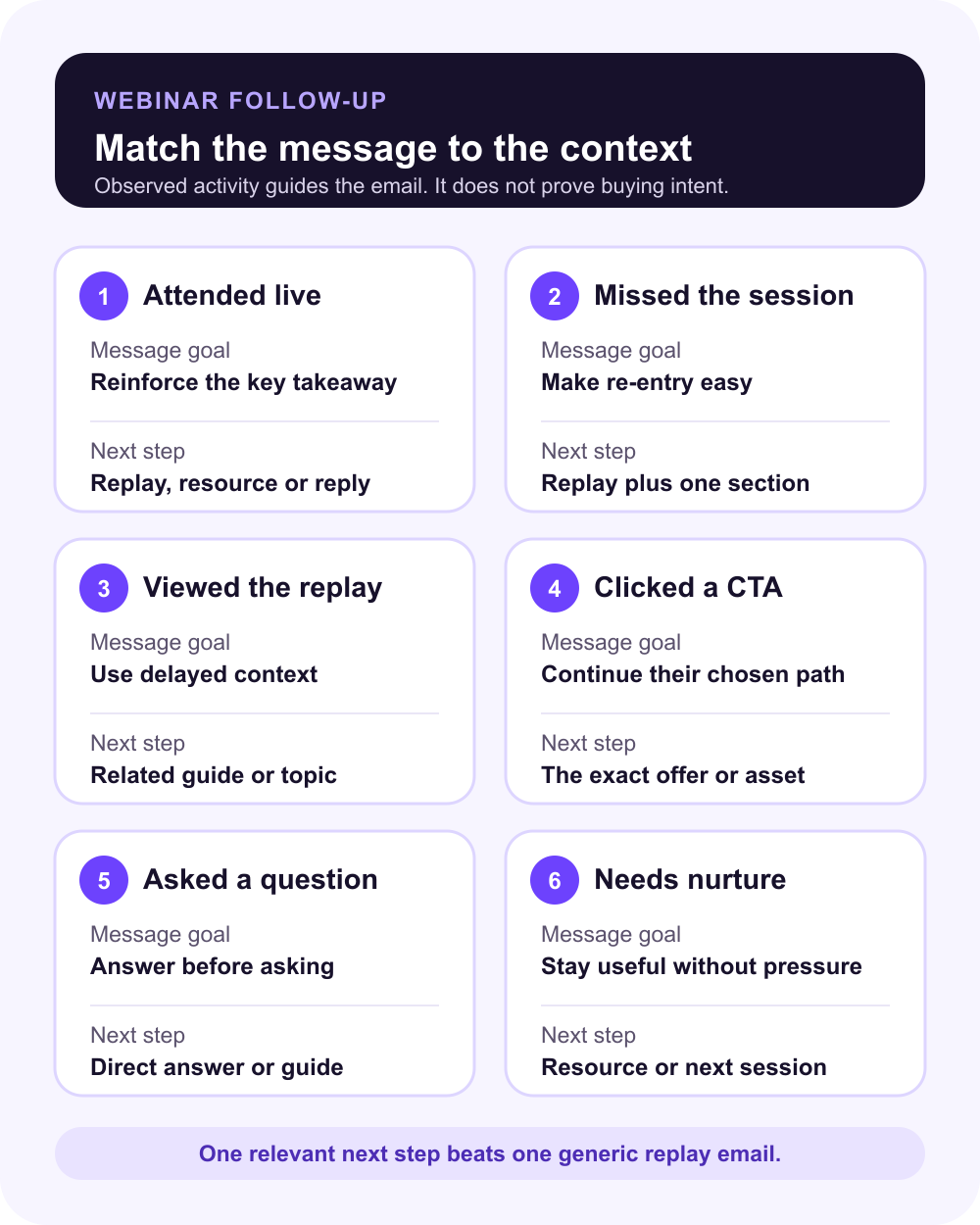
The strongest webinar follow-up emails use behavior as context, not as a shortcut to qualification. Attendance, replay views, CTA clicks, and questions can help you write a more relevant message. They do not prove that someone is ready to buy.
Use this matrix before you write:
| Segment | Signal | Message goal | Useful CTA | Template |
|---|---|---|---|---|
| Attended live | Joined the session or interacted live | Reinforce the main takeaway | Promised resource, recap, reply prompt, or next webinar | Use template 1 |
| Registered but missed it | Registered but did not attend live | Recover interest without guilt | Replay plus one specific section | Use template 2 |
| Watched the replay | Viewed the recording after the live session | Use delayed engagement as context | Related takeaway or resource | Use template 3 |
| Clicked a CTA | Selected an offer, booking link, checklist, trial, or product step | Continue the action they chose | Exact asset or next step behind the CTA | Use template 4 |
| Asked a question | Submitted a Q&A, chat, poll, or reply-worthy question | Answer the actual question | Direct reply, deeper guide, or relevant handoff | Use template 5 |
| Engaged but not sales-ready | Watched, clicked, or returned without enough fit or context | Nurture without forcing a meeting | Practical resource or related session | Use template 6 |
| Low-fit registrant | Registered or attended but does not match the current ICP | Keep the experience useful | Replay, resource, or newsletter path | Use template 6 |
Use webinar engagement metrics to define attendance, replay, CTA, and question activity consistently. The signals make the message more relevant, but none proves that someone is ready to buy.
This fits a broader CRM pattern. HubSpot's lead scoring guide separates engagement, fit, and combined scores. For webinar follow-up, you can use the same distinction without turning the process into a full scoring project.
For webinar follow-up, the practical version is lighter than a full scoring model: use fit, behavior, recency, and context before deciding the message.
A simple webinar follow-up sequence
There is no universal best webinar follow-up sequence. The right cadence depends on the topic, audience, offer, sales cycle, and how your registrants engaged.
Still, most B2B teams can start with a simple three-touch sequence:
| Timing | Audience | Message purpose | Trigger or context | Example next step | |
|---|---|---|---|---|---|
| 1 | Same day or next business day | All major segments, adapted by behavior | Deliver the replay, recap, or promised resource | Attended, missed, watched replay, clicked CTA, asked question | Watch replay, read recap, download resource, answer a question |
| 2 | 2-3 days later | Engaged attendees, replay viewers, question askers, CTA clickers | Add value based on the topic or behavior | Watched, clicked, asked, returned, or matched ICP | Send a related guide, checklist, answer, or useful comparison |
| 3 | Later that week | High-fit/high-context contacts or nurture segment | Offer the appropriate next step | Strong fit plus relevant action, or lower-intent nurture need | Book a walkthrough, try the product, join the next session, or keep learning |
The point is not to send three emails to everyone. The point is to decide what each person needs next.
That is where audience intelligence, webinar analytics, and behavior-based follow-up become useful. They help you avoid treating a no-show, replay viewer, and CTA clicker as if they all gave you the same signal.
Use this summary to choose a starting point, then adapt the detailed template below it:
| Segment | Subject-line pattern | First sentence | Primary CTA |
|---|---|---|---|
| Attended live | Thanks plus the topic | Thanks for joining today's session on [topic]. | Replay, promised resource, or reply |
| Registered but missed it | Replay plus a useful section | Sorry we missed you live today. | Replay with a starting point |
| Watched the replay | Next step from the replay | Here is a useful next step from [topic]. | Related resource or topic |
| Clicked a CTA | Follow-up on the chosen offer | Thanks for checking out [offer] during [topic]. | The exact asset or action |
| Asked a question | Their question or Q&A topic | Thanks for your question during [topic]. | Direct answer, then a relevant guide |
| Needs nurture | More help with the topic | Thanks for spending time with [topic]. | Useful resource or next session |
Template 1: attended live
Use this when someone joined the live webinar and you want to reinforce the main takeaway without jumping straight to a hard sales ask.
Subject options
- Thanks for joining: [webinar topic]
- The key takeaway from today's session
- Replay and resources from [webinar topic]
Template
Hi [first name],
Thanks for joining today's session on [webinar topic].
The main takeaway was this: [one-sentence takeaway tied to the session]. If you want to revisit it, here is the replay: [replay link].
I also wanted to share [resource, checklist, slide, example, or related guide] because it connects directly to the part of the session about [specific theme].
If [problem or workflow] is something your team is actively working on, happy to point you toward the most useful next step.
[sender name]
When to adapt it
If the attendee was passive, keep the CTA light. If they stayed through a product-relevant section, clicked a relevant CTA, or asked a buying-stage question, make the next step more specific.
Template 2: registered but missed it
No-shows are not failures. They are people who raised their hand once and may still need a better entry point.
Subject options
- We saved the replay for you
- The recording from [webinar topic]
- Missed it live? Start with this section
Template
Hi [first name],
Sorry we missed you live today.
Here is the replay from [webinar topic]: [replay link].
If you only have a few minutes, start with the section on [specific takeaway or timestamp]. It covers [practical outcome] and should help if your team is thinking about [problem].
We also shared [resource or checklist] during the session, which you can find here: [resource link].
Hope it is useful,
[sender name]
When to adapt it
For no-shows, avoid guilt and avoid pretending they attended. Give them the fastest useful way back into the content.
Template 3: watched the replay
Replay viewers can be easy to miss because they engage after the live moment. Treat replay activity as delayed context, not second-class attention.
Subject options
- A useful next step from the replay
- Saw you checked out [webinar topic]
- More on the replay section about [theme]
Template
Hi [first name],
I saw you checked out the replay for [webinar topic].
One section that tends to be especially useful is [timestamp or section], where we covered [specific takeaway]. If that is the part you were looking for, this related resource may help: [resource link].
If you are comparing ways to handle [workflow or problem], the simplest next step is to map [signal, step, or decision] before choosing the follow-up path.
Happy to send a more specific example if useful.
[sender name]
When to adapt it
Use replay behavior to make the message more relevant, but do not imply you know the person's intent. "I saw you watched the replay" can feel heavy if overused. When in doubt, reference the topic rather than the surveillance.
For replay-heavy programs, connect this template to a broader B2B webinar growth engine, where live attendance, replay viewing, CTAs, follow-up, and learning all feed the next session.
Template 4: clicked a CTA
A CTA click deserves a more precise follow-up than a generic replay email.
The important move is to follow up on the action they selected. If they clicked a checklist, send the checklist. If they clicked a booking link but did not book, offer the booking path again. If they clicked a product CTA, connect the message to that exact product workflow.
Subject options
- Following up on [CTA or resource]
- The [resource] from today's webinar
- Want the next step from [webinar topic]?
Template
Hi [first name],
Thanks for checking out [CTA, offer, or resource] during [webinar topic].
Here is the link again in case it is useful: [CTA link].
The reason we included it is that [brief explanation of how the CTA connects to the webinar problem]. For teams working on [workflow], it can help clarify [specific outcome or decision].
If you want to go one step deeper, the next useful move is [booking a walkthrough, reading a guide, trying the checklist, comparing options, or replying with context].
[sender name]
When to adapt it
Match the ask to the CTA. A product-demo CTA can justify a stronger next step than a broad educational download. A checklist click should usually lead to the checklist, not an immediate meeting push.
This is where live and replay CTAs are useful: they make the next step explicit during the session, so the follow-up can continue the path the viewer already chose.
Before prioritizing a contact for sales, ask a human owner to review the CTA or question alongside fit and account context. This webinar sales handoff keeps one action from being mistaken for purchase intent.
Template 5: asked a question or joined Q&A
Questions are some of the richest webinar follow-up signals because they tell you what the person was actually trying to understand.
The mistake is to ignore the question and send the same recap as everyone else.
Subject options
- Your question from [webinar topic]
- A quick answer on [question theme]
- Following up on the Q&A
Template
Hi [first name],
Thanks for your question during [webinar topic].
You asked about [short version of question]. The short answer is: [direct answer in one or two sentences].
A useful way to think about it is [practical framing, tradeoff, or example]. If helpful, this resource goes deeper: [resource link].
If this is connected to something your team is actively deciding, I am happy to help you think through the next step.
[sender name]
When to adapt it
If the question is educational, answer it and nurture. If it is about implementation, pricing, integrations, security, evaluation, or internal rollout, route it with more context. The key is to answer before asking.
Template 6: engaged but not sales-ready
Some contacts are engaged, but a meeting ask would still be too much.
They might be early-stage, low-fit, outside the buying committee, researching for later, or interested in the topic rather than the product. That does not make them worthless. It means the follow-up should be useful rather than forceful.
Subject options
- More resources on [webinar topic]
- A practical next step from [webinar topic]
- If your team is exploring [problem]
Template
Hi [first name],
Thanks for spending time with [webinar topic].
If you are still exploring [problem], this resource is probably the best next step: [resource link].
It covers [specific point] and should help you decide whether [workflow, channel, or approach] is worth prioritizing now or later.
We will also be covering related topics in future sessions, so I can send the next one over when it is live.
[sender name]
When to adapt it
Use this when engagement is real but the next step is not obvious. A softer nurture path is often stronger than asking every viewer to book time.
How to personalize without overcomplicating the workflow
Personalization does not mean writing a completely different email for every registrant.
It means using a few reliable fields to make the message feel connected to the session:
- first name
- webinar topic
- segment
- attended, missed, or watched replay
- key takeaway
- CTA clicked
- question asked
- replay section or timestamp
- role, company, or account fit
Before automating the handoff, map the minimum fields in your webinar CRM integration: registration or attendance state, replay activity, CTA or question context, fit, owner, and next action. That gives each message enough context while keeping ownership explicit.
The best version is specific without being noisy. "The section on replay CTAs may be useful based on the question you asked" is helpful. "I noticed you watched 17 minutes and clicked twice" can feel awkward.
Use enough context to make the message useful. Leave out details that make the follow-up feel automated, intrusive, or overconfident.
Where HeyStream fits
HeyStream is built around the idea that the live session is not the finish line.
Teams can run branded broadcasts, capture audience behavior, use CTAs during live and replay viewing, review engagement signals, and connect those signals to follow-up workflows. That makes it easier to move from one generic replay blast to a segmented post-webinar workflow.
The product does not magically decide who is ready to buy. It helps teams see what happened and act with better context.
That is the real job of a strong webinar follow up email. It should not overread one signal or push every person toward the same CTA. It should use the context your webinar created to send a message that feels timely, useful, and proportionate.


