If webinar registration spam is suspected, start by identifying the affected session, signup route and time window. Preserve the original count, review the available evidence, then ask each system owner to check access, messages and CRM effects before choosing a supported action. A sudden surge can also come from a legitimate campaign.
This guide gives you two review tables, a downstream checklist and a copyable incident worksheet. The aim is to reach a defensible decision while keeping legitimate attendees able to join and the event report honest.
Is this registration spam or an unexplained signup pattern?
For an organizer, webinar registration spam means unwanted or invalid submissions entering an event's registration process. At the start of a review, you may only have an unexplained pattern. Keep the observation separate from the finding.
Suspected automated submissions, deliberate human junk, duplicate records and disclosed internal tests need different explanations. Legitimate people can appear unusual too. Some cases will remain unresolved after you have checked everything available.
Before treating a surge as an incident, ask the campaign owner whether a partner sent a promotion, an import ran, a scheduled email went out or an existing audience returned. A plausible campaign explanation still needs checking against the affected session and time window.
Real registration floods do happen. Cornell's closed service alert records a registration flood beginning September 25, 2026, with resolution recorded October 7. That is a historical local notice. It does not establish how common the problem is, whether your event is affected or which mitigation fits your account.
An unwanted invitation in an attendee's inbox, a suspected phishing message and an in-session transcription bot are different problems. Route those to the relevant email, security or event owner rather than diagnosing them from the registration total.
Record what changed and where it entered
Write down the exact event and session, the time window with its timezone, and the signup route. A hosted page, an embedded widget and an external form may have different owners and controls. Include an API or import route only if it is actually supported and involved in your setup.
Record a before-and-after count using the same counting unit. Then review what you can actually see, such as registration times, answers, existing contact history and recorded campaign tags. A UTM tag is a label, not authenticated proof of origin. Missing attribution is not evidence of abuse.
| Observed pattern | Useful next check | What it cannot prove | Next owner |
|---|---|---|---|
| Sudden signup surge | Match the session and time to promotions or imports | Automation or malicious intent | Campaign and registration owners |
| Repeated or implausible answers | Review records and available context individually | That every similar answer is invalid | Registration reviewer |
| Duplicate or test records | Confirm counting rules and disclosed tests | That the person intended abuse | Event operations |
| Missing confirmation | Check eligibility, timing and sending evidence | That registration failed or was fake | Lifecycle email owner |
| Restriction complaint | Check the applied rule and actual access state | That the excluded person is abusive | Access or support owner |
| Unexpected CRM record | Inspect the receiving system's mapping and history | That an attendee can enter the event | CRM owner |
Use this table to choose the next check, rather than to assign a fraud score. An individual record and a cohort pattern are different kinds of evidence. A personal mailbox, unfamiliar name, country, shared network, no-show or low engagement is not enough on its own to establish abuse.
Keep the incident review separate from normal form improvements. The webinar registration page checklist covers the wider signup journey, including fields and consent.
Check what each control actually establishes
A control can answer one question while leaving several others open. First establish which control applies to the registration route you are reviewing and when it takes effect.
Cloudflare describes Turnstile as using browser challenges to distinguish human visitors from automated traffic. That purpose is different from proving mailbox ownership or marketing permission. Passing a challenge does not establish a person's employer or buying intent.
eWebinar's registration guidance separates its automatic reCAPTCHA checks from email access controls. It also illustrates why the absence of a visible challenge does not establish the absence of bot checks. These are provider-specific examples, not instructions for enabling equivalent settings in every platform.
| Control | Question it addresses | What remains unproven |
|---|---|---|
| Bot challenge | Does this interaction pass the provider's automated-traffic check? | Identity, mailbox ownership, consent and fit |
| Address or domain rule | Does the submitted address meet an acceptance rule? | Whether accepted people are genuine or excluded people are abusive |
| Mailbox confirmation, when offered | Can someone complete the mailbox check at that step? | Claimed employer, marketing permission and buying intent |
| Registration approval or access rule | Does this person meet the event's access policy? | Whether a record or notification already exists |
| CRM acceptance | What will the receiving system accept or change? | Attendee access or reversal of earlier actions |
Wistia's audience documentation explains that a domain-restricted person can still appear in its registration table while being ineligible for reminder emails and event access. Its documentation also says restricted access does not work when a marketing automation form is enabled. Both details matter when reviewing that provider's setup. Do not assume the same behavior in HeyStream or another platform.
Before changing a setting, ask the account or platform owner to confirm the supported action, the affected route and the consequences. A restriction is an event-policy decision. It does not establish consent or prove that an excluded person submitted spam.
Trace the affected records before containing the problem
Review each relevant system separately. A registration row is only one part of the record.
- Registration record. Is it present, changed or removed? Which session does it belong to?
- Event access. What access state is supported by the evidence? Has anyone verified the actual outcome?
- Messages. Are confirmations or reminders sent, pending, ineligible or unknown? Check the sending system's own evidence.
- CRM. Was a contact created or updated? Did the receiving system add a task, list membership or tag?
- Workflows. Which actions have already happened, and which are still pending?
- Reporting. Which counts include the affected records, and what counting unit does each total use?
Record "unknown" when history is unavailable. Removing a registration does not demonstrate that a contact, task, list membership or queued email was reversed. Each downstream owner needs to verify their own system. The webinar CRM integration guide explains the normal mapping and destination-ownership questions.
Choose the smallest supported, authorized change that addresses the confirmed issue. Record its scope, owner, start time and review condition before acting. If an existing process allows the sales-handoff owner to hold a suspect cohort for review, document that decision and its limits. Do not assume your setup supports cohort suppression or that a hold cancels messages already queued elsewhere.
A broader automation pause can affect legitimate people. The automation owner should review those consequences explicitly. If the available controls or history cannot establish a safe action, preserve the evidence and use the provider's known support route. An evidence gap is a reason to assign the next check.
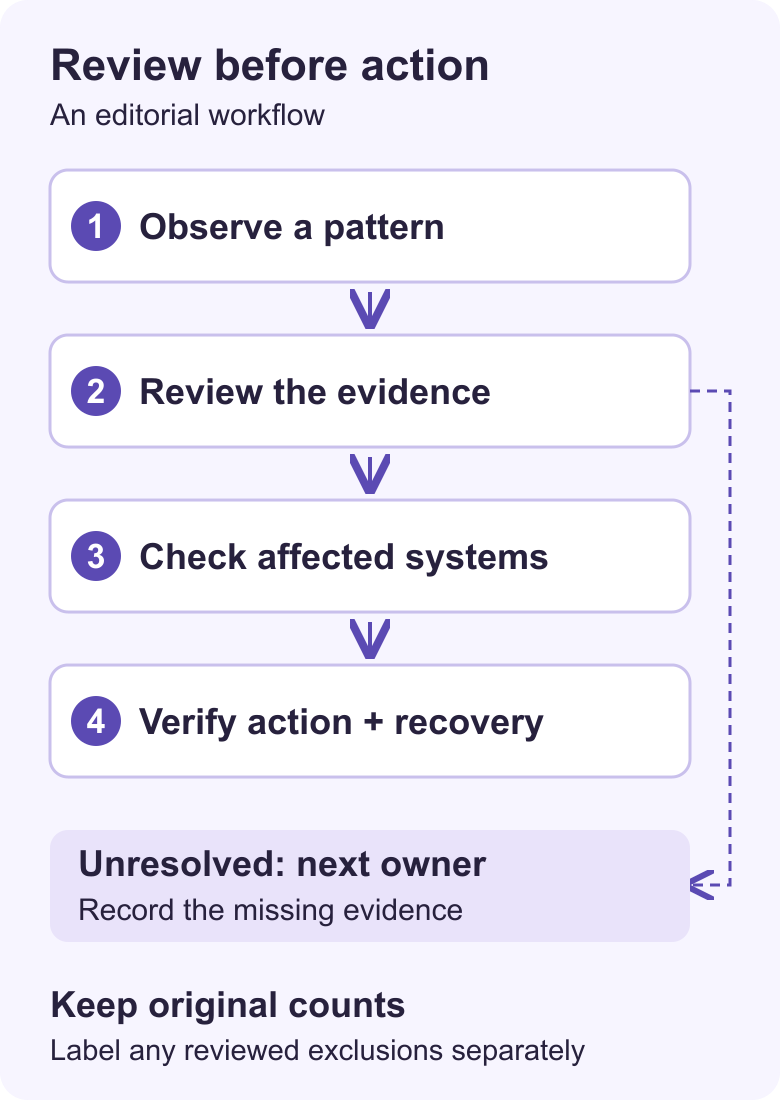
This editorial workflow shows the review sequence. It is not a HeyStream spam-detection screen. Unresolved findings keep a named owner, and reporting keeps the original counts.
Protect the legitimate attendee's route back in
An excluded attendee needs a supported route to recovery. Through your established private support channel, verify the correct session and relevant context, then review the original reason for the restriction with its owner.
Ask the authorized owner to use the provider's supported recovery action. Check actual event access and any pending message state afterward. Keep optional marketing preferences separate from event access. Do not ask someone to bypass a challenge, register repeatedly or borrow another person's join link.
If access is valid but a message is missing, troubleshoot webinar emails that do not arrive using eligibility, timing and sending evidence. Recovery of access alone does not prove delivery. When the outcome cannot be verified, leave the case open with a responsible owner and a next check.
Use the registration review worksheet
Copy these fields into your team's controlled incident record. Keep private identifiers there, with access limited to the people who need them. Use synthetic labels when sharing a teaching example.
- Event, session and registration route:
- Review window and timezone:
- Observed symptom and original count, with counting unit:
- Available evidence and checks that are unavailable:
- Finding: suspected, confirmed on recorded evidence, not supported or unresolved:
- Affected records or count, with separate reasons:
- Observed registration, access, message, CRM and workflow states:
- Proposed supported action and authorization owner:
- Scope, start time and review time or condition:
- Legitimate-attendee recovery path:
- Actual action taken and timestamp:
- Verified outcome, unresolved questions and remaining owner:
- Original and reviewed reporting treatment, including numerator membership:
The proposed action and actual action are separate fields for a reason. A plan to change access or correct a record is not evidence that the change happened.
Fictional case A: a mixed signup surge
An organizer records 120 unique registrations for one session. In this teaching scenario, the support owner supplies independently checked evidence confirming 8 invalid entries, and the team identifies 2 disclosed internal tests. Those categories do not overlap. Two other people who initially looked suspicious are cleared as legitimate and remain included.
The worksheet keeps the original 120 and records 10 reviewed exclusions with their separate reasons. It does not relabel internal tests as abuse or count the 2 legitimate attendees among the exclusions.
All 44 live attendees are known to belong to the retained set. That makes these two reporting views possible:
- Original denominator: 44 live attendees / 120 unique registrations = 36.7%.
- Reviewed denominator: the same 44 live attendees / 110 retained unique registrations = 40.0%.
Attendance did not improve. The reporting denominator changed after a documented review. Keep both views, the exclusion reasons and the confirmation of numerator membership. If membership or overlap is unknown, do not calculate the reviewed rate.
These fictional numbers are not HeyStream customer data, platform behavior or an abuse benchmark. The scenario supplies the confirmation as a teaching assumption. Repeated answers or other signals alone are not a rule for reaching it.
Fictional case B: a legitimate attendee is restricted
A relevant contractor uses a personal mailbox and is affected by an event access rule. The mailbox alone does not establish abuse.
The organizer verifies the session and context privately, then asks the authorized owner to apply the provider's supported recovery. The review stays open until actual event access and any pending message state have been checked. Optional marketing preferences remain unchanged.
This case does not assume a universal unblock button, a particular support response or guaranteed email delivery. Its lesson is to check the person's circumstances and the real recovery path before closing the review.
What HeyStream can help you review
HeyStream's attendee-response guide shows how to review registration details and answers for a selected broadcast. The documented details include name, email, registration time and attendee status. Those records can provide review context; they are not an automated abuse verdict.
HeyStream's contact-profile guide describes registration and activity history for an individual contact. Use the available history to collect context, without treating a profile as proof of identity, consent or intent.
Identify whether the relevant entry path was a hosted page or an embedded widget. The webinar registration pages overview helps distinguish those signup experiences. For a suspected incident, give the appropriate support owner the event and time references through the established private channel, then ask which controls and evidence apply to that route and account.
This review guidance does not establish native CAPTCHA, approval, quarantine or automatic rollback capabilities in HeyStream. Confirm the supported incident action before changing access or connected systems.
Close the review without hiding the original result
Close with a finding, the supported change actually made, the responsible owner and the verified outcome. Keep unanswered questions visible. An unresolved case can have a clear handoff without a claimed root cause.
Carry the counting unit, original total, reviewed exclusions, eligibility rules and numerator population into the webinar performance report template. Separate tests and duplicates from confirmed abuse. A smaller denominator should never become a claim that more people attended.
Start with one incident record and assign the next check to a named owner. When the evidence or controls are missing, the useful next step is a specific question to the platform or support owner, with the session, time window and known downstream states attached.