Use all-in-one webinar production software when the event is repeatable, marketing-led, and built around standard remote presenters. Add a specialist production stack when you need custom device routing, hardware inputs, advanced scene control, or local recording. Hire managed production when the event is high stakes and your team needs somebody else to own rehearsals, speakers, live operation, troubleshooting, and delivery. Use a hybrid when the webinar platform should own the audience journey but specialist people or tools should own the show.
That is the decision in one paragraph. The rest of this guide helps you define the work, assign ownership, and compare the four routes without getting distracted by the longest feature list.
Quick decision: software, specialist stack, managed service, or hybrid
| Route | Best fit | Internal owner | Production control | Audience workflow | Main trade-off |
|---|---|---|---|---|---|
| All-in-one webinar software | Recurring webinars, demos, panels, workshops, and customer sessions | A named webinar operator, with content, moderation, and follow-up owners | Standard presenter, layout, media, interaction, and recording controls | Usually connected from registration through replay | Simple tool chain, but bounded by the platform and plan |
| Specialist production stack | Multi-camera, hardware-heavy, graphics-heavy, or venue-integrated shows | An experienced technical producer | Fine control over sources, scenes, audio, capture, recording, and output | Often needs a separate webinar or event destination | More flexibility, but more setup and failure recovery to own |
| Managed production service | Executive events, flagship launches, customer conferences, or unfamiliar speaker groups | An internal event lead plus a contracted producer | Defined by the provider's tools and scope | Must be specified in the proposal | Transfers operational work, but only where the scope says it does |
| Hybrid | A standard audience journey with unusual production needs or added delivery risk | One owner for the platform and one for production | Split between the webinar platform and specialist people or tools | Can stay inside the webinar platform | Powerful when boundaries are explicit, fragile when they are not |
The best route is the simplest one that meets your real requirements. Do not buy specialist complexity to make an ordinary panel look impressive. Do not force a high-risk, multi-camera launch through a self-service workflow simply because the software can technically go live.
What webinar production actually includes
Webinar production is not just switching cameras. It is the whole set of jobs required to take a session from plan to replay:
- Define the session promise, content, run of show, and calls to action.
- Prepare speakers, roles, slides, videos, demonstrations, and rehearsals.
- Manage cameras, microphones, screen sharing, scenes, media, and branding.
- Run registration, joining, chat, Q&A, polls, captions, and attendee support.
- Monitor the live session and respond when a source, speaker, or audience path fails.
- Capture the recording, publish the replay, and hand data and follow-up actions to the right team.
No production route removes these jobs. It changes who owns them and which system carries them. This distinction matters because live streaming and webinars solve different jobs. A technically polished feed is not yet a complete webinar operation if registration, audience interaction, replay, and follow-up sit somewhere else.
Accessibility belongs in this definition too. W3C's guidance for making audio and video accessible explains why captions, transcripts, access to visual information, and an accessible media player should be planned from the start. They are not a final polish pass once the show is built.
Route 1: all-in-one webinar production software
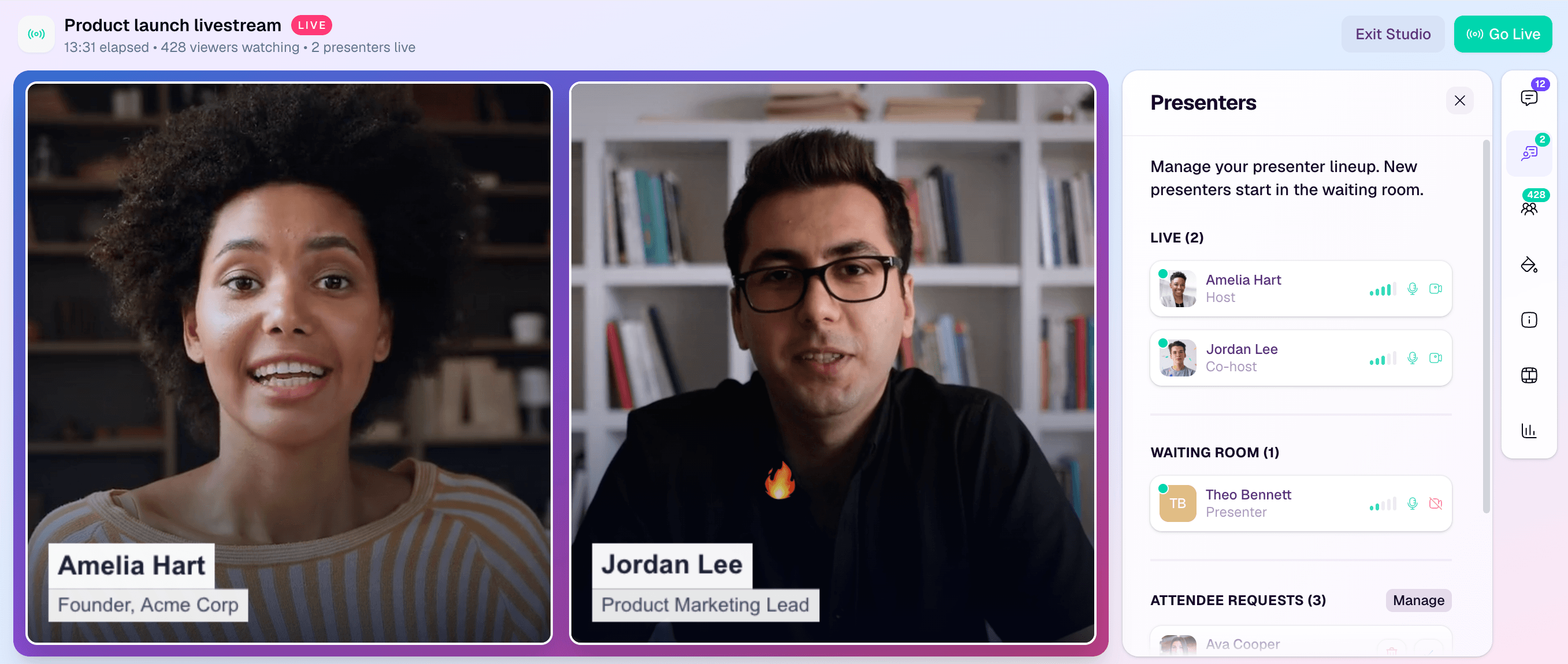
All-in-one webinar software combines the live studio with some or all of the attendee workflow. A team can prepare presenters and layouts, share slides or video, run audience interactions, record the session, and move viewers into a replay without joining several production tools together.
This route is usually the right starting point for recurring B2B webinars, product demonstrations, workshops, panels, customer stories, and marketing launches with remote speakers and standard media inputs. It reduces handoffs and makes a successful format easier to repeat.
The category has become broad. As one current example, Zoom's Webinars & Events page describes branded registration, audience interaction, production layouts, backstage coordination, recording, analytics, and RTMP distribution. Those capabilities vary by platform and plan, so treat the category as a shortlist, not a guarantee.
A browser-based webinar studio can be enough when your requirements are presenters, prepared scenes, screen and media sharing, chat, Q&A, polls, captions, and recording. You still need named owners for content, speaker preparation, audience moderation, technical operation, and follow-up. One person can cover several responsibilities in a simple session, but the responsibilities cannot be left anonymous.
Choose all-in-one software when:
- The production inputs are standard remote cameras, microphones, slides, videos, and screen sharing.
- The team runs a repeatable format and wants fewer tool and data handoffs.
- Registration, the watch experience, audience activity, replay, and follow-up matter alongside the live picture.
- An internal operator can rehearse the workflow and own live decisions.
Look elsewhere when custom device routing, complex venue audio, multiple hardware cameras, advanced switching, specialist local capture, or external show ownership are genuine requirements. If software is the right route, the next step is to set up a branded live stream studio in your browser, not to rebuild the decision framework from scratch.
Route 2: a specialist production stack
A specialist production stack gives a technical operator direct control over sources, scenes, capture devices, audio paths, recording, encoder settings, and outputs. It can include software such as OBS Studio, hardware switchers or capture devices, dedicated audio tools, graphics systems, and local recording workflows.
The OBS Studio Quick Start Guide shows the basic shape of this route: configure output, add sources to scenes, choose audio devices, and test a recording or stream. That extra control is useful when the show depends on multiple cameras, external audio, venue feeds, bespoke graphics, unusual source combinations, or a local master recording.
The trade-off is ownership. Somebody must configure the stack, understand the signal path, monitor it, and recover when a device or source fails. The webinar destination may still be a separate platform that owns registration, attendee interaction, data, and replay.
Choose a specialist stack when:
- A specific hardware input, audio route, scene, graphic, recording, or encoder requirement rules out simpler software.
- A technical producer can build, test, monitor, and recover the setup.
- You can state where the audience watches and how interaction and data move through the wider workflow.
- The extra control serves the event, rather than becoming production theatre.
Do not choose it solely because specialist tools appear more capable. If the real question is whether to build a deeper video architecture, compare live streaming SDKs versus all-in-one platforms as a separate decision.
Route 3: managed webinar production services
Managed production transfers agreed operational work to a producer or agency. It is a strong fit for executive broadcasts, customer conferences, high-visibility launches, hybrid venues, unfamiliar speaker groups, and teams that cannot safely own the live show themselves.
Scope varies, so the proposal matters more than the label. As one current example, MeetingOne's published production-service scope includes platform orientation, dry-runs, slide and transition support, Q&A, monitoring, troubleshooting, recording, and post-event reports. That is an example of one provider's service, not an industry-wide promise.
A useful proposal should state whether it includes:
- Platform selection and configuration
- Speaker onboarding and rehearsal
- Run-of-show development and show calling
- Slides, scenes, videos, audio, and transitions
- Audience moderation and attendee support
- Live monitoring, incident response, and escalation
- Captions, transcripts, recording, editing, and deliverables
- Registration, emails, integrations, data access, replay, and follow-up
Managed production does not automatically include promotion, creative, registration, accessibility, CRM work, or post-event distribution. It transfers only the responsibilities written into the scope. Your internal event lead still needs to own goals, approvals, data access, and the relationship between the show and the wider campaign.
Route 4: hybrid production
Hybrid models separate the audience workflow from the production workflow. They are often the most practical answer when a team wants a consistent webinar destination but needs extra expertise or technical control for a particular event.
Common patterns include:
- An all-in-one platform operated by a freelance producer or agency.
- A specialist production stack sending a finished feed into a webinar platform.
- An internal operator owning the platform while a partner manages speakers and rehearsals.
- Self-service recurring webinars, with managed production reserved for a flagship event.
The risk is not the number of tools. It is an unclear boundary. For every hybrid setup, write down who owns each tool, credential, signal, rehearsal, live decision, recording, data export, fallback, and post-event deliverable. If two parties both assume the other owns the backup audio path, the contract and the software will not save the session.
Choose by six constraints, not feature count
1. Event stakes and failure cost
A routine monthly session can tolerate a simpler operating model than an executive launch or customer conference. Define what failure means: a delayed start, a missing recording, a broken demo, lost captions, unavailable audience data, or a complete loss of the feed. Then name the person who decides what happens next.
2. Production complexity
Count the real inputs and transitions. Remote presenters, slides, one prerecorded video, and a screen share are different from multiple venue cameras, external audio, live demonstrations, remote contributors, bespoke graphics, and simultaneous destinations. Complexity is the work the team must test and recover, not a score on a vendor page.
3. Internal capability and ownership
Software cannot remove ownership. Even a simple webinar needs somebody responsible for content, speakers, audience interaction, technical checks, and follow-up. If your team cannot name an operator with enough time and confidence, managed or hybrid support may be the sensible route.
4. Audience workflow and data
Decide where people register, watch, ask questions, respond to polls, click calls to action, find the replay, and enter follow-up. A B2B webinar platform may be the stronger centre of gravity when that journey matters as much as switching scenes.
5. Cadence and repeatability
Recurring sessions reward a stable baseline. The team should be able to reuse its roles, scenes, emails, audience workflow, and incident plan, then change only what is event-specific. One-off events can justify more bespoke production, but bespoke work should solve a real requirement.
6. Budget scope
Do not compare a software subscription with a managed-service quote as if they buy the same thing. Normalize the work included: planning, staffing, tools, hardware, rehearsals, support, accessibility, recording, editing, data, travel, and change requests. Use current HeyStream pricing or another vendor's live quote rather than copying prices into a long-lived worksheet.
Security, procurement, privacy, accessibility, and regional requirements sit across all six constraints. They can disqualify a route even when the production fit looks good.
Copyable webinar production requirements worksheet
Complete the must-have column before speaking to vendors or providers. Put attractive but unnecessary complexity in the final column so it cannot quietly become a requirement during a demo.
| Requirement | Must have | Useful | Unnecessary for this event | Who owns it? | What happens if it fails? |
|---|---|---|---|---|---|
| Format, speakers, and locations | |||||
| Cameras, microphones, screen shares, and media | |||||
| Scenes, branding, graphics, and transitions | |||||
| Registration and attendee access | |||||
| Chat, Q&A, polls, and calls to action | |||||
| Captions, transcripts, languages, and visual information | |||||
| Recording, local master, replay, and editing | |||||
| Audience data, analytics, CRM, and follow-up | |||||
| Destinations and distribution | |||||
| Rehearsal, monitoring, support, and escalation | |||||
| Security, privacy, consent, and approvals |
The last two columns usually expose the right route faster than the feature list. A requirement without an owner or failure response is not ready for procurement.
Questions for software demos and service proposals
Ask a software vendor to demonstrate your real session workflow, not a prepared feature tour:
- How do presenters join, rehearse, and get help without appearing live?
- How are scenes, media, screen sharing, audience tools, and recording operated during the session?
- Which requirements depend on a particular plan, add-on, browser, device, or region?
- What happens when a presenter, source, recording, or operator connection fails?
- How do registration, attendee activity, data export, replay, and follow-up work?
- Which support route is available before and during a live event?
Ask a production provider to define the boundary of the service:
- How many planning sessions and rehearsals are included?
- Who owns speaker communication, the run of show, slides, and final approvals?
- Which platform and production tools will be used, and who owns the accounts and credentials?
- Who operates the show, moderates the audience, monitors the feed, and handles incidents?
- Are captions, transcripts, recordings, edits, reports, data exports, and replay handoffs included?
- How are late changes, cancellation, overtime, travel, and additional deliverables priced?
For a hybrid, put both parties in the same technical rehearsal and ask them to agree the handoff in writing.
Preflight the route before trusting it
Once you choose a route, run a representative technical rehearsal. Test the real speakers, audio paths, sources, scenes, audience interactions, calls to action, captions or transcript path, recording, data access, and fallback. Follow the wider webinar best practices that apply before and after the live session too.
Write a one-page incident plan covering the likely failures, decision owner, fallback, escalation route, and the point at which you stop trying to repair the live session. Run one diagnostic rehearsal, fix what you learn, then run one confirmation. Endless patch-and-test loops usually signal that the route or requirements are still unclear.
For a recurring program, save the proven baseline and document only the small changes for each event. Repeatability is one of the strongest reasons to prefer a simpler all-in-one or stable hybrid route.
Where HeyStream fits, and where it does not
HeyStream fits B2B marketing teams that want the studio and the audience journey in one repeatable workflow. It connects branded registration and watch pages with live production, audience records, interaction, calls to action, replay, analytics, and follow-up.
It is not an internal meeting tool, a creator monetization platform, a managed production agency, or the default answer for complex venue broadcast engineering. When unusual hardware, bespoke routing, or external show ownership is essential, use specialist production or managed support and verify the exact connection to the audience platform before committing.
If your requirements fit an all-in-one route, you can compare webinar and live-streaming platforms or inspect the HeyStream studio workflow. If they do not, the honest answer is to choose the route that does.
Final recommendation
Choose all-in-one webinar production software for repeatable marketing sessions with standard inputs and a connected audience journey. Choose a specialist stack for genuinely custom technical control. Choose managed production when responsibility for a high-stakes show must move outside the team. Choose a hybrid when the audience platform and production layer need different owners.
Start with requirements, ownership, and failure response. The right route is the one your team can rehearse, operate, recover, and repeat without carrying complexity it does not need.


