Most webinar advice is a list of disconnected tips: choose a good topic, promote early, rehearse, ask questions, and send a replay. Each suggestion can be sensible on its own, yet the webinar can still fail because nobody connected the steps.
A webinar best practice is a repeatable decision that protects a handoff from audience acquisition through the viewer's next action. For a B2B team, a successful webinar is not only a clean live session. It is a connected path from the right audience to a useful next step, followed by evidence that improves the next session.
That is the idea behind the B2B webinar growth engine: registration, live delivery, engagement, action, replay, follow-up, and learning work as one loop. The seven mistakes below help you find where that loop is breaking, who should own the fix, and what evidence to inspect next.
Seven webinar mistakes at a glance
Use this table as a first diagnostic. Find the symptom that looks familiar, then work on that handoff before adding more tactics elsewhere.
| Mistake | Visible symptom | Broken handoff | Owner | First fix | Evidence to inspect |
|---|---|---|---|---|---|
| Start with the format | Broad promise and mixed audience | Audience to promise | Campaign lead | Define one audience problem and next action | Registration source, questions, replies |
| Treat registration as admin | Page and reminders exist without a distribution plan | Promotion to attendance | Demand generation lead | Match the page promise, source tracking, and reminders | Visits, registrations by source, reminder delivery |
| Rehearse only the slides | Speakers are ready but live roles and recovery are unclear | Plan to delivery | Producer or moderator | Rehearse the real system and backup path | Checklist completion, access, unresolved risks |
| Broadcast at the audience | Dense presentation and generic Q&A | Attendance to participation | Content lead and moderator | Design interaction around a useful audience decision | Questions, poll responses, watch pattern |
| Add a disconnected CTA | The next step feels abrupt or irrelevant | Attention to action | Campaign lead | Choose one next step that matches the session promise | CTA views, clicks, destination behavior |
| Stop at the live close | Replay is buried and everyone gets the same follow-up | Live to replay and follow-up | Lifecycle lead | Plan replay, segments, messages, and owners in advance | Replay behavior, delivery, replies |
| Report without deciding | Recap shows totals but no next change | Evidence to learning | Program owner | Name one weak handoff and one change for the next session | Goal-specific signals, caveats, missing data |
The columns matter as much as the rows. A symptom is not a diagnosis, and a metric is not an owner. The team needs both before it can make the next webinar better.
Mistake 1: Starting with a topic or format
The team decides to run a panel, invite three speakers, or demonstrate a feature before it has agreed who the webinar is for and what problem the audience should be able to solve.
The result is usually a broad title that can attract several kinds of registrant but gives none of them a strong reason to attend. The content becomes a collection of talking points, and the closing CTA feels bolted on because the session never established one clear next action.
Fix the audience-to-promise handoff first. Write down:
- one specific audience;
- one problem they already recognize;
- one useful outcome the session can deliver;
- one next action that naturally follows that outcome;
- the evidence that would show whether the promise resonated.
The campaign or content lead should own this decision before speakers or formats are locked. If the topic still feels broad, use a webinar topic selection framework to narrow the reader problem and the useful promise.
After the session, inspect registration sources, questions, CTA relevance, and qualitative replies. Do not use registration volume alone as proof that the audience fit was strong. A broad promise can generate interest without creating a coherent session.
Mistake 2: Treating registration and promotion as calendar administration
The registration page is published, a calendar event is created, and reminders are scheduled. Operationally, the campaign looks ready. Strategically, it may still be missing the connection between the audience promise, distribution source, signup experience, and reason to attend live.
This breaks the promotion-to-attendance handoff. The team cannot tell whether weak turnout came from the topic, the channel, the page promise, the registration experience, the reminder path, or an audience that always planned to watch the replay.
The demand generation or campaign lead should connect those decisions before promotion begins:
- Match the registration-page promise to the audience problem defined in the brief.
- Choose distribution channels because they reach that audience, not because they are always on the checklist.
- Preserve source context so registrations can be compared by channel or partner.
- Set an honest expectation for the live session, replay, and next communication.
- Plan reminders around the audience and event rather than assuming one universal cadence.
HeyStream's webinar registration pages support hosted pages and embedded signup widgets for broadcasts and series. Whatever platform you use, keep the promise consistent from promotion through registration and access.
Review page visits, registration by source, registration conversion, reminder delivery, and live or replay attendance in context. If people register but do not move toward the useful next action, the deeper registration-to-action handoff is the better problem to investigate.
Mistake 3: Rehearsing slides instead of the live system
A slide review is not a webinar rehearsal. Speakers may know their material while access, handoffs, moderation, Q&A, CTA cues, captions, media, and failure recovery remain untested.
The peer-reviewed Twelve tips to present an effective webinar recommends clarifying logistics and objectives, designing interaction, becoming familiar with the technology, practicing, and learning from feedback. The paper focuses on educational webinars, but those operating principles transfer well to B2B sessions.
Rehearse the system that the audience will actually experience:
- Confirm each presenter's access, audio, video, connection, and screen-sharing path.
- Run the opening, speaker handoffs, moderator cues, interaction moments, CTA, and close.
- Test the media, layouts, links, recording, and replay-critical content.
- Name the person who handles questions, timing, presenter issues, and technical recovery.
- Confirm a backup host, a backup communication path, and the conditions for pausing or ending the session.
- Check the accessibility plan, including captions and how speakers will identify important visual information.
W3C's guidance for live captions explains that synchronized text helps people who are deaf or hard of hearing understand real-time video. Captions are an important part of the plan, but they do not make a webinar fully accessible on their own.
The producer or moderator owns this handoff. A copyable webinar moderator script and checklist can turn the rehearsal into a real operational review instead of a slide read-through.
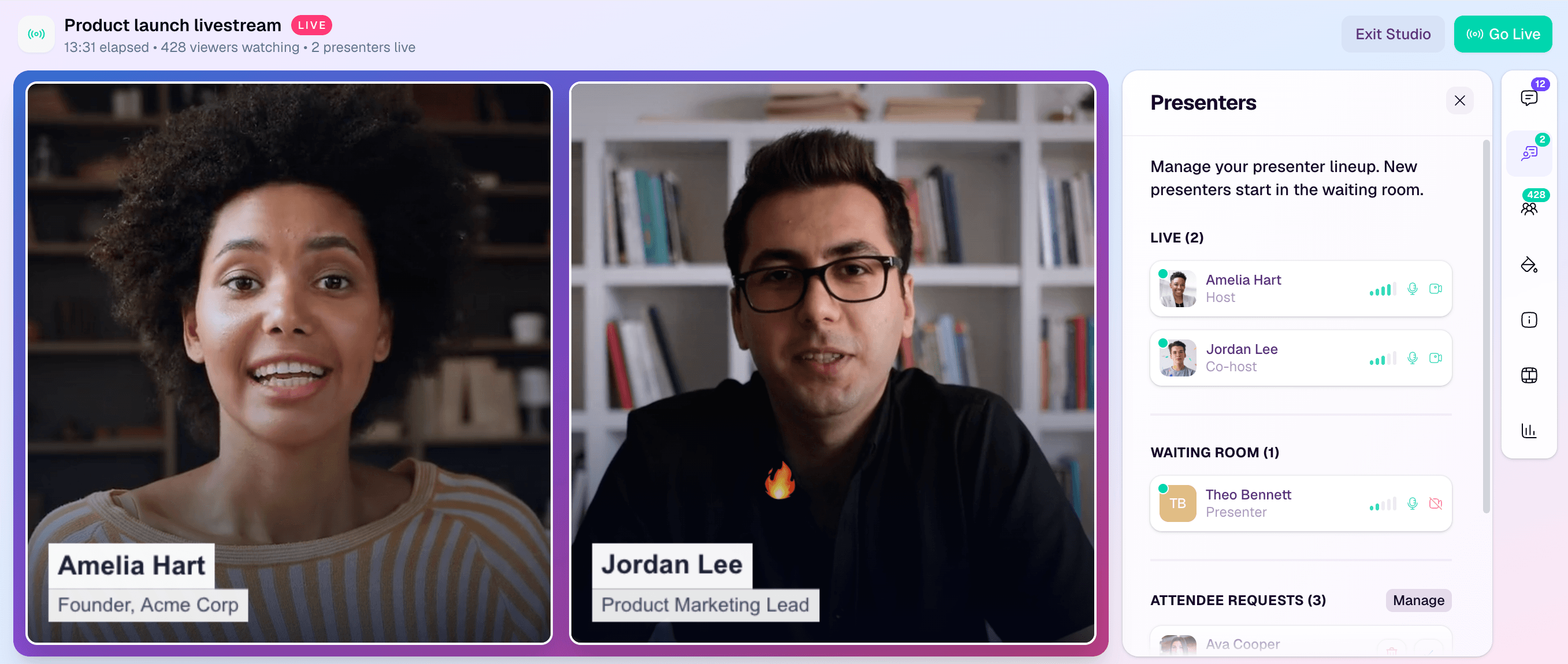
A browser-based webinar studio can bring presenters, media, branding, and live controls into one workflow. The important practice is still platform-neutral: rehearse the people, controls, cues, and fallback path you will use on the day.
Your evidence is concrete: a completed rehearsal checklist, confirmed access, named backup owners, and a short list of resolved or accepted risks. A smooth rehearsal does not guarantee a perfect broadcast, but it makes ownership visible before the audience arrives.
Mistake 4: Broadcasting at the audience
Interaction is often added late as decoration. Someone inserts a poll, leaves ten minutes for Q&A, or asks the audience to post where they are joining from. Those moments can be harmless, but they do not necessarily help the audience think, choose, or apply the material.
This breaks the attendance-to-participation handoff. The fix is not to maximize chat or poll volume. It is to design participation around the job of the session.
For each interaction, ask:
- What should the audience be thinking about at this point?
- Does a question, poll, chat prompt, example, or pause help them do that?
- How will the moderator acknowledge or use the response?
- What happens if participation is low or the answers reveal confusion?
- Does the interaction help the next section, or does it interrupt it?
The content lead should design the moment, and the moderator should own its delivery and triage. Evidence can include questions, poll responses, chat themes, watch-time patterns, and drop-off context.
Treat those as signals, not verdicts. A question can show curiosity without proving purchase intent. A quiet audience can still find the session useful. A busy chat can be socially active without moving anyone toward the intended next step.
Mistake 5: Adding a CTA that does not match the session promise
The webinar provides an educational answer, then abruptly asks viewers to book a sales call. Or it presents several competing CTAs and leaves the audience to guess which one matters.
This breaks the attention-to-action handoff. Choose the primary next step before building the content so the session can earn it naturally.
A useful CTA should:
- match the audience problem and stage;
- help the viewer continue the job they came to do;
- appear when its relevance is clear;
- explain what happens after the click;
- remain available in the replay when that makes sense;
- avoid implying that a click proves buying intent.
The campaign or demand generation lead owns the action, while the producer or moderator owns its live cue. HeyStream's live and replay CTAs can keep that next step available during both viewing modes. The product can make the action visible and measurable; it cannot make an irrelevant offer useful.
Inspect CTA impressions, clicks, destination behavior, and qualitative replies. Do not promise a conversion lift from placement alone. If people ignore the CTA, review its relevance, timing, clarity, and destination before adding more prompts.
Mistake 6: Treating the live close as the end
The recording is buried, attendees and no-shows receive the same generic message, unanswered questions have no owner, and useful CTA context disappears from the replay.
This breaks the live-to-replay-and-follow-up handoff. Plan the post-event path before the session starts:
- Decide where the replay will live and when it can be shared.
- Preserve the useful next action for replay viewers.
- Separate operational messages from marketing follow-up.
- Group people by relevant observed behavior where appropriate, without claiming the behavior reveals intent with certainty.
- Assign owners for unanswered questions, CTA actions, important replies, and sales handoffs.
- Set a point when the campaign stops sending and moves into the normal lifecycle.
HeyStream's webinar follow-up automation can use attendance, replay, CTA clicks, registration context, and engagement signals to support more relevant next steps. That context helps a team make a decision; it does not remove the need for judgment, permission, or a useful message.
The lifecycle or campaign lead owns this handoff. Review replay views, replay watch behavior, CTA action, message delivery, and replies. The aim is not to create as many segments as possible. It is to avoid treating clearly different audience experiences as if they were the same.
Mistake 7: Reporting attendance without deciding what changes
The recap deck lists registrations, attendees, watch time, questions, and clicks. Everyone agrees the webinar went well or could have gone better, but nobody identifies the weakest handoff or commits to a change.
This breaks the evidence-to-learning handoff. Attendance is one signal. It does not by itself prove engagement, intent, conversion, pipeline, revenue, or business impact.
The program owner should return to the original campaign job and review the minimum useful evidence across the loop:
- audience source and registration fit;
- live and replay attendance in context;
- watch and participation patterns;
- questions and qualitative feedback;
- CTA exposure and action;
- follow-up delivery and response;
- downstream business evidence that can be connected responsibly;
- gaps, caveats, and data that was not available.
HeyStream's audience intelligence can connect registration, live, replay, questions, and CTA activity to audience records. A webinar ROI scorecard can then help the team diagnose the wider journey without pretending attendance is ROI.
End the review with one sentence: “The handoff we will change next is ___ because the evidence showed ___.” If the team cannot complete that sentence, the report has described the session without improving the program.
Before, during, and after checklist
Use this checklist to protect the seven handoffs without turning the webinar into a giant process project.
Before the webinar
- Define one audience, one problem, one useful outcome, and one next action.
- Match the topic, title, registration promise, and promotional copy.
- Choose distribution channels and preserve source context.
- Plan registration, confirmation, access, reminders, and replay expectations.
- Assign campaign, content, production, moderation, lifecycle, and program owners.
- Build a run of show with speaker handoffs, participation, CTA, and close.
- Rehearse access, controls, media, audio, video, captions, backup paths, and incident ownership.
- Confirm what evidence will answer the campaign's primary question.
During the webinar
- Open with the audience promise and explain what viewers will be able to do.
- Orient speakers, moderator, timing, participation, and the next action.
- Use interaction when it helps the audience think, choose, or ask.
- Moderate questions and record themes that need follow-up.
- Cue the CTA when it is relevant and explain what happens next.
- Monitor delivery, accessibility, and technical risks without hiding ownership.
- Record decisions and issues that the team should review later.
After the webinar
- Publish or send the replay through the promised path.
- Keep the useful next action available for replay viewers where appropriate.
- Route unanswered questions, CTA actions, and follow-up to named owners.
- Use observed behavior as context, not as deterministic intent.
- Review the full path from source and registration through replay and follow-up.
- Document one learning, one caveat, and one change for the next session.
Fix the weakest handoff first
You do not need to overhaul the entire webinar program at once. Find the most visible symptom, trace it to the broken handoff, assign an owner, and choose the evidence that will tell you whether the next session improved.
That is the practical value of webinar best practices. They turn a collection of tips into a system the team can operate, inspect, and improve.


