A strong webinar moderator does more than welcome the audience and read questions. They keep ownership clear, protect the session when something goes wrong, and make sure each live moment leads cleanly into the next one.
This webinar moderator script is a practical operating pack for B2B teams. Copy it into your working document, replace the bracketed fields, and use it alongside your production plan. It covers the opening, speaker handoffs, timing cues, Q&A, technical issues, the CTA, replay expectations, and follow-up ownership.
Copy this one-page webinar moderator pack
Fill this out before rehearsal. If one person holds several roles, keep the responsibilities separate even when the names repeat.
Session details
- Webinar: [title]
- Audience promise: [what attendees should understand or be able to do]
- Moderator: [name]
- Speaker or panelists: [names and pronunciations]
- Host or producer: [name]
- Technical issue owner: [name]
- Start and finish time: [time and timezone]
- Q&A window: [start time and duration]
- CTA: [one next action]
- CTA owner: [name]
- Replay promise: [what will be sent, to whom, and when]
- Follow-up owner: [name]
- Private backchannel: [channel and backup contact]
Cue labels
- Say aloud: words intended for attendees.
- Send privately: a backchannel note for the speaker or producer.
- Watch for: a signal that requires action.
- Hand off to: the person who owns the next step.
Opening
Say aloud: Welcome to [webinar title]. Over the next [duration], we will show you [specific audience promise]. I am [name], your moderator. Please add questions to [Q&A location]. We will answer as many as we can during [Q&A timing], and [follow-up policy] for anything we cannot cover live.
Speaker handoff
Say aloud: Joining us is [speaker name], [short role and relevant experience]. [First name], let us start with [opening question or section].
Q&A transition
Say aloud: We are moving into Q&A now. I will group similar questions so we can cover the most useful themes. We have about [minutes] minutes, and I will give a final-question warning before we close.
Technical issue bridge
Say aloud: We are pausing for a moment while the team checks [audio, screen share, or connection]. While they do that, here is the key point to keep in mind: [useful recap].
CTA and close
Say aloud: Before we finish, your next step is [single CTA]. We will send [replay or resource] to [audience] by [time]. Thank you to [speakers] and everyone who joined us. We will follow up on [unanswered-question policy].
This is the live-use layer, not a replacement for your webinar run of show template. The run of show holds production timing and ownership. The moderator pack holds the words, cues, decisions, and handoffs needed in the room.
What a webinar moderator owns
A webinar moderator guides the audience through the live session. They introduce speakers, protect timing, surface useful questions, communicate through disruptions, and land the close. They do not need to operate every technical control, but they do need to know who owns each control and what attendees should hear while it is being used.
| Role | Owns | Does not automatically own |
|---|---|---|
| Moderator | Audience welcome, speaker handoffs, timing cues, question selection, verbal incident response, closing | Stream configuration, every technical fix, the speaker's content |
| Speaker | Expertise, presentation content, examples, answers | Q&A triage, production recovery, follow-up operations |
| Host or producer | Room setup, broadcast controls, media, layouts, recording, technical recovery | The moderator's spoken flow unless agreed |
| Follow-up owner | Replay delivery, promised resources, unanswered-question routing, next-step communication | Live production decisions |
A moderator script is also different from a presentation script. The speaker's script carries the lesson or demo. The moderator's script protects transitions, audience expectations, and fragile moments around that content.
Before attendees arrive
Use rehearsal to remove live ambiguity. Confirm the following before the room opens:
- Names, job titles, and pronunciations.
- Who welcomes attendees and who starts the recording or broadcast.
- The exact audience promise and the first question.
- Which features are actually enabled: chat, Q&A, polls, screen sharing, captions, replay, or recording.
- Where speakers receive private timing and issue cues.
- Who can approve, answer, hide, combine, or escalate questions.
- The final CTA, who presents it, and where it links.
- What you will say about replay availability.
- Who owns unanswered questions after the session.
- The fallback if a speaker, demo, or connection fails.
Add accessibility checks to the same plan. The W3C Web Accessibility Initiative's event checklist recommends describing important visual information, speaking clearly, allowing time to process information, and repeating audience questions through the microphone so everyone can follow. Ask speakers to explain what matters on screen, not simply say, "as you can see here."
If you use captions, transcripts, or accessible materials, verify them in the platform and workflow you will use. Do not promise a feature because it exists somewhere else in your stack.
Opening and speaker-handoff scripts
The best opening is short. It tells attendees what they will get, how to participate, and what happens next.
Standard opening
Welcome to [title]. Today we are covering [specific topic] for [audience]. By the end, you should be able to [practical outcome]. I am [name], and I will moderate the session. Add questions in [location] as we go. We will open Q&A at [time], and [replay expectation].
One-speaker handoff
Our speaker is [name], [short role]. [First name] works on [relevant area], so I have asked them to start with [specific problem]. Over to you.
Panel handoff
We have three perspectives in the room today. I will direct each question to one person first, then invite the others to add what is materially different. Let us begin with [name] on [topic].
Live-demo handoff
We are moving into the demo. [Speaker] will show [specific workflow]. If the screen pauses while we switch views, I will keep you updated. Please put questions in [location] rather than interrupting the demo flow.
Keep biographies to the details that help the audience trust the speaker on this topic. A long company history uses the attention you need for the actual session.
Timing, backchannel, and transition cues
Private cues should be predictable. Agree on a small set during rehearsal and keep each message actionable.
- 10 MIN: ten minutes remain in the current section.
- WRAP: finish the current point and hand back.
- SLOW: reduce pace or pause before the next idea.
- CLARIFY: explain the term, slide, or claim differently.
- Q&A: move to audience questions.
- AUDIO: stop speaking while the technical owner checks audio.
- SCREEN: stop describing the demo while the technical owner checks the share.
- CTA: hand to the agreed CTA owner.
For public transitions, give the audience a reason for the change:
We have covered [section takeaway]. Next, [speaker] will show how that changes [next problem or decision].
For private cues, state the action instead of narrating the problem:
Send privately: WRAP after this example. Two minutes remain before Q&A.
Q&A triage that works under time pressure
Do not simply read the queue from top to bottom. Group duplicates, remove private or unsafe material, and choose questions that help the largest part of the audience.
| Status | Use it when | Moderator action |
|---|---|---|
| Ask live | The question is relevant, clear, and useful to many attendees | Tighten the wording, name the topic, then direct it to one speaker |
| Combine | Several questions ask the same underlying thing | Summarize the shared theme without losing an important distinction |
| Answer in chat | The answer is short, factual, and does not need airtime | Route it to the right team member and mark it handled |
| Follow up later | The answer needs research, customer-specific detail, or another owner | Record the owner and avoid promising a response date you cannot meet |
| Skip with reason | It exposes private data, is abusive, is unrelated, or cannot be answered responsibly | Do not read it aloud; route it according to your moderation policy |
Use a consistent sequence:
- Scan for duplicates and private information.
- Group questions by theme.
- Prioritize relevance, usefulness, and the time available.
- Direct each question to one person first.
- Ask for a short addition only when another speaker brings a different view.
- Give a final-question warning and state what happens to unanswered themes.
A useful transition is:
I am combining a few questions about [theme]. [Speaker], what should the audience do first, and where does the answer change by [important condition]?
Technical issues and awkward moments
The moderator narrates the audience experience. The technical owner diagnoses and fixes the problem. Use the same response flow for most incidents:
- Acknowledge: say what attendees need to know, without guessing at the cause.
- Protect: stop duplicate audio, private discussion, or a broken demo from continuing.
- Cue: send the agreed signal to the technical owner.
- Bridge: recap a useful point or ask a prepared backup question.
- Resume or switch: return to the planned content or move to the backup.
- State the next step: tell attendees what will happen if the issue cannot be fixed live.
If a speaker loses audio
We have lost [speaker's] audio for a moment. The team is checking it now. While they reconnect, let me recap the decision they were explaining: [one-sentence recap].
If screen sharing freezes
The shared screen has paused, so we are switching away from it while the team resets the view. [Speaker], can you explain the next step without the screen, or should we take one question first?
If an answer runs long
I am going to pause you there so we can protect Q&A time. The practical takeaway is [short summary]. I will move us to [next topic or question].
If the audience is quiet
Do not shame attendees or fill the silence with "anyone?" Prepare two seed questions that expose common decisions or mistakes.
A question teams often ask at this point is [prepared question]. [Speaker], what changes when [useful condition]?
If a question is inappropriate
Do not read private, abusive, or unsafe content aloud. Skip it, preserve evidence if your policy requires it, and use a neutral transition:
I am moving us to a question about [relevant topic] that will be useful to more people in the room.
CTA, replay, and follow-up handoff
The close should connect the value attendees just received to one next step. Avoid a list of five links, products, and requests.
We have covered [three short takeaways]. If you want to put this into practice, the next step is [single CTA]. You can find it at [location]. We will send [replay or resource] by [time]. For questions we could not answer live, [specific policy]. Thank you for joining us.
If the CTA needs examples, use a small set of webinar CTA examples and choose one that matches the session's promise. Do not treat every question or poll response as buying intent. Pass useful themes into the replay notes and webinar follow-up, then let later actions provide the stronger signal.
This is where moderation connects to the wider B2B webinar growth engine: registration sets an expectation, the live session delivers it, the CTA offers a next step, and replay and follow-up keep the handoffs clear.
How the workflow fits HeyStream
HeyStream's Moderator role is labelled "Can manage chat and Q&A," while a live session can include chat, Q&A, and polls. The browser-based webinar studio also brings presenter management, on-screen content, audience participation, and recording into the live production surface. When the relevant control is available, selected chat, Q&A, and poll moments can be promoted to the stream.
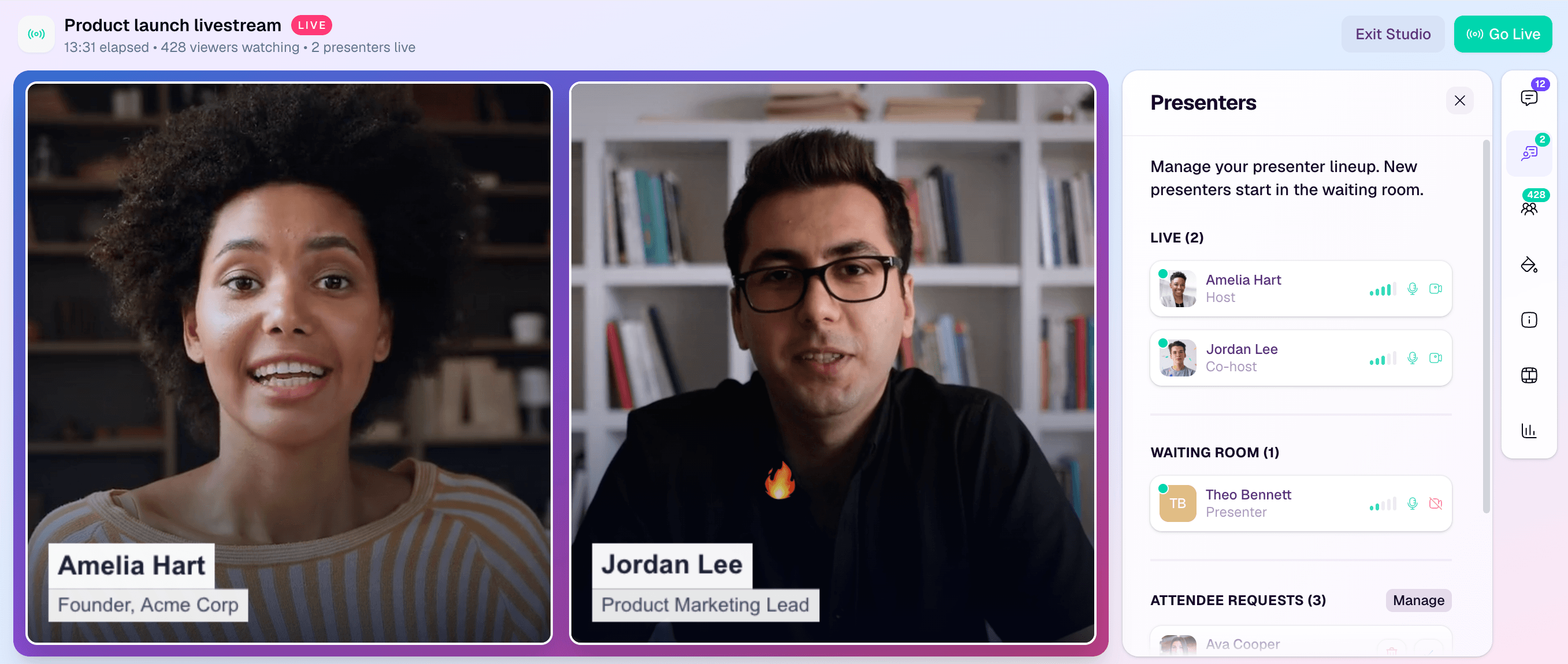
Keep the operating pack platform-neutral even when you use those controls. Confirm the actual room setup, role permissions, and labels during rehearsal, then adapt the cue sheet to match.
Five-minute post-session debrief
Run this before the team disperses:
- Which questions were not answered, and who owns the next decision?
- Which themes appeared repeatedly?
- Where did timing drift from the plan?
- Which transition or cue was unclear?
- Did the CTA happen at the agreed moment?
- What did attendees hear about replay and follow-up?
- Which speaker or technical follow-ups were promised?
- What one change should go into the next session's moderator pack?
The goal is not to score the moderator. It is to repair the operating system while the details are still fresh.
Final live-session checklist
- Audience promise and first question confirmed.
- Moderator, speaker, producer, technical, CTA, and follow-up owners named.
- Names and pronunciations checked.
- Chat, Q&A, polls, screen share, recording, replay, and accessibility setup verified where used.
- Opening, handoffs, private cues, Q&A transition, incident bridge, CTA, and close rehearsed.
- Two backup questions prepared.
- Unanswered-question policy agreed.
- Replay wording and delivery owner confirmed.
- Five-minute debrief booked before the team leaves.


