A live streaming SDK can be the right choice when live video is part of your product. An all-in-one platform is usually the better choice when live video is part of your go-to-market workflow.
That difference sounds simple, but it gets blurry fast. A product team may need deep control over video behavior, identity, latency, or app experience. A marketing team may need a branded registration page, a reliable live session, audience records, CTAs, replay, analytics, and follow-up without owning the whole video stack.
This guide gives B2B teams a practical way to decide which path fits the job in front of them.
The Quick Answer
Choose a live streaming SDK or API when your team is building live video into a product, app, device workflow, or custom customer experience. In that case, video is part of the thing you sell or operate, so engineering ownership can be worth it.
Choose an all-in-one live streaming or webinar platform when your team is running webinars, product launches, demos, customer education sessions, or recurring broadcasts. In that case, the business outcome is not just a playable stream. It is registrations, attendance, engagement, conversion, replay, and follow-up.
For many B2B teams, the real question is not "Can we build live video?" It is "Should we spend engineering time building the workflow around live video?"
What a Live Streaming SDK or API Gives You
A live streaming SDK is a developer toolkit for adding live video capabilities to software. A live streaming API gives your application a programmable way to create, manage, process, or distribute live streams. The exact boundary varies by provider, but both paths usually assume that your team will design and maintain the surrounding experience.
Official API and SDK docs make that responsibility visible. For example, YouTube's Live Streaming API centers on creating and managing live broadcasts, video streams, cuepoints, authorization, and state transitions. That is useful infrastructure, but it does not become a full B2B webinar journey by itself.
Google Cloud's Live Stream API is framed around transcoding live, linear video streams into output formats for delivery across devices. Its Live Stream API pricing also shows why infrastructure decisions need cost modeling: active channel time, resolution, output formats, distribution, and captions can all affect what you pay.
Other SDK paths are similarly developer-facing. Zoom's Video SDK live-streaming docs describe streaming a session over RTMP with destination details such as stream URLs, stream keys, and broadcast URLs. AWS Kinesis Video Streams WebRTC SDKs are presented as libraries for configuring devices and application clients as peers over signaling channels.
Those are strong building blocks when you need them. They are not shortcuts around product design, event operations, audience data, marketing automation, or post-event conversion.
What an All-in-One Platform Gives You
An all-in-one platform packages the live experience and the business workflow around it. For a B2B team, that often means registration, branded watch pages, presenter controls, reminders, engagement tools, CTAs, replay, audience records, analytics, and follow-up paths.
That is why a B2B webinar platform is a different category from an SDK. The platform is built around the job of running live sessions that create demand, educate buyers, support customers, or move accounts toward a next step.
A platform still needs reliable video. It also needs the parts around the video that make the broadcast useful to the business:
- A page where the right audience can register.
- A branded room where presenters can run the session.
- CTAs that work during live and replay viewing.
- Audience records that show who attended and what they did.
- Follow-up context for marketing, sales, or customer teams.
- Analytics that help the next session perform better.
If your team mostly needs those outcomes, a platform can be the more direct route.
The Hidden Work Behind an SDK
The first SDK decision is technical. The second one is operational.
Once you choose a build path, someone has to own more than the stream. Your team may need to design registration, authentication, email reminders, calendar invites, watch-page UX, presenter controls, audience permissions, fallback behavior, live QA, recording, replay access, CTA tracking, analytics, CRM handoff, privacy, compliance, support, and ongoing maintenance.
Some teams should own that work. If live video is core to your product, the control may be worth the investment. But if the team is trying to run a webinar program, the hidden work can pull effort away from the actual goal: creating a useful live experience that turns audience interest into a measurable next step.
A useful way to pressure-test the decision is to list everything that must happen before, during, and after the session. If most of the list is video behavior inside your product, an SDK may fit. If most of the list is audience journey and conversion workflow, a platform deserves a serious look.
SDK/API vs All-in-One Platform
| Decision area | SDK or API path | All-in-one platform path |
|---|---|---|
| Best fit | Live video embedded inside your own product or app | Webinars, demos, launches, customer education, and recurring broadcasts |
| Team needed | Engineering, product, QA, infrastructure, and operations | Marketing, product marketing, sales, customer education, or growth teams |
| Control | Highest control over app behavior and user experience | Enough control for branded sessions without owning infrastructure |
| Speed to usable workflow | Depends on engineering scope and surrounding systems | Faster when the packaged workflow matches the business use case |
| Audience journey | Must be designed and built | Usually included: registration, reminders, watch pages, replay, and follow-up paths |
| Analytics | Custom instrumentation required | Built around attendance, engagement, CTA, replay, and audience signals |
| Conversion | Must be connected to your own CTA and CRM systems | Often built into live and replay workflows through webinar conversion tools |
| Maintenance | Your team owns changes, provider updates, QA, and edge cases | Vendor owns the platform while your team owns the content and strategy |
| Cost model | Infrastructure, engineering, vendor usage, and support time | Subscription or platform pricing tied to the workflow you need |
The table is not an argument that one path is universally better. It is a way to make the tradeoff explicit. SDKs maximize control. Platforms reduce the amount of live-event plumbing your team has to own.
Where SDKs Make Sense
SDKs make the most sense when live video is part of the product experience itself. That might mean a customer-facing app, a marketplace, a telehealth workflow, a learning product, a device workflow, a custom community product, or a real-time collaboration surface.
In those situations, your team may need control over authentication, in-app identity, permissions, latency, custom UI, media behavior, device support, moderation, recording rules, or compliance. A packaged webinar platform may not fit because the experience needs to live inside your product rather than beside it.
An SDK can also make sense when you have strong engineering ownership and unusual requirements. If your product roadmap depends on live video behaving in a very specific way, a build path gives you room to shape the experience.
The important guardrail is to be honest about scope. Do not compare an SDK proof of concept with a fully operated webinar program. Compare the complete build, including the audience workflow and maintenance burden, with the platform path.
Where Platforms Make Sense
Platforms make sense when live video is a channel for growth, education, launch momentum, or customer engagement.
That includes B2B webinars, product demos, product launches, customer training, recurring thought-leadership shows, partner sessions, and sales enablement broadcasts. In these cases, the core job is not embedding video in your software. It is moving the right audience through a useful experience.
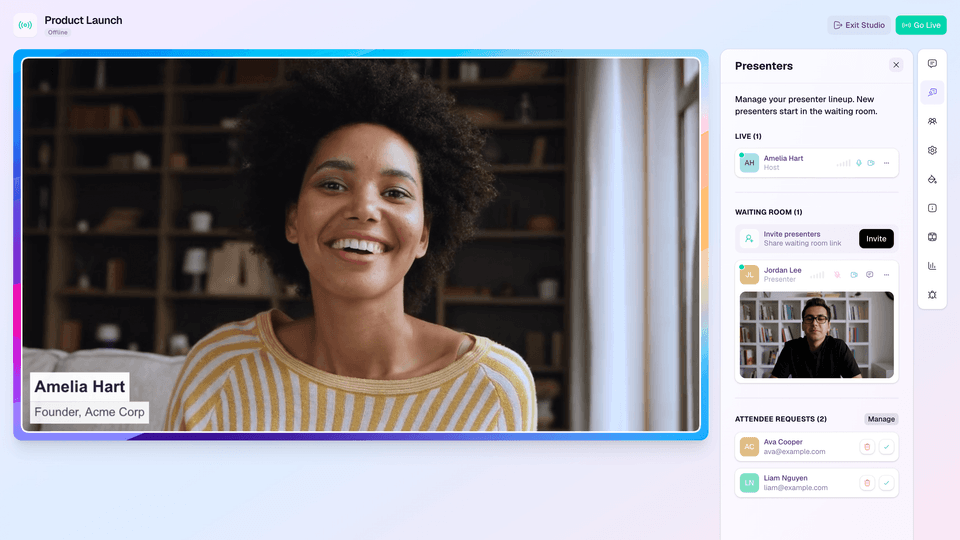
A browser-based webinar studio helps teams produce the live session without turning every broadcast into an engineering project. Audience intelligence then helps the team understand which viewers registered, attended, engaged, clicked, returned for replay, or showed intent.
That context matters because B2B webinars rarely end when the stream ends. The live moment is one part of a longer workflow that includes reminders, CTAs, replay, segmentation, handoff, and measurement.
A Three-Question Decision Framework
Start with three questions.
First, are you building live video into your product? If yes, an SDK or API may be the right foundation. You need control because the video experience is part of the product experience.
Second, do you have engineering ownership for the full lifecycle? That means not only the first integration, but QA, provider changes, analytics, security, support, event operations, and edge cases. If the answer is no, be careful about choosing a build path just because it looks flexible.
Third, do you need registration, audience data, CTAs, replay, and follow-up now? If yes, a platform is likely closer to the outcome. Those pieces are not extras for B2B webinar teams. They are the path from attention to action.
Here is the blunt version: choose an SDK when the product needs custom live video. Choose a platform when the business needs a repeatable live-program workflow.
How HeyStream Fits
HeyStream is not a live streaming SDK, and it should not be evaluated as one. It is for B2B teams that want to run polished live sessions without building the surrounding stack themselves.
That means HeyStream is a fit when your team needs branded registration and watch experiences, a live production surface, CTAs during live and replay viewing, audience records, analytics, and follow-up workflows. It is especially relevant when webinars are meant to support pipeline, education, launches, demos, or customer engagement rather than sit as isolated broadcasts.
If you are comparing platform paths, you can compare webinar platforms to see where HeyStream fits against broader event tools and webinar software. If you are building a custom video product, an SDK or API provider may be the better place to start.
The healthiest decision is not "build is bad" or "buy is lazy." It is matching the tool to the real job. B2B teams get into trouble when they buy developer infrastructure for a marketing workflow, or force a platform to behave like a custom video product.
Pick the path that lets your team own the right thing.


