The best Univid alternatives to shortlist are HeyStream for connected live programmes and reusable offers, Contrast for branded production and repurposing, Livestorm for attendee-credit budgeting, Demio for a room-and-host model, and Zoom Webinars for an organisation already using Zoom. Choose by the constraint you need to fix, then run your actual programme through the selected plan's audience and CRM rules.
HeyStream publishes this comparison and is one of the five options. These recommendations come from documented product scope, without hands-on comparative testing or numerical rankings. Provider sources were checked on 10 November 2026. Prices and entitlements can change, so the comparison focuses on counting methods and requirements rather than starting-price claims.
The shortlist by buyer job
| Alternative | A useful fit to investigate | Audience or commercial unit | Check before shortlisting |
|---|---|---|---|
| HeyStream | Connected live series with reusable offers | Live attendees per broadcast | Growth features and the exact CRM fields your workflow needs |
| Contrast | Branded production with content repurposing | Pro uses monthly unique registrants; other offers have different terms | Required production features, integrations and add-ons |
| Livestorm | Budgeting around people who actually attend | Annual attendee-credit packs, consumed per session | Replay usage, room capacity and connector tier |
| Demio | Choosing a webinar room and licensed hosts | Attendee-room size and host licensing | Capacity, simultaneous events and Premium integration requirements |
| Zoom Webinars | Extending an existing Zoom setup | Licensed user plus Webinar add-on and capacity | The exact Webinar product, replay journey and CRM connector |
The order is a way to navigate the options. It does not establish which platform will be cheapest or best for every team. For a broader shortlist, use the criteria in our webinar platform evaluation.
When staying with Univid makes sense
Stay with Univid when the attendee experience, commercial terms and existing follow-up already meet your needs. Its published scope includes browser-based delivery, on-demand viewing, simulated-live sessions on eligible subscriptions and CRM integrations. Check Custom entitlements when your requirements include SAML SSO or specialist integration support.
Univid's pricing FAQ describes a monthly unique-registrant allowance. A person can attend several webinars within that month without becoming a new unique registrant each time. Live participation has a separate allowance, so review both numbers.
That model can fit a programme with many returning people. Four sessions with the same audience need a different registration allowance from four sessions with entirely new audiences, even when every session has the same registration count.
Univid also has documented CRM depth. Univid's HubSpot guide describes attendance and engagement data, including CTA clicks, poll answers and watch time, with list and workflow uses. Do not replace an established workflow on the assumption that another platform's HubSpot logo means the same data will arrive.
Write the switching reason as a requirement: a connected series subscription, a production workflow, a different usage model or a specific connector behaviour. If you cannot identify the constraint, a migration may add work without solving a problem.
Count one programme before comparing prices
Start with your recurring webinar platform requirements, including the relationship between sessions. Then separate these audience measures:
- A registration entry is one signup for one session. One person can generate several entries.
- Monthly unique registered people counts each distinct person once across that month's registrations.
- Distinct live attendees counts people who watch a particular session live.
- Simultaneous peak is the largest number watching at the same moment. It can be lower than the session's distinct live audience.
- Replay-only viewers watch the recording without having attended that session live.
- Attendee-session credits count qualifying attendance separately for each session under the provider's rules.
Two illustrative programmes with the same session totals
The following figures are hypothetical inputs, not customer results or industry averages.
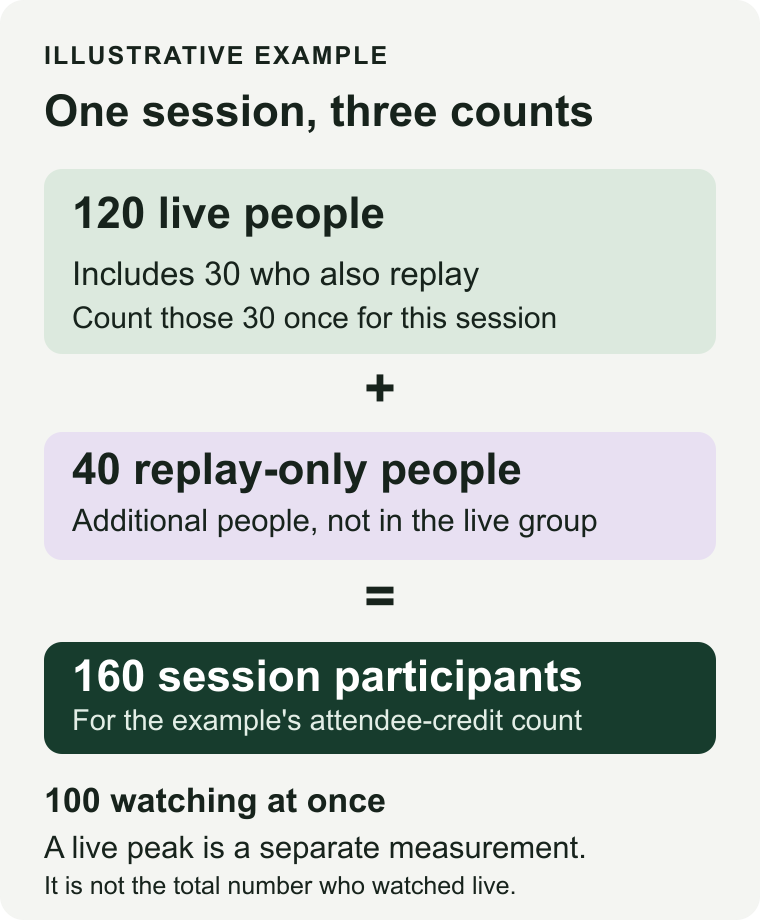
Both programmes contain four sequential one-hour sessions within one calendar month, one active series and two presenters. No broadcasts overlap. Each session has 200 registration entries, 120 distinct live attendees, a simultaneous peak of 100, 40 replay-only viewers and 40 people who never join. Of the 120 live attendees, 30 later watch that session's replay. Those 30 are already part of the live group.
Assume there are no other pre-live room visitors and no team members in the audience counts. Programme A has the same 200 registered people and attendance cohorts in all four sessions. Programme B has four entirely separate groups of 200.
| Measure | A: returning audience | B: new audience each session |
|---|---|---|
| Sessions / registration entries | 4 / 800 | 4 / 800 |
| New unique people by session | 200, 0, 0, 0 | 200, 200, 200, 200 |
| Unique registered people that month | 200 | 800 |
| Distinct live attendees per session | 120 | 120 |
| Maximum simultaneous live viewers | 100 | 100 |
| Replay-only viewers per session | 40 | 40 |
| Live attendees who also replay per session | 30, already counted live | 30, already counted live |
| Attendee-session credits under Livestorm's documented rules | 4 × 160 = 640 | 4 × 160 = 640 |
The diagram isolates one session so the overlap is easier to see. The table above remains the full, selectable programme ledger.
Apply the right unit to the right allowance
For Univid, the monthly registration input is 200 in A and 800 in B. Keep its live allowance alongside that input. Contrast Pro uses the same monthly uniqueness distinction; do not apply it automatically to a separately quoted annual-registrant contract.
HeyStream pricing measures its headline audience allowance in live attendees per broadcast, excluding registrations and replay views. The example has 120 distinct live attendees. A peak of 100 alone does not establish eligibility for Launch's 100-live-attendee allowance. Growth's 500-live-attendee allowance accommodates the example's live audience and includes the integrations and reusable CTA library required here. Check the rest of the plan separately.
Livestorm's credit rules count a person once for a particular session, including live and replay attendance at that session. The example therefore uses 120 live people plus 40 replay-only people, or 160 credits per session. The 30 who attend live and replay add no extra same-session credit. Across four sessions, both programmes use 640 credits because returning at a different session counts again. People who never join consume none under these assumptions. Put this month's usage into the annual credit budget.
For Demio and Zoom, ask the provider to confirm how the selected room or licensed capacity handles your live audience. Add host licensing and simultaneous-event needs before requesting a quote. Do not translate a monthly registrant number directly into a room size.
The sensitivity is useful. More new people increases monthly uniqueness. More replay-only attendance increases session-credit usage. A larger live audience changes capacity needs. Overlapping events can change licence requirements. None of these counts, by itself, proves a price saving.
1. HeyStream for connected live programmes and reusable offers
Shortlist HeyStream when your main job is running a connected live programme with offers you can reuse. Connected broadcast series let people subscribe through one registration flow and remain connected as future sessions are added. That is a specific workflow to demonstrate with your own session sequence.
Growth adds the reusable CTA library, integrations and outbound automations. Its published scope includes five active series, which covers this example's one series. Live and replay CTAs are useful when the same next step should remain available after the broadcast. Audience capacity still sits alongside duration, storage, presenters and other plan limits.
The CRM boundary matters. HeyStream's HubSpot integration updates matching contacts with contact details and selected registration fields when a person registers or attends. This one-way contact update does not establish parity with Univid's engagement payloads or HubSpot Marketing Events. Do not assume two-way sync, historical backfill or delivery of every CTA, poll and watch-time event.
In a demo, register the same person for two linked sessions, show what happens when another broadcast is added, reuse a required offer and inspect the exact HubSpot properties. If your acceptance criterion requires breakouts, SSO, an automation-first format or a richer CRM event, establish support before choosing a plan. Treat Growth as a candidate for the stated programme, not an automatic replacement for every incumbent workflow.
2. Contrast for branded production and repurposing
Contrast is relevant when the buying requirement includes a branded production environment and turning the recording into other content. Contrast's pricing page documents those capabilities, while its FAQ states that Pro counts unique registrants monthly. Switching to Pro therefore does not inherently remove a monthly registrant allowance.
Keep the commercial offers separate. Advanced introduces annual registrant quotas and additional scope. Ask for the exact terms covering your required API access, domain, presenter-side recording files, concurrency and enterprise controls rather than assuming the entry plan contains them.
For HubSpot teams, Contrast's Marketing Events guide describes event objects with registration and attendance reporting. Campaign association requires the relevant HubSpot Marketing Hub tier. An event object and an ordinary contact update are different acceptance criteria.
Ask the demo team to take one session through production, repurposing and the CRM record you actually need. Rule it out if the desired workflow requires entitlements your quote does not include, or if your sole objective is to stop budgeting around monthly unique registrants and you are evaluating Pro.
3. Livestorm for attendee-credit budgeting
Livestorm is worth evaluating when attendance varies and you want to budget around qualifying session participation. Its credit model distinguishes attendance from unused registrations, but the recurring-audience example shows why repeat viewers still need an annual budget.
Start with your expected calendar, include replay-only participation and confirm credit expiry, room capacity and additional usage terms. A low monthly unique-person count does not necessarily mean low credit consumption when those people attend repeatedly.
Livestorm's plan comparison separates the credit purchase from Enterprise integration access and other requirements. Confirm the tier for your named CRM connector rather than assuming all integrations shown across the site are available on Pro.
In the demo, follow one person through session one live, its replay and session two. Ask the provider to show the resulting usage and your required CRM record. Rule it out if the annual commitment, room capacity or necessary connector scope does not fit the programme.
4. Demio for a room-and-host evaluation
Demio provides a different buying structure to investigate. Demio's pricing page combines attendee-room choices with host licensing and explains that simultaneous events require multiple hosts. Two presenters in one session and two hosts running overlapping events are different requirements.
Size the room for the provider-confirmed audience definition. Then check the integration tier. Demio's HubSpot documentation makes HubSpot a Premium integration, although trial access is temporarily available. It describes contact sync and session registration, attendance and no-show activity. That does not imply that every in-platform engagement field is delivered to HubSpot.
Use the demo to inspect a returning contact's session activity and the follow-up segment you need. Confirm that the paid plan preserves the capability after the evaluation period. Rule it out if the room, paid-host requirement or integration tier makes the complete package unsuitable. Avoid deciding from the smallest advertised room alone.
5. Zoom Webinars for an existing Zoom organisation
Zoom Webinars is a practical shortlist option when the organisation already uses Zoom and wants to evaluate a webinar product within that setup. Zoom's webinar setup requirements specify a licensed user with the Webinar add-on. A meeting licence alone is not the same purchase.
Request the actual licensed-host and webinar-capacity configuration. Keep the base webinar product, Plus and Zoom Events separate in the quote and demonstration, so features from one product do not become assumed inclusions in another.
Run through registration, the live session, replay access and the named CRM connector. Inspect where the returning person's session history appears and which follow-up can use it. Rule it out if the selected product and connector cannot deliver the required attendee journey, even if existing Zoom administration makes procurement familiar.
Run a two-session acceptance exercise before switching
Ask your two or three strongest candidates to demonstrate the same small programme. This is a test to perform before buying, not a report of tests completed for this article.
Use a new person, an existing CRM contact who returns for session two, a no-show and a replay-only viewer. Keep the contacts distinct and use test records your team is authorised to use.
- Trace the signup. Record the person identifier, session identifier, registration source and selected fields. Confirm how the existing contact is matched.
- Trace attendance and replay. Check the actual fields or event records received, when they arrive and how they distinguish the two sessions. A generic contact update may not support session-specific reporting.
- Build one required follow-up rule. For example, identify a session-two attendee with a particular registration answer. If the rule also needs a CTA click, verify that exact signal in the destination. If it is unavailable, revise the rule or the shortlist.
- Reconcile records and usage. Inspect duplicates, failures, permissions and each provider's billable count. Preserve consent and email-suppression choices rather than treating a synced contact as permission to email.
- Confirm the paid entitlement. Get the plan, connector, capacity, hosts, active series, duration, storage and concurrency requirements in writing, including any relevant add-ons.
Keep registration, attendance and sales outcomes separate in the result. A CTA click can support a follow-up decision; it does not prove that a sale occurred.
Choose the constraint you need to fix
Stay with Univid if it already supports the programme, the monthly audience pattern fits the contract and the existing CRM workflow works. The hypothetical returning-audience programme is a useful reminder that 800 registration entries can still represent only 200 unique people.
If switching solves a documented constraint, shortlist the option whose scope addresses it, obtain comparable quotes and run the acceptance exercise. For a live programme centred on connected series and reusable offers, evaluate HeyStream Growth against that requirement. Check the contact-sync boundary at the same time.
Once you have chosen, use the webinar platform migration checklist to plan the cutover. Keep the old workflow available until you have reconciled the new one.