The best Livestorm alternative depends on the webinar operating model you actually need. HeyStream and Contrast suit live-first B2B marketing workflows, Demio mixes live and automated delivery, eWebinar is built around evergreen automation, Zoom Webinars and GoTo Webinar offer familiar broadcast operations, BigMarker covers broader event programs, and ON24 targets enterprise digital engagement.
HeyStream publishes this comparison, and HeyStream is one of the options. We have kept the same decision format for every platform: where it fits, where it does not, and what a team should test before switching. Livestorm itself remains a sensible choice when its browser-based delivery, registration, event emails, replay, integrations, and attendee-credit model already fit your program.
Livestorm alternatives at a glance
| Platform | Best fit | Defining workflow | Main tradeoff to test |
|---|---|---|---|
| HeyStream | Live-first B2B webinar growth | Broadcast, audience signals, CTAs, replay, and follow-up in one workflow | It is not an evergreen webinar automation system or a broad virtual-event suite |
| Contrast | Branded live webinars with deep HubSpot workflow | Modern studio, engagement, replay, and CRM activity | Salesforce and some service capabilities are plan-dependent or add-ons |
| Demio | Teams combining live and automated webinars | Live series plus automated and on-demand delivery | Hosts, room size, and advanced capabilities vary by plan |
| eWebinar | Evergreen demos, onboarding, and recorded delivery | On-demand, just-in-time, and recurring recorded sessions | It is automation-first, not a live broadcast studio |
| Zoom Webinars | Familiar, scalable broadcasting | Registration, webinar controls, audience engagement, recording, and reporting | Production and event-layer capabilities differ between packages |
| GoTo Webinar | Established webinar and training operations | Live, series, recorded, on-demand, reporting, and integrations | Branding, capacity, and advanced features vary by plan |
| BigMarker | Custom multi-format event programs | Webinars, conferences, virtual venues, hybrid events, and content hubs | Broader scope can mean more operational complexity |
| ON24 | Enterprise digital engagement | Live, simulive, on-demand, personalization, integrations, and analytics | Enterprise breadth and a sales-led buying process can exceed a focused team's needs |
This is a fit guide, not a universal ranking. A team choosing a B2B webinar platform should compare the whole path from registration to follow-up, not just the presenter studio.
Start with the operating model, not the feature count
Most webinar platforms can publish a registration page, admit attendees, run polls, record a session, and provide some reporting. The useful differences appear when you ask who owns each step after somebody registers.
A live-first B2B team needs a polished broadcast, contact-level audience signals, useful calls to action, replay behavior, and timely follow-up. An automation-first team needs a recorded session that is always available and can still handle questions. A large broadcaster may value familiarity and capacity. An enterprise program may need complex governance, integrations, personalization, and services across many event types.
If Contrast is also on your shortlist, compare alternatives to Contrast by delivery model, CRM handoff and cost before choosing your finalists.
That gives four practical lanes:
- Live-first B2B growth: HeyStream or Contrast.
- Mixed live and automated delivery: Demio.
- Automation-first evergreen delivery: eWebinar.
- Familiar broadcast or enterprise engagement: Zoom Webinars, GoTo Webinar, BigMarker, or ON24, depending on event breadth.
If recurring live programs are central to your plan, this recurring webinar platform guide explains the reusable registration, production, audience, replay, and follow-up decisions in more depth.
How we evaluated the eight options
We used current official product, pricing, and help pages rather than copying scores from software directories. Every option was assessed against the same questions:
- What delivery modes does it support: live, pre-recorded, automated, simulive, replay, or on-demand?
- How are registration, reminders, and attendee access handled?
- What does the presenter and moderator workflow look like?
- Which audience actions remain available at contact level?
- Can a team present a relevant CTA during the live session and replay?
- How does the platform connect with CRM and marketing automation?
- What happens after the session, including replay, follow-up, reporting, and content reuse?
- Which packaging, capacity, integration, or service boundaries need a live sales or trial check?
We avoided universal claims about reliability, support quality, ease of use, conversion, or ROI because those depend on implementation and need evidence beyond a vendor feature page.
1. HeyStream: best for live-first B2B webinar growth
Why it fits: HeyStream's B2B webinar workflow connects branded registration and live delivery with contact-level watch behavior, CTA activity, replay, and follow-up. It is designed for marketing, demand generation, product marketing, and event teams that want the live session to produce usable audience context.
Tradeoff: HeyStream is focused on live B2B broadcasts and what happens around them. It should not be treated as an evergreen automation platform, internal meeting tool, or broad enterprise virtual-event suite.
Choose it when: Your team wants to know who registered, watched, returned for replay, clicked a CTA, and needs the next follow-up, without rebuilding that handoff across separate tools after each webinar.
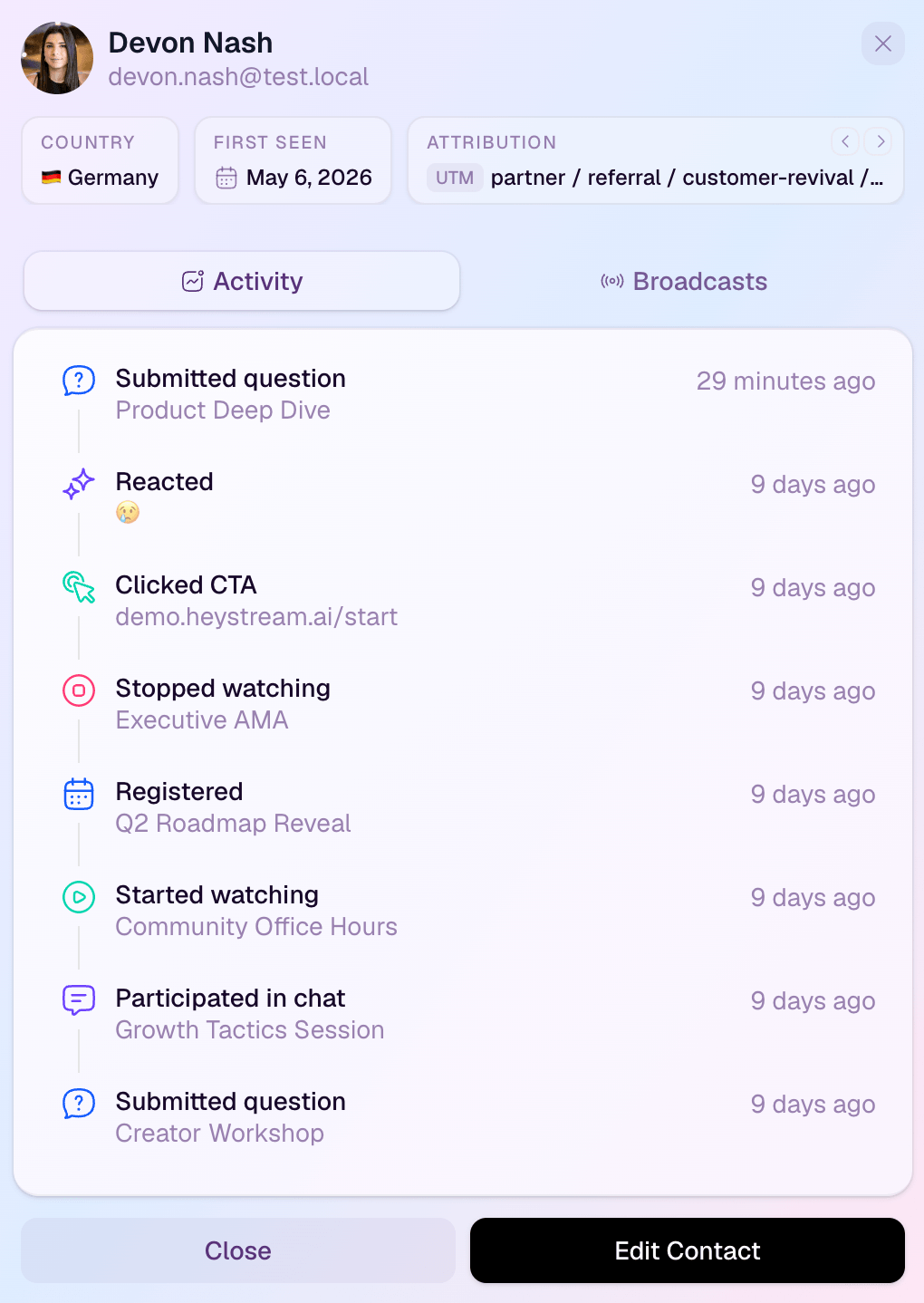
The screenshot matters because it shows the distinction this category often hides. A total attendee count can tell you how the session performed. A contact activity record can help your team decide what to do next.
2. Contrast: best for branded live webinars with HubSpot depth
Why it fits: Contrast's current feature matrix covers live, pre-recorded, recurring, replay, and on-demand webinars, alongside branded registration, engagement tools, analytics, and extensive HubSpot activity. Its listed HubSpot workflow includes registrant data, engagement, watch time, UTMs, forms, properties, app events, and activity-timeline updates.
Tradeoff: Package boundaries matter. Contrast lists Salesforce as an add-on, and dedicated services, onboarding, migration, and some security or API capabilities vary by plan or add-on.
Choose it when: A polished live studio and a detailed HubSpot handoff are central to the buying decision, and your team is comfortable verifying the exact package it needs.
3. Demio: best for teams mixing live and automated webinars
Why it fits: Demio's plan comparison spans live events and series as well as pre-recorded on-demand and automated webinars. That makes it a practical option for marketing teams that want both scheduled live sessions and evergreen delivery within one system.
Tradeoff: Do not compare Demio from a single headline feature list. Room size, hosts, event types, streaming quality, custom domains, restreaming, integrations, and other capabilities can differ across Free, Standard, and Premium.
Choose it when: Your program genuinely needs both live delivery and automated or on-demand formats, and you can map expected audience size, host count, and integrations to a current plan.
For a more focused look at that platform and five other workflow choices, see our guide to Demio alternatives.
4. eWebinar: best for evergreen, recorded delivery
Why it fits: eWebinar's feature set centers on recorded webinars offered on demand, just in time, or on a recurring schedule. Its chat model lets moderators answer privately while they are online or reply later, which suits repeated demos, onboarding, and training that should remain available without a live presenter every time.
Tradeoff: eWebinar is not a live production studio. Teams should also verify branding, domains, CRM connections, active-webinar limits, registrant volume, and any add-ons against the current package.
Choose it when: Availability and automation matter more than creating a live event, and a recorded session can do the core teaching or demonstration job.
If you are deciding between those models, the live versus automated webinar platform comparison makes the boundary explicit.
5. Zoom Webinars: best for familiar, scalable broadcasting
Why it fits: Zoom Webinars combines registration, webinar broadcast controls, chat, reactions, polls, Q&A, recordings, performance reports, and marketing-tool connections. The current product page separates standard Webinars from Webinars Plus, which adds pre-recorded delivery, backstage coordination, production layouts, event pages, content reuse, and richer cross-event analytics.
Tradeoff: Zoom's product family is wider than one webinar package. Webinars, Webinars Plus, and Events have different production, event-page, multi-session, networking, hybrid, analytics, and capacity boundaries.
Choose it when: Familiarity, broad organizational adoption, audience scale, and standard webinar controls matter more than keeping every B2B audience and follow-up step inside a focused webinar-growth workflow.
6. GoTo Webinar: best for established webinar and training operations
Why it fits: GoTo Webinar's feature set includes one-time events, series, recorded on-demand experiences, custom registration, templates, branding, engagement controls, attendee reports, event analytics, source tracking, and integrations with CRM and marketing tools.
Tradeoff: A broad feature catalogue does not mean every capability is available in every package. Verify audience capacity, branding, recording, simulive or pre-recorded delivery, integrations, and any paid-event or training requirements before choosing a plan.
Choose it when: Your team wants a mature operating system for standard webinars, recurring programs, customer training, or on-demand content and values established scheduling and reporting patterns.
7. BigMarker: best for customizable multi-format event programs
Why it fits: BigMarker's platform overview stretches from one-hour webinars to three-day conferences and persistent content destinations. It supports live, simulive, and on-demand studio experiences, flexible registration for virtual, hybrid, and in-person events, branded virtual venues, media hubs, CRM integrations, and event marketing.
Tradeoff: That breadth may be more than a focused webinar team needs. The product is sales-led, so packaging, implementation effort, services, and the practical boundary between webinar and wider event modules should be confirmed directly.
Choose it when: Your program extends beyond standard webinars into multi-day, hybrid, highly branded, or content-hub experiences and the extra operating surface is justified.
8. ON24: best for enterprise digital engagement and analytics
Why it fits: ON24 Webinars supports live, pre-recorded simulive, and on-demand experiences. Its current materials describe personalized content and CTAs, real-time attendee engagement metrics, detailed audience reports, marketing and CRM integrations, production services, and enterprise support.
Tradeoff: ON24's enterprise breadth, services, governance, analytics, and sales-led packaging can be heavier than a smaller team needs for a focused recurring webinar program.
Choose it when: A large marketing organization needs personalization, integration depth, structured support, and analytics across live and on-demand digital experiences.
How Livestorm's current pricing changes the comparison
Several older alternatives pages still describe Livestorm's previous monthly-active-contact model. That is no longer the right default for comparing current plans.
Under Livestorm's current pricing model, Pro and Enterprise use annual attendee-credit packs. A credit is used when an external attendee joins a live session, replay, or on-demand session. Registration alone does not consume a credit, and internal team members do not consume audience credits.
Livestorm's attendee-based pricing guide adds an important session rule: one attendee joining several sessions uses a credit for each session, while someone who attends live and later watches the replay of that same session is counted once for that session.
That model is neither automatically cheap nor automatically expensive. Compare it with your own workload:
- Annual registrants and expected attendees.
- Number of sessions each attendee is likely to join.
- Replay and on-demand usage.
- Hosts, moderators, and concurrent events.
- Peak audience capacity.
- Required integrations, services, security controls, and add-ons.
A fair pricing comparison needs those inputs. Per-attendee credits, per-registrant limits, host or capacity licences, subscription tiers, and custom enterprise quotes measure different things.
Who owns the workflow after registration?
A useful product trial should follow one representative contact through the full journey.
| Workflow step | What to verify |
|---|---|
| Registration | Form fields, consent, source tracking, confirmation, and calendar handling |
| Presenter setup | Speaker access, rehearsal, moderation, layouts, and failure recovery |
| Live experience | Join path, mobile and browser behavior, chat, Q&A, polls, and CTA controls |
| Audience record | Registration, attendance, watch time, questions, poll responses, clicks, and replay activity |
| Replay | Availability, access rules, CTA behavior, and contact-level tracking |
| CRM handoff | Contact or lead creation, field mapping, consent, deduplication, and activity sync |
| Follow-up | Trigger timing, segmentation, ownership, and message context |
| Reporting | Event totals, contact detail, exports, attribution inputs, and what the team can act on |
| Reuse | Recording, clips, transcripts, embeds, content hubs, and recurring-session setup |
Labels such as native, integrated, or automated are not enough. Run the workflow and inspect the resulting records.
When staying with Livestorm is the right choice
Switching platforms has a real cost. Stay with Livestorm when:
- Browser-based delivery already works for presenters and attendees.
- Registration, event emails, engagement, replay, on-demand, multi-session events, integrations, and analytics cover the job.
- Annual attendee credits fit your actual live and replay usage.
- The team would have to recreate working processes without gaining a meaningfully better operating model.
- Livestorm's enterprise integrations, session length, support, translations, or add-ons match requirements that another platform would only partly replace.
An alternative list should make it easier to stay as well as switch. If your decision has narrowed to two products, the direct HeyStream vs Livestorm comparison is more useful than repeating the full shortlist.
A migration test before you switch
Do not begin with a full account move. Run one bounded pilot built around a representative webinar.
- Export current event, attendee, replay, and engagement data, then check retention rules.
- Rebuild one real registration flow with its consent, tracking, confirmation, and reminder requirements.
- Rehearse presenter, moderator, and speaker access.
- Test the attendee join path on the browsers and devices your audience actually uses.
- Run chat, Q&A, polls, handouts, and the CTA moments your team depends on.
- Watch the replay as a new and returning attendee.
- Inspect the CRM objects, fields, activity history, deduplication, and consent state.
- Trigger the actual follow-up route and confirm timing, ownership, and personalization inputs.
- Compare event-level analytics, contact detail, and exports with the records your team uses today.
- Check capacity, concurrency, add-ons, and failure recovery before moving recurring sessions.
If you also need outside production help, use this pilot to decide whether you need software alone or a different webinar production route.
The practical recommendation
Choose the operating model first. HeyStream and Contrast are the live-first B2B choices, Demio covers mixed live and automated delivery, eWebinar specializes in recorded automation, Zoom Webinars and GoTo Webinar provide familiar broadcast operations, BigMarker suits broader event programs, and ON24 serves enterprise digital engagement.
Then pilot the complete workflow. The right alternative is the one that handles your real registration, presenter, attendee, replay, CRM, and follow-up requirements with fewer weak handoffs, not the one with the longest feature page.


