Demio is a capable webinar platform. It supports live sessions, event series, automated webinars, on-demand viewing, calls to action, and detailed event reporting. The right reason to replace it is not that it lacks the basics. It is that another platform fits your operating model better.
The quick answer is simple: choose HeyStream for connected live-first B2B webinar programs, eWebinar for host-independent automated sessions, Livestorm for a broad browser-based webinar suite, Zoom Webinars for Zoom-standardized large presentations, GoTo Webinar for structured webinar administration, and BigMarker for deeply customizable enterprise event programs. If Demio's mix of live and automated formats already fits your team, staying may be the best decision.
Disclosure: HeyStream publishes this comparison and is one of the products covered. We have used the same workflow criteria for every option, and there is no universal winner.
Demio alternatives at a glance
| Alternative | Best fit | Format focus | Follow-up owner | Main watch-out |
|---|---|---|---|---|
| HeyStream | Live-first B2B webinar programs | Live, recurring, replay | Built-in audience CRM plus integrations | Not a pure evergreen automation platform |
| eWebinar | Automated demos, onboarding, and training | Prerecorded, scheduled, on-demand | eWebinar plus connected CRM or automation tools | Not designed around a live host-led show |
| Livestorm | Teams wanting one browser-based webinar suite | Live, prerecorded, on-demand | Contact profiles, event emails, and integrations | Attendee-credit pricing needs careful forecasting |
| Zoom Webinars | Zoom-standardized organizations and large presentations | Live and recurring presentations | Usually Zoom plus an external CRM or marketing stack | Webinar licensing and downstream workflow can span several systems |
| GoTo Webinar | Structured webinar operations across teams or departments | Live, recorded-as-live, series, on-demand | GoTo reporting plus integrations | Less focused on an in-platform B2B audience workflow |
| BigMarker | Custom enterprise webinars and broader event programs | Live, simulive, automated, evergreen, on-demand | Platform data plus CRM and marketing automation integrations | Broader scope and sales-led buying process may be more than a focused team needs |
The order is editorial navigation, not a quality score. Start with the job your webinar program must do, then compare the products that serve that job.
Decide what kind of replacement you need
A list of features will not tell you whether a platform fits. Three operating-model questions will.
- Must the session run without a live host? If yes, prioritize automation-first platforms. If no, judge the live production, audience, and follow-up workflow.
- Do you need a focused webinar platform or a broader event suite? A marketing team running a weekly webinar has different needs from an enterprise team producing conferences, certification programs, and complex virtual events.
- Where should audience history and follow-up live? Some teams want the webinar platform to own the contact record and next action. Others intentionally use Salesforce, HubSpot, Marketo, or another system as the source of truth.
| Operating model | What it means | Strongest shortlist fit |
|---|---|---|
| Live-first webinar program | A host-led session is the core experience, with replay and follow-up connected afterward | HeyStream, Livestorm, Zoom Webinars, GoTo Webinar |
| Automation-first webinar program | Prerecorded sessions run repeatedly or on demand without depending on a live presenter | eWebinar, Demio Automated Events, BigMarker |
| Enterprise event program | The team needs deeper customization, multiple formats, larger scale, or broader event operations | BigMarker, Zoom Webinars, GoTo Webinar |
If you are still deciding between host-led and automated formats, this guide to automated webinars versus live webinars explains the trade-offs in more detail.
When staying with Demio makes more sense
Demio should not be treated as a weak baseline. Its own guide to Standard and Automated Events explains that Standard sessions run live and create replays, while Automated Events use prerecorded video and can offer on-demand access. That mix is useful for teams that want live launches, recurring events, and evergreen delivery in one product.
Demio also has real conversion and reporting tools. Hosts can share a booking link or another destination through a Featured Action, and Demio Insights covers registration, attendance, focused time, event activity, and drop-off context. Its current pricing and plan matrix organizes plans around attendee-room capacity and host access, with live series, engagement resources, analytics, and automated or on-demand features available according to plan.
Stay with Demio when:
- You value its blend of live, series, automated, and on-demand event types.
- Your presenters and operators already work comfortably in its room.
- Your CRM or marketing automation platform is intentionally the main contact record.
- Its host-seat and attendee-room pricing matches how your team runs events.
- A switch would mostly recreate the same workflow without solving a clear operating problem.
Consider switching when the job has changed. You may now need a live-first audience workflow, host-independent automation, a browser suite with attendee-credit pricing, closer alignment with an existing collaboration stack, or enterprise event breadth.
If your shortlist has narrowed to two products, use the detailed HeyStream versus Demio comparison instead of stretching this six-way article into a direct feature duel.
How these six alternatives were chosen
We compared each platform on the same practical criteria:
- The webinar formats it is designed to run.
- Registration and lifecycle-email workflow.
- Live production model.
- Engagement tools and calls to action.
- Replay, on-demand, and automation model.
- Audience or contact record.
- Which system owns follow-up.
- CRM and marketing integrations.
- Reporting.
- Public pricing structure and capacity logic.
- Fit for a focused B2B webinar team versus a broader enterprise event program.
Official vendor pages were checked on 18 August 2026. Pricing, plan names, capacities, and entitlements can change, so verify the commercial details that matter to your program before buying.
1. HeyStream: best for live-first B2B webinar growth programs
Best fit: B2B marketing teams that run recurring, host-led webinars and want registration, audience activity, CTAs, replay, and follow-up connected in one workflow.
HeyStream is a B2B webinar platform built around the live program rather than automated evergreen delivery. Teams create branded registration and watch pages, host the session, see who registered and watched, track CTA activity, keep the replay available, and use those signals to decide what happens next.
That in-platform audience record is the main difference. A contact can carry registration, live attendance, replay behavior, and CTA activity, so the webinar is not isolated from the follow-up that comes after it.
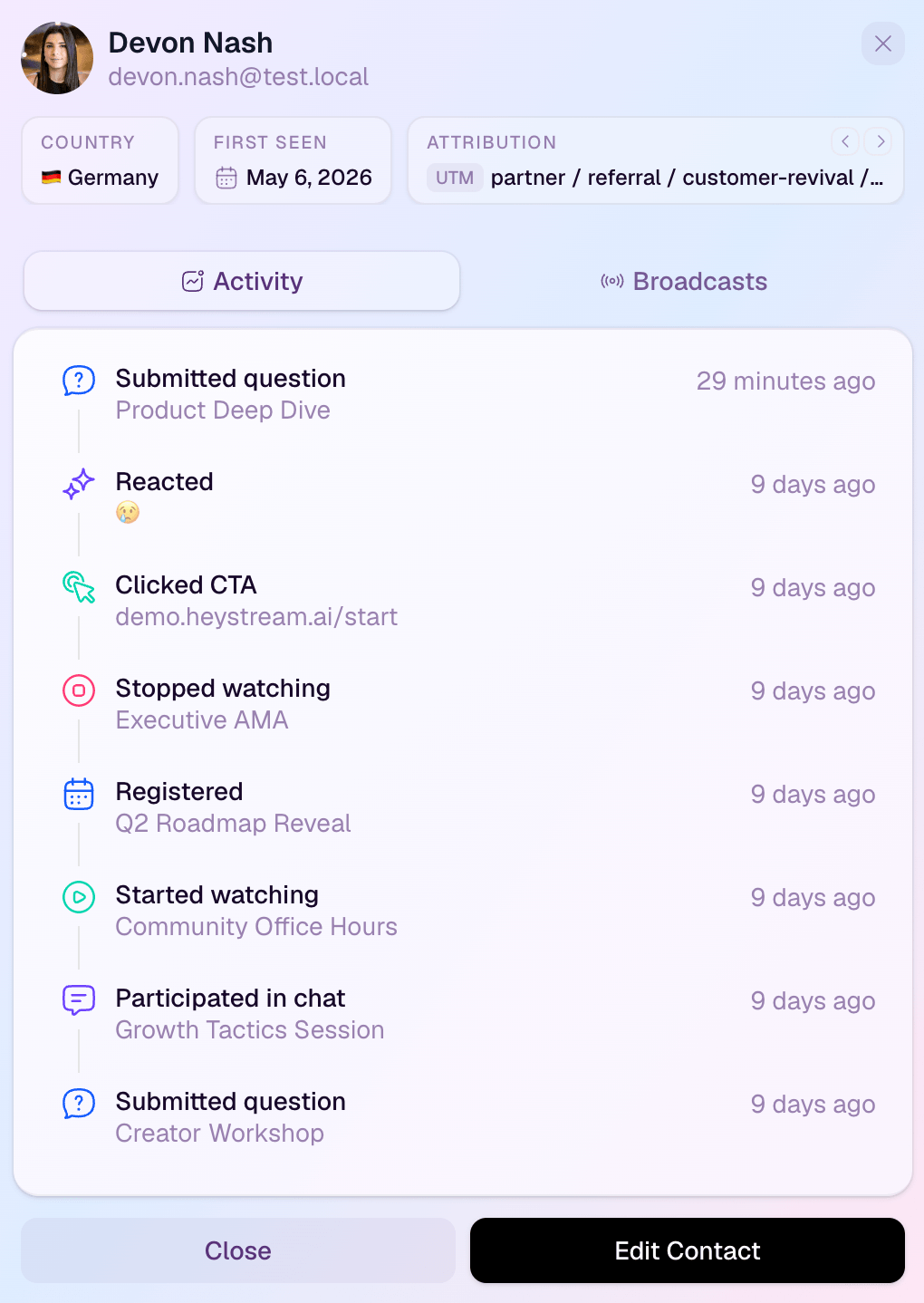
The strongest use case is a repeatable live program. HeyStream connects naturally to a recurring webinar platform decision and the wider B2B webinar growth engine: each session adds to the same audience and conversion workflow instead of starting from zero.
Main limitation: HeyStream is not a replacement for Demio's Automated Events or a dedicated evergreen-webinar product. Choose another option if the core requirement is to run prerecorded sessions around the clock without a live host.
Choose it over Demio when: The webinar platform itself should own audience context, reusable CTAs, replay conversion, and behavior-based follow-up for a live-first B2B program.
Stay with Demio when: You need live and automated webinar modes in the same product, and your external CRM or email stack already owns the downstream workflow.
Pricing model: HeyStream pricing is tied to live attendees per broadcast. At the time of review, annual billing is shown at US$49 per month for Launch with 100 live attendees, US$149 for Growth with 500, and US$399 for Scale with 2,000. Launch includes branded registration and watch pages, live and replay CTAs, and the audience CRM. Growth adds reusable CTA collections, CRM and email integrations, and outbound automations.
2. eWebinar: best for automated demos, onboarding, and training
Best fit: Teams whose main job is delivering a polished prerecorded session repeatedly, on demand, or at convenient scheduled times.
eWebinar's feature set is explicitly automation-first. It supports on-demand and just-in-time viewing, recurring schedules, replay access, and preprogrammed interactions placed on a video timeline. It also includes registration options, email notifications, browser access, analytics, and integrations with CRM and marketing tools.
That makes eWebinar the clearest choice when removing live host dependency is the point. A team can turn a proven demo, onboarding session, or training presentation into an available experience without asking a presenter to deliver it again every week.
Main limitation: It is not built around a live production team creating a host-led show. If the live moment, presenter interaction, or real-time event energy is the core product, start elsewhere.
Choose it over Demio when: Automated delivery is the primary workflow rather than one event type alongside live webinars.
Stay with Demio when: You need both live host-led events and automated sessions in one familiar platform.
Pricing model: eWebinar pricing scales by the number of active eWebinars and monthly registrants. At the time of review, Level 1 is US$99 per month for one active eWebinar and up to 1,000 monthly registrants. Higher levels expand both limits, while all subscriptions list unlimited recurring sessions and team members.
3. Livestorm: best for a broad browser-based webinar suite
Best fit: Teams that want live, prerecorded, and on-demand webinar workflows in a browser-based product with event emails, contact profiles, and integrations.
Livestorm's feature overview brings together branded registration pages, browser-based attendance, customized reminder and follow-up emails, contact profiles, engagement tools, data export, and live or on-demand formats. It offers more of the end-to-end event workflow inside one suite than a presentation-only add-on.
Livestorm is a useful middle path. It is broader than a focused live-first workflow, but it does not require buyers to jump immediately to the deepest enterprise-event category.
Main limitation: Its commercial model is based on attendee credits. That can align cost with use, but teams should forecast how live attendance, replay, and on-demand viewing consume credits rather than comparing only a headline monthly price.
Choose it over Demio when: Browser delivery, contact profiles, event emails, and flexible live or on-demand event management are the stronger fit.
Stay with Demio when: Demio's host and attendee-room model is easier to predict, or its live and automated event setup already covers the job.
Pricing model: Livestorm pricing uses attendee credits across webinars. At the time of review, its public Pro example shows €2.50 per attendee at 400 attendee credits, with unlimited events, recordings, and team members. Enterprise pricing is custom and adds longer sessions, enterprise integrations, custom analytics, and service options.
4. Zoom Webinars: best for Zoom-standardized organizations and large presentations
Best fit: Organizations already standardized on Zoom that need presentation-style webinars with controlled attendee roles, recurring scheduling, and large capacity options.
The Zoom Webinars documentation describes a clear stage-and-audience model: hosts and panelists share video, audio, and screens, while attendees are view-only unless the host allows more participation. Registration can be required or disabled, and webinars can be scheduled as one-off sessions, recurring series, or the same session at multiple times.
The strongest reason to choose Zoom is organizational fit. Procurement, IT, presenters, and attendees may already know the product, and webinar licenses scale from 500 attendees to much larger audiences.
Main limitation: The webinar itself may be only one part of the operating stack. Registration, contact history, campaign attribution, and follow-up commonly depend on CRM, marketing automation, and reporting integrations.
Choose it over Demio when: Zoom standardization, presentation control, or capacity licensing matters more than keeping the whole marketing webinar workflow in one purpose-built product.
Stay with Demio when: You prefer a dedicated marketing webinar environment with automated-event options and a more contained webinar workflow.
Pricing model: Zoom Webinars is sold through webinar licensing tied to capacity. Compare the exact license, attendee limit, host requirements, HD needs, and any CRM or marketing integration costs for your account.
5. GoTo Webinar: best for structured webinar administration
Best fit: Teams or departments that want established webinar administration, live and prerecorded delivery, registration, automated emails, engagement tools, and reporting.
GoTo Webinar's feature page covers one-time events, series, prerecorded webinars that run like live sessions, and on-demand experiences. It also includes custom registration, webinar templates, reminder and follow-up emails, polls, Q&A, attendee reports, analytics, and source tracking.
This makes GoTo Webinar a credible operational choice for departments running regular presentations, training, or external events. It is particularly relevant when buyers value established webinar administration over a newer audience-led growth workflow.
Main limitation: Its core story is webinar delivery and administration. Teams that want a built-in audience CRM, reusable conversion assets, and behavior-based follow-up may still assemble those parts through other systems.
Choose it over Demio when: Department-level administration, plan capacity, or a familiar GoTo operating model is the deciding factor.
Stay with Demio when: You prefer Demio's room experience and its combination of live, automated, on-demand, and engagement features.
Pricing model: GoTo Webinar pricing currently presents Reach for one organizer and up to 500 participants, Elevate for up to 1,000 participants plus branded webinars and recordings-as-live, and a custom Complete tier. The public page may localize or hide exact prices, so request the current total for the attendee capacity, organizer seats, and add-ons you need.
6. BigMarker: best for customizable enterprise webinar and event programs
Best fit: Larger teams that need multiple webinar formats, deep audience-experience customization, enterprise-scale operations, and CRM or marketing automation data flows.
BigMarker's webinar platform spans live, simulive, automated, evergreen, and on-demand formats. It also covers branded audience environments, webinar series, registration pages, email workflows, engagement, analytics, and CRM or marketing automation integrations.
BigMarker is the broadest option in this shortlist. That breadth can be valuable when a webinar program overlaps with virtual events, media hubs, certification, large-scale streaming, or highly customized experiences.
Main limitation: Broad capability brings a broader buying and implementation decision. A small team that needs a focused weekly webinar workflow may not benefit from the full event-platform scope.
Choose it over Demio when: Customization, format breadth, enterprise data flows, or wider event operations are central requirements.
Stay with Demio when: You want a more focused marketing webinar platform and do not need the extra event-production scope.
Pricing model: BigMarker uses a sales-led commercial process for this enterprise platform. Ask for a quote that separates attendee capacity, webinar formats, customization, integrations, service, and any media-hub or event modules.
Demio alternatives comparison matrix
Use this matrix to narrow the category. It describes the center of gravity of each platform, not every plan entitlement.
| Criterion | HeyStream | eWebinar | Livestorm | Zoom Webinars | GoTo Webinar | BigMarker |
|---|---|---|---|---|---|---|
| Live webinars | Core fit | Not the core fit | Supported | Core fit | Core fit | Core fit |
| Series or recurring | Core live-series fit | Unlimited recurring automated sessions | Supported | Supported | Supported | Supported |
| Automated or on-demand | Replay-led, not evergreen automation | Core fit | Supported | Integration or recording-led | Supported | Core fit |
| Browser attendee experience | Core fit | Core fit | Core fit | Join options depend on setup | Browser webcast available by mode | Core fit |
| Registration and lifecycle email | Built in | Built in | Built in | Registration built in, lifecycle often integration-led | Built in | Built in |
| Live CTA model | Built-in live CTAs | Timeline interactions | Engagement tools and integrations | Often integration-led | Engagement tools | Built-in action prompts |
| Replay CTA model | Built-in replay CTAs | Core interactive playback | Supported by event workflow | Often integration-led | On-demand workflow | Interactive on-demand tools |
| Audience or contact record | Built-in audience CRM | Analytics plus integrations | Contact profiles | Integration-led | Reports plus integrations | Platform data plus integrations |
| Follow-up owner | HeyStream or connected CRM | Connected CRM or automation stack | Livestorm or connected stack | Usually external stack | Usually external stack | BigMarker plus connected stack |
| CRM and integrations | Included by plan | Supported directly and via Zapier | Supported by plan | Broad ecosystem | Supported | Enterprise CRM and MAS flows |
| Enterprise event breadth | Focused webinar product | Focused automated product | Moderate to broad | High-capacity presentation | Departmental webinar operations | Broadest in this shortlist |
| Pricing logic | Live attendees per broadcast | Active eWebinars and registrants | Attendee credits | Webinar license capacity | Tier, capacity, organizers, add-ons | Custom quote |
Pricing and entitlements were checked on 18 August 2026. Treat plan-dependent items as a prompt to verify the exact package, not as a promise that every tier includes the feature.
Choose by operating model
Choose HeyStream when a live-first B2B webinar should keep registration, audience signals, CTAs, replay, and follow-up connected. It is especially relevant for recurring webinars where the same audience workflow compounds across sessions.
Choose eWebinar when the session must run without a live presenter and automation is the main product, not a secondary event mode.
Choose Livestorm when you want a browser-based suite that combines live and on-demand events, contact profiles, event emails, and integrations, and attendee-credit pricing fits your usage.
Choose Zoom Webinars when your organization already runs on Zoom or needs controlled presentation roles and very large capacity options.
Choose GoTo Webinar when structured administration, departmental use, registration, event emails, and established webinar reporting are the priority.
Choose BigMarker when your webinar program is part of a wider enterprise event operation that needs customization, format breadth, and deep data flows.
Stay with Demio when its blend of live, series, automated, and on-demand formats already matches your team. A migration should solve a real operating problem, not merely replace one capable webinar room with another.
Migration checklist before leaving Demio
Switching webinar platforms affects more than the next event. Map the full workflow before cancelling or redirecting anything.
Event setup
- Inventory every Standard, Series, Automated, and On-Demand event.
- Record registration settings, custom fields, event URLs, schedules, host ownership, and attendee-room requirements.
- Identify reusable templates, brand assets, slides, videos, handouts, polls, and Featured Actions.
- Decide which live, automated, and replay formats the replacement must support.
Audience data
- Export registrants, attendees, no-shows, and engagement history where available.
- Preserve consent, suppression, source, and campaign fields.
- Decide whether the new webinar platform or your external CRM becomes the authoritative contact record.
- Document how duplicate contacts and historical events will be handled.
A clear recurring webinar workflow is especially important when the same people register for, attend, or replay several sessions.
Email and follow-up
- Map confirmations, reminders, follow-up emails, and replay messages.
- Rebuild CRM and marketing automation mappings.
- Recreate booking links, CTAs, segments, and routing rules.
- Test the difference between attended, missed, clicked, and replayed states.
Recordings and URLs
- Download or preserve recordings before access changes.
- Decide where old replays will live.
- Keep existing public URLs available until replacement pages and redirects have been verified.
- Check embedded registration forms, calendar links, campaign pages, and automated emails for old destinations.
Verification
- Rebuild one representative event first.
- Test registration, lifecycle email, presenter access, live delivery, CTA, replay, reporting, CRM sync, and follow-up.
- Run the full path with internal test contacts.
- Keep Demio available until the replacement event and downstream data have been read back successfully.
No vendor should be assumed to offer a one-click, lossless migration unless its current documentation says so.
The best Demio alternative depends on the workflow
Start with three questions: must the session run without a host, do you need a focused webinar product or an enterprise event suite, and where should audience history and follow-up live?
That puts the choices into clear groups. HeyStream is strongest for live-first B2B programs with connected audience and conversion workflows. eWebinar is strongest for host-independent automated delivery. Livestorm offers broad browser-based webinar coverage. Zoom and GoTo fit standardized presentation and administration needs. BigMarker fits the widest enterprise-event requirements. Demio remains a good choice when its hybrid live and automated model already fits.
If your priority is a live program that connects the event to the next action, review HeyStream's B2B webinar workflow and then compare the current plans against your audience size and operating needs.


