The best Contrast alternatives to shortlist depend on the job: HeyStream for a live-first audience and CTA workflow, Livestorm for browser-based team webinar operations, Demio for a mix of live and automated sessions, eWebinar for recorded evergreen delivery, Zoom Webinars for teams already working in Zoom, and Goldcast for a broader event and video-content program. If Contrast already handles your webinar experience and HubSpot handoff well, keeping it may be the better decision.
HeyStream publishes this guide and is included in the shortlist. The order is not a performance ranking. We reviewed public product documentation and pricing on September 3, 2026; we have not run a comparative hands-on benchmark. Here, “best” means a defensible fit for a particular workflow, subject to the same checks for every product.
The useful starting question is: what must still work after we switch? A different studio can look appealing while leaving your team with a contact record that no longer contains the activity needed for follow-up. Conversely, a rich integration can be unnecessary if your team wants to manage the audience and next-step offers close to the live session.
Contrast alternatives at a glance
Use this shortlist to choose two candidates for a pilot. The pricing column identifies what you need to measure, not a comparable quote. The linked product and plan sources in each section explain the documented basis for inclusion.
| Alternative | Strongest fit | Important trade-off | Pricing basis to check | First pilot question |
|---|---|---|---|---|
| HeyStream | Live-first audience and CTA operations | Its HubSpot contact sync does not reproduce a rich activity timeline | Plan and live attendees per broadcast | Do the selected fields reach the correct contact? |
| Livestorm | Browser-based team webinar operations | Repeat attendance across sessions consumes additional credits | Attendee-credit pack and purchase terms | How are two sessions and a replay counted? |
| Demio | Live and automated marketing sessions | Room size, host count and CRM entitlement must be checked together | Attendee-room size, hosts and tier | Does the required handoff work for both formats? |
| eWebinar | Repeated delivery of recorded demos or training | A different model from an unscripted live panel | Active webinars and monthly registrants | Who answers chat, and when? |
| Zoom Webinars | A webinar program within an existing Zoom environment | Base Webinars, Plus and Events have different scope | Selected package, licence and capacity | Is the required experience in the purchased package? |
| Goldcast | A wider event, recording and content-reuse program | A broader bundle needs a broader business case | Proposed bundle and contract | What is included from event through content reuse? |
Start with what already works in Contrast
A fair comparison starts with the incumbent's actual capabilities. Contrast's product overview includes live events, replays, pre-recorded events and recurring events. It also describes branded experiences and recording reuse. Recurring delivery alone is therefore not a reason to assume you need another product.
Before evaluating replacements, save an inventory of:
- Registration forms, required fields and the links already in campaigns.
- Presenter access, live interaction and the way recurring sessions are configured.
- Reminder emails, replay access and next-step offers.
- CRM properties, activity records and the workflows that depend on them.
- Recordings and other content your team still uses.
Give special attention to HubSpot. Contrast's HubSpot setup guide describes registration and viewing activity on contact records, alongside connection-timing rules and new contacts being non-marketing by default. If that activity is central to your sales process, replacing it is part of the switching cost.
Write down one concrete reason to consider a change. It might be a different delivery model, a preference for where the audience workflow lives, or a cost structure that better matches your event pattern. “Another platform has more features” is too vague to test.
How we compared the six options
Our recommendations are editorial judgments from current public documentation. A documented feature makes a product worth considering; it does not prove that your plan, configuration and downstream systems will produce the result you need.
Apply the same six questions to every candidate, including HeyStream:
- Delivery: Do you need live discussion, a replay, scheduled recorded delivery, or a mixture?
- People: Can your presenters and attendees complete the intended journey on the devices they use?
- Data: Where should contact details, attendance and engagement records live?
- Continuity: What happens to the offer, registration and viewing experience after the live session?
- Cost: What is counted, which tier is required, and what else must be purchased?
- Operations: Can your team meet its support, procurement and day-to-day operating requirements?
Choose the non-negotiable answers before reviewing optional features. A platform that fails the one handoff your sales team relies on should not win because it has a longer checklist.
Six alternatives, matched to the job
1. HeyStream: for a live-first webinar workflow
Shortlist HeyStream when you want branded registration and watch experiences, audience records and CTA operations close to the broadcast. Its B2B webinar platform is relevant to teams running live demos, launches and recurring marketing sessions with a clear next step for attendees.
Compare the right plan. HeyStream pricing places reusable CTA collections, CRM and email integrations, and outbound automations in Growth and above. Launch provides the branded webinar entry point; it is not the like-for-like tier if external CRM integration is a requirement. Plans also differ in live attendees per broadcast.
There is a specific limitation for HubSpot-heavy teams: HeyStream syncs contact details and selected registration fields on registration or attendance triggers. It does not export a rich HubSpot engagement-event timeline, poll answers or watch-time history through that integration. An attendance trigger is not itself proof that an attendance activity record was created.
That makes HeyStream worth testing when its in-platform workflow and the selected-field handoff match your needs. It is a weaker fit if your existing HubSpot activity model must transfer unchanged, or if a fully automated evergreen program is the non-negotiable job.
Pilot question: When an existing contact registers and attends, do the selected fields update the correct HubSpot contact, and can your team complete its intended next step with that evidence?
2. Livestorm: for browser-based team webinar operations
Livestorm is worth considering when your evaluation centers on browser access and the experience your team manages around each session. Livestorm's feature guide describes browser-based attendance, branded registration pages and emails, and contact profiles. Check the particular features and integrations you need against the offered plan.
The pricing distinction matters for recurring audiences. Livestorm's current pricing uses attendee credits purchased in a pack. It is not the older monthly-active-contact model that still appears in some comparisons. A returning person attending another session can consume another credit.
That is neither inherently cheaper nor more expensive than registrant pricing. It depends on attendance, repeat visits, replay consumption and the purchase terms. Get a quote using your own event pattern, especially if the same people attend a series.
Pilot question: Can the team run the session and complete the required CRM handoff, and can you reconcile credit use for a person who attends two sessions and watches one of their replays?
3. Demio: for live and automated marketing webinars
Consider Demio when your program combines live sessions with recorded or automated delivery. Demio's product overview describes polls, featured actions and handouts alongside automated and on-demand event options. That makes it a plausible candidate for a marketing team that needs both formats.
The decision should use the plan you would actually buy. Demio's plan comparison separates attendee-room sizes, host licensing and feature entitlement, including premium integrations. A small Starter room with one host is not a meaningful price comparison if you need several operators and a CRM capability in another tier.
The trade-off to investigate is whether your two delivery formats produce the same downstream evidence. Similar registration pages do not establish identical automation behavior, and a listed CRM connection does not explain every field or activity it sends.
Pilot question: Run one live session and one recorded delivery. Does each produce the exact contact information and event evidence needed by your follow-up process on the quoted plan?
4. eWebinar: for recorded evergreen delivery
eWebinar is a different kind of alternative. Its feature overview centers on recorded webinars, preset interactions and chat. Shortlist it when your main job is to make a repeatable demo or training session available without presenting the content live each time.
This is not a like-for-like replacement for hosting an unscripted live panel. Decide whether the audience needs a live conversation, a recorded presentation with a way to ask questions, or both. Being clear about that distinction is more useful than comparing products simply because both use the word “webinar.”
eWebinar's pricing combines active-webinar limits with monthly registrant allowances. Count how many recordings must be available at once as well as how many people will register. Confirm the plan and any add-ons needed for your intended workflow.
Pilot question: Can viewers find a suitable session, ask a question and receive the intended response? Assign someone to own chat follow-up and verify that the registration allowance fits the program.
5. Zoom Webinars: for teams already operating in Zoom
Zoom's webinar offering is worth evaluating when your team already works in that environment. Existing familiarity is a reason to test it, not proof that external speakers and attendees will find every step straightforward.
Zoom's Webinars and Events overview distinguishes standard Webinars, Webinars Plus and Events. Plus adds production and on-demand capabilities; Events extends into multi-session event scope. Do not attribute the full range to a base Webinars licence.
Compare the selected package, licensed users and attendee capacity in the current purchasing flow. Then check the additional systems needed for your exact registration, CRM and follow-up requirements. A familiar meeting experience does not establish that those marketing handoffs are already solved.
Pilot question: Can the intended presenters use the correct permissions, can attendees join as expected, and do the purchased production, replay and CRM capabilities support the full event?
6. Goldcast: for a broader video and event program
Goldcast belongs on the shortlist when the buying decision covers more than the webinar room. Goldcast's platform overview groups event and recording creation with content reuse and distribution. That scope may suit a team planning a wider video program around its events.
The same breadth can make it an unnecessarily large evaluation for a small team with one narrow live-webinar job. Define which parts of the event-to-content process you will use, who will operate them and what evidence would justify the change.
Goldcast's plans page offers a custom bundle conversation. Ask for a proposal covering the actual products and services you need; a Content Lab entry point should not be treated as a free webinar plan or a comparable event-platform quote.
Pilot question: Can your team take one event through the required recording and content-reuse process, and does the proposed contract include each part of that workflow?
Compare pricing using your real event pattern
Pricing units answer different questions:
- Unique monthly registrants: How many distinct people registered in the billing period?
- Attendee credits per session: How many counted session attendances occurred?
- Live capacity per broadcast: How much room is needed for one live session?
- Active recorded webinars: How many recorded experiences must remain available?
Host licences, tier requirements and custom bundles add further constraints. A larger number in one column does not necessarily mean more usable capacity for your program.
Consider this illustrative event pattern, not a vendor quote: you run two sessions in a month, with 300 unique people registered in total. Each session has 120 live attendees, 60 of whom attend both sessions. Another 30 people watch only the replay of one session.
There are 240 live attendance occurrences across the two sessions. The 60 returning people are included in both session counts. Adding the 30 replay-only attendances gives 270 session attendances.
Under Livestorm's attendee-credit definition, that pattern would consume 270 credits, assuming these are external attendees and there are no other counted room visits. Someone who watches live and then watches the replay of that same session is counted once for that session. Joining a second session consumes another credit. Your own usage calculation should also account for any room visits before the live event.
By contrast, Contrast's pricing guide describes unique monthly registrants as the Pro usage unit. The 300 registered people and the 270 session attendances are different measures of the same illustrative program. They are not interchangeable capacity figures or a savings calculation.
For a live-capacity plan, establish the maximum simultaneous audience you must support; total attendance across a session does not tell you the exact peak. For a recorded-webinar plan, add the number of recordings that need to remain active.
Ask each finalist to price the same scenario, including your CRM subscription, required integrations or add-ons, support, annual commitment and content-retention needs. Compare the full cost of the required workflow, then consider the time needed to implement it.
Check what reaches your CRM before you switch
Three separate outcomes are often compressed into “CRM integration”:
- Contact sync: A contact is created or updated with selected fields.
- Activity creation: An attendance, viewing or interaction record appears where the next system can use it.
- Follow-up execution: A rule or person takes the intended action and you can verify the result.
Success at one step does not prove the next.
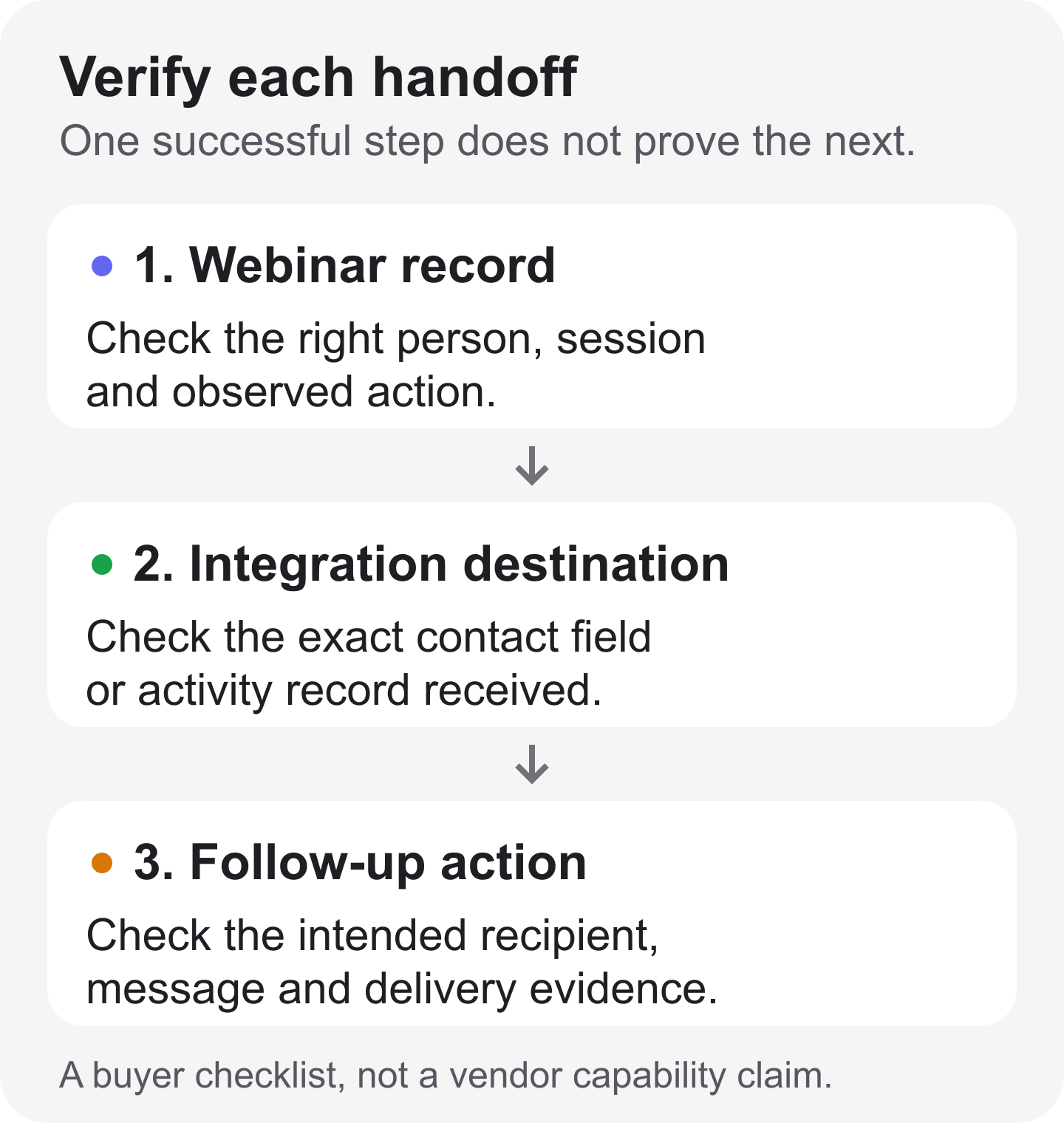
The diagram is a buyer checklist. It does not claim that any listed vendor performs all three steps automatically.
Fill this ownership worksheet for each finalist. The entries describe evidence to request, not features we have assumed the product supports.
| Required evidence | Owning system to name | Destination to specify | Dependency to confirm | Pilot acceptance |
|---|---|---|---|---|
| Identity and selected fields | Registration or contact system | Exact contact and properties | Field mapping and permission | Existing contact updated correctly |
| Attendance state | Session attendance record | Named field or event record | Trigger and session identity | Test attendee linked to the right session |
| Engagement activity | Tool recording the interaction | Required activity or property | Supported activity type and tier | Expected action visible at destination |
| Replay history | Replay viewing record | Dated viewing evidence | Replay support and retention | Replay activity kept distinct where required |
| Segmentation | System that builds the audience | Named list or segment | Available fields and rules | Test contact enters only the intended group |
| Follow-up execution | Email tool, CRM or operator | Delivery record or completed task | Rule, permission and recipient eligibility | One intended action verified |
Contrast and HeyStream illustrate why the distinction matters. Contrast's cited HubSpot guide describes viewing activity on contact records. HeyStream's HubSpot integration documents contact details and selected registration fields, with registration and attendance triggering contact updates. It does not promise to export the same activity timeline, lists, scoring or attribution.
Either approach can fit a team. The question is whether the evidence you need arrives in the form your next process requires. If your sales team acts on a particular viewing event, a correctly created contact with no such event is not an equivalent handoff.
For a platform-neutral way to specify that contract, use the webinar CRM integration guide. Keep observed behavior separate from interpretation: viewing a replay or clicking an offer does not by itself establish buying intent or revenue.
Run a small migration pilot before committing
Test two finalists with consenting internal participants and a representative session. Use the same acceptance criteria for both:
- Identity and fields: Register an existing contact and a new contact. Check matching, selected values and any changes made by the integration.
- Registration experience: Follow the invitation, form, confirmation and join path. If recurring sessions matter, verify the registration behavior you need rather than relying on the feature name.
- Live and replay behavior: Test presenter roles, viewing, interaction, replay access and the intended next-step offer.
- Downstream evidence and action: Inspect the exact CRM destination, then complete one approved test follow-up to the intended test recipient.
- Retention and rollback: Confirm what can be exported, what must remain in the old platform, and how you would return to the previous process if a required step fails.
Record the result of each check and an owner for any gap. Do not replace an acceptance criterion with “the integration says connected.”
Keep old campaign links and histories available until the new path has been verified. A successful contact import does not prove that engagement history has migrated. Once a finalist passes, use the webinar platform migration checklist for the fuller inventory, cutover and reconciliation work.
When to stay with Contrast, switch, or choose a different category
Stay with Contrast if its actual workflow, HubSpot evidence and cost fit your program. Switching has to solve a meaningful problem while preserving the parts that already work.
Shortlist HeyStream if your priority is live-first audience and CTA operations and its documented integration boundary fits your team. If automated recorded delivery dominates, test that specialist workflow directly. If events feed a wider video-content operation, evaluate the whole program and its ownership.
Choose two candidates, write down the handoff neither can fail, and test that before committing. If HeyStream matches those requirements, use a trial to run the same small pilot you would ask of any alternative.


