Most standard B2B webinars fit a 45 to 60 minute calendar block. A focused session built around one idea, one expert answer, or one product workflow can work well in 30 minutes. The right webinar length depends on the job the session must do, the depth of the material, the number of speakers, the interaction plan, and the time needed for useful questions and a clear next step.
That answer is a starting point, not a universal rule. A tightly run 30-minute briefing can be more valuable than a padded hour, while a complex panel or workshop may genuinely need longer. The practical question is not simply, "How long are webinars?" It is, "What must happen during this session, and how much time does each part deserve?"
This framework will help you choose a duration, build an agenda that adds up, protect the most useful moments, and learn from what viewers actually do.
The short answer: how long should a webinar be?
For most B2B teams, use these starting points:
- 30 minutes for one focused idea, a short product demo, an expert briefing, or a narrowly scoped update.
- 45 minutes for a teaching session, customer story, interview, or standard demo with meaningful interaction.
- 60 minutes for a panel, complex walkthrough, multi-speaker session, or format that needs substantial Q&A.
- More than 60 minutes only when the promised depth truly requires it. Publish the commitment clearly, consider a break, or split the material into a series.
Current platform data supports 45 to 60 minutes as a common convention. In its 2026 B2B Webinar Benchmark Report, Goldcast analyzed 26,190 webinars hosted by 522 B2B organizations in 2025 and reported a mean duration of 56.8 minutes and a median of 60 minutes. Exactly 60 minutes accounted for 50.5% of the webinars in that dataset, while 15.5% ran for exactly 30 minutes.
Those figures show what Goldcast customers scheduled, not what every audience prefers or what will perform best for your program. Topic, format, speakers, audience expectations, and production choices all change the answer. Treat the benchmark as a useful reference point, then design from your own session goal.
It also helps to separate four ideas that often get blurred together:
- Scheduled duration: the commitment shown on the registration page and calendar invite.
- Presentation time: the minutes used for teaching, discussion, or demonstration.
- Interaction time: the minutes reserved for polls, chat, Q&A, and audience choices.
- Actual watch time: how long live and replay viewers spend with the session.
A webinar can be scheduled for 60 minutes, contain 35 minutes of core content, and produce a much shorter average watch time. Those are different signals, and each supports a different decision.
Choose webinar length from the session job
Start with what the audience should be able to understand, decide, or do after the webinar. Then choose a format and duration that can deliver that result without rushing or padding.
| Session job | Sensible starting duration | What the time must cover | Choose a different length when |
|---|---|---|---|
| One focused idea or short demo | 30 minutes | Fast context, one useful walkthrough, interaction, next step, buffer | The topic needs several examples or substantial Q&A |
| Teaching session or customer story | 45 minutes | Problem framing, practical content, audience questions, summary | The content can be reduced to one decision, or multiple speakers add transition time |
| Panel or complex walkthrough | 60 minutes | Introductions, multiple perspectives, guided discussion, Q&A, close | The panel is too broad for one session or the material is better as a series |
| Workshop or training | 60 to 90 minutes | Instruction, practice, discussion, breaks, troubleshooting | Participants only need a briefing rather than hands-on work |
Use the table as a planning tool, not a promise that a format always requires a certain number of minutes. If a customer story has one sharp lesson, 30 minutes may be enough. If a technical demo includes configuration, security questions, and implementation tradeoffs, 60 minutes may be justified.
This is where broader webinar best practices matter. Duration is one part of a complete handoff from registration promise to live delivery, replay, follow-up, and the next session.
Six inputs that change the answer
1. The audience outcome
Write one sentence that completes this prompt: "By the end of this webinar, the audience will be able to..."
If the sentence contains three or four unrelated outcomes, the problem is probably scope rather than duration. Choose one primary result and move the rest into follow-up material or another session.
2. Topic complexity
A clear point of view, a single case study, or one workflow can fit in a short session. A technical implementation, multi-stage process, or nuanced decision may need more explanation and more room for questions.
Do not add time simply because the subject is important. Add time only when the audience needs the extra context, evidence, demonstration, or practice to get the promised value.
3. Number of speakers
Every speaker adds useful perspective, but also introduces handoffs, introductions, and a greater chance of repetition. A three-person panel needs a stronger moderator and more transition time than a solo expert briefing.
Count the minutes required for the conversation you want, not just the number of names on the event page. If each panelist gets only a few minutes, narrow the question or reduce the panel.
4. Interaction plan
Polls, chat prompts, Q&A, and demonstrations need real time. They cannot be added to a finished presentation without changing the runtime.
Decide which interactions help the audience think, choose, or apply the material. Remove interactions that exist only to manufacture activity. A useful poll followed by a short discussion earns its minutes. A generic icebreaker may not.
5. Q&A expectations
Q&A length should reflect the topic and the audience promise. A focused briefing may need five minutes. A panel or implementation session may need 10 to 15 minutes.
Set an overflow policy before going live. Decide whether unanswered questions will receive a written follow-up, become a resource, or shape the next session. This protects the close without pretending every question will fit.
6. The next step
Leave enough time to summarize the value, explain the next step, and close calmly. The call to action might be a resource, a replay, a related session, a product trial, or a conversation with the team. It should follow naturally from the webinar promise.
Do not hide every useful next step until the final minute. If a resource helps during the session, introduce it when it becomes relevant and restate it near the close.
Three webinar agendas you can adapt
These agendas are starting templates. Change them to fit the topic, audience, and format, but make sure every segment adds up to the published runtime.
A focused 30-minute webinar
- 0 to 3 minutes: Welcome, audience promise, and format.
- 3 to 8 minutes: Problem and essential context.
- 8 to 20 minutes: Core idea, example, or product workflow.
- 20 to 25 minutes: Audience interaction or selected questions.
- 25 to 28 minutes: Summary and next step.
- 28 to 30 minutes: Buffer and close.
This shape works when the host can reach the useful material quickly. It is a poor fit for a broad panel, a multi-part framework, or a demo that requires lengthy setup.
A practical 45-minute webinar
- 0 to 4 minutes: Welcome and session outcome.
- 4 to 10 minutes: Problem, stakes, and promise.
- 10 to 28 minutes: Teaching, customer story, interview, or demo.
- 28 to 38 minutes: Q&A or guided discussion.
- 38 to 42 minutes: Summary and next step.
- 42 to 45 minutes: Buffer and close.
The 45-minute format creates enough room for substance and interaction while forcing the team to choose what matters. It is a useful default for a standard B2B education session.
A multi-speaker 60-minute webinar
- 0 to 5 minutes: Welcome, speakers, and session outcome.
- 5 to 12 minutes: Framing and shared context.
- 12 to 35 minutes: Teaching, panel, or complex walkthrough.
- 35 to 48 minutes: Questions and audience interaction.
- 48 to 53 minutes: Relevant next step or CTA.
- 53 to 58 minutes: Summary and follow-up plan.
- 58 to 60 minutes: Buffer and close.
The extra time only helps when it is allocated deliberately. If introductions, biography slides, and broad context consume the first 15 minutes, the audience receives less useful content even though the calendar block is longer.
Build the run of show backwards from the close
Many webinars overrun because the team builds the opening first and treats the final minutes as flexible. Reverse that process.
Protect these moments before adding anything else:
- The central insight or demonstration the audience was promised.
- Enough Q&A or interaction to make the session responsive.
- A clear, relevant next step.
- A concise summary and an on-time close.
- A small buffer for transitions or technical friction.
Once those are fixed, decide what can move into the replay email, a downloadable resource, or a second webinar. Speaker biographies can often be shortened. Background context can be sent before the session. Optional examples can sit below a cut line in the run of show.
Put the promised runtime on the registration page and repeat it at the beginning. When a session is advertised as 45 minutes, finishing close to 45 minutes is part of delivering what people registered for.
Rehearse for the real clock
A written agenda is not evidence that the webinar will finish on time. Rehearse aloud with the actual speakers, slides, demonstrations, transitions, polls, and handoffs.
LinkedIn's Webinar Implementation Guide begins with the webinar's purpose and audience, then works through roles, technical setup, rehearsal, delivery, and follow-up. That sequence is useful because timing problems often start before anyone enters the studio.
During rehearsal:
- Assign a moderator or timekeeper.
- Agree on visible cues for five minutes remaining, two minutes remaining, and hard stop.
- Identify the section that can be shortened safely.
- Mark optional examples that can be skipped without breaking the argument.
- Test speaker handoffs and screen-sharing transitions.
- Decide how the moderator will handle unanswered questions.
A practical webinar moderator script can turn those decisions into exact opening, handoff, Q&A, incident, and closing cues.
Give the CTA enough room to be useful
The CTA is not a tax the audience pays for attending. It should help them take the next logical step after the value you delivered.
Place it where it makes sense. A worksheet can appear during the section it supports. A product feature can be introduced during the relevant workflow. A related webinar can be mentioned while answering a question that needs more depth. Then summarize the most important next step near the close.
Avoid keeping the audience waiting for a late reveal or implying that every viewer should take the same action. Live viewers and replay viewers may arrive with different context, and the next step should remain understandable in both experiences.
Review what happened, then improve the next session
Scheduled duration tells you what the team planned. Actual behavior tells you how the session was experienced.
After the webinar, review:
- Planned runtime versus actual runtime.
- Average watch time.
- Live versus replay viewing.
- Questions and recurring points of confusion.
- CTA views and clicks.
- Sections the team rushed, skipped, or extended.
- Follow-up responses that reveal missing context.
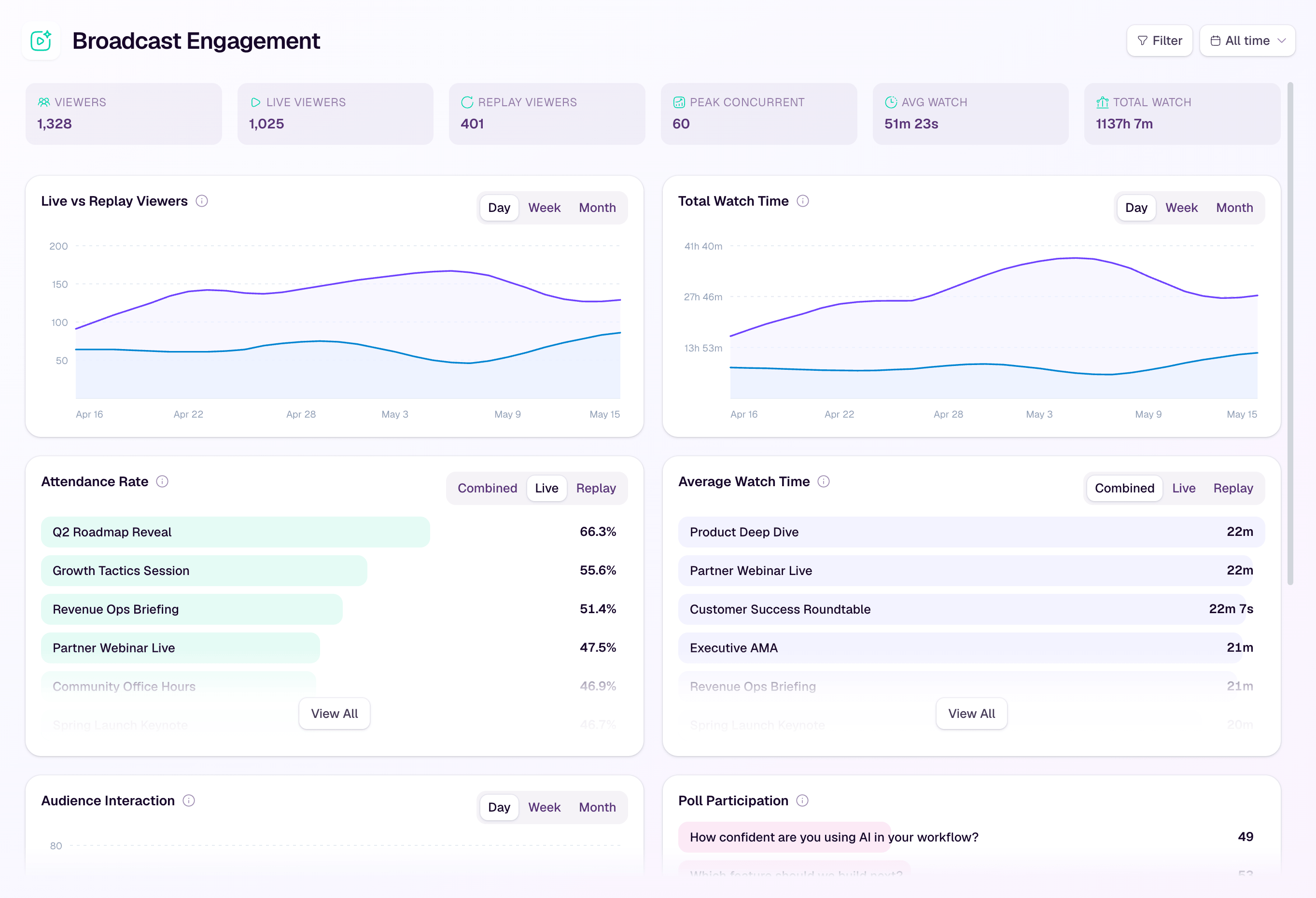
Use webinar analytics as directional evidence, not a verdict. A lower average watch time does not prove the webinar was too long. The wrong audience, a weak opening, a misleading registration promise, or a technical problem could produce a similar pattern.
Compare like with like. Review demos against other demos, panels against other panels, and sessions with similar audiences and topic depth. If you run a recurring program, a webinar series planner can help you record the format, timing choice, owner, and one change to test next time.
Change one meaningful variable at a time. For example, keep the topic and format comparable, shorten the opening by five minutes, and protect Q&A. That produces a more useful learning loop than declaring that every future webinar should be shorter.
Where HeyStream fits
HeyStream gives B2B marketing teams branded registration and watch pages, a live streaming studio, audience records, questions and engagement signals, live and replay CTAs, average watch time, and broadcast analytics.
Together, those tools help a team connect the promised duration with what happened during the session and what viewers did next. HeyStream does not choose the right webinar length for you, and the analytics do not prove that duration caused an outcome. They give your team evidence for the next comparable decision.
If you are building a repeatable webinar program rather than a one-off broadcast, explore the B2B webinar platform and the broader B2B webinar growth engine.
Choose the job, then choose the time
Most B2B webinars can begin with a 45 to 60 minute calendar block. Use 30 minutes when one focused idea or demo is enough. Use longer formats only when the promised depth, interaction, or practice genuinely needs the time.
Choose the audience outcome, allocate every segment, protect Q&A and the close, rehearse with the real speakers, and review comparable sessions afterward. The best webinar length is not a number copied from a benchmark. It is a deliberate operating choice that your team can explain, deliver, and improve.


