A webinar can hold attention for 30 or 45 minutes, but attention is only useful if the audience knows what to do next.
That is the job of a webinar CTA. It gives registrants, live attendees, or replay viewers a clear next step while the topic is still relevant to them.
For B2B teams, the strongest webinar CTAs are not just buttons at the end of a presentation. They are part of the full webinar journey: registration, live engagement, replay, follow-up, and measurement. Used well, they help turn a session from a one-time event into a more measurable growth workflow.
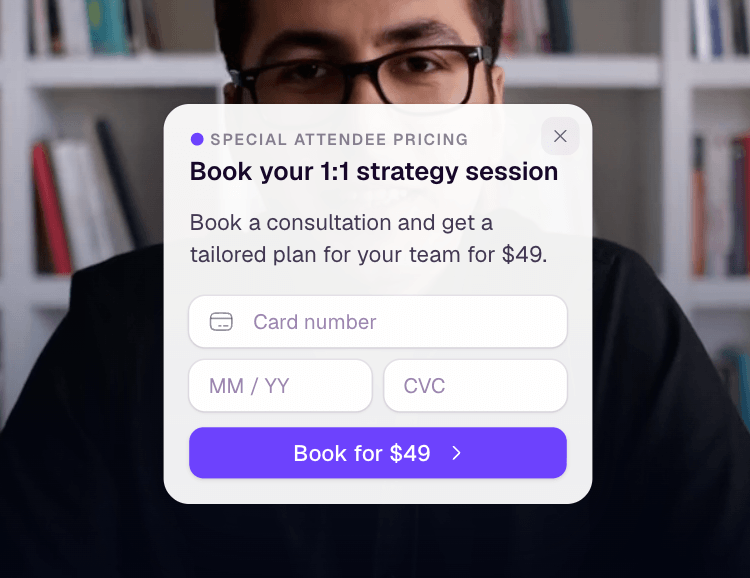
A webinar CTA turns attention into a next step
A webinar CTA is a prompt that asks someone to take a specific action before, during, or after a webinar.
That prompt can be a button, link, slide, chat message, offer, poll, form, replay prompt, or spoken instruction from the host. The format matters less than the job: it should make the next step obvious at the moment the viewer is most likely to care.
Common webinar CTAs include:
- Register for a session
- Save a seat
- Download a guide
- Book a demo
- Start a trial
- View pricing
- Ask a question
- Answer a poll
- Watch the replay
- Join the next session
The key is specificity. A CTA like "learn more" asks the audience to do the work of interpreting what comes next. A stronger CTA says what the person gets and why it fits the moment.
Webinar CTAs are different from generic website CTAs
A website CTA usually appears in a stable browsing context. Someone lands on a page, scans the offer, and chooses whether to continue.
A webinar CTA happens inside a time-based experience. The viewer has just heard a point, watched a demo, asked a question, clicked a replay chapter, or stayed engaged through a specific section. That context should shape the CTA.
This is why webinar CTAs need more than good button copy. They need timing, relevance, and a clear connection to the viewer's intent.
For example, a CTA near the start of a session might invite attendees to submit a question. A CTA after a product workflow might offer a related checklist. A CTA near the end might invite high-intent viewers to book a demo. A replay CTA might point viewers to the next session or a follow-up resource.
Each action is useful for a different reason. Treating them all as the same generic "contact us" moment makes the webinar less helpful and harder to measure.
Where webinar CTAs should appear
The best webinar CTA plan starts before the live session and continues after it ends.
On a webinar registration page, the CTA is usually the registration action itself. The goal is to make the value of attending clear enough that the right audience is willing to commit.
In promotion and invitation emails, the CTA should point to the same promise the registration page makes. If the email says the session will help demand gen teams improve follow-up, the landing page should not suddenly feel like a broad product pitch.
During the live session, CTAs can appear as slides, host prompts, chat links, overlays, polls, or in-player buttons. This is where timing matters most. A CTA placed immediately after a relevant teaching moment will usually feel more natural than one dropped in after the audience has already mentally checked out.
In replay, the CTA should respect the fact that the viewer is watching asynchronously. They may be skipping to the section they need, comparing options, or catching up after missing the live session. Replay CTAs work best when they are connected to the content the viewer is consuming, not just pasted from the live event.
In follow-up, CTA performance becomes part of a larger audience signal. Someone who registered, attended, clicked an in-session CTA, and then watched the replay is giving the team more context than someone who only opened an email.
Match the CTA to the viewer's moment
A webinar does not have one audience moment. It has several.
Before the webinar, the audience is deciding whether the session is worth their time. The CTA should reduce friction and clarify the value of registering.
During the webinar, the audience is evaluating the content. The CTA should help them act on what they are learning, not interrupt the experience.
After the webinar, the audience is deciding whether the session mattered enough to revisit, share, or continue the conversation. The CTA should make that next step easy.
Replay viewers need the same care. They may not want a live-session prompt that no longer applies. They may need a related resource, a way to book time, or a path to the next session.
This is the practical difference between a webinar CTA and a generic call to action: the webinar CTA should follow the audience's context.
Keep the action clear and easy to complete
A useful webinar CTA usually has five traits.
First, it asks for one primary action. A session can have multiple CTAs across the journey, but each moment should have a clear priority.
Second, it uses direct wording. "Download the checklist" is clearer than "Access our resource hub." "Book a product walkthrough" is clearer than "Explore solutions."
Third, it explains the outcome. The viewer should understand what they get after clicking.
Fourth, it keeps friction low. If the CTA asks for too much too soon, the audience may ignore it even when the offer is relevant.
Fifth, it can be measured. A CTA that cannot be tracked is harder to use in follow-up, reporting, and future webinar planning.
That does not mean every CTA has to drive a sales conversion. Some CTAs are designed for engagement, education, or qualification. A question prompt, poll, replay link, or downloadable worksheet can all be useful when they reveal what the audience cares about.
Use different CTA types across the webinar journey
Different stages call for different actions.
| Webinar moment | CTA role | Example CTA |
|---|---|---|
| Registration | Turn interest into commitment | Save your seat |
| Promotion | Move the right audience to the registration page | Register for the session |
| Opening | Encourage participation | Send us your biggest question |
| Teaching section | Help the audience apply the idea | Download the checklist |
| Product workflow | Connect the lesson to a next step | See how the workflow works |
| Closing | Capture high-intent interest | Book a demo |
| Replay | Keep the content useful after the live session | Watch the related session |
| Follow-up | Continue the conversation based on behavior | Get the follow-up guide |
This is also why long lists of webinar CTA examples are most useful when they are tied to the viewer's stage. A demo CTA may be strong after a buyer-intent section and too aggressive during a broad educational intro.
The question is not only "what should the button say?" It is "what is the most useful action for this viewer right now?"
Measure CTA performance without overclaiming intent
Webinar CTA performance can tell you a lot, but it should be read carefully.
Useful signals include CTA clicks, response rate, timing, attendee segment, replay activity, follow-up engagement, and whether the click created a meaningful next step. These signals are stronger when they are connected to broader webinar engagement metrics, not viewed alone.
A CTA click does not automatically prove buying intent. Someone may click because they are curious, because the resource is useful, or because the host made it easy. But a CTA click can still be a valuable signal when paired with attendance, watch time, question activity, replay behavior, and follow-up response.
For example, a viewer who attends live, watches most of the session, clicks a pricing-related CTA, and responds to a follow-up deserves different handling from someone who registers but never attends. The CTA is one part of the story, not the entire story.
This is where audience intelligence matters. The goal is not to treat every action as a lead score shortcut. The goal is to understand what people did, what they cared about, and what should happen next.

Connect CTAs to follow-up and learning
A webinar CTA is most valuable when it feeds the next step.
If someone clicks a live CTA, the follow-up should acknowledge that behavior. If someone engages with the replay, the follow-up should not assume they attended live. If one CTA consistently attracts interest while another is ignored, the team should use that learning in the next session.
This is how CTAs become part of a repeatable webinar system. They help the team learn which topics, offers, and moments create action.
In HeyStream, conversion tools, audience signals, replay behavior, and follow-up automation can sit closer together, so teams have a clearer view of what happened before deciding how to respond. That does not replace thoughtful sales or marketing judgment. It gives those teams better context to work from.
The same principle applies across a broader B2B webinar growth engine: registration creates the first signal, the live session creates moments of intent, CTAs turn attention into action, replay extends the shelf life, and follow-up carries the conversation forward.
A better webinar CTA is useful before it is persuasive
It is tempting to think of a CTA as a conversion trick. Better wording, brighter button, stronger urgency.
But the best webinar CTAs usually work because they are useful. They fit the viewer's stage. They appear at the right moment. They make the next step clear. They help the team understand what the audience cared about.
That makes CTAs a practical part of webinar strategy, not just a final slide.
If your webinar already has attention, the CTA's job is simple: help the right viewer take the right next step while the context is still fresh.


