A useful webinar poll is short, neutral, answerable in seconds, and connected to a decision. It gives the audience an easy way to shape the session, while giving the host enough direction to adjust the next example, explanation, or follow-up.
The difficult part is not adding a poll to your webinar platform. It is choosing a question that earns the interruption. This guide gives you 30 copyable webinar poll questions for six live moments, with answer formats, sample options, host actions, and a clear limit on what each response can prove.
What makes a good webinar poll question?
A good live poll passes four tests:
- It helps the audience. People can see why answering will improve the session or the resource they receive next.
- It is easy to answer live. The wording is short, specific, and understandable while someone is also watching a presentation.
- It changes something. The host knows what they will explain, skip, revisit, or send based on the result.
- It is safe to interpret. The team does not turn one answer into a claim about buying intent, lead quality, or the whole audience.
Question wording matters. Pew Research Center's survey-method guidance explains that even small wording changes can affect answers. It recommends clear, specific questions, one concept at a time, with response options that are complete enough for the decision and do not overlap.
The UK Government Analysis Function's questionnaire-design guidance starts from how the answer will be used, then recommends testing questions in their intended context. That is a good discipline for live polling too: decide what the response should change, write the question, then rehearse the full moment before the webinar.
Choose the right interaction for the job
A poll is only one way to involve the audience. Use the format that matches the job.
| Interaction | Best for | What it gives you | Avoid using it for |
|---|---|---|---|
| Live poll | A fast, structured choice during the session | Comparable responses that can guide the next live decision | Detailed explanations or sensitive questions |
| Chat prompt | Open conversation, reactions, and informal examples | Language, nuance, and audience-to-audience energy | Clean categories or a result you need to compare |
| Q&A | Attendee-led questions that need an answer | Specific concerns, edge cases, and requests for clarification | Forcing everyone through a fixed set of choices |
| Registration question | Context you need before the session starts | Planning information for content, routing, or accessibility | In-the-moment understanding or feedback |
| Post-webinar survey | Considered feedback after the session | Session evaluation, follow-up preferences, and future-topic input | Steering the live presentation |
If the feedback can wait until after the broadcast, use a post-webinar survey question set. Keep the live poll for choices that can improve the session while it is happening.
The six moments where a live poll can help
The most useful poll plan follows the session rather than scattering questions at fixed intervals:
Open → Understand context → Diagnose → Check understanding → Choose direction → Select the next step
You do not need to use all six moments in one webinar. Pick the moments where a structured answer will genuinely help the audience or host.
30 webinar poll questions to copy and adapt
Replace the words in square brackets with your topic, process, or examples. Keep the answer options visible and brief enough to scan without leaving the stream.
| # | Live moment | Question | Format and sample options | When to launch | What the host should do | What the answer cannot prove |
|---|---|---|---|---|---|---|
| 1 | Open | Which word best describes where you are with [topic]? | Single choice: New to it; Exploring; Using it; Scaling it | After the welcome and before the first teaching point | Acknowledge the mix and explain which parts serve each level | Skill, role seniority, or purchase readiness |
| 2 | Open | What brought you to this session today? | Multiple choice: Build a plan; Fix a problem; Compare approaches; Find examples | As the host frames the agenda | Name the strongest reasons and connect them to the agenda | That a selected goal is urgent or funded |
| 3 | Open | How familiar are you with [core concept]? | Rating scale: 1 New to this; 5 Confident using it | Before introducing specialist terms | Define more or less background based on the spread | Actual ability or experience |
| 4 | Open | What would make this session most useful? | Single choice: Clear framework; Practical examples; Live demo; Next-step checklist | Before the detailed agenda | Emphasize the requested format without abandoning the promised topic | That other formats have no value |
| 5 | Open | Where are you in the process today? | Single choice: Exploring; Planning; Running; Improving; Not sure yet | At the end of the introduction | Use examples that reflect the dominant stage and include one bridge for the rest | How close someone is to buying |
| 6 | Understand context | How often does your team run webinars? | Single choice: This is our first; A few each year; Monthly; Weekly or more | Before discussing repeatable operations | Calibrate examples between first-event basics and program-level systems | Quality, maturity, or commercial success |
| 7 | Understand context | Who helps run your webinar program? | Multiple choice: Marketing; Product marketing; Demand generation; Events; Sales; Shared team | Before discussing ownership | Call out likely handoffs and name an owner for the next live task | Formal responsibility or decision authority |
| 8 | Understand context | Which session format do you run most often? | Single choice: Educational webinar; Product demo; Panel; Customer session; Launch | Before format-specific examples | Choose the closest example or explain how advice changes by format | Which format performs best |
| 9 | Understand context | Which part takes the most effort today? | Single choice: Registration; Production; Audience participation; Follow-up; Reporting | Before presenting a workflow | Spend more time on the leading friction point or flag the best later resource | That the selected area is the root cause |
| 10 | Understand context | Which audience outcome matters most for this session? | Single choice: Understand the topic; Make a plan; Compare options; Try a workflow; Choose a next step | Before stating the learning objectives | Tie the next section to the dominant outcome | Pipeline impact, conversion, or eventual behavior |
| 11 | Diagnose | What is your biggest live-session challenge? | Single choice: Technical readiness; Audience participation; Timing; Speaker flow; Moving to the next step | Before the problem-solving section | Start with the leading challenge and park the others for Q&A or follow-up | The severity or frequency of the problem |
| 12 | Diagnose | Where does webinar momentum usually drop for you? | Single choice: Opening; Main teaching; Demo; Q&A; Closing | Before showing the session structure | Add one practical fix for the leading moment | Why momentum drops |
| 13 | Diagnose | What makes live polling difficult for your team? | Single choice: Writing questions; Setting up polls; Choosing timing; Interpreting responses; Avoiding too many polls | Before the polling framework | Address the leading barrier in the next example | That the team should poll more often |
| 14 | Diagnose | Which audience signal is hardest to act on? | Single choice: Poll responses; Chat comments; Questions; CTA clicks; Replay activity | Before discussing audience context | Explain the limits and next action for the leading signal | That one signal indicates buyer intent |
| 15 | Diagnose | What would you improve first in your current webinar? | Single choice: Sharper topic; Better examples; Clearer roles; More audience input; Stronger next step | At the start of a planning section | Connect the leading choice to the relevant part of the framework | Which change would produce the largest business result |
| 16 | Check understanding | Which step comes first in [process]? | Single choice: [Step A]; [Step B]; [Step C]; Not sure | Immediately after teaching the sequence | Confirm the answer, then briefly correct the most common misconception | Long-term retention or ability to execute |
| 17 | Check understanding | Which example best matches [principle]? | Single choice: [Example A]; [Example B]; [Example C]; None of these | After contrasting good and weak examples | Explain why the leading answer fits or fails the principle | Mastery of the wider topic |
| 18 | Check understanding | How confident are you applying [method] now? | Rating scale: 1 Need another example; 5 Ready to try it | After the practical walkthrough | Revisit the step connected to low confidence or move to application if confidence is high | Actual performance after the session |
| 19 | Check understanding | Which part should we revisit before moving on? | Single choice: [Part A]; [Part B]; [Part C]; Ready to continue | At the end of a dense section | Re-explain the leading choice using a different example | That unselected parts were fully understood |
| 20 | Check understanding | What would you do next in this scenario? | Single choice: [Action A]; [Action B]; [Action C]; Ask for more context | After a realistic scenario or demo | Discuss the reasoning behind each option, not only the popular answer | What someone would do in a real workplace |
| 21 | Choose direction | Which example should we unpack next? | Single choice: Early-stage team; Growing program; Complex enterprise workflow; Show two briefly | Before an optional example block | Use the selected example and explain where it differs from the others | Company size, budget, or product fit |
| 22 | Choose direction | Where should we spend the remaining time? | Single choice: Implementation; Measurement; Objections; More examples | At a planned decision point | Adjust the remaining depth while protecting the promised close | That other topics are unimportant |
| 23 | Choose direction | Which objection should we tackle first? | Single choice: Too much setup; Hard to involve speakers; Unclear audience value; Difficult follow-up | Before objection handling | Start with the leading objection and group related questions | That the objection blocks adoption |
| 24 | Choose direction | What level of detail would help right now? | Single choice: Quick overview; Practical steps; Deeper technical detail; Edge cases | Before a flexible explanation or demo | Match the depth and state what will move to follow-up | The technical skill of the audience |
| 25 | Choose direction | How should we use the next ten minutes? | Single choice: Continue the walkthrough; Shorten it and add Q&A; Move to Q&A now | Before the final content block | Follow the result when it still meets the session promise | Satisfaction with the webinar as a whole |
| 26 | Select next step | Which follow-up resource would help most? | Single choice: Checklist; Template; Recording; Worked example; Office hours | Before the close | Send or prioritize the selected resource and name when it will arrive | Buying intent or willingness to share contact details |
| 27 | Select next step | Which polling moment will you try first? | Single choice: Opening; Context; Diagnosis; Understanding check; Direction; Next step | After teaching the six-moment framework | Recap one practical tip for the leading choice | Whether someone will implement it |
| 28 | Select next step | What should the next session explore? | Single choice: Use cases; Teardown; Workshop; Expert Q&A; Customer example | When planning a series or recurring program | Use the result as one input to the content plan | Market-wide demand or guaranteed attendance |
| 29 | Select next step | How would you prefer to keep learning? | Single choice: Written guide; Live workshop; Short video; Product demo; No follow-up needed | Near the end, after delivering the promised value | Offer a relevant path without pressuring attendees | Purchase authority or preferred sales motion |
| 30 | Select next step | What is your most useful next move? | Single choice: Share the notes; Try the workflow; Compare approaches; Discuss with the team; Decide later | In the final recap | Summarize the action paths and point people to the matching resource | That the action will happen or lead to a purchase |
Pick the answer format from the decision
Use the simplest format that gives the host enough information.
| Format | Use it when | Example | Watch for |
|---|---|---|---|
| Single choice | You need one dominant answer or one branch to follow | Which section should we expand? | Options must not overlap |
| Multiple choice | Several answers can genuinely be true at once | Which teams help run your webinars? | Too many options can make the poll hard to scan |
| Rating scale | The underlying idea has a meaningful order | How confident are you applying this method? | Label both ends clearly and keep the direction consistent |
Write one concept per question. Avoid combining two judgements, such as asking whether the session was "clear and useful." Someone may think it was clear but not useful.
For single-choice polls, make the options mutually exclusive. If people could reasonably fit two options, change the boundaries or use multiple choice. Add "Not applicable," "Other," or "Not sure" when omitting that route would force a misleading answer.
Finally, test the poll in the same environment where it will run. Read the question aloud, check every option on a smaller screen, and make sure the presenter knows what comes next for each likely result.
Run the poll without creating dead air
The poll itself may last less than a minute, but the surrounding moment needs an owner and a script.
- Set it up before the webinar. Draft the question, answer options, response time, visibility, and follow-through during rehearsal.
- Explain why you are asking. One sentence is enough: "Choose the example that would be most useful, and we will unpack that one next."
- Launch and keep talking. Give people a clear response window while you restate the options or set up the next section.
- Close deliberately. Watch the response count, close the poll, then acknowledge the result. Do not wait indefinitely for every attendee.
- Act on the answer. Change the example, revisit the concept, choose the next resource, or explain why the planned route still serves the group.
The webinar moderator script and checklist can help you assign who launches, closes, reads, and responds to each poll.
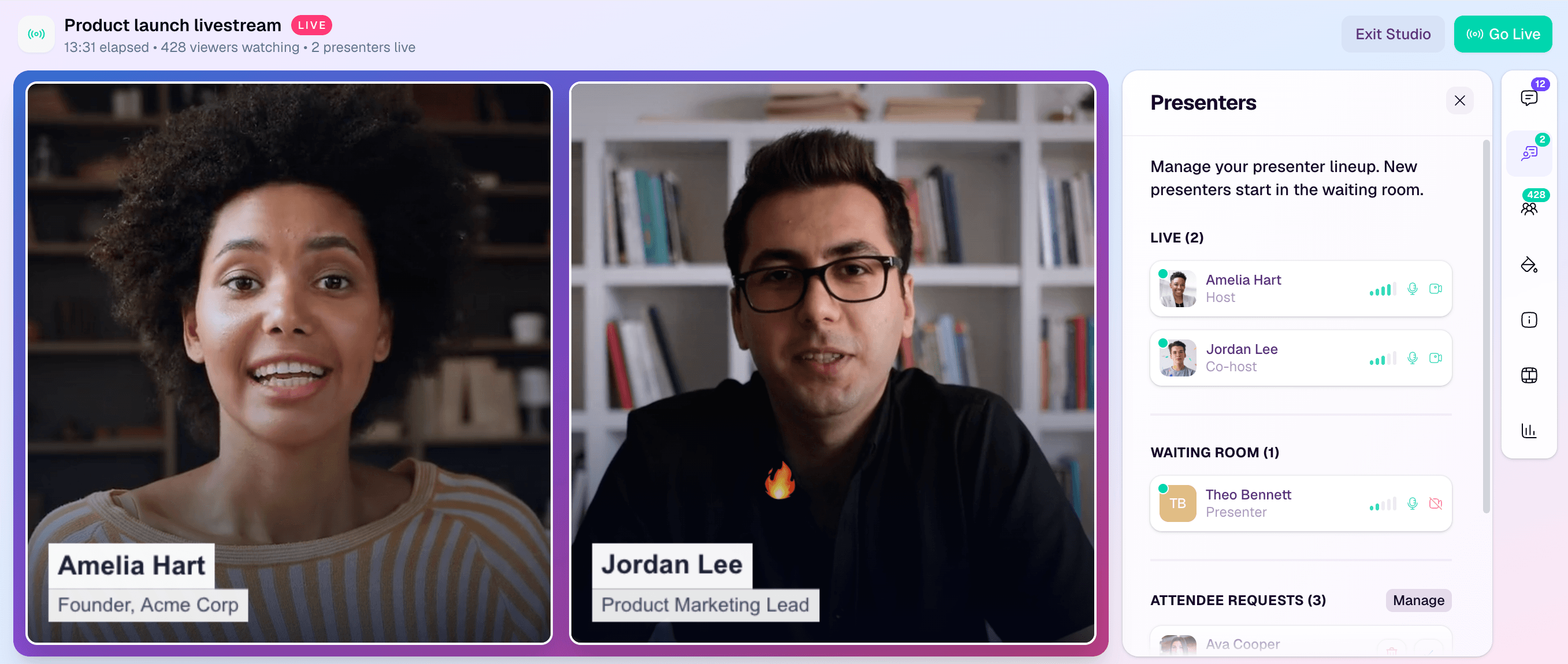
A browser-based webinar studio keeps the live controls close to the presentation. Whatever platform you use, rehearse the poll with the same host, moderator, and presenter roles you will use on the day.
Interpret poll responses responsibly
A live poll is directional context. It can guide the next moment, but it is not a representative market study or a shortcut to qualification.
| Response pattern | It can support | It cannot prove |
|---|---|---|
| One topic wins clearly | Spend more live time on that topic | The whole market prioritizes it |
| Many attendees choose "Not sure" | Add context or a simpler example | The audience lacks expertise |
| Participation is high | The prompt was easy or relevant enough to answer | The webinar was successful |
| A small group selects a next-step resource | Offer that resource to interested attendees | Those attendees are sales-ready |
| The same answer appears across repeated sessions | Investigate a recurring pattern | Causation, market size, or revenue potential |
Wording, option order, session context, nonresponse, and self-selection all shape the result. A small audience makes overinterpretation even easier. When you compare answers across sessions, keep the wording, options, timing, and surrounding context as consistent as practical.
Learn to interpret poll responses alongside other audience signals, not in place of them. Review aggregate interaction through webinar analytics, then combine signals only with an explicit guardrail. One poll response is not a lead score, and a popular answer is not evidence of purchase intent.
Where HeyStream fits
HeyStream lets teams create timed polls inside the broadcast studio. The current HeyStream Polls guide documents single-choice, multiple-choice, and rating-scale formats, along with draft setup, live activation, a response countdown, closing controls, and the option to show results live or keep them hidden for later discussion.
That makes it possible to prepare the question and follow-through before the session, then run the interaction without switching away from the live production workflow. The useful part is not simply collecting another engagement event. It is using the response to improve the experience while keeping the interpretation honest.
Copy-and-run poll preflight checklist
Before the broadcast, confirm that:
- Every poll has a clear audience or host decision behind it.
- The audience can see why answering helps.
- Each question asks one thing.
- Single-choice options do not overlap.
- The answer set includes a fair "Not sure" or "Not applicable" route when needed.
- The host has a next line, example, or content branch ready.
- The interpretation limit is written into the run sheet.
- Sensitive qualification questions have been removed or made genuinely optional.
- The moderator knows who launches, closes, and discusses the poll.
- Results are shown live only when sharing them helps the audience.
Ask fewer, better questions
A poll should not interrupt the webinar just because the feature exists. Use it when a fast, structured answer can improve what happens next.
Start with one or two high-value moments. Rehearse the wording, options, and response. Then let the audience see that their answer changed the session. That is more useful than filling a webinar with questions that create data but no decision.


