Live-stream analytics can tell you how many people registered, how many showed up, and how long the session ran.
Those numbers matter, but they are not the whole story.
For a B2B webinar or live broadcast, the more useful question is what the audience did before, during, and after the session. Who registered? Who attended live? Who asked a question, clicked a CTA, returned for the replay, or took a follow-up action?
Audience intelligence is the practice of connecting those signals so your team can understand what people care about and what should happen next.
In other words, the goal is not just to gather more audience insights. It is to turn those insights into better timing, better follow-up, and a sharper next broadcast. That is why audience intelligence belongs inside a broader B2B webinar growth engine.
What Audience Intelligence Means in Live Streaming
Audience intelligence in live streaming is the process of collecting, connecting, and interpreting audience signals from a broadcast.
In a webinar context, those signals can include:
- registration source and form responses
- live attendance and watch time
- questions, chat, polls, and reactions
- CTA views and clicks
- replay views and replay watch time
- follow-up email clicks, replies, bookings, or signups
- repeat engagement across multiple broadcasts
The point is not to collect more data for its own sake. The point is to build a clearer picture of the audience journey.
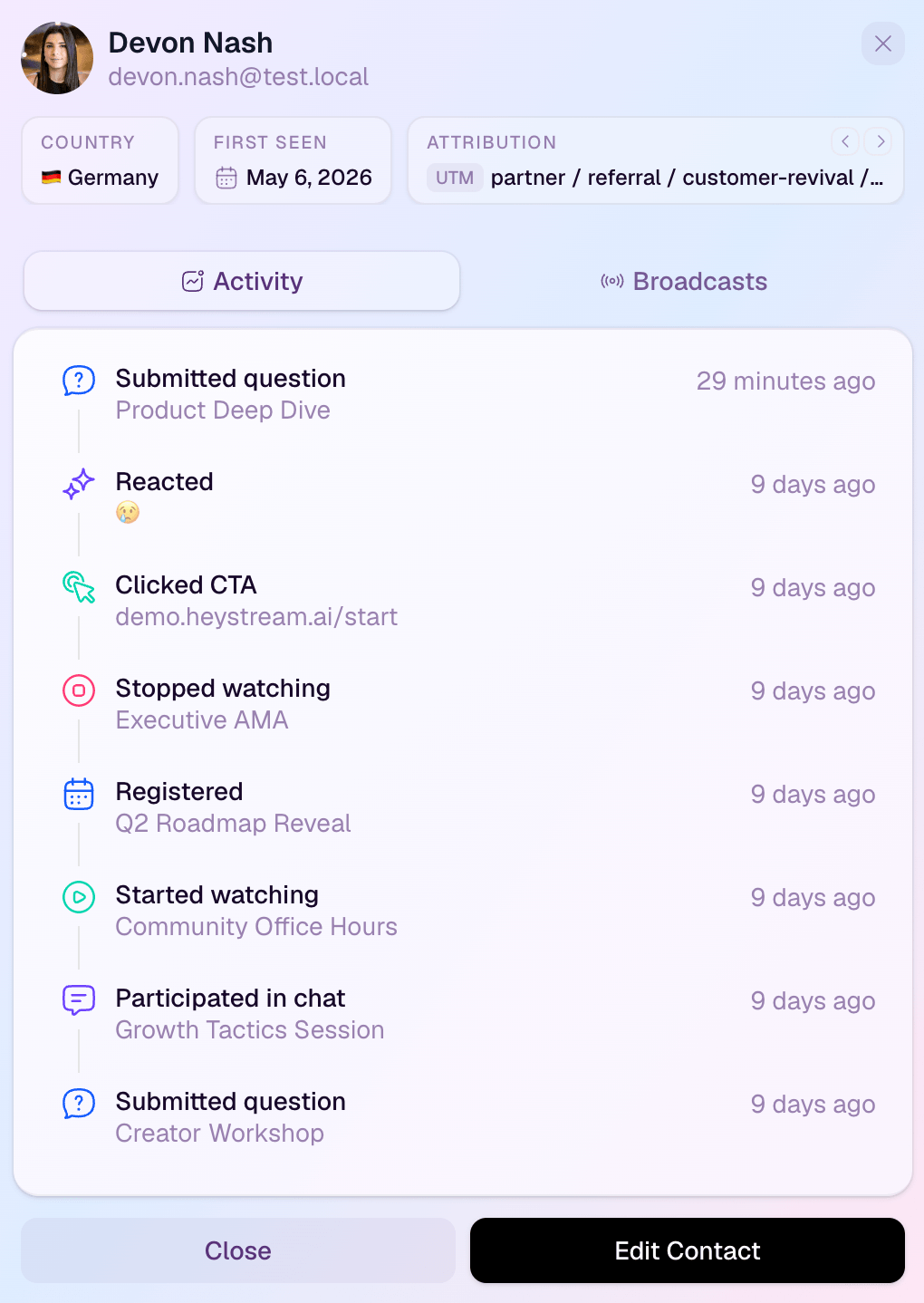
A registrant who never attends, an attendee who watches deeply but takes no action, and a replay viewer who clicks a product CTA should not all receive the same interpretation. Audience intelligence helps your team see those differences without reducing people to one flat attendee count.
That makes it different from broad audience research. Demographics, company fit, and channel source can all be useful, but live-stream audience intelligence is grounded in first-party behavior: the actions people take around your own broadcast.
Audience Intelligence vs. Standard Webinar Analytics
Standard webinar analytics usually summarize what happened.
Audience intelligence helps you decide what to do with what happened.
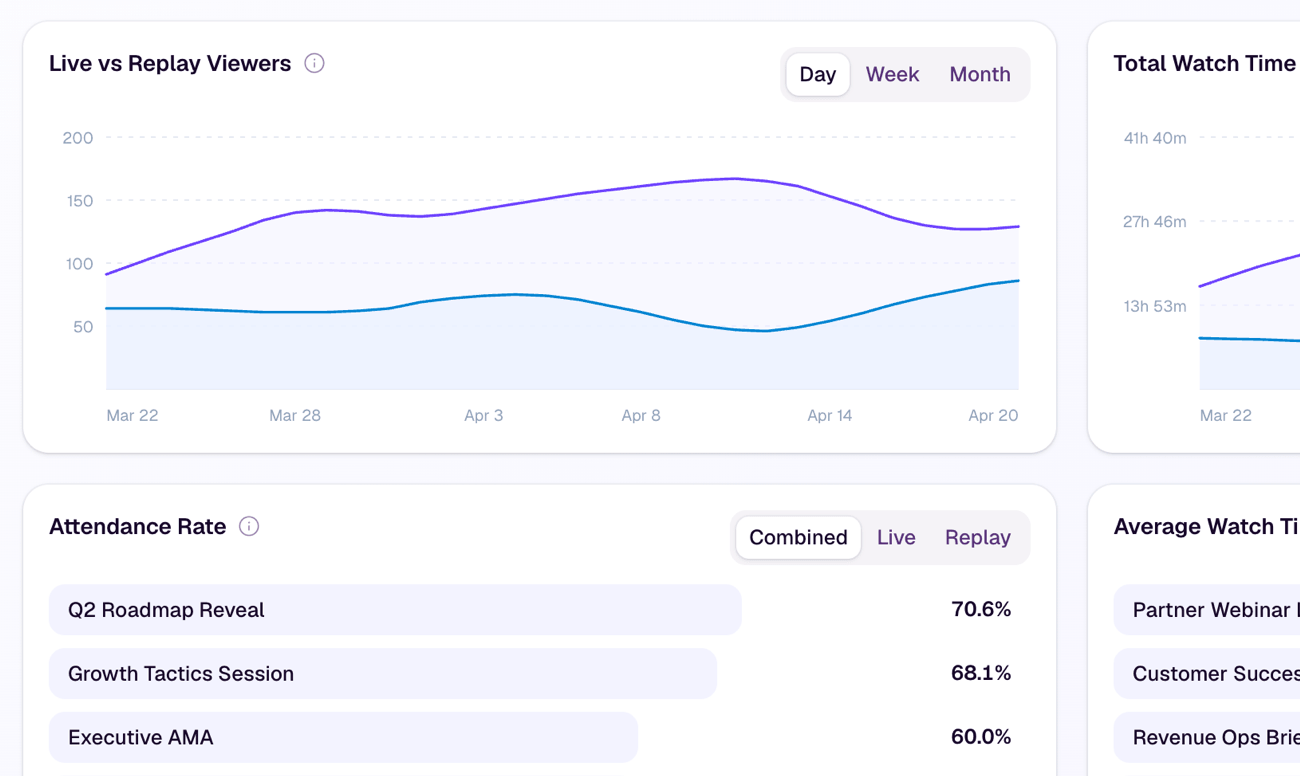
That distinction matters. A normal report might show total registrations, total live attendees, average watch time, and total questions. Those metrics are useful for reviewing the session, but they often stay at the aggregate level.
Audience intelligence connects the same data to people, context, and decisions:
| Standard analytics | Audience intelligence |
|---|---|
| How many people registered | Which segments, sources, or topics created useful interest |
| How many people attended | Who attended live, who returned later, and what that suggests |
| Average watch time | Which contacts watched deeply or dropped off early |
| Total questions | Which themes, objections, or needs appeared during the session |
| Total CTA clicks | Which offers moved which viewers to act |
| Replay views | Who came back after the live moment and what they watched |
This is why audience intelligence belongs beside webinar engagement metrics, not instead of them. Metrics are the inputs. Intelligence is the interpretation your team can act on.
The best audience insights answer a practical question. They help the team decide whether to send a sales note, a replay, a resource, another invite, or no follow-up at all.
The Signals That Make Audience Intelligence Useful
A useful audience intelligence workflow covers the full broadcast journey.
Registration Signals Show Topic Pull
Registration is the first signal.
It tells you which topic, promise, campaign, or partner source attracted someone. It can also give you useful context through role, company, segment, or one carefully chosen qualifying question.
That does not mean registration equals intent. Someone can register casually and never attend. But registration does show interest in the promise of the session, and that interest is worth preserving.
This is why the webinar registration page matters. It is not just a form. It is the first place your team starts learning who is interested and why.
Attendance and Watch Time Show Depth of Attention
Attendance shows who made time for the live session.
Watch time adds depth. A viewer who stays through the practical section or returns after stepping away is behaving differently from someone who joins for a few minutes and leaves.
This does not mean long watch time always equals buying intent. It may signal education interest, internal research, or general curiosity. But it does help your team avoid treating every attendee the same way.
At the content level, drop-off patterns can also show where the session lost momentum. That can shape the next broadcast, not just the next email.
Questions and Interactions Show What People Care About
Questions, chat, polls, and reactions are useful because they reveal what the audience is trying to understand.
A question about setup may point to implementation friction. A question about integrations may suggest a workflow concern. A poll response may show whether the audience is early-stage, actively evaluating, or already trying to improve an existing process.
Use well-designed webinar poll questions to make those responses easier to interpret. Observed behavior can suggest what held someone's attention; a poll answer is explicit feedback, but neither one proves buying intent on its own.
These signals need context. A busy chat does not automatically mean strong commercial intent, and a quiet audience is not always disengaged. Some viewers are evaluating silently.
The useful move is to combine interaction data with the rest of the audience record.
CTA Clicks Show Action
CTA clicks are one of the clearest signals because they move from attention to action, but the click still needs context before anyone treats it as purchase intent.
The meaning depends on the offer. A viewer who clicks a demo CTA is showing a different kind of interest from someone who downloads a checklist or registers for the next webinar. Both actions can matter, but they should lead to different follow-up.
For example, a CTA click during a live product section may call for a timely sales or customer-success response. A click on an educational resource may suggest a lighter nurture path.
This is where conversion tools become part of the audience intelligence system. The CTA is not just an overlay. It is a moment where audience interest turns into a trackable next step.
Replay Behavior Shows Continued Interest
The replay is often where a second audience appears.
Some people registered but could not attend live. Some attended and returned to share or revisit a section. Some discover the session later through follow-up, search, or internal sharing.
Replay behavior helps you separate "missed the live session" from "lost interest." A registrant who watches the replay deeply may deserve a more relevant follow-up than someone who attended live for only a few minutes.
For more on that workflow, see the guide to webinar follow-up best practices. The best follow-up does not start from one generic attendee list. It starts from what people actually did.
A short set of post-webinar survey questions can add self-reported feedback to those behavioral signals. Survey answers clarify what people say they need; they do not prove that someone is ready to buy.
Turn Signals Into Better Decisions
Audience intelligence becomes valuable when it changes a decision.
It can help your team decide:
- who should receive immediate follow-up
- who should receive a softer educational path
- which questions should shape the next piece of content
- which CTA matched the audience's interest
- which replay viewers are still engaged after the live session
- which topic should become the next webinar
- which segments may need a different invitation, reminder, or offer
The goal is not to build a complicated scoring model before you can act. A simple interpretation layer is often enough.
When the team needs a repeatable prioritisation framework, a webinar lead scoring model can turn those signals into a shared route. Treat the score as an aid, not a verdict: include neutral or negative signals, preserve the underlying context, and keep a person involved in follow-up decisions.
| Audience pattern | What it may suggest | Useful next step |
|---|---|---|
| Registered, attended live, clicked a CTA | Clear interest in the topic and offer | Follow up around the clicked CTA |
| Registered, missed live, watched replay | Timing issue, but topic still matters | Send a replay-specific next step |
| Watched deeply, no CTA click | Interest without a clear action | Share a useful resource or softer CTA |
| Asked an implementation question | Practical evaluation or internal planning | Follow up with setup-focused context |
| Registered only | Light interest or low urgency | Send a concise reason to watch or join the next session |
That is the practical value of audience intelligence. It helps the team respond based on behavior instead of assumptions.
What to Avoid
Audience intelligence can become noisy if the team treats every signal as certainty.
Avoid three common mistakes.
First, do not treat one behavior as proof of buying intent. A CTA click, long watch time, or replay view is a signal, not a guarantee.
Second, do not collect data the team will not use. More fields, tags, and scores only help if they change follow-up, content, or sales context.
Third, do not let audience intelligence become a reporting exercise. The value is not a prettier dashboard. The value is a better decision after the broadcast.
It is also worth separating audience intelligence from buyer intent data. Audience intelligence can include buyer-intent signals, but it should not pretend every signal is sales-ready. A viewer may click because they are evaluating, researching, sharing internally, or simply interested in the topic.
Good analytics and insights should make the next move clearer: who to follow up with, what to send, what to improve, and what to run next.
Use Audience Signals Responsibly
Decide why you need each audience signal before you collect it. Tell people clearly how their registration details and viewing behavior will be used, keep only the data the team needs, set retention rules, and make someone accountable for the decisions that follow.
The ICO's guide to the data protection principles is a useful starting point for transparency, purpose limitation, data minimisation, storage limitation, and accountability. It is UK guidance rather than a complete answer for every jurisdiction, so your own legal and privacy requirements still apply.
Human judgment matters too. Watch time, questions, poll answers, CTA clicks, replay views, and scores can help a team prioritise, but they should not quietly become automatic claims about a person's intent.
Where HeyStream Fits In
HeyStream is built around the idea that the live session is not the finish line.
Each contact record can bring together registration responses, live attendance, replay history, clicks, questions, and other engagement signals. Teams can use those records to understand what happened without treating one action as a verdict about intent.
Those signals can then shape behavior-based webinar follow-up: create segments from registration or viewing behavior, send a more relevant next step, and pass useful context into connected CRM and email tools. That makes audience intelligence part of the workflow rather than a report someone has to reconstruct later.
The goal is simple: help teams move from "how many people watched?" to "what did we learn, and what should we do next?"
The Takeaway
Audience intelligence in live streaming is not about tracking everything.
It is about connecting the right first-party signals so your team can understand the audience more clearly and act with better timing.
Registration shows topic pull. Attendance and watch time show attention. Questions and interactions show what people care about. CTA clicks show action. Replay behavior shows continued interest. Follow-up outcomes show whether the session created useful movement.
Read together, those signals turn a live broadcast into a feedback loop.
That is how a webinar becomes more than a one-time event. It becomes a repeatable way to learn from your audience, improve the next session, and turn attention into action.


