HeyStream is worth evaluating for recurring live B2B programs, Zoom for its webinar and production ecosystem, Livestorm for browser-based sessions with attendee-credit billing, Demio for live and automated marketing sessions, and Univid for branded interactive sessions with registration-based packaging. Keeping Teams can also be the right decision. Check your current license, tenant policies and marketing handoff before buying another system.
This guide is published by HeyStream, which appears in the shortlist. We reviewed official product, commercial and integration documentation on October 21, 2026. These are conditional recommendations based on documented capabilities, not hands-on test results or a performance ranking. The numbers help you navigate the five options.
A Microsoft Teams webinar alternative replaces a particular external event workflow. Your company can keep Teams for meetings, chat and collaboration while choosing another product for marketing sessions.
Compare the five alternatives with your current Teams setup
Start with the job that needs to change. A different interface is a weak purchasing requirement; a demonstrated registration, production or follow-up gap is a useful one.
| Product | Fit to investigate | Commercial unit to compare | Principal check |
|---|---|---|---|
| Keep Microsoft Teams | Your licensed tenant meets the event and follow-up requirements | Actual organizer entitlement and any incremental event licensing | Prove external access, configuration and data delivery before switching |
| 1. HeyStream | Recurring live B2B sessions with audience records, CTAs and follow-up | Plan, workspaces and live attendees per broadcast | Check the tier and exact integration events; assess evergreen and governance requirements separately |
| 2. Zoom Webinars | A webinar program that needs Zoom's event and production options | Selected webinar package, organizer licenses and capacity | Distinguish Webinars, Webinars Plus and Events |
| 3. Livestorm | Browser-based programs where attendance credits match actual use | Annual attendee credits used per person, per session | Model repeat attendance across different sessions and required integration tier |
| 4. Demio | Marketing programs using live and automated formats | Hosts, attendee room size and feature tier | Confirm format availability and host needs for simultaneous events |
| 5. Univid | Branded interactive sessions with monthly registration packaging | Unique monthly registrants plus live participant capacity | Verify the integration, API and access controls in the proposed plan |
The linked primary sources in each profile explain the offers behind this table. A documented feature still needs a plan check, and an included feature still needs a test with your audience.
Check the Teams workflow you actually have
An old Premium-only feature list can give you the wrong starting point. Microsoft's events licensing overview documents the April 1, 2026 changes that moved some event capabilities previously available only with Teams Premium into Teams Enterprise. Foundational and advanced entitlements differ, and legacy Premium purchases have their own conditions. Identify the organizer's exact license rather than assuming every Microsoft 365 subscription includes the same event tools.
Microsoft's event guidance also describes a unified Teams events experience. Confirm which experience your tenant exposes. Product direction, assigned entitlement and the controls an organizer can use are separate checks. The legacy Live Events product should not be confused with a blanket retirement of Teams webinars.
Ask the event organizer, Microsoft administrator and CRM owner to complete this ledger together. Record the evidence before writing the remaining gap.
| Requirement and owner | Evidence to collect from the current setup | Remaining gap and pass condition |
|---|---|---|
| External registration and joining: event operator | Form, required fields and guest joining test | Name the audience that cannot complete the path and what successful access means |
| Branding and email: marketing | Actual registration page, confirmation, reminder and sender settings | Identify the specific brand or communication requirement still unmet |
| Presenter control: producer | Rehearsal with the intended speaker roles and presentation | Define who must control layouts, sharing and attendee interaction |
| Audience records and CRM: CRM owner | Sample identity, registration and attendance records at the destination | List the exact missing field or event and the follow-up it prevents |
| Replay: content owner | Recording permissions, replay access and available viewing data | Specify access, retention and reporting requirements |
| Capacity and governance: IT and procurement | Current license, policies and proposed event size | Obtain approval for the actual audience, access and contract requirements |
Teams does have a documented marketing handoff in some environments. HubSpot documents a Teams webinar integration that syncs registration and attendance after administrator setup. Its registration workflow supports First Name, Last Name and Email as required fields; making other fields required can cause registration to fail. The documentation also identifies cases, such as manual registration approval, that need different sync handling.
That is a reason to inspect the connector. It is not evidence that every CRM receives every poll answer, CTA click, replay view or consent field. For any integration, identify the destination contact, event identifier, delivered fields and timing, then check how duplicates and retries behave. Our guide to webinar CRM integration gives you a mapping model for that work.
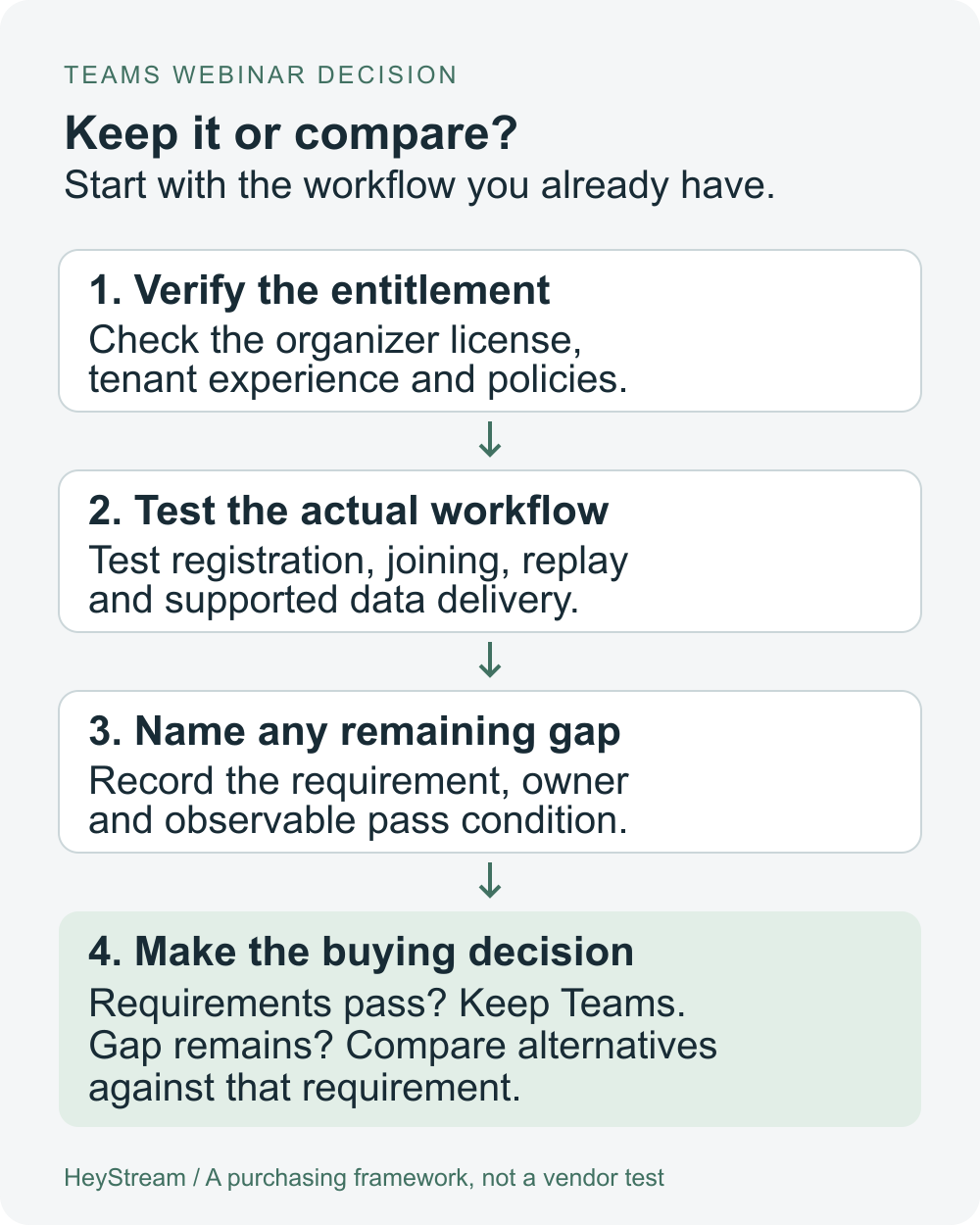
The decision flow is straightforward. Verify your entitlement, test the actual workflow and write down the requirement that still fails. Keep Teams if the requirements pass. Compare alternatives when a meaningful gap remains after reasonable configuration or licensing fixes.
How to compare each option fairly
Use the same questions for all five products. Choose the delivery mode first, then inspect external registration and joining, page and email branding, presenter operations, audience actions, exact CRM delivery, replay and commercial limits. Bring IT into the access and governance checks before the final demo.
Keep three notes for each requirement: what the vendor documents, what the quoted plan includes and what your pilot demonstrates. An integration logo answers none of those questions on its own. An unknown should remain an open question until the vendor or your test resolves it.
“Best” here means a fit for the stated operating requirement. We have not measured comparative reliability, conversion rates or revenue outcomes, and those claims would need different evidence.
1. HeyStream for recurring live B2B programs
HeyStream is a candidate when the recurring job is running branded live sessions and keeping the audience, CTA and follow-up work connected. Its built-in audience CRM stores webinar audience context. It should not be assumed to replace your company's full sales CRM.
HeyStream's current plans include branded registration and watch pages, audience CRM, live and replay CTAs, lifecycle emails and recording with replay. Growth adds the reusable CTA library, CRM and email integrations, and outbound automations. Check the selected tier instead of treating every capability as part of the entry plan.
The live attendee limit applies per broadcast; registrations and replay views do not count toward that limit. That distinction matters when comparing it with a registration or attendance-credit model.
Investigate this option if your operator wants to inspect webinar audience signals alongside the next action. During the demo, have the owner identify a test contact, an available engagement signal and the supported follow-up path. Confirm the required connector events and exports rather than assuming every signal is sent everywhere.
HeyStream is a poor fit for replacing Microsoft collaboration. If evergreen automation is your main delivery mode, you need a full expo or networking environment, or your governance and capacity requirements remain unverified, resolve those points before choosing it. Audience records, CTAs and follow-up tools are also available in other products; the decision is whether this particular workflow fits your team.
2. Zoom Webinars for a webinar and production ecosystem
Consider Zoom when your purchasing requirement involves its webinar operation and production options. Evaluate the webinar offer you would actually buy rather than using Zoom Meetings as a proxy.
Zoom's current webinar range distinguishes Webinars, Webinars Plus and Events. Webinars Plus describes tools including prerecorded content delivered like a live session, backstage coordination, production layouts and post-event content tools. Confirm which package contains the capabilities your producer needs.
The practical question is who owns the work around the event. Ask the producer to rehearse the intended show, then ask marketing to demonstrate registration, recording access and delivery of the required data to its systems. A richer production package may still leave those responsibilities spread across tools.
Zoom may add unnecessary purchasing and operating work if your current Teams setup already meets the requirement. Before adding it, verify organizer licensing, audience capacity, selected production tools and the exact integration scope. Do not assume a familiar meeting experience settles an external webinar decision.
3. Livestorm for browser-based programs with attendance credits
Livestorm is worth inspecting when the team wants browser-based webinar delivery and can budget around actual attendance across its program. Test the external attendee path on the devices and corporate networks you expect to serve; browser access alone does not establish that every guest will have a smooth experience.
Livestorm's pricing explanation uses annual attendee credits. One credit covers a unique participant in a session, whether they join live, watch its replay or watch it on demand. The same person attending live and replay for that session counts once. Attending a different session uses another credit, and team members are excluded from the count.
That model can be sensible, but monthly unique audience size is not enough to estimate usage. A regular attendee joining several distinct sessions consumes credits for those sessions. Model attendance across the calendar before comparing the quote with a fixed live-capacity plan.
Check the plan for the required integration, analytics, session duration and support. The published offer distinguishes Enterprise integrations from the general offer. If a particular connector is essential, demonstrate the actual fields and events on the proposed tier. A frequent repeat audience across many sessions deserves a careful usage estimate rather than a quick “cheaper” verdict.
4. Demio for live and automated marketing webinars
Demio belongs in the evaluation when the program mixes presenter-led live sessions with prerecorded on-demand or automated formats. Decide how the operator will run each format and how someone will handle attendee questions and follow-up.
Demio's plan comparison ties the purchase to hosts, attendee room size and feature tier. It lists live and event-series formats alongside prerecorded on-demand and automated webinars. Confirm the tier required for the formats you intend to run. Its pricing guidance also says simultaneous events require multiple hosts.
Use the same acceptance questions you used for Teams. Register a guest with the necessary fields, verify the email and joining path, and trace the supported action into the destination system. Ask which branding, domain and integration options are included in the quote.
Demio is less compelling if you need none of its delivery or marketing workflow differences and your existing tenant already passes the test. Room size alone is also an incomplete buying comparison when hosts and feature gates affect the program. Confirm current costs and feature inclusion directly.
5. Univid for branded interactive webinars
Univid is a candidate for teams comparing a branded interactive webinar experience with registration-based packaging. Univid's product overview describes calls to action, polls, Q&A and follow-up tools. Those are documented capabilities to investigate, not proof of a conversion advantage over Teams or another platform.
Univid's pricing page distinguishes unique monthly registrations from live participant capacity. A registrant is counted as unique within a month and can attend multiple webinars. Live capacity is a separate constraint, so ask for both limits in the proposed plan.
The published offer places broader integrations, custom integrations and API access, and SAML SSO in its Custom offer. Confirm the connector and access controls you need, including the exact audience signals they deliver. Do not infer that every integration needs Custom or that every available connector sends the same data.
If your requirements need a custom plan, obtain the applicable contractual capacity, support and data terms. An “unlimited” marketing label does not settle every operational condition. A broader event program or an unverified enterprise requirement needs its own evaluation before this becomes the right choice.
When keeping Teams is the better choice
Keep Teams when the organizer can run the intended event, external guests can register and join, the producer has the required controls, and the right records reach the person responsible for follow-up. Existing IT ownership and procurement can make that a sound operating choice.
Suppose marketing's complaint is that a registration field never reaches its CRM. First identify whether the field is collected, whether the connector supports it and whether the sync is configured correctly. Changing platforms without answering those questions can reproduce the same gap in a second system.
A licensing or configuration fix may be enough. Compare its incremental cost and ongoing administration with another subscription, setup, training, integration work and content migration. Already-committed Microsoft spending is part of the context, but it does not make every additional event entitlement free.
Staying also needs ownership. Assign someone to maintain the registration path, someone to manage the event and someone to reconcile follow-up records. If that workflow meets the requirements without excessive manual work, keeping it is a defensible decision. Switching should solve a named remaining problem.
Compare the cost of the same webinar program
Use a written scenario so every vendor quotes the same job. For example, imagine four sessions each month, 600 unique monthly registrants, a peak of 180 live viewers and two operators. Some people attend several sessions and some watch replays. Once a quarter, two sessions may overlap. These are fictional worksheet inputs, not industry benchmarks or expected outcomes.
Ask each vendor to price that scenario in the same currency and billing period, including the required connectors, support and access controls. Check how it counts the following:
- A person who registers but never attends.
- One person joining three different sessions.
- Someone attending live and then watching the same replay.
- Both operators preparing events, and two events running simultaneously.
- A session that exceeds the expected live audience or registration allowance.
Keep the accounting separate. Record already-committed Microsoft spend, avoidable incremental licenses, the new platform subscription, implementation and training work, and the CRM or email tools you will retain. Only compare totals after the commercial units and scope match.
A lower headline price can cover a different program. A higher price does not establish better outcomes. You need the applicable quote and a demonstrated workflow before either number is useful.
Run one representative pilot before switching
Choose an event that resembles your real program. Include an external corporate guest, a guest outside your identity provider, a speaker and the CRM owner. Write the acceptance conditions before the demo so everyone can tell what passed.
- Register test contacts with the required fields and consent choices. Verify confirmation and reminder delivery, then test joining on desktop and mobile with the relevant attendee permissions.
- Rehearse the producer and speaker workflow. Check presentation control, one required CTA, recording and replay access. Inspect the limits that matter to your event.
- Reconcile the known records. Separate registrants, live attendees, no-shows, replay viewers and the CTA action where supported. Missing replay or action data stays unknown; do not silently treat it as no activity.
- Follow the supported data into the destination system. Check contact and event identifiers, timestamps, required consent fields, duplicate handling, retry behavior and follow-up suppression. Record any manual step and its owner.
- Have the operator, IT owner and procurement owner review the result. Keep a rollback path to Teams until the new workflow passes the agreed checks and the switching cost is accepted.
Registration, attendance, replay viewing and CTA activity describe different actions. None alone proves a qualified opportunity or incremental revenue. A single pilot demonstrates the tasks you observed; it does not establish comparative reliability or conversion uplift.
After selection, use the webinar platform migration checklist to plan inventory, cutover and reconciliation. If the evaluation reveals a different reader job, the broader webinar platform evaluation can help you reset the shortlist.
Buy the product that passes your requirements with an operating model your team can own. If Teams already does that, keep it. If a gap remains, take that exact gap into the next vendor demo.


