Choose an interactive demo when a buyer needs to explore a bounded product workflow at their own pace. Choose a webinar when they need an explanation, context, or answers from a presenter. Use both when the second experience answers a question the first leaves open. If the question is whether your product works with the buyer's real data, permissions, or infrastructure, plan a technical evaluation instead.
We're the team behind HeyStream, a platform for B2B live sessions and webinars. That gives us a reason to care about this choice, but a webinar is only useful when it suits the buyer's task. You do not need a second format simply because another team uses one.
The comparison below separates control, timing, human response, and measurement. Those decisions tell you more than a generic promise of better engagement.
Define the experience before comparing it
In this article, an interactive demo means a self-guided, clickable product experience. A buyer follows a captured workflow or chooses among prepared paths. They might open a report, change a filter, and see the illustrated result without signing into the production application.
Navattic's category guide distinguishes asynchronous click-through demos from sandbox environments used for deeper product exploration. That is a useful category example, rather than a universal naming standard. Check what a particular experience actually lets someone do.
A product demo webinar is a presenter-led session that explains a product workflow to an audience. During a live session, a staffed question channel can let buyers ask about the explanation. A replay preserves the presentation, but does not by itself provide a live expert.
Other formats answer different needs:
- A one-to-one live sales demo lets a presenter respond to a specific buyer's situation. It may be more appropriate for private requirements than a group session.
- A prerecorded demo video follows an edited narrative. Playback controls let viewers change pace or skip sections, but do not make the product itself clickable.
- An automated webinar delivers prepared material through a scheduled or automated viewing experience. Any questions or human support depend on how the team operates it.
- An on-demand replay is a recording available for later viewing. Its availability says when someone can watch, rather than what they can interact with.
A presenter can also guide someone through an interactive demo. These categories can overlap. For the deeper timing decision, see automated webinars vs live webinars.
Compare the buyer's job and the operating requirements
Use the same criteria on both sides. Counting checkmarks would hide the more useful question: which experience can answer the buyer's next question?
| Decision | Self-guided interactive demo | Presenter-led webinar |
|---|---|---|
| Buyer task | Explore a focused product workflow | Understand a topic or workflow with explanation |
| Control | Follow prepared clicks or branches | Follow the presenter's narrative; use player controls on replay |
| Timing | Asynchronous access when the demo is available | Scheduled live participation or recorded viewing later |
| Human response | A separate help route unless someone assists | Live answers when staffed; replay needs a separate response route |
| Evidence offered | An illustration of the captured workflow | An explanation or demonstration of the workflow |
| Interaction | Product-path clicks where supported | Questions, polls, chat, or CTAs where supported |
| Identity and observation | Anonymous or identified sessions, depending on setup | Anonymous or identified viewing and engagement, depending on setup |
| Operating work | Capture, edit, check accessibility, maintain versions and destinations | Prepare, rehearse, promote, moderate, and maintain replay and links |
| Next step | Help, a live session, a trial, or technical evaluation | Focused exploration, a conversation, a trial, or technical evaluation |
Neither a simulated click nor a polished presentation proves production compatibility. If that proof matters, make it an explicit evaluation step.
Choose for a specific buyer question
Consider a fictional B2B reporting product. The same product can need different experiences because the questions differ.
"Can I find and filter a saved report?"
A short guided tour can answer this. Let the buyer open a saved report, select a filter, and inspect the illustrated output. Keep the path focused enough that someone can explain what they learned afterward.
A group presentation may add little if the workflow is easy to understand and no discussion is needed. Keep the demo as the only experience if it answers the question. Offer a clear help route for exceptions.
"How should our team change its reporting process?"
A webinar can explain the choices behind the workflow. A presenter could show how teams move from separate spreadsheets to a shared reporting routine, then take questions about responsibilities and exceptions.
The live session earns its place through explanation and response. A tour can show where to click, but a prepared path may not address why a team should change its process. If you choose a session, the B2B webinar formats guide can help you decide whether it should be a demonstration, workshop, or presentation with questions.
"Will our permissions and data connection work?"
Arrange a technical evaluation with the right product or engineering owner. Agree on the environment, test data, access, and success conditions before starting.
A captured permissions screen can explain the concept. A webinar can discuss the setup. Neither establishes how the buyer's own connection behaves. A private conversation may also be needed before the buyer can share requirements safely.
Avoid assigning these experiences to fixed funnel stages. An existing customer might need a guided tour of a new workflow; a new prospect might arrive with a technical question. Route the question you have, rather than the stage you assume.
Plan the work across the life of the asset
Compare the work your team will actually own. There is no useful universal answer to which format is cheaper or easier.
For an interactive demo, name the person who captures and edits the workflow. Give them an update trigger, such as a changed navigation menu, permission model, or product screen. QA should cover the click path, accessibility, example-data hygiene, and the final destination. Someone also needs to answer questions the prepared experience cannot handle.
For a webinar, name the content owner, presenter, moderator, and follow-up owner. Some roles can belong to the same person, but the work still exists. Check presenter availability and the effort needed for each delivery. Afterward, review the replay when product screens, advice, offers, or linked destinations change.
A compact planning note can capture the responsibility for either format:
- Setup owner and work needed before the first use.
- Delivery or support owner during normal use.
- Change that triggers a review.
- QA owner and checks before republishing or sending traffic.
- Follow-up owner and response route for unanswered questions.
Price the actual tools and staffing against that note. Reusing an asset may reduce some work, but only if someone keeps it accurate. A replay with an expired offer and a tour of an old interface have the same maintenance problem.
Measure observations before making intent claims
Both formats can offer person-level signals. Zoom's webinar reporting documentation describes attendee join and leave times, total time in session, and individual poll results. Access, registration, and settings affect what a particular report contains. That example is enough to reject the claim that webinar analytics are always aggregate-only.
The harder task is interpreting an observation without giving it more meaning than it supports.
| Observed behavior | What it can help explain | What it does not prove | Identity needed for personal follow-up | Sensible next decision |
|---|---|---|---|---|
| Demo path completed | Which prepared workflow someone explored | Understanding, product fit, or purchase readiness | A verified contact link in that tool | Offer help with the remaining question |
| Webinar attendance recorded | Participation during the recorded session window | Continuous attention or agreement | An identifiable attendee record | Share relevant recap material |
| Substantive question asked | A stated concern or requirement | Budget, authority, or an agreed project | A known question author | Answer the specific concern |
| Webinar CTA clicked | Interest in the linked next step | Destination completion or a purchase | A known click record for personal routing | Check what the destination can separately confirm |
| Help explicitly requested | A direct request for a response | A qualified opportunity | Contact details and appropriate permission | Assign an owner to respond |
Keep anonymous activity separate from known people. An account-level identification is also different from knowing which person used the experience. If a tool cannot establish a contact match, leave the activity unmatched.
Define the population and time window before calculating a rate. Demo CTA clicks per engaged demo user, webinar attendees per registrant, and qualified opportunities per account describe different events and different groups. Comparing those percentages would not identify a winning format.
Even when the event definition matches, record how people reached each experience and how the audience was selected. Otherwise, differences in traffic or eligibility can look like differences in the format. Start by asking what each observation helps your team do next.
Combine the formats where a new question begins
There are two useful directions for a handoff. Someone finishing the reporting tour might want a live explanation of the reporting process. Someone leaving that session might want to try the specific saved-report path at their own pace.
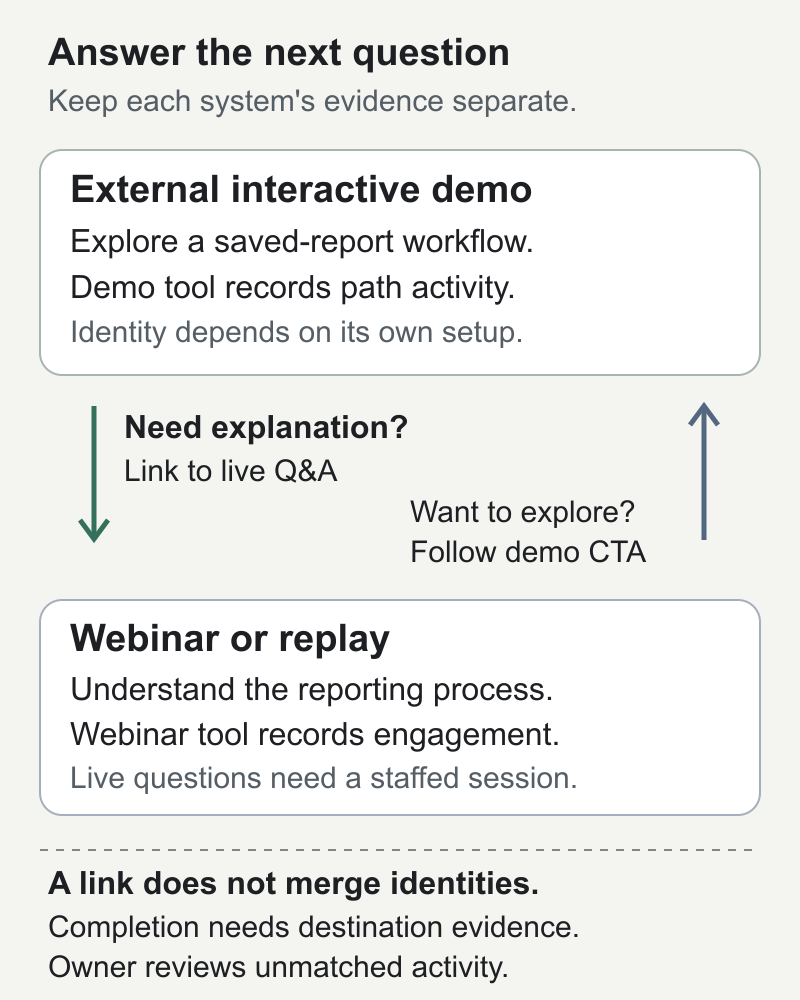
The diagram's text equivalent is simple. An external demo can link to a relevant webinar registration page when someone needs explanation or questions. A webinar or replay CTA can link to a focused external demo when someone wants to explore. Each tool records its own observations. A link between them does not merge identities or prove completion in the destination.
Before adding either link, write down:
- The buyer's unanswered question and why the destination helps.
- The destination URL and what the buyer should expect there, including any registration or access requirement.
- The owner who checks that the destination is current and answers follow-up questions.
- The observation available in the originating tool and the separate observation available in the destination.
- Whether either observation belongs to a known person, and how any proposed contact match would be verified.
- A fallback when the link fails, the buyer cannot get access, or no contact match exists.
Use a standard public destination and manual review unless you have independently verified a documented integration. A campaign tag can help describe a referral, but it does not establish the same person's identity across systems. Keep personal data out of URLs.
For the fictional reporting product, the webinar's link could promise "Explore the saved-report workflow." The demo's return link could promise "Ask about your reporting process at the next live session." Those promises are more useful than sending everyone to an unspecified next step.
Where HeyStream fits
HeyStream fits when the chosen job is running product demo webinars with branded registration and watch experiences, browser broadcasts, and replay. Its audience intelligence gives known webinar contacts engagement context for follow-up. That does not make every visitor identifiable.
Live and replay CTAs can point viewers to an external demo URL. The demo remains a separate system. Do not assume that this link supplies native click-path analytics, a completed-demo trigger, automatic contact matching, or cross-system attribution. Verify those capabilities independently before designing a workflow around them.
If the requirement is only a self-guided clickable experience, evaluate a demo-building tool. If the requirement is production compatibility, plan a technical evaluation. After choosing a live session, use the product demo webinar checklist for preparation and delivery details.
Make one useful choice
Write a short selection sheet before buying another tool or commissioning another asset:
- Audience: who has the question?
- Unresolved question: what do they need to understand or verify?
- Experience: a guided demo, webinar, conversation, technical evaluation, or a justified sequence.
- Owner: who keeps it current and responds?
- Next action: what should someone do when their question is answered?
- Review condition: what feedback or product change would make you revise the choice?
Use the first delivery to ask people what remains unclear. If the current experience answers the question, keep it. Add another only when you can explain the separate job it will do. Any later outcome comparison needs a defined audience and measurement window; a handful of visits is a reason to listen, not to declare a statistically meaningful winner.


