WebinarGeek and Demio are worth shortlisting for a combined live and recorded webinar programme. HeyStream fits presenter-led B2B sessions and replay. eWebinar fits prerecorded delivery alongside a separate live product, while Livestorm merits a look when its session-based credits and integration tiers suit your programme. The right EasyWebinar alternative depends on which parts of your current workflow must stay connected.
HeyStream publishes this guide and is one of the five options. We group the shortlist by fit, using the same criteria for each platform. The order is not a measured ranking. This is a review of public product documentation checked on 18 November 2026, without comparative hands-on tests or customer outcome data.
Quick comparison of five EasyWebinar alternatives
Compare delivery, audience counting, CRM and follow-up ownership, payment requirements, and the complete subscription commitment. A platform can meet the video requirement and still fail the buying decision.
| Platform | Strongest-fit programme | Delivery boundary | Billing unit to check | Dependency to prove |
|---|---|---|---|---|
| HeyStream | Recurring presenter-led B2B sessions | Live broadcasts and replay; do not assume unattended evergreen delivery | Plan and live attendees per broadcast | Required integration tier and any separate prerecorded product |
| WebinarGeek | Several webinar formats in one platform | Live, automated and on-demand formats are documented | Viewer-count plan, users and integration add-ons | Exact CRM handoff and paid-access flow |
| Demio | Marketing sessions using live and automated events | Automated events require Growth or higher | Paid hosts and attendee room size | Event settings to rebuild and concurrent-host needs |
| eWebinar | Prerecorded presentations with chat | No live video; a live programme needs another product | Active eWebinars, monthly registrants and add-ons | Who owns chat and follow-up across the two systems |
| Livestorm | Multi-session events with automation | Start, end and video actions are documented; funnel equivalence needs proof | Annual attendee credits consumed by session | Total credits, required connector and payment route |
EasyWebinar is the baseline, rather than a sixth alternative. Its current offering connects capabilities that a replacement may distribute across several tools.
What are you replacing in EasyWebinar?
EasyWebinar describes a product combining live sessions, automated delivery, selling tools and CRM. Its plan guide separates the live entry offer from Growth and higher capabilities for automation, payments and EasyCRM. That matters if the current programme depends on more than the webinar room.
Write down the constraint that prompted the search. Perhaps you need a better recurring live workflow, a particular external CRM connection, or a different commercial commitment. Then identify the functions you actually use. A built-in feature you have never enabled should not decide the replacement.
A programme dependency is a requirement that another part of the programme relies on. If purchase confirmation controls workshop access, replacing the video room without preserving that confirmation breaks the paid workshop. If a lifecycle email depends on an engagement field, exporting an email address alone does not preserve the follow-up.
Keep EasyWebinar on the shortlist when its combined workflow still fits. A switch needs a concrete benefit and a credible destination for every required dependency. A shorter feature list or lower headline subscription is not enough.
Keep the delivery models separate, too. A replay lets someone watch a past session. Scheduled prerecorded delivery runs a recording at defined times. Recurring live sessions still need presenters. Our guide to automated webinars vs live webinars covers that format decision in more detail.
Five alternatives by programme fit
1. HeyStream for presenter-led recurring B2B sessions
Choose HeyStream when the main job is running recurring B2B webinars with branded registration, live broadcasts, audience context, CTAs and replay. Its relevant fit is the connected live programme and what the team does after each session.
HeyStream's audience records and viewing history connect registrations, attendance, clicks and replay activity. That context can inform follow-up. It does not establish that every EasyCRM field, historical funnel record or external CRM action transfers automatically.
Check HeyStream pricing for the applicable capacity and integration plan. The published headline audience limit concerns live attendees in one broadcast; registrations and replay views do not count toward that limit. CRM and email integrations are plan-dependent. A live capacity allowance is a different unit from monthly registrations or annual session attendance credits.
An unattended evergreen presentation in the same product is a disqualifying requirement unless independently demonstrated. This guide does not treat HeyStream as a documented replacement for that job. You would need to retire the requirement deliberately or put it in another product, with a separate subscription and owner.
The decisive demo request is to show a returning attendee across two live sessions and replay, then show exactly which event context reaches the team's follow-up system. Keep the paid-workshop checkout and access requirement separate until that path is demonstrated.
2. WebinarGeek for several webinar formats in one platform
Choose WebinarGeek for evaluation when you want to keep live, automated and on-demand delivery together. WebinarGeek's current pricing page lists those formats and plan-dependent integrations. Its displayed paid offers are Premium and Enterprise, so older comparisons built around a Basic plan are a poor basis for a current quote.
Start with the viewer-count plan and identify the users, connector and add-ons your programme needs. The current offer distinguishes integrations available as additions from those included at a higher tier. Confirm the exact commercial package rather than treating a connector logo as a complete entitlement.
The rebuild questions concern the external CRM record, follow-up trigger and workshop payment flow. A documented webinar format does not establish that your EasyCRM history or in-room checkout will work the same way.
Do not accept the candidate while a required integration or payment route remains unresolved. Ask the vendor to demonstrate a live registration and a prerecorded registration reaching the intended CRM with distinct event context, followed by the actual paid-workshop access path.
3. Demio for marketing programmes with live and automated events
Demio is a candidate when the team wants both presenter-led marketing sessions and recorded delivery. Demio's conversion guide says that creating on-demand sessions and hosting automated events requires Growth or higher. It also states that settings from the original Standard Event do not copy into the new automated event.
That settings boundary is a useful buying question. List the registration, communication and follow-up settings you rely on, then ask which ones must be recreated. Converting a recording does not mean the original event's full configuration has moved with it.
Demio prices paid hosts and attendee room sizes separately. Its pricing guidance says multiple hosts are needed to run more than one event simultaneously. Include concurrency in the quote, even if two sessions a month sounds like modest usage.
Demio does not pass the shortlist if the required automated plan, host arrangement or rebuilt follow-up exceeds the team's accepted scope. Ask for a demonstration starting with an existing recording and ending with the new event's registration settings and actual CRM handoff. Confirm payment requirements independently.
4. eWebinar for prerecorded delivery alongside a live product
Choose eWebinar for evaluation when the recorded presentation is a distinct job that can have its own system. eWebinar explains that it does not provide live video. Its model combines recorded presentation delivery with chat, rather than replacing the presenter-led portion of a mixed programme.
That makes it a possible partner to a live platform. It also creates a second place to configure registration, maintain a presentation, answer chat and inspect activity. Assign someone to each of those jobs before calling the split simpler.
eWebinar's subscription model uses active eWebinars and monthly registrant allowances, with add-ons to consider. Unlimited recurring sessions should not be read as unlimited registrants or an absence of extra subscription charges.
It is a poor fit when live video must remain inside the same platform. For a split programme, ask the vendors to show what happens when one person attends the live demo and later registers for onboarding. Which system holds each interaction, who answers chat, and how does the follow-up owner avoid duplicate messages? Those are proposed acceptance questions, not workflows we have tested for this guide.
5. Livestorm for multi-session programmes with automation
Livestorm is worth evaluating when session-based audience credits and its integration tiers fit your programme. Livestorm documents event automation for session start, end and video playback. Those actions support a recorded-delivery evaluation, but they do not prove equivalence with every rule in an EasyWebinar funnel.
Livestorm's attendee-credit rules count an attendee by session. Someone who attends live and watches the replay of that same session uses one credit. Someone who attends two different sessions uses a credit for each. Registrants who never attend consume no attendee credits under that rule.
Its pricing page separates base and enterprise integrations and describes a yearly credit pack. Identify the required connector and annual attendance requirement before comparing its quote with a live-room plan or monthly registrant allowance.
Do not accept the candidate if the necessary integration tier or annual commitment does not fit. Ask for the exact session and replay counting rule to be applied to your programme, then demonstrate the required automated path and follow-up record. Keep the paid-workshop payment route unresolved until shown.
Work through one mixed programme before buying
Consider this fictional B2B programme. These are illustrative inputs, not a customer implementation or performance evidence:
- Two presenter-led product demos each month.
- One continuously available prerecorded onboarding presentation.
- One paid customer workshop each quarter.
- An external CRM record, one lifecycle-email owner and one follow-up owner.
The team currently runs its sessions in EasyWebinar. Revenue operations owns the external CRM, marketing operations owns lifecycle email, and the demand-generation lead owns follow-up. Their first question is whether onboarding still needs unattended delivery.
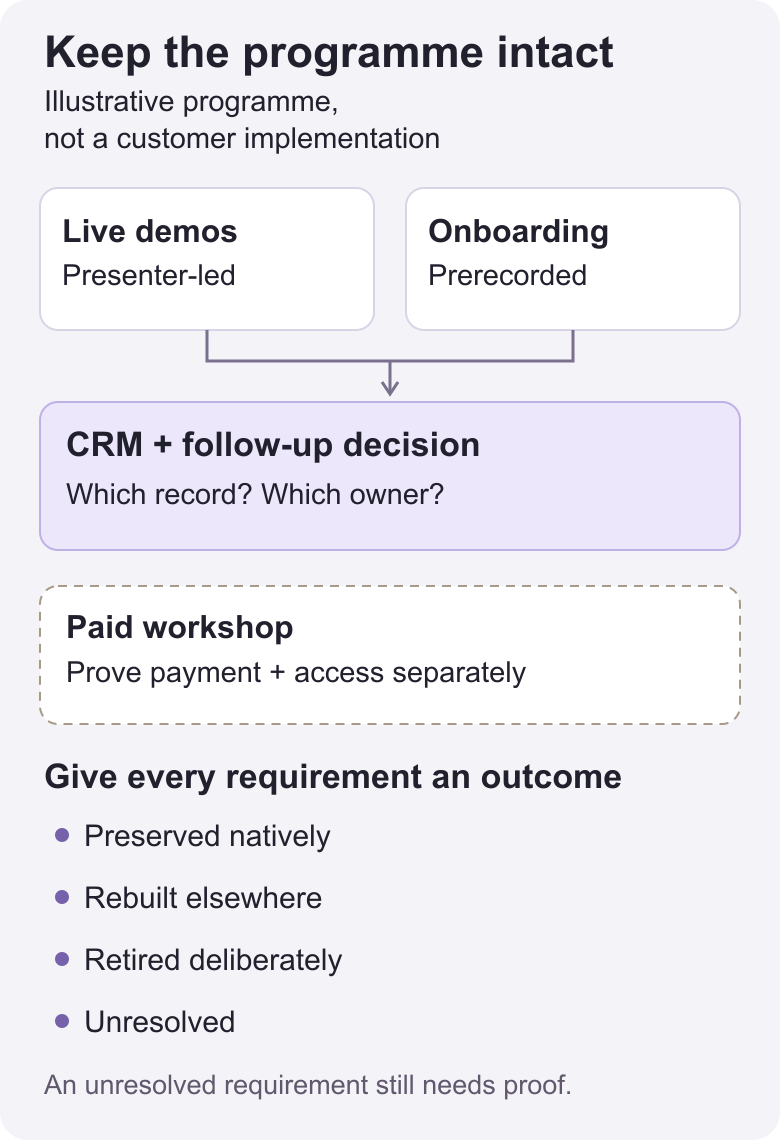
Give each requirement one of four outcomes. Preserved natively means current documentation covers the need, subject to the buyer validating the exact configuration. Rebuilt elsewhere names a separate system and owner. Retired deliberately means the team explicitly drops a requirement it no longer needs. Unresolved means the candidate cannot yet be accepted for that requirement.
The table below sketches a possible HeyStream plus eWebinar split. It is a worksheet for verification, not a claim that an integration between the products has been tested.
| Requirement | Current owner/system | Candidate destination | Outcome | Extra dependency or cost | Proof needed | Responsible owner |
|---|---|---|---|---|---|---|
| Two live product demos | Demand generation / EasyWebinar | HeyStream | Preserved natively, subject to validation | Live plan and capacity | Representative presenter and registration path | Demand-generation lead |
| Prerecorded onboarding | Customer education / EasyWebinar | eWebinar | Rebuilt elsewhere | Second subscription and presentation setup | Scheduled or on-demand path required by the team | Customer-education lead |
| Live and recorded activity in the external CRM | Revenue operations / existing connector | External CRM fed by the selected systems | Unresolved | Connector tier and field mapping | Same contact, distinct event context and usable follow-up fields | Revenue operations |
| Lifecycle messages | Marketing operations / email service | Existing email service with new triggers | Rebuilt elsewhere | Trigger configuration and duplicate prevention | Correct message for each registration and attendance state | Marketing operations |
| Paid workshop access | Workshop owner / current payment flow | Candidate payment and access route | Unresolved | Payment system and access control | Purchase, confirmation and authorized entry | Workshop owner |
| Prerecorded onboarding, if no longer required | Customer education / current recording | No replacement | Retired deliberately, only if approved | Loss of unattended onboarding | Business owner agrees this job can end | Customer-education lead |
The onboarding rows are mutually exclusive choices. Keep the recorded programme and rebuild it elsewhere, or agree to retire it. Do not quietly remove it because a live platform is otherwise attractive.
Four decisions the audit can support
Keep EasyWebinar if it already meets the combined live, recorded and paid requirements and the proposed switch has no convincing benefit after rebuild costs.
Choose one combined-format vendor if WebinarGeek, Demio or Livestorm can demonstrate the exact required delivery, CRM, messaging and payment paths. Several documented formats in one product make it a candidate, rather than an automatic replacement for the whole funnel.
Move the live programme to HeyStream and retire recorded onboarding only when the business explicitly no longer needs that service. This changes the programme itself and needs the programme owner's agreement.
Use HeyStream plus eWebinar if separate live and prerecorded products fit the work and the team accepts the extra subscription, audience record and operating responsibility. The external CRM and email handoffs remain acceptance gates.
A payment CTA, paid registration and checkout inside a session solve different jobs. For the quarterly workshop, decide whether payment controls entry or sells something during the session. Demonstrate the required route before marking the payment row resolved.
Apply the same audience inputs to different billing units
Suppose 80 external people attend each live demo. Of those, 20 also watch that same session's replay. Another 30 people per session watch replay only.
Under Livestorm's cited rule, each session has 110 counted attendees: 80 live attendees plus 30 replay-only attendees. The 20 returning replay viewers are already included. Two sessions therefore consume 220 attendee credits. This is session attendance, not a claim about unique people across the month. Prerecorded onboarding adds an unspecified amount, and the quarterly workshop must also be budgeted.
For HeyStream, the stated live-room input is 80 live attendees per broadcast. For Demio, check the room size and hosts needed at the same time. For WebinarGeek, confirm how the selected viewer-count offer applies to the live and recorded requirements. For eWebinar, count onboarding registrations against the monthly allowance and the presentation against active eWebinars. For EasyWebinar, confirm the applicable audience period and contract terms rather than forcing its limits into another vendor's unit.
These are inputs to a quote. They are not equivalent allowances or a complete subscription estimate.
Compare the complete cost and unresolved requirements
Ask for a quote against the requirement table, rather than comparing the cheapest plan on each homepage. Keep the source currency and record the commercial commitment.
Use this budget worksheet for each finalist:
- Record the required platform tier, billing unit, allowance period and annual or monthly commitment.
- Add paid hosts, concurrency, extra users and the required integrations or add-ons.
- Include any separate prerecorded product, external CRM, lifecycle-email service and payment system.
- Estimate setup labour, presentation rebuilding and the period of overlapping subscriptions.
- Separate a promotion from ordinary pricing and renewal terms. Ask what changes when the offer ends.
- Leave a visible unresolved line for any requirement the vendor has not demonstrated.
Do not insert a zero for a dynamic price that did not load or a capability whose documentation is unclear. Request the amount or mark it unresolved. Avoid assuming checkout equivalence or automatic transfer of engagement history because two products both list a CRM integration.
If the team has not settled on its delivery model or shortlist criteria, start with the broader webinar platform evaluation. The decision here is narrower: what should replace the parts of EasyWebinar this programme actually uses?
Prove the dependency that could stop the switch
Choose two plausible candidates and send both the same requirement table. Ask each to demonstrate a representative live path and, where required, the prerecorded path. Include one returning contact with distinct event context, the intended CTA or payment route, and the record the follow-up owner will actually receive.
For every must-keep row, capture the expected state, observed evidence, responsible owner and unresolved issue. For example, a contact appearing in the CRM is insufficient if the follow-up rule needs the specific session and attendance state. Confirm which fields arrive and what the email service does with them.
This is an acceptance exercise for your team to run. We have not run it across these vendors. A demo can expose a disqualifier before a migration starts; it cannot by itself guarantee complete data transfer or future outcomes.
Once a destination passes the required rows, use the webinar platform migration checklist for inventory, export, cutover and rollback planning.
The next step is concrete. Pick two candidates, name the dependency that would disqualify each, and require evidence for it. Stay, switch or split only when every required row has an owner and a supported answer.