The best alternative to Zoom's webinar product depends on the operating model your team actually needs. Choose HeyStream for a live-first B2B program with audience records and conversion workflows; Livestorm or Demio for browser-based delivery; Sequel for events embedded on your website; eWebinar for evergreen automation; GoTo Webinar for established programs; BigMarker for complex event production; and ON24 for enterprise engagement and analytics.
HeyStream publishes this comparison, and HeyStream is one of the options. We assessed every platform using the same questions: where it fits, where it does not, how it handles the path from registration to follow-up, and what you should test before switching. Zoom itself remains a strong choice when its familiar presenter workflow, broad organizational adoption, audience capacity, or current Plus-tier production tools already match the job.
Zoom Webinars alternatives at a glance
| Platform | Best fit | Delivery model | Pricing model to verify | Main tradeoff |
|---|---|---|---|---|
| HeyStream | Live-first B2B webinar growth | Live, recording, and replay | Plan tier and live-attendee capacity | Not an evergreen automation system or full virtual-event expo |
| Livestorm | Browser-based programs with flexible team access | Live, replay, and on-demand | Annual attendee credits | Replays and on-demand attendance can consume credits |
| Demio | Teams mixing live and automated delivery | Live, series, automated, and on-demand | Hosts, room capacity, and plan | Important capabilities vary by package |
| Sequel | Website-embedded demand generation | Live, simulive, replay, and on-demand | Attendee volume and contract | Sales-led buying and a website-centric operating model |
| eWebinar | Evergreen demos, onboarding, and training | Automated recorded sessions | Active webinars and registrant volume | Not a live production studio |
| GoTo Webinar | Established webinar and training operations | Live, series, simulive, recorded, and on-demand | Plan capacity and feature tier | Packaging and visible prices can vary |
| BigMarker | Complex webinars, webcasts, and virtual events | Live, on-demand, simulive, evergreen, and series | Quote-led Webcast package | More operational surface than a focused team may need |
| ON24 | Enterprise engagement, personalization, and analytics | Live, simulive, and on-demand | Custom package and services | Enterprise breadth and sales-led procurement |
This is a fit guide, not a universal ranking. If you are choosing a B2B webinar platform, compare the whole workflow rather than counting features in isolation.
Plan costs and packaging details in this guide were checked on 25 August 2026. Vendor packages change, so verify current capacity, billing units, integrations, and add-ons before buying.
First, identify which Zoom product you are replacing
A true alternative to Zoom's webinar product must support controlled one-to-many sessions, registration, audience interaction, recording or replay, attendee data, and a workable follow-up path. A general meeting app is not automatically a replacement.
Zoom now sells several related products, and older comparison articles often blur them together. Zoom's current webinar product page separates the standard, Plus, and Events offers, while its Webinars and Webinars Plus comparison explains the additional production and post-event layer in Plus.
| Zoom product | Main job | Important boundary |
|---|---|---|
| Zoom Meetings | Collaborative conversations where many people may speak and share | A meeting can serve a group session, but it is not automatically a structured webinar workflow |
| Zoom Webinars | Standard one-to-many broadcasts with registration, interaction, recordings, and reporting | The base product does not include every Plus production, event-page, or cross-event analytics capability |
| Webinars Plus | Produced webinar programs with backstage, Production Studio, Simulive, pinned resources and CTAs, richer analytics, and content reuse | It is broader than the older description of Zoom as meeting-first software |
| Zoom Events | Multi-session virtual and hybrid events with lobbies, ticketing, sponsors, and networking | This is an event-platform job, not simply a larger webinar |
Before building a shortlist, write down the exact product you use today and the capability you want to improve. Otherwise, you may compare an automated-webinar tool with an event suite and call them substitutes when they solve different problems.
How we evaluated the eight options
We used current official product and plan pages rather than copying directory scores or vendor-authored rankings. Each option was assessed against eight practical questions:
- Which delivery modes does it support: live, simulive, automated, replay, or on-demand?
- How does registration work, including consent, branding, reminders, and attendee access?
- What does the presenter, moderator, and production workflow require?
- Which audience actions remain available at contact level?
- Can the team present useful CTAs during the live session and replay?
- How does data move into CRM and marketing automation?
- What happens after the event, including replay, follow-up, reporting, and content reuse?
- Which billing unit, plan gate, capacity, integration, or service boundary needs a live check?
We did not use universal claims about reliability, support quality, ease of use, engagement, conversion, pipeline, or ROI. Those outcomes depend on implementation and cannot be proven from feature pages alone.
1. HeyStream: best for live-first B2B webinar growth
Why it fits: HeyStream connects branded registration and live delivery with a built-in audience CRM, viewer-level activity, live and replay CTAs, recording, and follow-up context. HeyStream's current pricing page shows those audience and conversion foundations across every paid plan, while reusable CTA collections, integrations, and outbound automations appear as the program grows.
That makes HeyStream a fit for demand generation, product marketing, event marketing, and lean B2B teams that want the session to create an actionable audience record. The distinction is not simply more analytics. Webinar audience intelligence helps a team see what an individual watched or did, while live and replay CTAs capture a concrete next action.
Where it does not fit: HeyStream is not an evergreen webinar automation system, a general meeting app, or a full virtual-event expo platform. If the core job is a permanently available automated demo or a multi-track conference with sponsors and networking, another option is a more natural fit.
Choose it when: You want registration, live delivery, replay activity, audience context, and follow-up to form one focused B2B workflow.
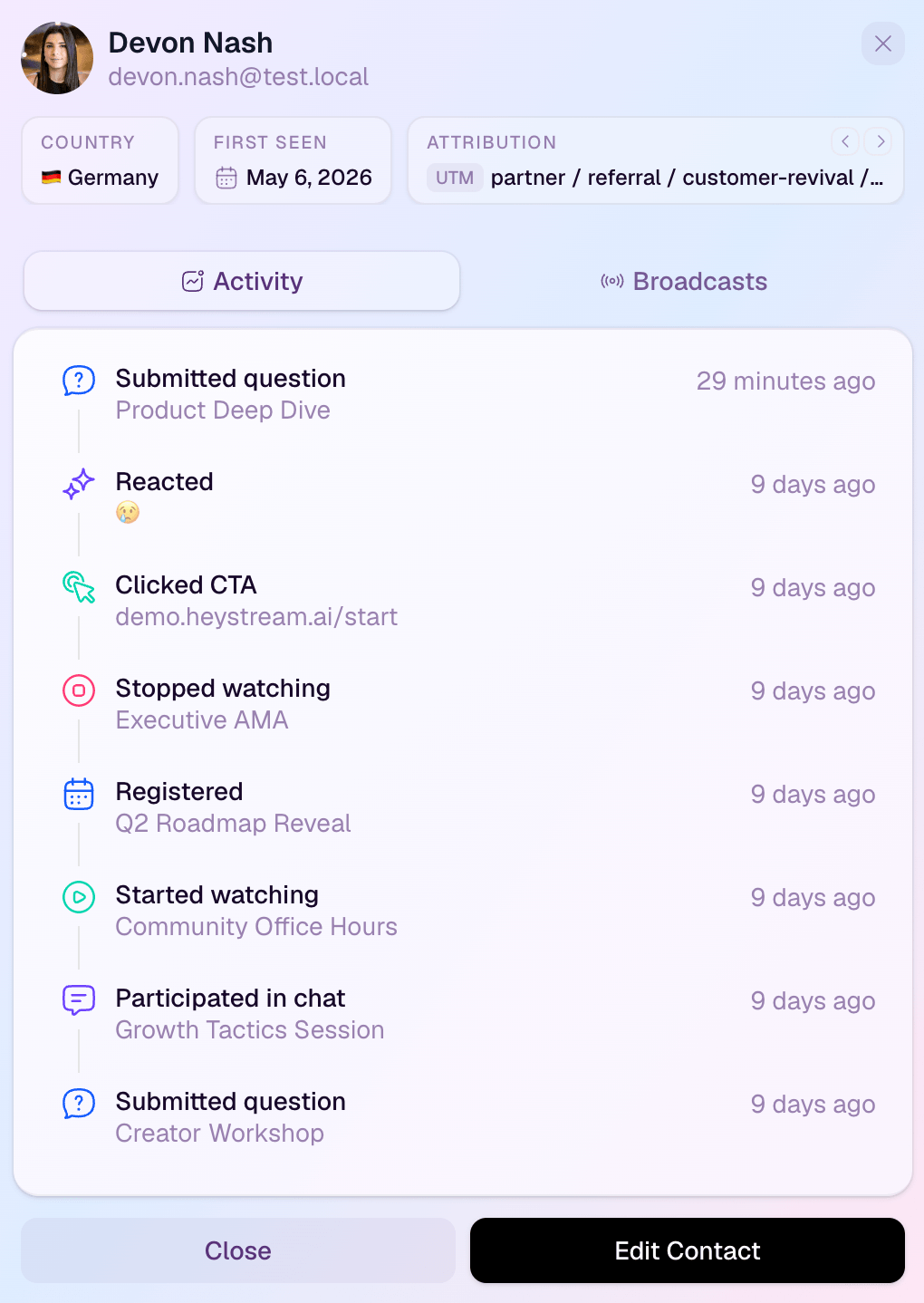
The screenshot shows the operating difference that a feature checklist can hide. An event total tells you how the program performed; a contact record helps your team decide what to do next. If your decision has narrowed to these two products, compare HeyStream with Zoom Webinars directly.
2. Livestorm: best for flexible browser-based webinar operations
Why it fits: Livestorm suits teams that want browser-based delivery, unlimited events and recordings, broad team access, integrations, and a billing model based on actual external attendance rather than registration alone. Livestorm's current pricing page describes annual attendee-credit packs that cover live, replay, and on-demand participation.
Where it does not fit: Credits are easy to misunderstand. A no-show does not consume a credit, but an external participant viewing a session live, on replay, or on demand can. Teams with substantial replay libraries or many sessions per contact should model that usage before deciding the billing model is economical.
Choose it when: Browser access, flexible internal collaboration, and attendee-based annual usage fit your operating rhythm better than a host or fixed-capacity subscription.
For a deeper shortlist around that model, our Livestorm alternatives guide compares its closest workflow substitutes.
3. Demio: best for teams mixing live and automated delivery
Why it fits: Demio's plan comparison combines live events and series with pre-recorded on-demand and automated delivery. It also lists audience interaction through chat, polls, Featured Actions and handouts, plus engagement analytics and registration-source tracking.
Where it does not fit: Room capacity, hosts, automated formats, streaming quality, custom domains, restreaming, integrations, and other capabilities vary by plan. A team should map its real session format and audience size to the current package rather than assuming a headline feature applies everywhere.
Choose it when: You need both scheduled live sessions and repeatable automated delivery in one system, and you can define the host, room, branding, and integration boundaries before subscribing.
If Demio is already on your shortlist, the Demio alternatives guide gives that operating model more room.
4. Sequel: best for website-embedded demand generation
Why it fits: Sequel puts online events and live sessions on the company's own domain rather than centering the experience on a separate hosted destination. Sequel's current pricing page describes live sessions, branded registration and email, simulive, replays, engagement tools, CRM integrations, and plans based on attendee volume. Its Audience Insights page connects session engagement with website behavior before and after the event.
Where it does not fit: This model assumes the website should own more of the experience and data path. Buying starts with a demo and attendee-volume discussion, so it is less transparent than self-serve software. Smaller teams may not need its embedding, CMS, data, and enterprise integration surface.
Choose it when: Your website is the primary demand-generation environment and you want the event, content, and audience journey to stay on that domain.
5. eWebinar: best for evergreen automation
Why it fits: eWebinar is designed around recorded sessions that run on demand, just in time, or on a recurring schedule. eWebinar's current pricing model uses the number of active automated programs and monthly registrants rather than live-host seats, with preprogrammed interactions and private chat that can be answered live or later.
Where it does not fit: It is not a live production studio. Teams should also verify add-ons and plan boundaries for CRM connections, custom domains, cross-team administration, branding, and registrant volume.
Choose it when: A recorded demo, onboarding session, or training class should remain available without a presenter joining every run, and automation matters more than live production.
6. GoTo Webinar: best for established webinar and training operations
Why it fits: GoTo Webinar's current plan comparison spans live and simulive delivery, registration, automated emails, integrations, recordings, reports, and engagement tools across its packages. The separate GoTo Webinar feature guide covers event series, recorded and on-demand experiences, templates, attendee reports, source tracking, and integrations for established programs.
Where it does not fit: Capacity, full-service registration, branding, cloud storage, breakout rooms, paid events, certificates, and other production or training capabilities can vary by package. Visible costs may also depend on region or sales context.
Choose it when: Your team wants a mature operating system for recurring programs, customer training, recorded sessions, and standard reporting, and is comfortable validating the exact tier.
7. BigMarker: best for complex webinar and event production
Why it fits: BigMarker's current Webcast plans cover live, on-demand, Simulive, evergreen, always-on, and series formats. Higher packages add advanced production, richer data capture, CRM and marketing automation integrations, embeddable experiences, custom audience journeys, and enterprise services.
Where it does not fit: The platform reaches beyond focused webinar delivery into broader virtual, hybrid, and persistent event programs. Quote-led packaging, implementation choices, and optional services add buying and operating complexity.
Choose it when: Your requirements genuinely include large audiences, advanced production, embedded experiences, hybrid or virtual-event scope, or hands-on service support.
8. ON24: best for enterprise engagement and analytics
Why it fits: ON24's webinar capability guide covers live, simulive, pre-recorded, and on-demand experiences with personalized content, interactive tools, integrations, and detailed audience reporting. ON24's current package page extends that model into segment personalization, first-party engagement data, content hubs, automated nurture experiences, and analytics across broader enterprise programs.
Where it does not fit: ON24's governance, analytics, services, content, and integration breadth can be heavier than a smaller team needs. Costs are custom, and vendor claims about pipeline or conversion should be treated as product positioning rather than independent outcome evidence.
Choose it when: A large marketing organization needs enterprise support, personalization, multi-program analytics, content experiences, and integrations across a substantial digital-engagement program.
When staying with Zoom is the better decision
Switching has a cost. Stay with Zoom when:
- Presenters, moderators, IT, and attendees already know the workflow.
- Your organization has standardized purchasing, security, identity, and support around Zoom.
- The standard product already covers registration, interaction, recording, and reporting.
- The Plus tier now covers the backstage, Production Studio, Simulive, CTA, richer analytics, event-page, or content-reuse capability you thought was missing.
- Zoom Events is the better match for multi-session, networking, sponsor, ticketing, or hybrid requirements.
- The operational cost and data migration risk of moving exceed the workflow gain.
Run the same pilot you would use for a replacement against your current Zoom setup. Sometimes the useful answer is to change the plan or operating process, not the platform.
When none of these eight is the right replacement
A structured webinar platform is not always the correct category.
- Use a meeting product when the session is collaborative and most participants need to speak, share, and work together.
- Consider Microsoft Teams when the organization is already Microsoft-centered and the event is closer to a structured internal or external presentation than a marketing-led program. Microsoft's current Teams webinar guide distinguishes collaborative meetings from structured events with limited attendee audio and video permissions, and notes that advanced registration availability changed in 2026. Check licensing with your IT administrator.
- Use an event platform when you need multiple tracks, sponsor areas, networking, ticket types, hybrid logistics, or a persistent venue.
- Use an automation-first tool when a recorded session should run continuously without a live production team.
- Use a video hosting or content platform when the real job is an on-demand library rather than registration, live interaction, and follow-up.
Choosing the correct category is more valuable than forcing every requirement into an alternatives list.
Compare pricing without fooling yourself
Webinar vendors charge for different units, so headline prices are rarely comparable. Build one twelve-month scenario and normalize these inputs:
- Annual versus monthly billing.
- Hosts, administrators, and concurrent sessions.
- Registrants, live attendees, replay viewers, on-demand viewers, and attendee credits.
- Active automated programs and monthly registrant limits.
- Session duration, recording storage, video quality, and audience capacity.
- Branding removal, domains, integrations, API access, security controls, and support.
- Production, onboarding, migration, and event-service fees.
- The external CRM, page builder, email, reporting, or follow-up tools still required.
A cheaper subscription can create more manual work. A broader package can be poor value when most of its surface remains unused. Compare the total operating model, not one number.
Run a migration proof before you sign
Do not begin with a full account move. Test one representative session from beginning to end.
- Export the Zoom event, registration, attendance, replay, and engagement records you must retain.
- Rebuild one real registration flow with its form fields, consent, source tracking, confirmation, reminders, and calendar behavior.
- Rehearse organizer, presenter, moderator, and backstage access.
- Test the attendee join path on the browsers, devices, and network conditions your audience actually uses.
- Run screen sharing, video, chat, Q&A, polls, handouts, captions, and the CTA moments your team depends on.
- Verify recording, replay, on-demand access, captions, and post-event email behavior.
- Inspect contact creation, field mapping, consent state, deduplication, attendance status, watch activity, and CTA events.
- Trigger the actual attendee, no-show, replay, and CTA follow-up routes, then confirm timing and ownership.
- Export the event-level and contact-level reports your team uses, and compare them with the current Zoom records.
- Run a failure drill, define rollback to Zoom, and compare the total operating work after the pilot.
Feature availability is only the first gate. The replacement succeeds when the resulting records and follow-up routes are correct.
The practical recommendation
Choose by operating model. HeyStream is the focused live-first B2B choice; Livestorm and Demio cover accessible browser-based operations; Sequel keeps the experience on your website; eWebinar specializes in evergreen automation; GoTo Webinar supports established programs; BigMarker covers complex production; and ON24 serves enterprise engagement.
Then test the complete path from registration to follow-up. The right alternative is the one that handles your real presenters, audience, replay, data, and action requirements with fewer weak handoffs, not the one with the longest feature list.
If you are still comparing categories and vendors, use the wider webinar and live-streaming platform comparison. If the choice is specifically HeyStream versus Zoom, move to the direct comparison instead.


