The best WebinarGeek alternative depends on the job you need it to do. HeyStream fits recurring B2B live programmes that connect audience signals to follow-up. Livestorm uses flexible attendee credits. Demio suits a straightforward browser-based marketing event workflow. Contrast is strong for HubSpot-centred teams. eWebinar specializes in automated demos and onboarding. EasyWebinar combines live and evergreen funnels. Zoom fits organizations already standardized on its event products.
HeyStream publishes this comparison and appears in the shortlist. We checked every platform against the same workflow criteria and current official sources on 8 September 2026. This is a fit comparison, not a claim that one product is best for every team.
WebinarGeek itself remains a credible choice. Its current product covers live, automated, on-demand, paid and hybrid webinar formats. If its registration, CTA, integration and reporting workflow already works for your team, switching may create work without solving a real problem.
WebinarGeek alternatives at a glance
This workflow-fit table was checked on 8 September 2026. Vendor packaging changes, so confirm the exact delivery mode, integration and limit before buying.
| Platform | Best fit | Delivery model to verify | Audience or CRM model | Billing unit | Main watch-out |
|---|---|---|---|---|---|
| HeyStream | Recurring B2B live programmes | Live, series and replay | Built-in audience CRM plus integrations | Plan and live attendees per broadcast | Not an automated evergreen platform |
| Livestorm | Teams that want flexible annual usage | Live, replay and on demand | Platform data plus integrations | Attendee credits | Replay and on-demand attendance can use credits |
| Demio | Straightforward marketing webinars | Live and series, with automated and on-demand on higher plans | Platform data plus integrations | Hosts and attendee-room size | Host count and room size both shape cost |
| Contrast | Branded, HubSpot-centred programmes | Live, prerecorded, recurring and replay | Deep native HubSpot workflow | Monthly registrants | Advanced API and Salesforce needs sit higher |
| eWebinar | Automated demos, onboarding and training | Prerecorded, scheduled and on demand | Platform data plus integrations | Active eWebinars and monthly registrants | It does not replace presenter-led live webinars |
| EasyWebinar | Live plus evergreen sales or education funnels | Live, automated, simulive and evergreen on eligible plans | Built-in CRM plus integrations | Plan, live attendees and automated viewers | Automation and built-in CRM start above Launch |
| Zoom Webinars | Zoom-standardized organizations and larger events | Live, with simulive and richer production on higher tiers | Reporting plus connected marketing tools | Licensed capacity and tier | Advanced production sits in Webinars Plus or Events |
Once you know the operating model you need, you can compare webinar and live-streaming platforms without forcing unlike products into one score.
Should you switch from WebinarGeek?
Start by documenting what already works. WebinarGeek's current plan comparison lists live and on-demand formats on Basic, while Premium adds automated delivery, marketing integrations and custom branding. Published limits currently run from 50 viewers on Basic to 1,000 on Premium and 5,000 on Enterprise. Session limits and add-ons also vary by plan.
Conversion and automation are not obvious gaps. WebinarGeek's call-to-action guide explains how viewers can respond to a banner or button interaction, while its integration-trigger documentation covers actions tied to registrations, viewers, replay activity and other webinar events.
A switch is justified when a named requirement fails, not when another platform has a longer feature list.
| Current situation | Evidence to collect | Next step |
|---|---|---|
| The existing live and recorded workflow fits | Operator time, audience path, integration results and current cost | Stay with WebinarGeek and review again when the requirement changes |
| One must-have capability or plan boundary fails | The exact event, role, integration, limit or billing problem | Test only platforms that solve that specific gap |
| Costs feel unpredictable | Registration, attendance, replay, host, workspace and add-on volumes | Rebuild the comparison using each vendor's billing unit |
| A migration looks attractive but risky | Data export, import, event setup, presenter access, replay and follow-up evidence | Run one representative event before cancelling anything |
How these alternatives were evaluated
The shortlist uses seven criteria: delivery modes, registration and branding, live and replay engagement, audience data and CRM handoff, operator and capacity limits, billing structure, and migration risk. We did not use decimal scores because the weight of each criterion changes with the buyer.
A good alternative preserves the parts of your current programme that already work, then improves the workflow that caused you to look elsewhere. For a recurring webinar programme, that workflow includes the repeatable handoff between promotion, registration, delivery, replay and follow-up. For teams connecting event activity to sales or marketing systems, the webinar CRM integration matters as much as the live room.
1. HeyStream for recurring B2B live growth programmes
Best for. Teams running repeatable live events, demos and broadcasts that want audience records, reusable conversion tools and follow-up close to the event workflow.
HeyStream's current plans include branded registration and watch pages, a built-in audience CRM, live and replay CTAs, and cloud recording. Growth adds cloud-powered streaming, reusable CTA collections, CRM and email integrations, and outbound automations. Scale raises live capacity and concurrent-broadcast limits.
HeyStream is deliberately live-first. It is not the right replacement when automated or evergreen delivery is the central requirement. During evaluation, run registration, the live session, CTA activity, replay and follow-up as one journey. Verify that the audience record and connected systems receive the fields your team needs.
2. Livestorm for flexible attendee-credit programmes
Best for. Teams that run a varied mix of browser-based sessions and want to spread usage across the year instead of buying around one fixed room size.
Livestorm's pricing page uses annual attendee-credit packs. An external attendee consumes a credit when joining live, watching a replay or watching on demand. A no-show registration does not consume one, and internal team members do not consume credits. Pro includes unlimited events, recording and team members, while some larger integrations and controls sit on Enterprise or in add-ons.
This model can fit variable event demand, but it needs forecasting. A person who attends different sessions can use more than one credit. Test a month that includes live attendance and replay viewing, then verify credit use, registration data and downstream integration behaviour.
3. Demio for straightforward marketing webinars
Best for. Marketing teams that want a browser-based live webinar workflow with event series and higher-plan automated or on-demand options.
Demio's plan grid separates host count from attendee-room size. Starter is limited to one host and a 50-person room. Growth and Premium offer larger room choices, while prerecorded on-demand and automated delivery are listed on the higher plans. Premium adds selected integrations, custom domains, longer sessions and more people on stage.
Host planning matters because a host can start and stop an event, and concurrent events require multiple hosts. During evaluation, run one live session and one prerecorded session. Check host roles, room capacity, branding, replay, integrations and exports against the tier you would actually buy.
4. Contrast for HubSpot-centred webinar operations
Best for. B2B teams that want branded webinar programmes and detailed registration and engagement data inside HubSpot.
Contrast's current pricing meters Pro by monthly registrants and includes unlimited team members and event hosting, branded experiences, CTAs, prerecorded sessions and a native HubSpot integration. Advanced adds annual registrant quotas, concurrent events, API access and webhooks. Salesforce is listed at Enterprise.
The registrant model is different from live-attendee capacity. Contrast counts unique registrants in the month, whether or not each person attends. During evaluation, register through the intended page or HubSpot path, watch live and on demand, then inspect the engagement timeline and the follow-up workflow in HubSpot.
5. eWebinar for automated demos and onboarding
Best for. Teams turning prerecorded demos, onboarding sessions or training into scheduled and on-demand experiences without a live presenter.
eWebinar's pricing model adjusts by the number of active eWebinars and monthly registrants. Level 1 currently includes one active eWebinar, 1,000 monthly registrants, unlimited recurring sessions and unlimited team members. Higher levels increase the active library and registrant allowance.
That specialization is also the boundary. eWebinar does not replace a presenter-led live programme. Test one real recording, scheduled and on-demand entry, interactions, question handling, notifications and lead routing before assuming the recorded workflow will operate unattended.
6. EasyWebinar for live and evergreen funnels
Best for. Teams that want live sessions, automated or simulive delivery, paid events and a built-in sales follow-up path in one product.
EasyWebinar's pricing page lists live delivery on Launch. Growth and higher plans add automated, simulive and evergreen formats, paid sessions, multistreaming and EasyCRM. Native HubSpot and Salesforce sync is listed on Pro. Capacity is split between live attendees and automated viewers.
The wider funnel scope can be useful, but a live-only team may not need it. Build one live event and its automated path during evaluation. Trace a registrant through reminders, attendance, replay or automation, checkout if relevant, and CRM follow-up.
7. Zoom Webinars for Zoom-standardized organizations
Best for. Organizations that already use Zoom for identity, procurement and presenter workflows, or that need familiar roles and larger event tiers.
Zoom's current webinar overview separates its standard product from the Plus tier. The standard tier covers live broadcast controls, engagement, recordings and reports. The Plus tier adds prerecorded simulive delivery, backstage coordination, production layouts, richer event pages, content repurposing and engagement analytics. Events extends the offer to multi-session and hybrid formats.
Zoom is primarily a broadcast and event environment, so a B2B team may still rely on other systems for audience records and follow-up. Rehearse host and panelist roles, live controls, simulive if needed, recording, reporting and the integration path into your system of record.
Compare the billing unit, not the starting price
Viewer capacity, attendee credits, monthly registrants, host seats, active automated experiences and licensed capacity measure different constraints. A low starting price tells you little until you map it to your real programme.
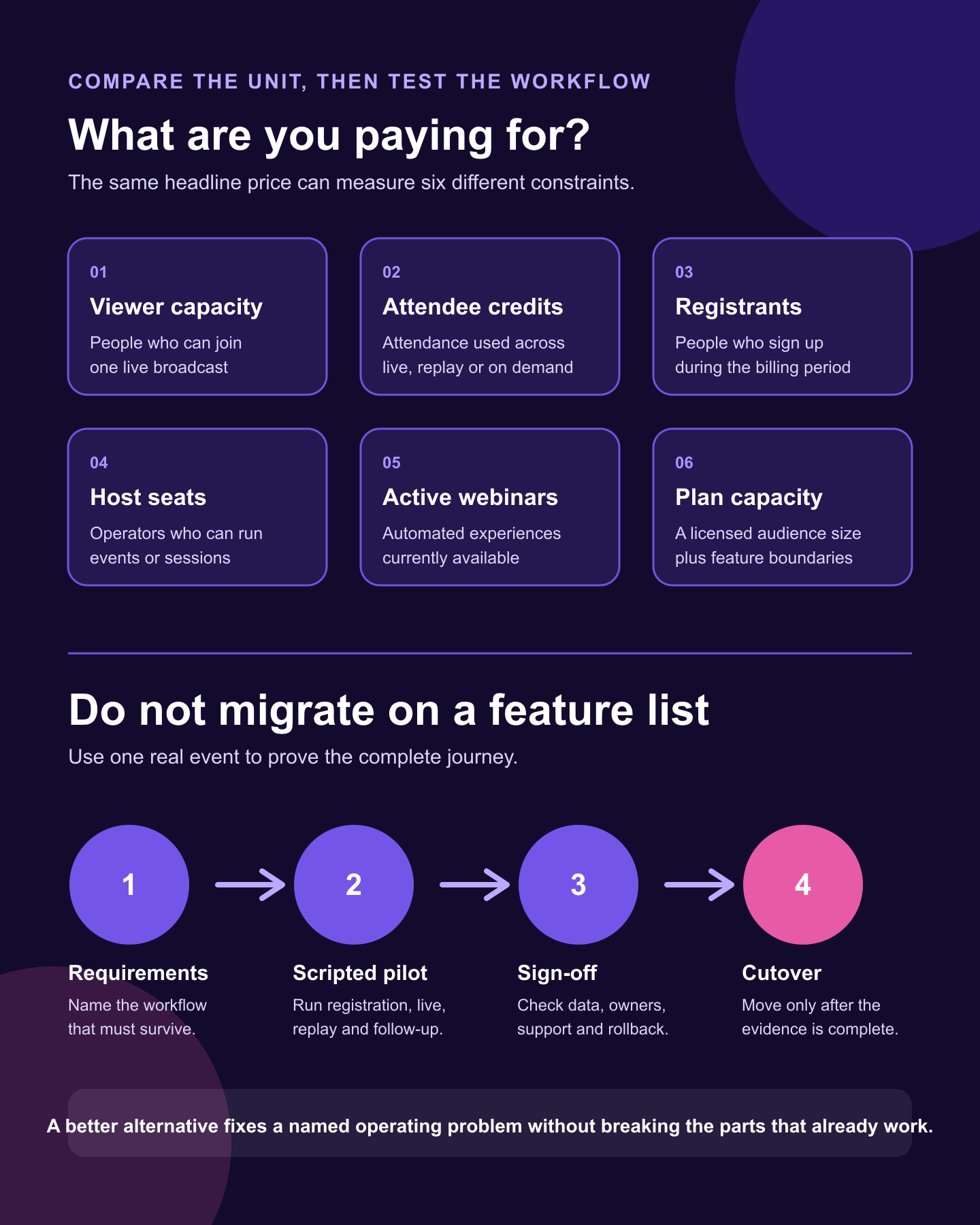
Build one dated scenario before requesting quotes:
- Live events per month and expected duration.
- Registrations, live attendance and replay or on-demand viewers.
- Concurrent events, hosts, presenters and workspaces.
- Automated experiences or simulive sessions that must stay active.
- Required CRM, email, API, domain and support features.
- Contract term, add-ons, overages and expected growth.
Ask each vendor which people, sessions or assets consume its allowance. Then ask what happens at the limit. This will not identify a universal cheapest option. It will show which model matches your usage without hiding important costs in another unit.
Choose an alternative in five steps
- Write down the workflow you must preserve, including registration, reminders, presenter access, live interaction, replay and follow-up.
- Name the one gap the switch must solve. Reject products that do not solve it.
- Price the same usage scenario across your shortlist, including add-ons and higher-plan boundaries.
- Run the same scripted pilot on the two strongest fits.
- Sign off the migration checks before you cancel WebinarGeek.
Migration acceptance checklist
Run one representative event with real internal owners. Do not rely on an empty-room demo.
- Registration pages, embeds, consent fields and branded URLs behave as expected.
- Confirmation, reminder, calendar and join-link delivery reaches the right test accounts.
- Hosts, presenters and moderators can join with the intended permissions.
- Audio, video, screen sharing, media, chat, Q&A, polls and CTAs work in the chosen delivery mode.
- Recording and replay become available on the expected schedule.
- CRM fields and webinar events arrive with the right names and timing.
- Follow-up segments separate registrants, attendees, no-shows and replay viewers as intended.
- Required recordings, exports and templates can be moved or recreated.
- Support escalation, rollback ownership and the cancellation date are clear.
Our webinar platform migration checklist covers the inventory, mapping, pilot, cutover and rollback work in more detail. An export proves only that you can obtain a file. It does not prove that the replacement can import the same data or preserve the workflow around it.
Which WebinarGeek alternative should you choose?
Choose by workflow. HeyStream fits recurring B2B live programmes that connect audience activity to conversion and follow-up. eWebinar or EasyWebinar fit automation-led delivery. Contrast is a strong option for HubSpot-centred teams. Livestorm suits attendee-credit planning. Demio offers a straightforward marketing webinar model. Zoom fits organizations already operating inside Zoom.
Stay with WebinarGeek when its current mix of live, recorded, CTA, integration and reporting features meets the real requirement. The right alternative fixes a named operating problem without breaking the parts that already work.


