A webinar is not finished when the live session ends.
The recording matters, but it is only one part of the asset. The stronger material is usually hidden inside the session itself: the questions people asked, the objections that came up, the points that made people stay, the CTAs they clicked, and the replay moments they returned to later.
That is what makes webinar content repurposing different from generic video repurposing. The goal is not to squeeze the maximum number of posts out of one recording. The goal is to turn the best audience moments into useful replay, follow-up, social, sales, and future-event content.
For B2B teams, the best way to repurpose a webinar is to plan the content system before the session, capture high-signal moments during the broadcast, and turn those moments into assets that help the audience take the next useful step.
Start Before The Webinar
Repurposing works better when it is planned before the live session, not rescued afterward.
Before the webinar, decide what the session should become after it is over. That does not mean writing every follow-up post in advance. It means knowing which themes, moments, and audience signals are worth capturing.
Start with five decisions:
| Decision | Why it matters |
|---|---|
| Core audience | Keeps the repurposed content from becoming too broad. |
| Main problem | Gives the eventual replay, article, and clips a clear spine. |
| Primary next step | Helps CTAs and follow-up feel connected to the session. |
| Priority channels | Prevents the team from creating assets nobody will use. |
| Signal capture plan | Makes questions, clicks, and replay behavior easier to act on. |
This matters because B2B content teams are already under pressure to create useful, action-driving content with limited resources. Content Marketing Institute's current B2B research highlights challenges around creating content that drives action, using AI, and measuring effectiveness. A webinar can help with those pressures, but only if the team treats it as a source of reusable insight rather than a one-time campaign.
A simple pre-webinar capture plan should cover:
- speaker quotes worth turning into short posts
- questions and objections worth answering later
- demo moments worth clipping or explaining
- poll answers worth using as content prompts
- CTA moments worth reviewing after the event
- replay sections that should be easy to find later
This also connects the webinar to the broader B2B webinar growth engine. A live session creates the most value when registration, engagement, replay, follow-up, and learning all feed the next step.
Capture The Moments Worth Reusing
Not every minute of a webinar deserves to become content.
The most useful repurposed assets usually come from moments where the audience reveals what they care about. That could be a question in Q&A, a spike in chat, a strong poll response, a CTA click, a replay return, or a demo section that people keep watching.
Those moments are more useful than generic highlights because they tell you something. They show where the audience had curiosity, confusion, urgency, or interest in a next step.
Use a simple signal map while reviewing the webinar:
| Source moment | What it can become | What it may signal |
|---|---|---|
| Repeated audience question | Blog section, FAQ, sales enablement answer | Confusion or demand for clarity |
| Strong speaker quote | LinkedIn post, short clip, newsletter opener | Memorable framing |
| CTA click | Follow-up segment, replay prompt, sales note | A possible next step to review |
| Poll answer | Social post, article angle, future topic | Shared audience challenge |
| Demo section | Clip, help article, product-led follow-up | Practical evaluation interest |
| Replay return | Nurture email, future webinar topic | Continued viewing after live attendance |
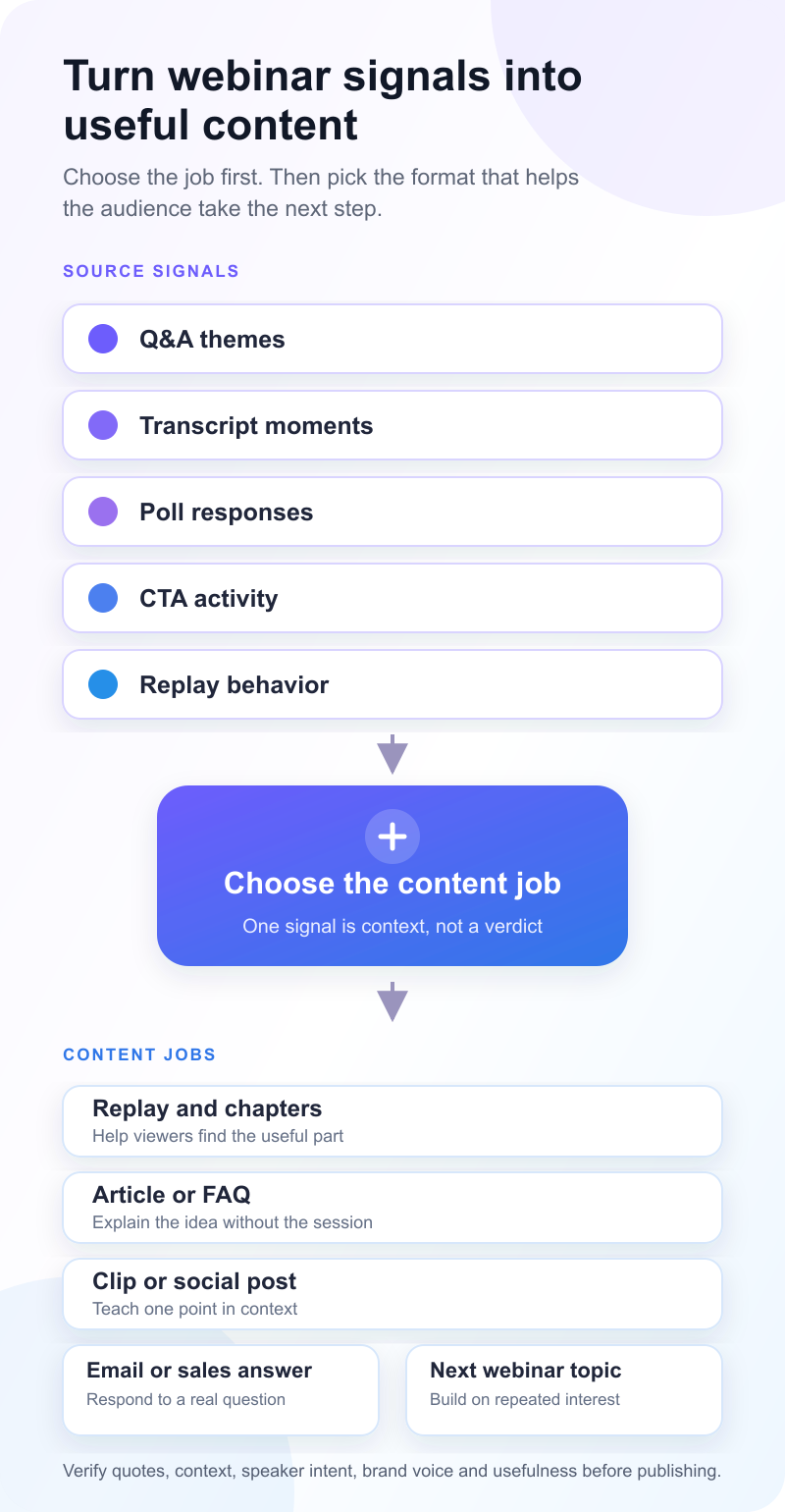
This is where audience intelligence matters. A webinar recording tells you what was said. Audience signals tell you what people did with it. One signal is context, not a verdict, so use several signals and the surrounding conversation before choosing a follow-up.
Package The Replay First
The replay should be the first repurposed asset, not the last thing the team uploads before moving on.
A replay is not an archive. It is a second chance for the session to create useful engagement. ON24's webinar benchmark commentary reports continued on-demand viewing and increased use of its own AI content engine for derivative webinar content. Treat that as directional vendor data, not a universal benchmark. The practical point holds: the after-live experience deserves planning.
A strong replay should include:
- a clear title that explains why the session is worth watching
- a short summary of the problem and takeaway
- chapters or timestamps for the strongest sections
- a visible next step for viewers who are ready to act
- follow-up paths for people who watched live, missed it, or returned later
If the webinar introduced a framework, the replay can become the canonical version of that framework. If it answered a specific objection, the replay can support sales conversations. If it was a customer or expert session, the replay can become a trust-building asset for future nurture.
For a deeper replay workflow, use a dedicated webinar replay strategy instead of treating the recording as a passive upload.
Turn One Strong Theme Into Long-Form Content
The transcript is raw material, not final copy.
A good webinar often contains one idea that deserves to become a deeper article, guide, or resource. It might be the main framework from the session, the best audience question, the strongest product-demo lesson, or the objection that kept coming up in Q&A.
When turning a webinar into long-form content, resist the temptation to summarize everything that happened. Most readers do not need a chronological recap. They need the clearest version of the idea.
A useful long-form workflow looks like this:
| Step | What to do |
|---|---|
| Pick the strongest theme | Choose one idea the audience clearly cared about. |
| Pull supporting moments | Use quotes, questions, examples, and demo points as source material. |
| Add missing context | Bring in citations, product context, screenshots, or examples the live session did not cover. |
| Write for the reader | Make the article useful on its own, even for someone who never attended. |
| Link back to replay | Give readers a way to watch the full session when useful. |
This is how a webinar becomes more than a recording. The live format captures raw insight. The article turns that insight into a structured asset people can search, share, and use later.
Create Short-Form Assets From High-Signal Moments
Short-form repurposing works best when each asset has a job.
A clip should not exist just because it is easy to cut. A LinkedIn post should not exist just because someone said something quotable. Each repurposed piece should help with one of a few clear outcomes: teach a point, answer an objection, promote the replay, support a sales conversation, or seed the next webinar.
Nature Partnerships gives a simple practical example of this kind of reuse: Q&A can become written content, takeaways and quotes can become social posts, and the on-demand recording can be shared with people who missed the live event. The stronger B2B version is to connect each asset to a specific audience need or next step.
Good short-form formats include:
- speaker quote posts that clarify the session's point of view
- short clips that explain one useful idea
- Q&A posts that answer a real audience question
- newsletter snippets that summarize a practical takeaway
- sales snippets that handle common objections
- replay promotion posts that point to the most relevant section
- follow-up emails that segment people by what they did
This is also where repurpose video content fits naturally. Video clips can be useful, but they should come from moments that carry meaning without the full session around them. A clip that needs five minutes of setup is probably better as an article section or replay chapter.
Use AI for the production pass, not the editorial decision
AI can speed up the first production pass. Use it to mark transcript themes, propose clip boundaries, summarize Q&A, and draft channel variants. Then put a human back in charge before anything reaches an audience.
| AI can help with | A human must verify |
|---|---|
| Group transcript themes | Whether the themes reflect the speaker's real point |
| Propose clip start and end points | Whether the clip makes sense without the full session |
| Summarize Q&A threads | Quotes, claims, omissions and audience context |
| Draft social, email and sales variants | Brand voice, usefulness and the right next step |
The review is not a light polish. Check every quote, factual claim, speaker intention, edit and implied conclusion. Do not infer buyer intent, pipeline impact or performance from one question, click, poll answer or replay view. AI is useful here because it reduces production work. It does not decide which moment deserves to become content.
Use Questions And Objections As Follow-Up Content
Audience questions are often the most useful repurposing source because they come from real friction.
If multiple people ask about the same problem, that question may deserve a blog section, a short post, a sales enablement answer, or a future webinar. If an attendee asks a product-specific question, it may deserve a more direct follow-up path.
Separate questions into practical buckets:
| Question type | Best repurposed use |
|---|---|
| Definition question | FAQ, glossary, intro section |
| Objection | Sales enablement, follow-up email, product explanation |
| Implementation question | How-to article, checklist, future workshop |
| Strategic question | Thought-leadership post, webinar sequel |
| Product question | Demo follow-up, support content, product-led clip |
The follow-up should reflect what the person did, not just whether they registered. Someone who attended live and clicked a CTA should not receive the same sequence as someone who registered but never watched. A replay return provides different context from a five-minute live visit, but neither action proves buyer intent on its own.
Use webinar follow-up email templates when you need copyable messages for those different paths.
That is where behavior-based follow-up becomes useful. The point is not to automate for its own sake. It is to make the next message more relevant to the action the viewer actually took.
Build A Simple Repurposing Calendar
You do not need to promise that one webinar will create six months of content.
That kind of claim is usually too neat. Some webinars deserve a full content run. Others produce one strong replay, two useful posts, and a handful of follow-up snippets. The better approach is to build a calendar around the strength of the material.
Here is a practical example:
| Timing | Asset | Source moment | Audience | Next step | Metric |
|---|---|---|---|---|---|
| Day 1 | Replay email | Full recording and summary | Registrants and no-shows | Watch replay | Replay views, CTA clicks |
| Week 1 | LinkedIn post | Strongest quote or audience question | Broader target audience | Read or watch | Saves, comments, clicks |
| Week 2 | Blog post | Main framework or theme | Search and nurture audience | Learn deeper | Organic visits, time on page |
| Week 2 | Sales snippet | Common objection from Q&A | Open opportunities | Continue conversation | Replies, meetings influenced |
| Week 3 | Short clip | Demo or teaching moment | Social audience | Watch replay or book next step | Video completion, clicks |
| Later | Future topic | Repeated question or poll answer | Existing audience | Register for next session | Registrations |
This keeps repurposing focused. The team can decide what each asset is supposed to do before creating it.
Measure The Job Of Each Asset
Repurposed content should not all be measured the same way.
A replay email, a blog post, a sales snippet, and a short clip each have different jobs. The metric should match the job.
For replay assets, look at replay views, completion, return visits, and CTA clicks. For blog content, look at organic traffic, engaged reading, internal-link clicks, and assisted follow-up value where you can measure it. For social posts, look for saves, comments, profile visits, and meaningful clicks rather than surface reach alone. For sales enablement, track whether the asset helps answer a real question in the sales process.
Use the webinar performance report template to keep those asset-level metrics tied to decisions and follow-up owners instead of treating isolated engagement as ROI or buyer intent.
Webinar analytics are most useful when they help the team choose what to do next. If a replay section gets strong attention, it may deserve a standalone article. If one CTA gets clicks from replay viewers, it may deserve a more prominent follow-up path. If a topic drives questions every time, it may deserve its own webinar.
Where HeyStream Fits
HeyStream helps teams run branded live broadcasts and connect the session to what happens afterward: replay, CTAs, audience signals, analytics, and follow-up.
That matters for repurposing because the useful material is not only in the recording. It is also in the behavior around the recording. Which viewers registered? Who attended live? Who returned for replay? Which CTA did they click? Which topics created questions? Which moments should shape the next session?
With live and replay CTAs, audience records, and follow-up workflows in one place, repurposing can become part of a repeatable webinar program rather than a manual content scramble after every event.
For teams running recurring webinars, that compounding effect matters. A webinar series planner gives the calendar and ownership decisions a practical home. Each session can then create content for the current campaign, insight for the next session, and better follow-up for the people who already showed interest.
The Practical Takeaway
The best way to repurpose webinar content is not to ask, "How many assets can we make from this recording?"
Ask better questions:
- What did the audience care about?
- Which moments should become replay, social, blog, email, or sales content?
- Which actions suggest a useful follow-up?
- Which topic should become the next webinar? Use the framework for choosing webinar topics when that question needs a structured answer.
- Which assets actually help people take the next step?
That is how a webinar becomes more than a live event. It becomes a source of content, signal, and momentum for the next part of the growth loop.


