A webinar replay is often treated like a recording link. The live session ends, the team sends the replay email, and the asset quietly moves into the archive.
That is a missed opportunity.
For B2B teams, the replay is not just a convenience for people who missed the live session. It is a second intent moment. Some viewers return because they want to revisit a specific section. Some missed the live event but still care about the topic. Some find the replay later through a nurture sequence, a sales conversation, or a related resource.
A practical webinar replay strategy gives those viewers a clear path forward. It packages the recording with context, keeps the right CTAs available, tracks replay behavior, and connects those signals to follow-up. It is one part of the broader B2B webinar growth engine.
Plan the Replay Before the Live Session Ends
The best replay strategy starts before the webinar goes live.
That sounds early, but it prevents the replay from becoming an afterthought. If the team waits until after the session, the replay usually inherits whatever is easiest: a raw recording, a generic follow-up email, and a CTA that may not match the replay viewer's context.
Before the session, decide:
- which replay CTA should appear after the broadcast
- what page or email will introduce the replay
- which sections should be highlighted for different audience segments
- what behavior should trigger follow-up
- how replay engagement will be reviewed before the next event
This does not need to be complicated. The goal is to treat the replay as part of the webinar workflow, not as cleanup after the real event is over.
If you are building a recurring webinar program, this matters even more. A repeatable replay process helps each session keep working after the live room closes, without forcing the team to rebuild the follow-up plan every time.
Should You Gate a Webinar Replay?
There is no universal answer. Gate the replay when identifying a new viewer genuinely changes what you can give them or how you should follow up. Remove the form when the viewer is already known, the replay is intended for broad discovery, or another registration step adds friction without adding useful context.
Start by separating four decisions that are often bundled together:
- Replay access: whether someone can watch immediately or must complete a step first.
- Viewer identification: whether the viewing session can be connected to a known contact.
- Analytics: which viewing and CTA signals you will measure.
- Marketing permission: whether you have an appropriate basis to send a particular follow-up message.
A form can identify a viewer and collect information, but it does not automatically settle permission for every future use. Apply the privacy and marketing rules relevant to your audience and location, and make the purpose of each field clear.
Use this decision matrix as a starting point:
| Viewer or replay use | Replay purpose | Access choice | Identity state | Minimum information needed | Follow-up permission | Discoverability trade-off | Measurement approach |
|---|---|---|---|---|---|---|---|
| New awareness visitor | Let a new prospect learn from a useful session | Usually open when reach and search matter; use a short form only when identification changes the experience | Unknown | Nothing for open access; otherwise email plus only fields needed for routing | Ask separately for any permission the intended follow-up requires | Open access removes friction; a form reduces reach but can identify viewers | Anonymous replay views for open access; identified sessions and CTA clicks after registration |
| Existing registrant | Help someone watch or revisit the session they already registered for | Direct tracked replay link | Known | No repeat registration | Use the permissions and expectations already recorded for that contact | Minimal friction, but the link is not designed as a public discovery page | Connect replay watch time, returns, and CTA activity to the existing contact |
| No-show | Give an interested registrant a second chance to watch | Direct tracked replay link | Known | No repeat registration | Keep the message tied to the event relationship and recorded preferences | Low friction; discovery is not the main goal | Separate no-show-to-replay conversion from live attendance |
| Live attendee returning to a section | Let an attendee revisit a useful moment | Direct tracked link, ideally with the relevant section highlighted | Known | No repeat registration | Follow up only when the action and permission support it | Low friction; sharing may be limited if the link is personal | Track repeat sessions, the revisited section where available, and CTA activity |
| High-value training or confidential material | Limit access to an approved audience | Authenticated or otherwise controlled access | Known or verified | Only the details required to confirm eligibility and deliver access | State how access and subsequent contact will be handled | Stronger control reduces public reach and search visibility | Measure access, completion, and approved next steps rather than raw public views |
| Partner event | Give both partners useful distribution and attribution | Agree one access model before promotion; avoid conflicting forms | Known or unknown, depending on the campaign | Fields both parties can justify and handle consistently | Define ownership, notices, and follow-up permissions before launch | Open access expands shared reach; gated access requires a clear data-sharing plan | Use agreed campaign sources, partner attribution, viewing, and CTA signals |
| Recurring-program replay library | Build a useful archive that supports future discovery and nurture | Open the educational library; gate only specific high-value or controlled assets | Mixed | None for open resources; collect only what changes access or routing | Treat library access and ongoing marketing as separate choices | Open libraries compound search and sharing; blanket gating limits discovery | Track page and replay performance by session, plus identified activity where appropriate |
The most important practical rule is simple: do not ask an already-known registrant to complete the same registration again when a direct tracked replay link can do the job. Repetition does not create better data; it mainly creates another point of abandonment.
For new viewers, use a minimum-fields rule. Collect a field only when the answer changes access, personalisation, routing, or a clearly explained follow-up. The UK's Information Commissioner's Office guidance on data minimisation says personal data should be adequate, relevant, and limited to what is necessary for the stated purpose. That is UK data-protection guidance, not universal legal advice, but it is a useful discipline for replay forms anywhere.
Build the Replay Page Around Context and One Next Step
A raw video link asks too much from the viewer.
They have to remember what the session was about, decide whether it is worth watching, find the relevant section, and figure out what to do next. A replay page should remove that friction.
At minimum, the replay page should include:
- a clear title that explains the practical value of the session
- a short summary of who the replay is for
- three to five key moments or takeaways
- the replay video itself
- one primary next step that fits the topic
That last point is important. The replay page should not become a link dump. A viewer who just watched a product workshop, customer story, or tactical webinar should see one relevant next step: book a demo, download the checklist, register for the next related session, start a trial, or share the replay with a teammate.
The right CTA depends on the session. The discipline is choosing one primary action instead of asking the viewer to sort through every possible option.
Keep CTAs Active During the Replay
Many teams plan CTAs for the live event but let them disappear during replay.
That weakens the replay experience. A viewer may reach the exact moment where the offer makes sense, but the next step only exists in an old email or a slide that is no longer clickable.
Replay CTAs work best when they match the moment in the content:
| Replay Moment | Useful CTA |
|---|---|
| The speaker introduces the problem | Download a checklist or planning template |
| The session explains a framework | Save the worksheet or related guide |
| The demo shows the workflow | Book a product walkthrough |
| The topic connects to a broader program | Register for the next session |
| The viewer reaches the end | Choose the next best resource or action |
For more ideas on matching offers to viewer moments, the guide to webinar CTA examples breaks down practical CTA types for live and replay sessions.
The replay CTA does not need to be aggressive. It needs to be present, relevant, and easy to act on.
Track Replay Behavior at the Contact Level
Aggregate replay views can tell you whether the recording attracted attention. They cannot tell you who is engaged or what should happen next.
For follow-up, the useful replay signals are contact-level signals:
- who watched the replay
- whether they attended live first or only watched later
- how much of the replay they watched
- whether they returned for another viewing session
- which CTA they clicked
- whether replay behavior connects to prior registrations, attendance, questions, or CTA activity
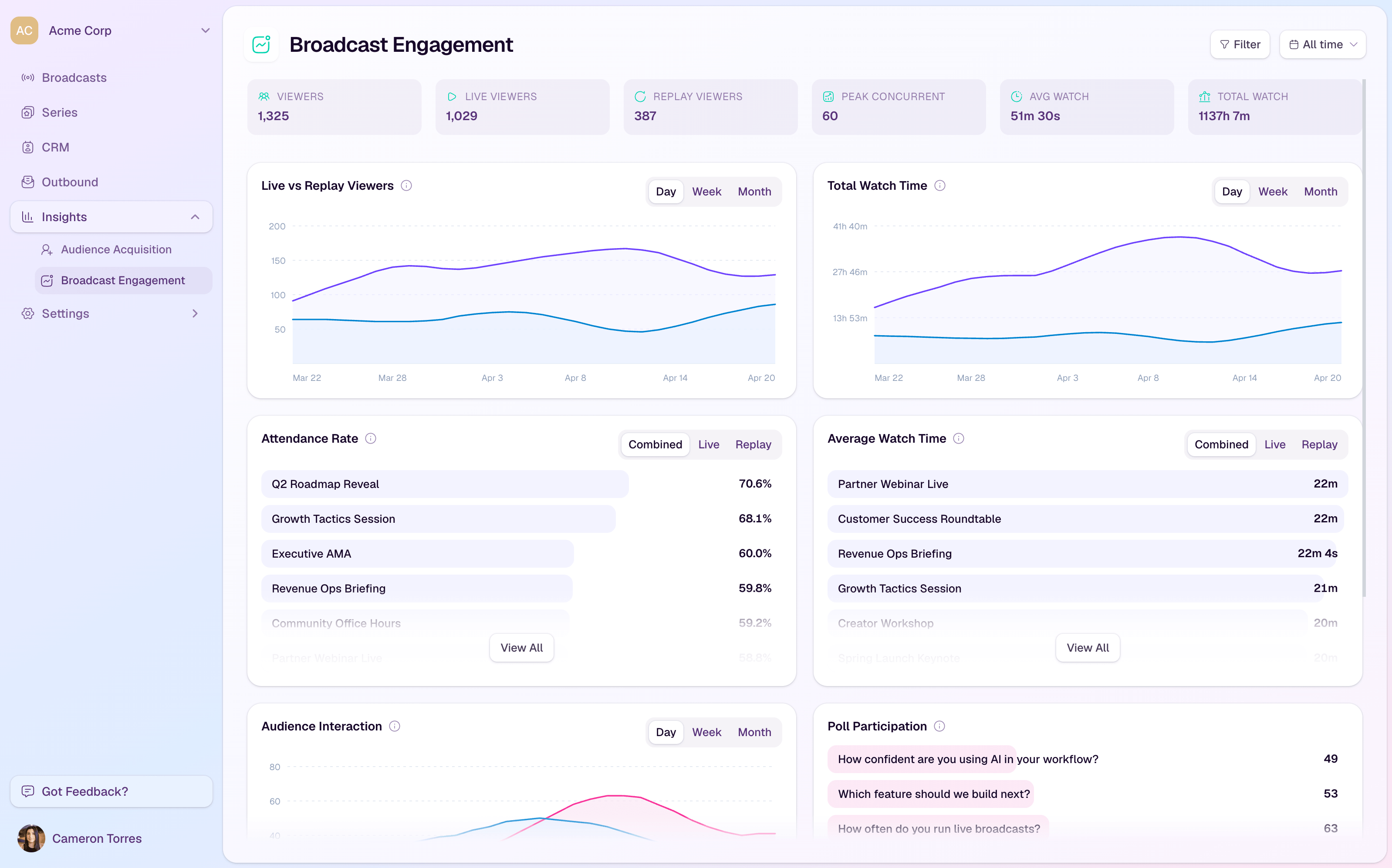
This is where analytics and insights matter. The replay should help the team understand continued interest, not just total views.
Be careful with lead-scoring shortcuts here. A long replay view can be meaningful, but it does not automatically mean someone is ready for sales. A CTA click can show intent, but the intent depends on the offer. A repeat viewer may be evaluating, sharing internally, or simply catching up.
The useful question is not "is this person hot?" It is "what did this person do, and what next step would be relevant?"
Segment Follow-Up by Replay Behavior
Replay follow-up should respond to what the viewer actually did.
Someone who registered and never watched needs a different message from someone who watched the replay after attending live. A viewer who clicked a booking CTA needs a different next step from someone who only watched the first few minutes.
A practical segmentation model can stay simple:
| Segment | What It Suggests | Follow-Up Angle |
|---|---|---|
| Registered but did not watch | Topic interest, no content consumption yet | Send a short reason to watch, with one key moment highlighted |
| Watched briefly | Light interest or limited time | Send a concise recap or point them to the most relevant timestamp |
| Watched deeply | Stronger topic engagement | Send the related resource, invite, or next educational step |
| Clicked a replay CTA | Interest in a specific offer | Follow up around that CTA, not a generic webinar recap |
| Returned after attending live | Continued interest or internal evaluation | Send a more specific next step tied to the section they revisited |
The goal is not to create an elaborate automation map for every possible behavior. It is to avoid treating every replay viewer the same.
The webinar follow-up email templates give you copyable starting points for each route. The article on webinar follow-up best practices covers the broader decision-tree approach. Replay should be one branch of that follow-up system, not a separate manual process.
Redistribute the Replay Without Making It Feel Old
The first replay email is only one distribution moment.
A strong replay can support sales enablement, nurture campaigns, partner follow-up, social posts, onboarding, and future webinar promotion. The key is to package it around the current audience's problem, not around the fact that the event already happened.
Instead of saying:
Watch the replay of last week's webinar.
Try a more useful frame:
See the 12-minute section on choosing the right CTA for each webinar moment.
Or:
Share this customer-story replay with stakeholders who want to see how the workflow works in practice.
This makes the replay feel like a resource, not leftovers from a past campaign.
For teams using conversion tools, replay distribution also creates more chances to present the right CTA at the right moment. A replay viewer who arrives from a sales email may need a different next step from someone who arrives from a public blog post or event recap.
Feed Replay Learning Into the Next Live Session
Replay behavior can improve the next webinar.
After each session, review:
- which parts of the replay held attention
- which CTAs received clicks
- which no-show segments came back later
- which follow-up paths created useful replies, bookings, signups, or sales conversations
- which questions or sections deserve a deeper follow-up session
Keep live attendance and replay-adjusted reach separate. The guide to average webinar attendance rate explains how to build a live attendance baseline without using replay views to inflate it.
Then carry the evidence into a consistent debrief with the webinar performance report template. If you need a quick check across registration, live viewing, replay, CTAs, and follow-up, the webinar ROI scorecard can help you find the weakest part of the path.
This turns replay from a static asset into part of the live growth loop. The live session creates the first audience signals. The replay creates a second set of signals. Follow-up acts on those signals. The next session gets sharper because the team has learned what people came back to watch.
That learning loop is the real value. A replay strategy is not only about squeezing more from one recording. It is about making every broadcast more useful than the last.
How HeyStream Supports Replay Strategy
Replay strategy becomes harder when the recording, registration data, CTA clicks, audience history, and follow-up actions all live in different tools.
HeyStream is built to keep those pieces closer together. Teams can run branded live broadcasts, keep replay registration open for new viewers when it suits the session, send registered contacts authenticated replay links, add CTAs during live and replay viewing, and see live and replay behavior in analytics and insights.
That separation matters. A new viewer can register for replay access when identification serves a clear purpose, while an existing registrant can use a direct replay link or request a fresh watch link with the email they already registered. The viewer does not need to complete the same registration twice.
HeyStream also connects audience signals with follow-up automation, so teams can route messages using registration, attendance, CTA, and replay activity. The organizer still needs to decide which messages are appropriate and ensure their notices and permissions cover the intended follow-up.
The product point is simple: the replay should not be detached from the audience record.
The Takeaway
A webinar replay strategy is not the same as sending a recording link.
The practical version starts before the live session, chooses access based on the viewer and purpose, avoids repeat registration for known contacts, keeps CTAs active, tracks behavior at the contact level, segments follow-up, redistributes the asset thoughtfully, and feeds the learning into the next broadcast.
When that workflow is in place, the replay stops being an archive. It becomes another moment where the audience can learn, act, and show your team what to do next.


