If you are looking for a Hubilo alternative, check the current successor before you move. Hubilo's public site now redirects to Virtual PRO, a Brandlive product built around larger virtual and hybrid events. That may be the right place to stay if your program needs multiple sessions, networking, or production support. For a recurring marketing webinar, compare focused webinar tools against the registration, audience, replay, and follow-up work your team actually runs.
This guide compares Virtual PRO, HeyStream, Goldcast, and Bizzabo by job rather than placing them in a universal ranking. HeyStream publishes this article and is one of the options. We have not run a hands-on test of every platform or verified the terms of your existing contract. Use the shortlist to decide what to demo, then test your own data and event flow before switching.
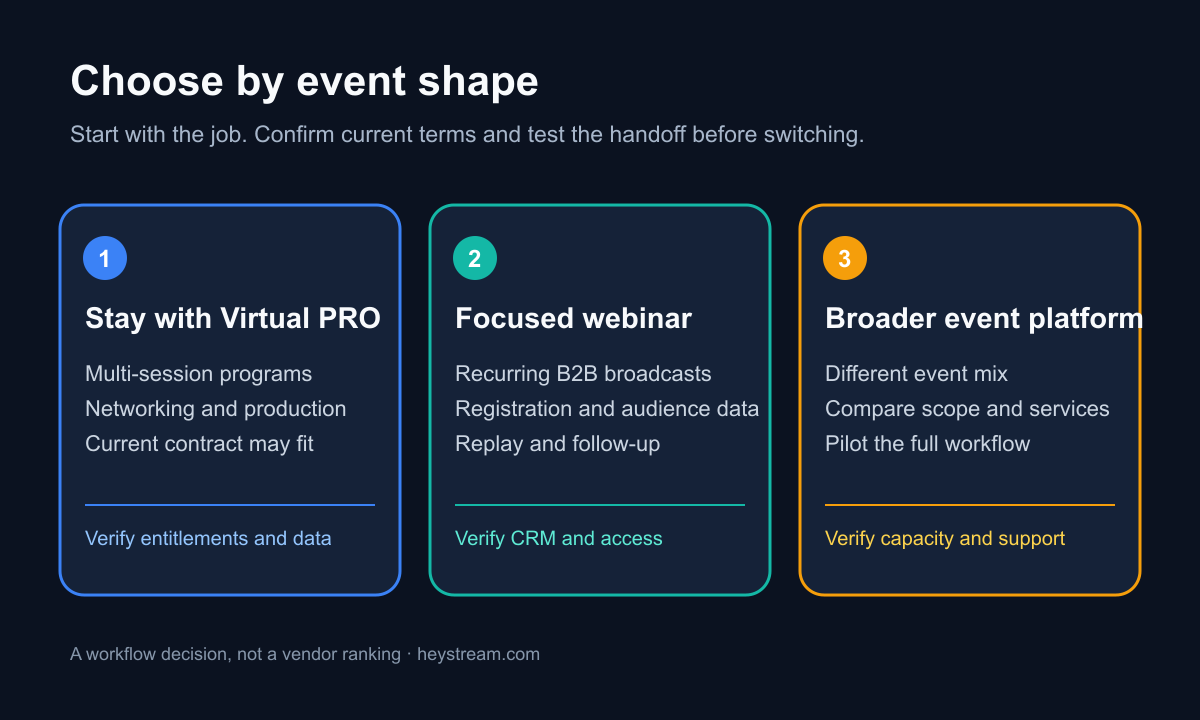
First, establish what changed
The old Hubilo name still appears in search results and review sites, but its public domain now redirects to Virtual PRO. Brandlive's Virtual PRO launch announcement said existing Hubilo customers would receive Virtual PRO access and training. That is a vendor statement about access, not proof that every Hubilo recording, registration URL, contact field, consent record, or CRM mapping moved automatically.
Virtual PRO's current product overview describes multi-session and multi-day events, networking, CRM integrations, and production support. Its Zine presents the newer brand's emphasis on event design and production. Those are useful signals about product direction. Your contract and a working pilot are still the sources of truth for your team's entitlements and data continuity.
If your existing program is working, switching has a cost. Ask your account team what stays intact before treating an alternatives list as a migration plan.
Match the platform to the event
Start with the shape of your next six events. A single-session product demo repeated monthly is a different job from a multi-track customer conference. The broader B2B webinar platform guide has a fuller demo exercise; these are the criteria that matter most for a Hubilo evaluation.
| Option | Strongest fit to investigate | Main trade-off to test | First demo question |
|---|---|---|---|
| Virtual PRO | Large virtual or hybrid programs with multiple sessions, networking, or production help | Enterprise scope and contract terms may be more than a recurring webinar needs | Which existing assets and entitlements carry into our account? |
| HeyStream | Recurring B2B webinars and broadcasts where registration, audience records, live and replay CTAs, and follow-up matter | Do not assume conference networking, multi-track operations, or managed production | Can our team run the full registration-to-CRM handoff in a pilot? |
| Goldcast | Marketing event programs that also need on-demand content and repurposing | Verify the exact package, services, and data flow for your event mix | Which webinar, event, and content workflows are in our quote? |
| Bizzabo | A wider event program with registration, event sites, email, analytics, and virtual delivery | Confirm the virtual experience and required add-ons against your contract | Which capabilities are included for this specific event format? |
The shortlist is a starting point, not a claim that these vendors share the same feature set. Goldcast's pricing overview describes its webinar, virtual-event, and content workflows without giving a single public price for every package. Bizzabo's virtual-event page describes its virtual offering, while its pricing page sets out an annual Event Experience OS starting point and separately quoted add-ons. Ask each vendor to show the workflow you plan to run.
For more category context, compare webinar and live-streaming platforms before narrowing your demo list. If your evaluation is closer to an enterprise webinar suite, the ON24 alternatives guide covers that adjacent decision.
When staying with Virtual PRO makes sense
Virtual PRO is a serious candidate when your program needs several sessions, audience networking, hybrid delivery, or production support. Its own product pages describe these capabilities, so the fair first step is to ask for a current account walkthrough, not to assume the successor has lost them.
Check the commercial unit as carefully as the feature list. Virtual PRO's current pricing page lists annual tiers with admin counts and per-event audience limits, says events are unlimited within its plans, and offers additional production and audience options. Those published terms can change, and the number you need depends on how your agreement defines admins, audience, services, and add-ons. Get the quote and entitlement details in writing.
Ask the account team to show a recent recording, a current registration page, an export of registrant and attendee records, and the CRM mapping in your own account. The launch announcement's access-and-training statement does not settle any of those questions.
When a focused webinar platform makes sense
A focused platform may fit better when your team runs repeatable product demos, partner sessions, or educational webinars and needs to see what happens after registration. The practical demo should follow one person from the invite link through signup, joining, a live CTA, replay, and the CRM record. If any step relies on a manual export or a separate tool, write that into the operating cost.
HeyStream's B2B webinar platform page describes branded registration and watch pages, audience activity, and live and replay CTAs. Those are relevant to a marketing team that wants one visible path from attention to follow-up. HeyStream is not a claim to replace enterprise networking, a conference schedule, or an outsourced production team. Ask for a demo of your exact event shape.
A recurring webinar team should also test the unglamorous parts: email confirmation, access control, replay availability, field ownership, consent handling, and what a failed CRM sync looks like. An attractive watch page does not repair a broken handoff.
When a broader event platform makes sense
If your program includes conferences, customer communities, or field events as well as webinars, a broad event platform may be more appropriate. Goldcast's public materials emphasize webinars and events alongside content reuse. Bizzabo describes a wider event operating system, including event sites, registration, email, and analytics. Neither description proves the right package for your team. Ask vendors to demo the same event agenda, audience journey, and reporting export.
Keep the shortlist honest about production. A managed show, a self-service webinar, and a multi-track event can all appear under the label "virtual event." Write down who builds the event, who runs it live, who owns the data, and who handles a failed stream. That often separates the options faster than a long feature checklist.
Compare the billable unit, not the headline price
Put every quote on one worksheet. Record contract term, base subscription, admin seats, expected live audience, number of events, production services, branded assets, integrations, support level, and overage rules. Then calculate the cost for your actual event calendar. Avoid calling one offer cheaper until those units match.
For reference, HeyStream's current pricing page shows plan prices and attendee limits, while Virtual PRO's pricing page uses annual tiers with admin and per-event audience limits. Bizzabo publishes an annual starting point; Goldcast asks buyers to discuss packages. These are different pricing structures. Check today's pages and written quotes before making a budget decision.
The same discipline applies to capacity. Ask whether a stated audience number means registrants, concurrent viewers, or attendees per event, and whether replay views count. Have the vendor demonstrate the behavior at the limit you expect to reach.
Make migration a pass-or-fail test
Do not retire Hubilo or a Virtual PRO account because a sales demo looked good. Use a small pilot with acceptance criteria, then cut over deliberately. The webinar platform migration checklist covers the full inventory and rollback plan. For this decision, capture these proofs:
- Export one past event with registrants, attendance, recordings, and available engagement data. Record which fields and files are missing.
- Map every registration and consent field to its destination. Confirm how duplicates and opt-out states are handled.
- Rebuild one upcoming event. Test the public URL, confirmation, join access, reminders, live experience, replay, and CTA.
- Send a test contact through the CRM handoff. Compare the source, timestamps, field values, and ownership in both systems.
- Write a redirect and recording plan for public links. Keep the old system available until the new path works for a real event.
- Reconcile the pilot after it ends. Count registrations, attendees, CTA actions, replay viewers, and CRM records in each system, then investigate gaps.
Ask the vendor to show a migration tool if it claims one. If the workflow is manual, budget the work. Access to a successor product does not mean your historical data and URLs moved.
The decision
Stay with Virtual PRO if its current account and service model already meet your large-event needs. Test HeyStream when your priority is a recurring B2B webinar with a clear registration, audience, CTA, replay, and follow-up path. Demo a broader platform when your event mix needs more than that. Keep the incumbent live until one pilot proves the new workflow and data handoff.


