Customer education is usually described as a program of courses, help docs, academies, onboarding content, and product training. That is all useful, but SaaS customers often need something more immediate: a live place to see the product in context, ask questions, compare their workflow with other users, and leave with a clear next step.
That is where customer education webinars fit. They give B2B SaaS teams a repeatable way to teach customers at scale without turning every education moment into a one-to-one call.
A strong customer education webinar program is not just a series of training sessions. It is a live-to-replay learning loop. You run focused sessions for the moments where customers need guidance, package the replay for people who could not attend, and use the questions, engagement, survey responses, and viewing behavior to improve the next session and guide follow-up.
What is a customer education webinar?
A customer education webinar is a live or replayable session that helps customers understand, adopt, and get more value from a product they already use or are preparing to use.
That makes it different from a demand-generation webinar. The goal is not to create net-new pipeline by teaching a broad market problem. It is to help existing customers and active users learn a product, apply it to their workflow, and feel more confident about what to do next.
It is also different from a generic demo. A demo usually shows what the product can do. A customer education webinar teaches a specific audience how to use the product to complete a real job, such as onboarding a new team, setting up a workflow, adopting a feature, preparing for a launch, or interpreting results after a campaign.
Gainsight's guide to SaaS customer education frames customer education as a way to improve customer experience through useful resources and measurable learning programs. Webinars are one practical format inside that broader program: they add live explanation, examples, and interaction where static content is not enough.
When webinars are the right format
Webinars work best when the topic benefits from guided explanation. If the answer is a short reference step, a help article is usually better. If the customer needs a structured curriculum, certification path, or self-paced course library, an LMS or academy may be the better home.
Use customer education webinars when the learning moment needs one or more of these qualities:
- A person needs to explain the "why" behind the workflow.
- Customers need to see examples, edge cases, or setup decisions.
- The topic changes often, such as a launch, release, or best-practice update.
- Customers are likely to have questions during the session.
- The team wants to collect feedback, objections, or confusion patterns.
- The replay will be useful as a lightweight training asset.
That means webinars should complement the rest of your education system. Docs help customers find quick answers. Courses help them progress through structured lessons. In-app nudges guide them in the product. Office hours help with open-ended questions. Customer education webinars sit in the middle: more guided than a document, more flexible than a course, and more scalable than a customer success call.
Customer education webinar formats for SaaS teams
The easiest way to make the program useful is to match each webinar format to a customer lifecycle moment. A new customer, a power user, and an admin evaluating a new feature do not need the same session.
| Format | Best-fit use case | Audience | Cadence | Useful signals |
|---|---|---|---|---|
| New customer onboarding | Teach the first successful setup or workflow | New customers, admins, implementation teams | Weekly or biweekly | Attendance, questions, replay views, setup milestones |
| Role-based training | Show how a specific role should use the product | Admins, operators, managers, end users | Monthly or by cohort | Role questions, confidence scores, resource clicks |
| Feature adoption workshop | Help customers use an under-adopted or newly released feature | Existing users in relevant accounts | Monthly or launch-based | CTA clicks, feature usage context, repeated objections |
| Advanced workflow session | Teach expert workflows and deeper use cases | Mature customers, champions, power users | Quarterly or by segment | Watch time, Q&A depth, follow-up requests |
| Release education | Explain what changed and how customers should respond | Active customers affected by a release | Around launches | Attendance by segment, replay usage, support themes |
| Customer Q&A or office hours | Let customers bring live questions | Mixed customer audience | Recurring | Question patterns, unresolved gaps, help-content opportunities |
| Community learning session | Share workflows, examples, or peer lessons | Champions, community members, advocates | Monthly or quarterly | Engagement, topic suggestions, speaker interest |
| Expansion enablement | Educate customers on broader workflows or adjacent use cases | Champions, admins, account stakeholders | As needed | CTA clicks, account interest, CSM follow-up context |
This matrix also prevents the common mistake of putting every customer education need into one oversized training webinar. A better program has smaller, clearer sessions that each serve a distinct job.
How to build a repeatable customer education webinar program
Start with one customer segment and one learning outcome. "Teach customers how to use the product" is too broad. "Help new workspace admins create their first broadcast series and understand follow-up options" is specific enough to shape the session.
From there, build the program around six decisions.
First, choose the customer moment. Are you supporting onboarding, feature adoption, advanced usage, release education, or customer feedback? The moment determines the audience, examples, call to action, and follow-up.
Second, define the learning objective. A useful objective sounds like something the customer can do after the session: create a recurring program, set up a segment, interpret a report, prepare a launch session, or collect better post-webinar feedback.
Third, pick the format. Some topics need a product walkthrough. Others need a workshop, office hours, teardown, customer example, or Q&A. Avoid using the same webinar shape for every topic.
Fourth, set a cadence. Onboarding education may need to run weekly or biweekly. Feature education can often run monthly. Advanced sessions may be quarterly. Office hours work best when customers know they are recurring.
Fifth, standardize the run-of-show. A simple structure works well: customer problem, product context, guided workflow, practical example, live questions, next step, replay and resources. Use the webinar run-of-show template to assign timing and owners to each part before the session.
Sixth, decide what happens after the session. This is where many education webinars lose value. The replay, resource links, survey responses, questions, and engagement data should feed follow-up and future planning.
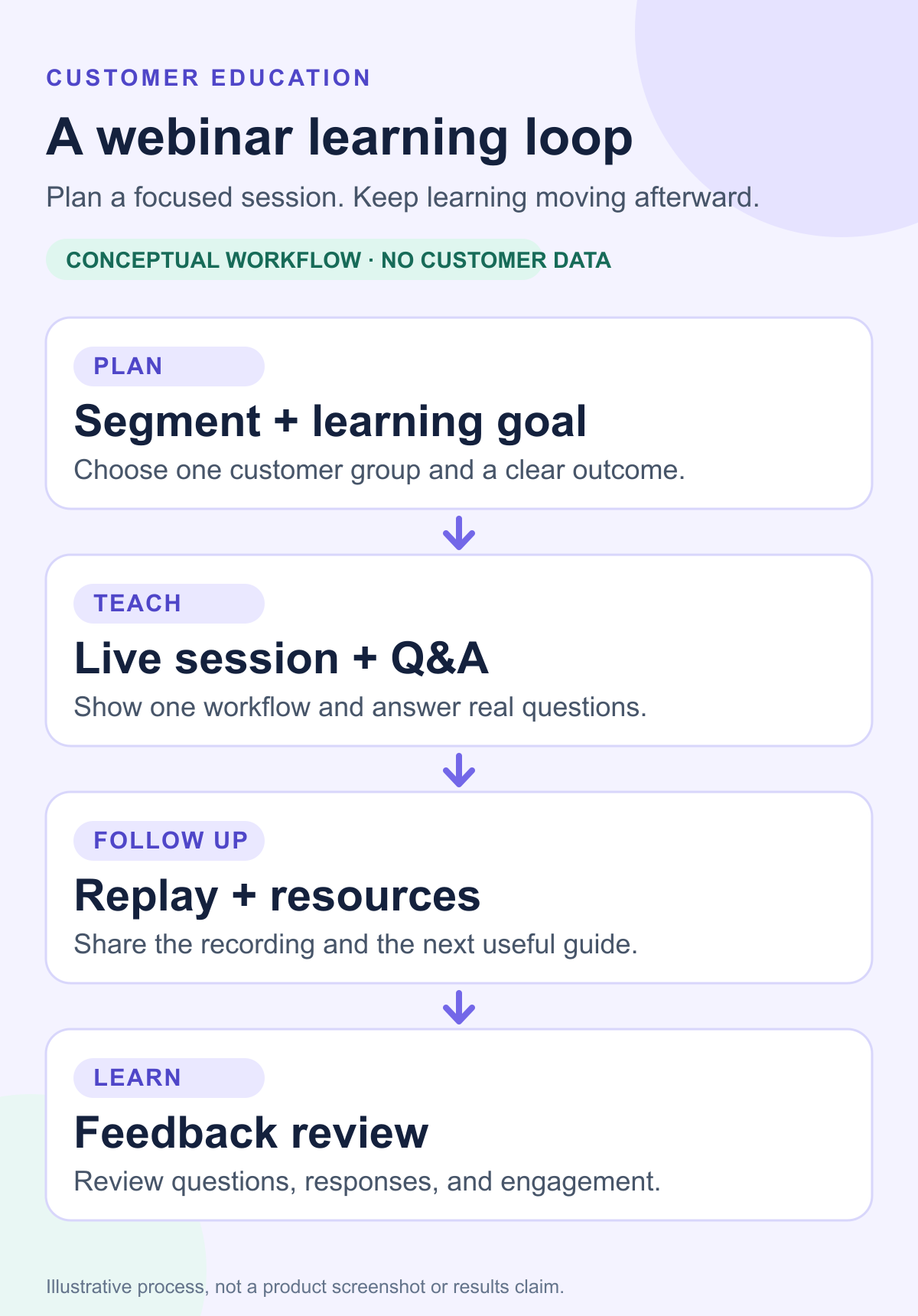
In HeyStream, customer education webinars can connect the live session, replay, audience activity, CTAs, and follow-up workflow in one place. That matters because customer education is not finished when the live room closes.
A practical live-to-replay workflow
A customer education webinar should be designed as a before, during, and after workflow.
Before the session, create a registration page that makes the learning outcome clear. Avoid vague promises like "learn best practices." Tell customers what they will be able to do after the session. If the audience includes different roles or maturity levels, collect one or two fields that help you segment follow-up.
During the session, keep the structure tight. Start with the customer problem, not the product menu. Show the workflow in context. Use real examples where you can. Invite questions at planned moments rather than saving every question until the end. If the session is educational rather than sales-led, the call to action should usually be a next learning step, setup action, replay resource, checklist, or follow-up path.
After the session, send the replay and resources quickly. Segment follow-up by behavior where possible: attended live, registered but did not attend, watched the replay, clicked a resource, asked a question, or gave low-confidence feedback. A webinar follow-up automation workflow helps turn those differences into useful next steps instead of one generic thank-you email.
This is also where the replay becomes more than an archive. The best customer education teams treat replays as lightweight learning assets. They link them from help docs, onboarding flows, CSM follow-ups, launch notes, customer communities, and future session invites.
What to measure
Customer education webinar measurement should separate session performance from customer outcomes. Attendance is useful, but it is not the whole story.
Start with session metrics:
- Registrations
- Attendance
- Replay views
- Average watch time
- Drop-off points
- Questions asked
- Poll or survey responses
- Resource clicks
- CTA clicks
Then look at learning signals:
- Self-reported confidence after the session
- Repeated questions or confusion themes
- Whether customers clicked the right next resource
- Which segments watched the replay
- Which topics generated follow-up requests
Finally, connect education signals to customer context with care. Product usage, onboarding milestone movement, support themes, renewal context, expansion interest, and CSM notes can all help explain whether education is supporting the customer journey. But avoid claiming that a webinar caused retention, adoption, or support reduction unless your team has the measurement model to support that conclusion.
Skilljar's article on customer education and product adoption emphasizes that customer education should align with journey stages, KPIs, and feedback loops. For webinars, that means the measurement plan should not stop at who attended. It should help the team decide what customers need next.
HeyStream's audience engagement signals can help teams understand who asked questions, clicked CTAs, watched live, or returned for the replay. Program-level webinar analytics then help teams see which education topics are earning attention and where the next session should improve.
For a deeper reporting structure, use a webinar performance report template after each session or monthly education cycle.
Where webinars fit beside academies, docs, and courses
Customer education webinars should not try to replace a full education ecosystem. They are strongest when they fill the live and conversational gaps around it.
Docebo's customer education strategy guide describes customer education as a structured effort that may include onboarding, training, certifications, resources, and ongoing learning. A webinar program can support that structure by giving teams a repeatable live layer for timely product education.
Use docs when customers need quick reference. Use help center content when the job is searchable and repeatable. Use an academy or LMS when customers need a formal learning path. Use in-app guidance when the learning moment belongs inside the product. Use webinars when customers need a guided explanation, a live example, or a chance to ask questions.
That mix is especially useful for B2B SaaS teams because the product, customer goals, and team roles keep changing. A static article can explain a workflow. A webinar can show how that workflow applies to a current release, a real customer use case, or a role-specific setup decision.
Common mistakes to avoid
The first mistake is treating customer education like a sales demo. Customers can tell when a session is built to pitch instead of teach. It is fine to mention the product, but the session should help the customer make progress.
The second mistake is trying to cover too much. A 45-minute onboarding webinar that covers every feature is usually harder to remember than a focused session that helps one role complete one workflow.
The third mistake is running one-off sessions without a replay and follow-up plan. If the session is worth producing, it is worth packaging into a replay, resource set, and next-step workflow.
The fourth mistake is measuring attendance only. A packed session can still fail if customers leave confused. A smaller session can be valuable if it reveals a support gap, adoption blocker, or high-intent follow-up group.
The fifth mistake is ignoring lifecycle differences. New customers need different examples than mature customers. Admins need different context than end users. Champions need different next steps than occasional users.
The sixth mistake is forcing everything into a webinar. Some topics belong in docs, templates, checklists, or in-app guidance. A good education program chooses the format that makes learning easiest.
Customer education webinar checklist
Use this checklist before each session:
- Audience: Who is this session for?
- Customer moment: Is this onboarding, adoption, release education, office hours, or advanced enablement?
- Learning outcome: What should attendees be able to do afterward?
- Format: Walkthrough, workshop, Q&A, teardown, release briefing, or community session?
- Topic promise: Is the registration page specific enough?
- Speaker: Who can teach the workflow clearly?
- Demo flow: What example or scenario will make the lesson concrete?
- Questions: Where will you invite interaction?
- Replay destination: Where will the recording live after the session?
- Follow-up segments: How will you treat attendees, no-shows, replay viewers, and question-askers differently?
- Measurement owner: Who reviews the session data and decides what changes next?
If you collect feedback after the session, a focused post-webinar survey can help you ask about confidence, clarity, unresolved questions, and future topic needs without overwhelming customers.
The takeaway
Customer education webinars are most useful when they are built as a repeatable learning system. The live session teaches the workflow. The replay extends the value. The questions and engagement data show what customers still need. The follow-up turns that signal into action.
For B2B SaaS teams, that makes webinars a practical layer between static resources and one-to-one customer success. They help customers learn in context, give teams a clearer view of education needs, and create reusable assets for the next customer who has the same question.
HeyStream supports that loop with branded registration, polished live sessions, recurring webinar series, replay-friendly pages, CTAs, audience signals, and follow-up workflows, so customer education can keep working after the live session ends.


