The best Webex Webinars alternative depends on the job your team needs the platform to do. HeyStream is a strong fit for focused B2B marketing programs that connect registration, live delivery, audience signals, calls to action, replay, and follow-up. Zoom Webinars suits teams already comfortable with Zoom. GoTo Webinar fits established webinar operations. Livestorm and Demio serve browser-first marketing teams. BigMarker and ON24 cover broader event or enterprise engagement requirements.
Webex may still be the better choice for very large, multilingual, tightly governed programs or organizations already standardized on Cisco. This article is published by HeyStream, which appears in the comparison. We have applied the same criteria to every option, included HeyStream's limits, and used current official vendor pages checked on 11 August 2026. This is a webinar-specific comparison, not a ranking of meeting, calling, or contact-centre software.
Quick answer: the best Webex Webinars alternatives by fit
- HeyStream for B2B marketing teams that want registration, audience records, live and replay CTAs, and follow-up in one workflow.
- Zoom Webinars for teams that value a familiar Zoom host and attendee experience.
- GoTo Webinar for established live, recorded, series, and on-demand webinar operations.
- Livestorm for browser-first marketing events and attendee-credit pricing.
- Demio for smaller marketing teams running live and automated webinars.
- BigMarker for organizations combining webinars with virtual, hybrid, and in-person events.
- ON24 for enterprise B2B engagement, personalization, analytics, integrations, and content programs.
The order makes the article easier to navigate. It is not a universal performance score. Your shortlist should reflect audience scale, delivery model, marketing workflow, accessibility needs, governance, integrations, and total cost.
How we compared these webinar platforms
We reviewed current official product and pricing pages on 11 August 2026. We did not conduct a hands-on test or rank products using user-review scores.
The comparison focuses on the parts of a webinar operation that affect both the attendee experience and the team's work:
- Audience scale and the route to larger capacity
- Live, simulive, automated, and on-demand delivery
- Presenter preparation and production workflow
- Registration, branding, and the watch experience
- Q&A, polls, chat, calls to action, and other engagement tools
- Captions, interpretation, accessibility, and regional requirements
- Audience records, analytics, replay, and follow-up
- CRM and marketing integrations
- Governance, procurement, and operational complexity
- Published pricing or the route to a quote
Plan limits, prices, and entitlements change. Treat every quantitative detail below as a dated starting point and confirm it with the vendor before buying.
Webex Webinars alternatives comparison
| Platform | Best for | Delivery and audience route | Marketing workflow | Pricing route | Main check before switching |
|---|---|---|---|---|---|
| HeyStream | Focused B2B marketing programs | Live and replay, with self-serve plans for 100, 500, or 2,000 live attendees | Branded pages, audience CRM, live and replay CTAs, integrations, automations | Public self-serve pricing, enterprise conversation for larger needs | Whether the audience ceiling, accessibility, and governance fit your program |
| Zoom Webinars | Familiarity and large-audience options | Webinar delivery within the Zoom ecosystem, with capacity and advanced features depending on licensing | Registration, engagement, recordings, and marketing integrations | Plan and capacity selection | Which premium features and prerequisites your chosen license includes |
| GoTo Webinar | Established webinar operations | Live, recorded, series, and on-demand formats across plan tiers | Registration, emails, polls, Q&A, reporting, and source tracking | Public plan comparison and sales route | Capacity, currency, add-ons, and the automation included in your tier |
| Livestorm | Browser-first marketing events | Browser-based sessions with limits tied to plan and attendee credits | Registration, email, engagement, analytics, and integrations | Public attendee-credit model plus enterprise route | What consumes credits and which limits require add-ons |
| Demio | Smaller marketing teams | Live and series events plus automated and on-demand webinars | Branded rooms, audience actions, analytics, and marketing workflows | Public plans by room size | Hosts, concurrent sessions, room size, and automation entitlements |
| BigMarker | Broad event requirements | Webinars plus virtual, hybrid, and in-person event formats | Registration, engagement, analytics, and event-program tooling | Sales-led packaging | Implementation scope, services, and which products are included |
| ON24 | Enterprise engagement and content programs | Live, pre-recorded, simulive, and on-demand experiences | Personalized engagement, CTAs, analytics, integrations, and content reuse | Sales-led packaging | Complexity, services, integration scope, and total program cost |
Use the table to narrow the field, then verify the operational detail that could block your program. A product page not mentioning a feature does not prove that the feature is absent.
When staying with Webex is the better choice
Switching is not automatically an upgrade. Webex describes Webex Webinars as a platform for large global audiences, with practice sessions, moderated Q&A, polling, chat, branding, interpretation, and breakout sessions. Its headline product page says it can accommodate up to 100,000 attendees and provide real-time translation in more than 100 languages, although the exact capacity and language features depend on the chosen plan and delivery mode.
The current Webex Webinars plan page separates single-session virtual webinars from the broader Webex Events product. It lists attendee capacity bands from 1,000 through 10,000 and above, plus live, simulive, and on-demand streaming, practice sessions, attendee moderation, breakouts, branded registration, automated emails, and CRM integrations.
Staying with Webex may be sensible when:
- You need a very large or global audience, simultaneous interpretation, or complex language support.
- Your team relies on practice sessions, moderated large events, breakouts, or established presenter roles.
- Cisco procurement, security review, administration, and support are already embedded in the organization.
- Your webinar operation depends on Webex Meetings or the wider Webex Suite.
- You really need a multi-session, hybrid, or in-person event platform. That job may belong to Webex Events rather than Webex Webinars.
- Migration risk is larger than the benefit of changing the attendee or marketing workflow.
The important distinction is that Webex Meetings is designed for collaborative meetings, Webex Webinars for single-session virtual webinars, and Webex Events for multi-session virtual, in-person, and hybrid events. Define the job before comparing products.
1. HeyStream: best for a focused B2B marketing workflow
HeyStream is designed for B2B marketing teams that want to connect the whole webinar journey rather than manage the live room in isolation. The HeyStream B2B webinar platform brings together branded registration, live delivery, audience activity, conversion moments, replay, and follow-up.
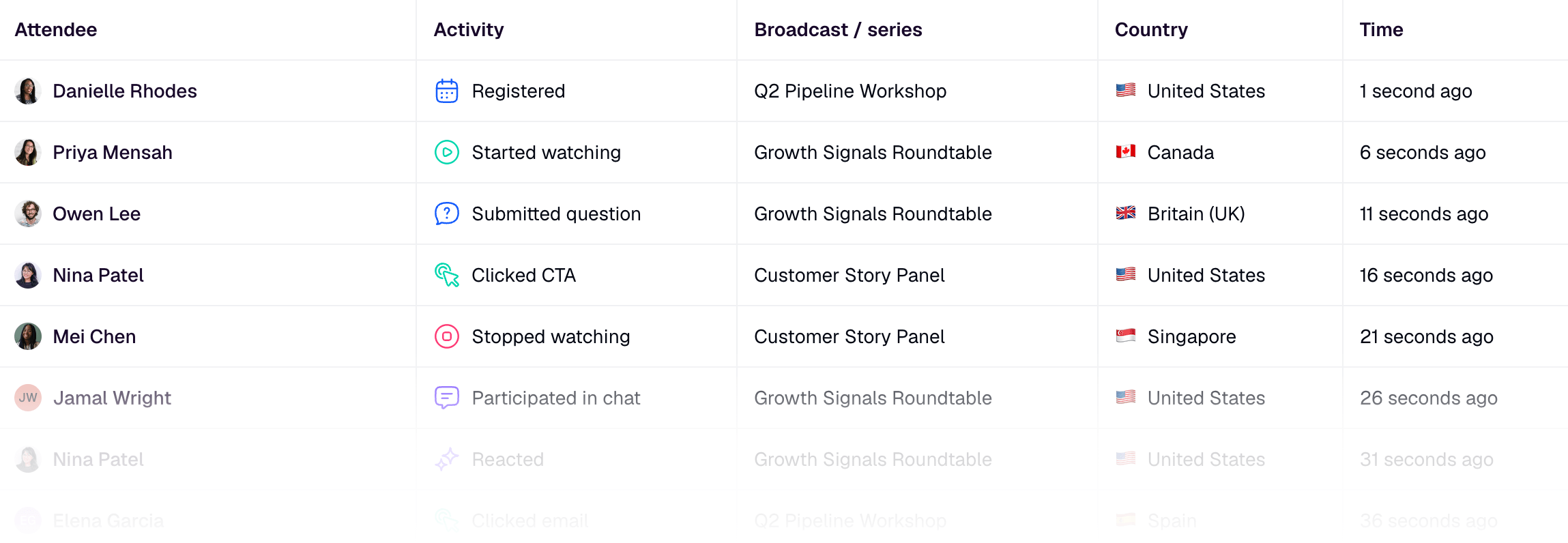
That workflow is the reason HeyStream belongs on this list. A marketer can see registrations and viewing activity in an audience record, present a relevant offer during the live session or replay, and use those signals to guide the next message. The aim is useful context for follow-up, not a claim that one click proves purchase intent.
The image below shows the kind of contact-level activity record that supports that workflow.
HeyStream's published pricing lists Launch at US$49 per month billed yearly for up to 100 live attendees, Growth at US$149 for up to 500, and Scale at US$399 for up to 2,000. The plans include branded registration and watch pages, a built-in audience CRM, live and replay CTAs, and increasing integration and automation capability.
What to verify: HeyStream is not the default answer for a 10,000 to 100,000-person event, complex interpretation, multi-track conferences, broad internal collaboration, or a mature enterprise content hub. Confirm accessibility, governance, integration, and capacity requirements before switching.
For a wider vendor-evaluation path, use the webinar platform comparison. If your priority is the marketing workflow, explore the B2B webinar platform for marketing teams, webinar audience intelligence, live and replay CTAs, and behavior-based webinar follow-up.
2. Zoom Webinars: best for a familiar collaboration ecosystem
Zoom Webinars is the natural shortlist option for teams whose hosts, speakers, and attendees already know Zoom. The official Zoom Webinars page presents a webinar experience with polls, chat, Q&A, reactions, recordings, marketing integrations, and large-audience options.
Familiarity can reduce the amount of process change around joining, hosting, and speaker preparation. It can also make Zoom easier to procure when the wider organization already uses the platform.
What to verify: Zoom's webinar capacity and advanced production features can depend on the underlying license and premium entitlements. Confirm the exact audience size, backstage or practice workflow, simulive and breakout needs, RTMP options, marketing integrations, and total license structure for your use case.
Zoom is a better fit than a focused webinar-marketing platform when ecosystem familiarity and enterprise scale matter more than having audience records, CTAs, replay, and follow-up designed as one B2B marketing flow.
3. GoTo Webinar: best for established webinar operations
GoTo Webinar is a mature choice for teams that run repeatable programs across several webinar formats. The GoTo Webinar pricing page lays out capacity-based plans, while the official feature overview covers live, pre-recorded, series, and on-demand webinars alongside registration, automated emails, polls, Q&A, reporting, and source tracking.
This makes GoTo Webinar relevant when the operating model is already built around scheduled programs, automated communication, recordings, and reporting. It is less about replacing an entire collaboration suite and more about keeping a familiar webinar production system.
What to verify: Plan capacity, displayed currency, automated or pre-recorded entitlements, breakout needs, host seats, integrations, and any services or add-ons. Normalize those items before comparing cost with another platform.
GoTo Webinar may fit better than Webex when the team wants a dedicated, established webinar workflow without needing the wider Cisco collaboration environment.
4. Livestorm: best for browser-first marketing events
Livestorm is a strong shortlist candidate for teams that want attendees and speakers to join through a browser. The Livestorm webinar platform combines registration, email workflows, engagement, analytics, and CRM integrations. Its pricing page uses an attendee-credit model for public plans and provides an enterprise route for larger or more tailored needs.
Browser-first delivery can simplify joining, especially for external audiences who may not want to install an application. The wider marketing workflow also makes Livestorm more relevant than a general meeting tool.
What to verify: Understand exactly what consumes an attendee credit, how long credits remain available, which session and participant limits apply, and which integrations or advanced features require another plan or add-on. Credit economics can look very different for a monthly event, a large launch, and a frequent evergreen program.
Livestorm may fit better than Webex when browser access and a marketing-oriented event flow outweigh the need for Webex's broader enterprise collaboration and very-large-audience options.
5. Demio: best for smaller marketing teams
Demio focuses on marketing webinars rather than broad workplace collaboration. Demio's current pricing page describes plans that support live and series events, automated and on-demand webinars, audience actions, analytics, branding, and room sizes that grow with the selected tier.
It belongs on the shortlist for a smaller team that wants to create registration, run the session, engage attendees, and keep the workflow relatively contained. Automated and on-demand options also make it relevant for teams building an evergreen layer alongside live events.
What to verify: Room size, host seats, concurrent sessions, automation limits, branding, integrations, and the billing cadence. Confirm how the plan handles a sudden audience spike and whether the presenter workflow fits the way your team rehearses and moderates sessions.
Demio may be a better fit than Webex when the webinar program is marketing-led, modest in scale, and does not need a wider enterprise collaboration suite.
6. BigMarker: best for broad event requirements
BigMarker spans more than conventional webinars. The BigMarker pricing and packages page positions its products across webinars and broader virtual, hybrid, and in-person event formats, with live and on-demand delivery and sales-led packaging.
That breadth matters when a team expects its program to include summits, hybrid experiences, event communities, or other formats that would otherwise require separate systems. It also means the buying decision may involve more implementation and packaging work than choosing a self-serve webinar tool.
What to verify: Ask which BigMarker product and services are included in the proposal, the attendee and host limits, registration and branding scope, integration work, support model, and implementation timeline. Do not assume that every capability shown across the platform belongs to one package.
BigMarker may fit better than Webex Webinars when the job has expanded beyond single-session webinars, but compare it with Webex Events as well as Webex Webinars when hybrid and multi-session requirements are central.
7. ON24: best for enterprise engagement and content programs
ON24 is aimed at enterprise B2B organizations that treat webinars as part of a broader engagement and content operation. The ON24 webinar platform supports live, pre-recorded, simulive, and on-demand experiences, with personalized engagement, calls to action, audience analytics, integrations, content reuse, and a wider portfolio of enterprise event formats.
The distinction is not just audience size. ON24 can make sense when a marketing organization needs structured personalization, deep integration, content hubs, governance, and a program that extends well beyond a single event.
What to verify: Packaging is sales-led, so confirm implementation services, integration scope, content and personalization products, support, data model, governance, and total program cost. Separate essential webinar requirements from capabilities that are attractive but not needed.
ON24 may fit better than Webex when enterprise marketing engagement and content reuse are the primary jobs. For a deeper look at that decision, compare the best ON24 alternatives for B2B webinar teams.
How to choose the right alternative
Start with the requirement that would make a purchase fail, not with the longest feature list.
- Choose Webex when very large or multilingual delivery, Cisco standardization, governance, or complex enterprise event requirements dominate.
- Choose HeyStream when a small or mid-sized B2B marketing team wants registration, live delivery, audience records, CTAs, replay, and follow-up connected in one workflow.
- Choose Zoom Webinars when Zoom familiarity and large-audience routes reduce operational change.
- Choose GoTo Webinar when an established webinar operation across live, recorded, series, and on-demand formats is the priority.
- Choose Livestorm when browser-first joining and a marketing-oriented event flow are central.
- Choose Demio when a smaller marketing team needs straightforward live and automated webinars.
- Choose BigMarker when the scope extends into broader virtual, hybrid, or in-person events.
- Choose ON24 when enterprise engagement, personalization, analytics, integrations, and content reuse justify a larger program.
Price should come later. A useful comparison normalizes attendee capacity, host seats, concurrent sessions, delivery modes, add-ons, integrations, implementation services, and support. Two monthly prices are not comparable if they buy different operating models.
Webex Webinars migration checklist
Do not cancel Webex as soon as a replacement contract is signed. Migrate the operating system around the webinar, then prove the new path with a bounded rehearsal.
Before the switch
- Export registrants, attendance, engagement, and recording data that you are permitted to retain.
- Map consent, privacy, and lifecycle-email permissions to the destination system.
- List every registration field, custom domain, branded page, confirmation email, reminder, and replay email that must be recreated.
- Document host, cohost, panelist, producer, moderator, interpreter, and support roles.
- Inventory Q&A, polls, chat, handouts, CTAs, breakouts, and audience-management requirements.
- Confirm captions, interpretation, accessibility, dial-in, browser or app, regional, and security needs.
- List CRM, marketing automation, calendar, SSO, analytics, and data-export integrations.
- Decide where recordings, transcripts, replay pages, and retention policies will live.
During migration
- Rebuild forms, pages, emails, roles, integrations, and field mappings.
- Import only the data that has a lawful and useful destination.
- Test registration, confirmation, reminders, joining, moderation, recording, replay, CTAs, and follow-up.
- Compare the new audience and engagement records with the fields your marketing and sales teams actually use.
- Prepare a fallback route and clear ownership for live support.
Before cancelling Webex
- Run one rehearsal using the real presenter roles and a representative attendee journey.
- Run one bounded live session if the risk of a direct cutover is high.
- Confirm that recordings, exports, integrations, and required audit records are complete.
- Verify renewal and cancellation dates, notice periods, and any dependent Webex products.
The safest migration is not the one with the shortest checklist. It is the one that makes every handoff visible before the old system disappears.
Final recommendation
The right Webex Webinars alternative is the platform that fits your webinar operating model with the fewest critical compromises.
Choose HeyStream when focused B2B marketing, audience context, conversion moments, replay, and follow-up are the central job. Choose Zoom for familiarity, GoTo Webinar for established webinar operations, Livestorm for browser-first marketing events, Demio for smaller marketing teams, BigMarker for broader events, or ON24 for enterprise engagement and content programs. Stay with Webex when its scale, language support, governance, or wider Cisco environment is the stronger fit.
If HeyStream matches your requirements, review HeyStream pricing and compare capacity, integrations, and workflow against the system you have today. The goal is not to replace Webex at any cost. It is to choose a platform that makes your team and audience experience easier to operate and easier to improve.


