The best Crowdcast alternative depends on the job your webinar program needs to do. Choose HeyStream when live and replay behavior should feed a B2B audience record and follow-up workflow; choose Livestorm or Demio for broader marketing automation and webinar analytics; choose WebinarNinja for mixed creator and education formats; choose Zoom Webinars or GoTo Webinar for established organizational programs; and choose eWebinar when automated delivery matters more than live production.
Crowdcast is still a credible choice for community-led events built around a simple registration, live, and replay journey. Switching only makes sense when another operating model solves a problem your team actually has.
HeyStream publishes this comparison and is one of the products covered. We have used current official product and help sources throughout, and you can also compare HeyStream with other webinar platforms before making a shortlist.
Quick answer: the best Crowdcast alternatives by job
| Platform | Best fit | Pricing model checked 4 August 2026 |
|---|---|---|
| HeyStream | B2B teams connecting live delivery, audience signals, CTAs, replay, and follow-up | Subscription plans based on workflow and live-attendee limits |
| Livestorm | Browser-based programs prioritizing marketing automation, integrations, and wider organizational use | Free plan plus paid subscriptions |
| Demio | Marketing teams wanting browser delivery and contact-level engagement analytics | Paid subscriptions with a free trial |
| WebinarNinja | Creators and educators mixing live, automated, hybrid, series, and paid formats | Paid subscriptions with a trial |
| Zoom Webinars | Organizations already working in the Zoom ecosystem | Licenses vary by attendee capacity and feature set |
| GoTo Webinar | Established training and marketing programs using live, prerecorded, on-demand, and series workflows | Subscription plans by attendee capacity and features |
| eWebinar | Teams centered on automated, prerecorded, on-demand, or just-in-time webinars | From $99 per month for one active eWebinar and 1,000 monthly registrants |
This is a fit guide, not a universal ranking. Start with the dominant job, then verify the presenter journey, attendee experience, plan limits, and integrations against a real event.
When Crowdcast is still the right choice
Crowdcast has a clear operating model: one browser-based event page can handle registration, the live session, and the replay. Its current product page also describes reminders, chat, polls, Q&A, calls to action, paid events through Stripe, multistreaming, RTMP, analytics, data exports, and Zapier connections. Those are meaningful strengths, not gaps to be corrected by default.
The current Crowdcast V3 guide documents a rebuilt stage with media controls, slides, screen sharing, overlays, backgrounds, and branding. It also distinguishes available features from items marked as coming soon, so check the latest documentation before treating a newly announced capability as shipped.
Crowdcast is particularly coherent when you want:
- One link before, during, and after the event.
- Community-style chat, upvoted Q&A, polls, and session-specific CTAs.
- An event page that can continue serving the replay.
- Browser access without asking attendees to install a meeting app.
- Recurring events that reuse settings by duplicating a previous event.
- Paid community events or multi-session programs.
Crowdcast's own workflow notes confirm that the event URL stays the same for live attendance and replay, while replay views are unlimited across its current plans. If that journey already fits your program, migration, retraining, and rebuilding integrations may create more work than value.
Price also needs context. On 4 August 2026, Crowdcast's pricing page listed Lite at $49 per month, Pro at $89, and Business at $195, with different live-attendee, streaming-hour, session-length, team-seat, storage, and multistream limits. The page also listed overage and add-on charges. Treat those figures as a dated snapshot and recheck the plan details before buying.
How to compare Crowdcast competitors
A feature count hides the decision. Compare the complete webinar workflow instead.
- Registration and access: Can you create the right page, collect the fields you need, send reminders, and let people join without unnecessary friction?
- Live production: Does the presenter and producer workflow fit your team, brand, media, layouts, scale, and destinations?
- Audience action: Can attendees ask questions, respond to polls, download resources, or take a useful next step at the right moment?
- Replay and recurring programs: Does the replay keep working after the live moment, and can the team reuse the workflow across a series?
- Audience data and follow-up: Can you understand what each person did and move that context into the next message or system?
- Pricing fit: Are attendee limits, seats, hours, add-ons, and integrations predictable for your real schedule?
The correct answer is the platform whose constraints match your program, not the one with the longest marketing page.
1. HeyStream: best for a connected B2B webinar growth workflow
Best for: B2B marketing, demand generation, product marketing, and event teams that want webinar behavior to inform the next audience action.
HeyStream connects branded registration and watch pages, live production, replay, CTAs, audience records, and follow-up in one workflow. The B2B webinar platform is designed around what happens after people watch, rather than treating the live room as the end of the job.
Its strongest distinction is contact-level context. HeyStream's audience intelligence brings registrations, attendance, clicks, replay visits, and engagement history into audience records. Its webinar conversion tools add live and replay CTAs, including a reusable CTA library on relevant plans. Webinar follow-up automation can then segment and message people using registration and viewing signals.
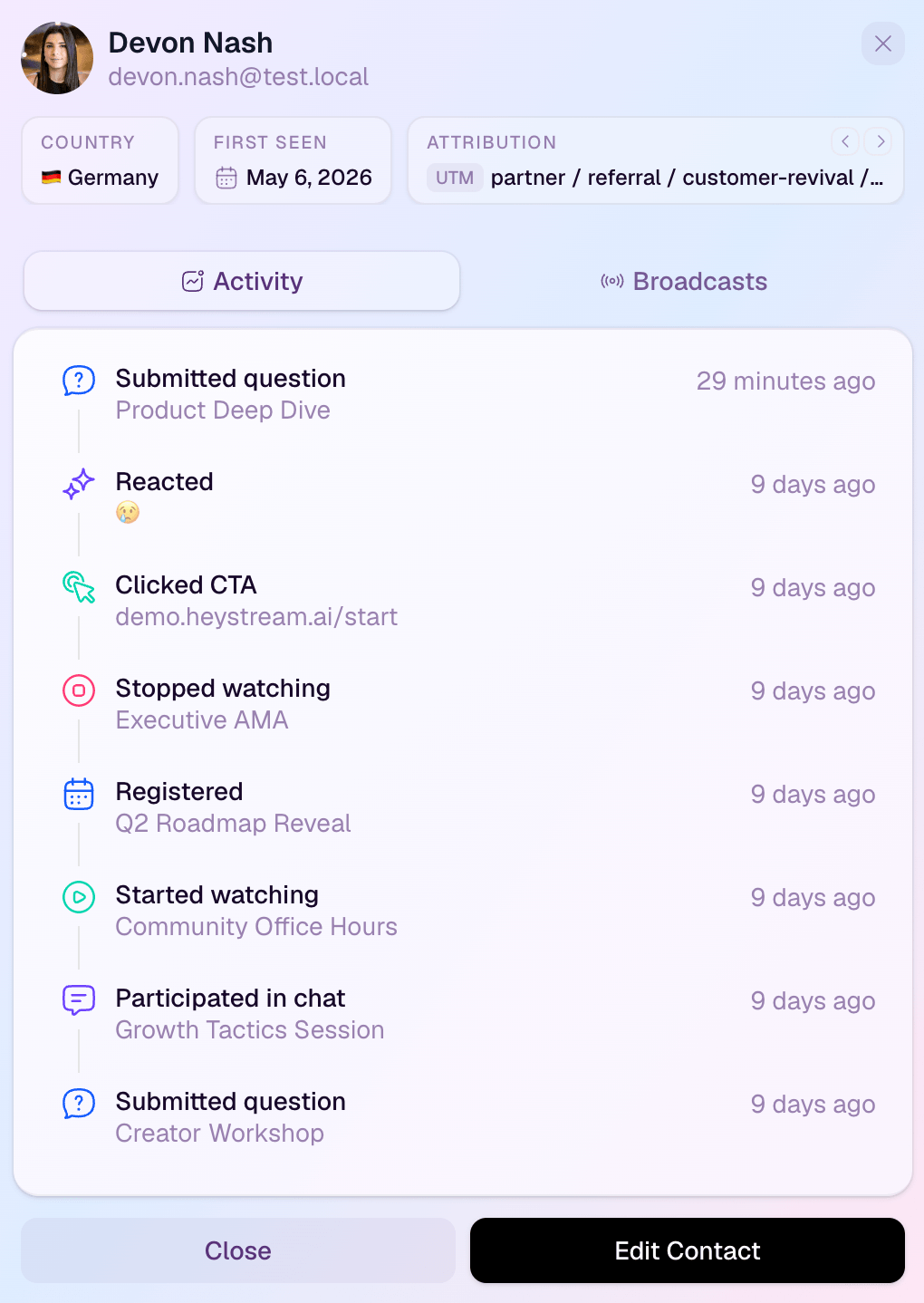
Tradeoff relative to Crowdcast: HeyStream is focused on B2B webinar growth workflows. It is not trying to be the broadest platform for creator communities, internal meetings, or every virtual-event category.
Who should shortlist it: Teams that need to connect the live session to audience insight, reusable offers, replay activity, and behavior-linked follow-up. Check HeyStream pricing against your required live-attendee limits and workflow.
2. Livestorm: best for browser-based marketing automation and integrations
Best for: Organizations that want browser-based webinars with registration, email workflows, contact data, analytics, and a broad integration layer.
Livestorm's current webinar pages describe customizable registration pages, email cadences, polls, analytics, contact records, and CRM connections. Its feature directory also documents browser access, contact profiles, multi-session registration, data exports, workspace roles, embedded streams, and restreaming as an add-on.
Tradeoff relative to Crowdcast: Livestorm's breadth is valuable when webinars sit inside a larger marketing or organizational workflow, but that means you should inspect plan-specific limits, add-ons, and workspace needs carefully. Crowdcast may remain the simpler fit when the one-link community event journey is the main requirement.
Who should shortlist it: Marketing and customer-education teams that value browser delivery, automated communications, integrations, and organizational controls across several event types.
3. Demio: best for marketer-oriented engagement analytics
Best for: Marketing teams that want browser-based delivery, interactive resources, and detailed post-event activity data.
Demio supports polls, handouts, featured actions, chat, automated emails, recordings, and multiple event formats. Its current Insights documentation explains that unique registration links enable attendance, drop-off, focus, poll, handout, featured-action, replay, and message reporting. It also makes an important limitation explicit: registration is required for that attendee-level tracking.
Tradeoff relative to Crowdcast: Demio is a strong shortlist candidate when marketer-facing reports and contact activity are central. Crowdcast may fit better when community interaction, public event channels, paid events, or its live-to-replay event page is the more important operating model.
Who should shortlist it: Webinar marketers who need to analyze what registrants did and pass useful engagement data into CRM or marketing workflows.
4. WebinarNinja: best for creators and educators using mixed formats
Best for: Creator, coaching, course, and education programs that mix live, automated, hybrid, series, and paid webinars.
WebinarNinja's current feature page lists live, automated, series, hybrid, and paid webinar formats, along with registration and thank-you pages, automated email sequences, replay controls, offers, polls, surveys, handouts, analytics, Stripe, and Zapier connections.
Tradeoff relative to Crowdcast: WebinarNinja's format range can suit teaching and selling workflows well. B2B marketing teams should still test whether its audience data, integrations, permissions, and follow-up model match their operational needs rather than assuming that format breadth settles the decision.
Who should shortlist it: Educators and creators who want several delivery formats and revenue tools inside the same webinar system.
5. Zoom Webinars: best for teams already in the Zoom ecosystem
Best for: Organizations that value a familiar vendor ecosystem, attendee capacity options, integrations, and structured one-to-many events.
Zoom Webinars currently describes branded registration, polls, Q&A, chat, reactions, RTMP streaming, recordings, performance reports, CRM connections, and Simulive prerecorded events. Zoom also explicitly distinguishes webinars from Zoom Meetings: webinars use a controlled one-to-many format, while meetings are designed for more open participant collaboration.
Tradeoff relative to Crowdcast: Zoom's ecosystem and scale options may be decisive for an organization already standardized on Zoom. Crowdcast may feel more coherent for a community-led event where registration, live participation, and replay stay on one event page.
Who should shortlist it: Teams whose procurement, user familiarity, integrations, or scale requirements already point toward Zoom. Do not assume it will automatically be cheaper or simpler; verify the specific webinar license and attendee tier.
6. GoTo Webinar: best for established training and marketing programs
Best for: Teams running repeatable live, prerecorded, on-demand, or series-based training and marketing events.
GoTo Webinar's feature guide documents custom registration, templates, branding, prerecorded events, series and on-demand scheduling, browser-based webcast mode, polls, surveys, attendee reports, source tracking, integrations, and GoToStage for on-demand discovery.
Tradeoff relative to Crowdcast: GoTo Webinar offers a broad, established program toolkit. Crowdcast may be a better fit when the priority is an audience-facing community experience and a continuous one-link path from registration through replay.
Who should shortlist it: Training, customer education, and marketing teams that want repeatable program operations, reporting, and several delivery modes.
7. eWebinar: best for automated, prerecorded delivery
Best for: Teams whose core job is to deliver the same prerecorded presentation repeatedly, with flexible scheduling and interaction layered around it.
eWebinar's pricing and feature page describes unlimited recurring sessions, browser-based viewing, preprogrammed interactions, private chat that can be answered live or later, integrations, analytics, and team access. It is an automated-webinar specialist, not a live broadcast studio.
On 4 August 2026, eWebinar listed Level 1 at $99 per month for one active eWebinar and 1,000 registrants per month, Level 2 at $199 for up to five active eWebinars and 3,000 registrants, and Level 3 at $299 for up to 15 active eWebinars and 5,000 registrants. Add-ons and annual billing change the effective cost, so recheck the current page before choosing.
Tradeoff relative to Crowdcast: eWebinar is a category shift. Choose it when repeatable prerecorded delivery is the dominant job. Stay with Crowdcast or choose another live platform when real-time production and community participation are central.
Who should shortlist it: Customer education, onboarding, demo, and training teams that need scheduled, on-demand, or just-in-time automated delivery more than a live stage.
Crowdcast alternatives comparison
| Platform | Live delivery | Automated or on-demand | Registration | Audience interaction | Audience data and follow-up | Ecosystem or distribution fit |
|---|---|---|---|---|---|---|
| HeyStream | Branded browser-based B2B broadcasts | Cloud recording, replay, and recurring webinar workflows | Branded pages and widgets | Chat, Q&A, polls, live and replay CTAs | Built-in audience CRM and behavior-based follow-up | B2B webinar growth and additional streaming destinations by plan |
| Livestorm | Browser-based live webinars | On-demand and prerecorded workflows | Custom pages and fields | Polls, Q&A, reactions, and other event tools | Contact profiles, exports, analytics, CRM integrations, and email cadences | Broad organizational use, integrations, and restreaming add-on |
| Demio | Browser-based live events | Automated, scheduled, and on-demand formats | Registration pages and unique join links | Polls, handouts, featured actions, chat, and Q&A | Contact-level Insights, exports, and CRM connections | Marketing-led webinar programs |
| WebinarNinja | Live webinars with multiple presenters | Automated, hybrid, series, and evergreen replay formats | Custom forms and thank-you pages | Chat, Q&A, polls, surveys, offers, and handouts | Registration, replay, offer, and interaction analytics plus integrations | Creator, education, and paid-webinar workflows |
| Zoom Webinars | Structured one-to-many live events | Simulive and recordings | Branded registration and event pages | Polls, Q&A, chat, reactions, and breakout features by product | Reports, engagement analytics, marketing tools, and CRM connections | Zoom ecosystem, capacity options, hybrid events, and RTMP destinations |
| GoTo Webinar | Live and browser-based webcast modes | Prerecorded, on-demand, and series formats | Custom forms, quizzes, and templates | Polls, surveys, raise hand, and multi-presenter sessions | Attendee reports, source tracking, downloadable reports, and integrations | Established training and marketing programs plus GoToStage |
| eWebinar | Not a live production studio | Core automated, scheduled, on-demand, and just-in-time delivery | Flexible pages, embeds, and access controls | Preprogrammed interactions and private asynchronous chat | Registrant analytics, integrations, add-ons, and team dashboards | Automated education, onboarding, and demo delivery |
Capabilities and plan limits change. Use this table to narrow the field, then confirm the exact workflow and contract with each vendor.
Which Crowdcast alternative should you choose?
Use a three-step shortlist.
First, name the dominant job. Is the webinar mainly a live community event, a B2B demand program, an integrated marketing workflow, a creator-led course, an enterprise broadcast, a repeatable training series, or an automated presentation?
Second, test the real journey. Ask a presenter to join, run the session, register as an attendee, click an offer, watch the replay, and inspect the resulting contact data. A polished feature list cannot show where your team will lose time or context.
Third, verify the constraints. Check attendee limits, seats, streaming hours, series rules, replay access, automation, integrations, data export, add-ons, and annual commitment against your actual calendar.
The decision branches are straightforward:
- Stay with Crowdcast for a community-led one-link event journey that already fits.
- Choose HeyStream when a connected B2B webinar workflow matters most.
- Choose Livestorm for browser-based marketing automation and integration breadth.
- Choose Demio for marketer-oriented engagement and attendee analytics.
- Choose WebinarNinja for creator or education programs across several formats.
- Choose Zoom Webinars for Zoom ecosystem fit, procurement, and capacity options.
- Choose GoTo Webinar for established training and marketing programs.
- Choose eWebinar when automated delivery is the primary job.
If your shortlist is still broad, compare one real event on two platforms rather than extending the spreadsheet. The operational differences become clearer as soon as presenters, attendees, CTAs, replay, and follow-up all have to work together.
A practical final check
Crowdcast alternatives are not interchangeable. Crowdcast remains a credible home for interactive community events, while each option above emphasizes a different part of the workflow.
For B2B teams, the most useful question is often what happens after a person registers, watches, clicks, or returns for replay. If that connected workflow is your priority, explore HeyStream's B2B webinar platform. If your dominant job is different, choose the platform that is built around that job and verify it with a real session before migrating.


